

In the fourth of a series of posts from a workshop at the Centre for Investigative Journalism Summer School (the first part covered idea generation; the second research; the third spreadsheets), I look at using generative AI tools such as ChatGPT and Google Gemini to help with scraping.
One of the most common reasons a journalist might need to learn to code is scraping: compiling information from across multiple webpages, or from one page across a period of time.
But scraping is tricky: it requires time learning some coding basics, and then further time learning how to tackle the particular problems that a specific scraping task involves. If the scraping challenge is anything but simple, you will need help to overcome trickier obstacles.
Large language models (LLMs) like ChatGPT are especially good at providing this help because writing code is a language challenge, and material about coding makes up a significant amount of the material that these models have been trained on.
This can make a big difference in learning to code: in the first year that I incorporated ChatGPT into my data journalism Masters at Birmingham City University I noticed that students were able to write more advanced scrapers earlier than previously — and also that students were less likely to abandon their attempts at coding.
You can also start scraping pretty quickly with the right prompts (Google Colab allows you to run Python code within Google Drive). Here are some tips on how to do so…
Learning scraping with generative AI
A good prompt for a genAI tool to write scraper code should consider the following:
- Specify the URL(s) that the scraper will need to get the data from
- Specify the HTML tags (‘selectors’) surrounding the information the scraper will need to store (see below for more on this)
- Specify how you want to store and export that data
- Specify any libraries and/or functions that you prefer the code to use or avoid (typically Requests and BeautifulSoup)
- Specify if you need the code to work on platforms like Google Colab (this allows you to run Python inside Google Drive rather than having to install it on your computer)
- Ask it to include comments in the code to explain it
- Iterate to expand the code so that it grabs more information and/or extends to further pages
The more programming knowledge you already have, the better, but you can also adapt the template prompts below and then learn the jargon as you go along.
The major genAI platforms will include an explanation below the code, but asking it to include comments for every line means that an explanation is also included in the code itself wherever you use it.
Here’s an example of a prompt which incorporates all those:

Note: for Gemini include the direction “do not use the browse extension” to prevent it saying it cannot scrape the page.
In this example the target webpage is described as containing the information in a “HTML table”. This is enough information for generative AI to ‘translate’ to “it will be in a <table> HTML tag on that page, structured into rows that use the <tr> tag, and cells that use the <td> tag.”
But in many cases — even if the information looks like it’s in a table — the information won’t be so conveniently stored.
Here’s an example of a tweak to that prompt where you need to be more specific about the HTML tags you want the scraper to target:
Write code that will work in Colab that uses the requests and BeautifulSoup library to:
1) fetch the page at the URL https://www.gov.scot/collections/first-ministers-speeches/
2) grabs the contents of a) all <a> tags inside <ul class="collections-list"> and b) the href= attribute for each of those tags
Writing this prompt requires a certain amount of knowledge about HTML tags and how to describe what’s inside them, which I’ll come onto in the next section.
Note also that this is typically just a starting point for your scraper: it’s a good idea to only start with trying to fetch one or two pieces of information from one page, so that you can check the code works before spending any more time on it (if it doesn’t, there’s a chance the problem is the page rather than the scraper).
Once you know the code works, you can then ask it to extend the code to target other HTML tags, and/or further pages.
Using genAI to describe target HTML tags (selectors) for a scraper
If you don’t know how to describe the targeted HTML tags in a scraper, then generative AI can help there, too. Here’s an example prompt that can be adapted for this purpose:
I want you to generate Python code which will fetch the contents of particular HTML tags at the URL https://www.gov.scot/collections/first-ministers-speeches/. The HTML is pasted below.
The code should fetch the words 'STUC anti-Racism rally: First Minister’s speech - 25 November 2023' and other sentences in the same HTML tags:
<ul class="collections-list"> <li><a href="/publications/stuc-anti-racism-rally-glasgow-november-25th-2023-first-ministers-speech/">STUC anti-Racism rally: First Minister’s speech - 25 November 2023</a></li>
Note: for Gemini include the direction “do not use the browse extension” to prevent it saying it cannot scrape the page.
In order to write this prompt you need to:
- Look at the HTML of the page you are targeting (by right-clicking on the page and using View Source or using the Inspector)
- Copy the section containing the first piece of information you want to target (search for it using the browser’s Edit > Find menu) and the HTML around it.
It’s a good idea to include ‘parent’ tags (the ones above the closest tags) as this can improve the results significantly.
For example, if the parent tag <ul class="collections-list"> was not included in the sample HTML above, the response would only be able to target <li> tags, which are likely to be used for other information too.
In particular, look for tags and parent tags which include attributes (such as class= or id=) that distinguish them from others. For example the class="collections-list" in the tag above distinguishes this from other <ul> tags. If the tag doesn’t include anything like this, include more parent tags.
Scraping using regular expressions (regex) and genAI
Sometimes scraping requires you to describe a pattern of text or HTML using a ‘regular expression’ — often abbreviated to regex.
For example if you wanted to fetch all the email addresses on a webpage you might write a regular expression which means ‘some alphanumeric characters followed by an @ sign, followed by some alphanumeric characters followed by a period, followed by some alphanumeric characters’.
Written in regex, that description could be represented like this:
^\w+@\w+\.\w+$
This is essentially a translation task, and so is perfect for language models.
The key when writing these prompts is to understand how a regular expression describes parts of text in three ways:
- By literally describing a specific character or characters (e.g. ‘a letter A’ or the sequence of characters ‘Date:’),
- By describing the type of character (‘a number’, ‘a lower case letter’, ‘a non-alphanumeric character’), and
- Specifying its quantity (‘one’, ‘one or more’, ‘none or more’, ‘two’, etc.) of the above
Here’s an example prompt, which describes dates:
Write code in Python which fetches the contents of <a> tags from the URL https://hollyoaks.fandom.com/wiki/List_of_Deaths where they match the following pattern: one or two numbers followed by two lower case letters, then a space, then a word beginning with a capital, then a space, then four digits. Add comments in the code that explain the resulting regex.
There are AI-driven websites — such as AutoRegex and RegexGo — and custom GPTs — like RegEx GPT — dedicated purely to generating regex based on a description. If all you want is a regular expression that you can slot into existing code, those tools are probably the quickest option.
Bug-fixing using generative AI
Scraping will always involve problems — in fact, it’s best to see scraping as a problem-solving skill involving multiple problems to solve — including bugs — rather than simply ‘writing code to scrape webpages’.
Generative AI can be a big time-saver when it comes to the inevitable error messages you will encounter. It’s especially good at spotting those minor typos that can take so long to spot when you’re scanning through your own code, or common beginner errors such as using capital letters and spaces in the wrong places.
When asking genAI tools to help fix code which generates an error, try to do the following in your prompts:
- Include the error message that you are getting
- Include the code that generates the error message — not just the individual line but any lines leading up to that which are likely to be relevant (e.g. where variables are created or functions defined)
- Describe the environment you are writing the code in — for example, if it’s in Google Colab or a Jupyter notebook, command line, etc.
- Ask it to explain its response in a way that a 10-year-old (or a description of yourself) would understand
- Ask it to consider factors outside of the code itself, such as the nature of any webpages you are trying to scrape (for example scraper detection)
Here’s an example with just one line of code:
Can you suggest solutions to an error I am getting when writing Python in Google Colab, and explain the cause of the problem as if you are explaining to a 10-year-old with no knowledge of coding? Here is the code: import BeautifulSoup And here is the error: ModuleNotFoundError Traceback (most recent call last) <ipython-input-4-ad1a75b85793> in <module>() ----> 1 import BeautifulSoupModuleNotFoundError: No module named 'BeautifulSoup'
Remember that you can iterate if the initial solution doesn’t work, or if you need it explaining further.
Autocompleting code in Google Colab
Google Colab notebooks allow you to write Python (and R) within Google Drive. It can be used to write scrapers which will run on Google servers — and last year it started to “add AI coding features like code completions, natural language to code generation and even a code-assisting chatbot”
Colab notebooks consist of code blocks that you run, and text blocks that explain what the code is doing. One impressive-slash-creepy byproduct of AI integration is that if you describe in a text block what you’re about to do in the following code block, it will use that description to suggest code as you type.
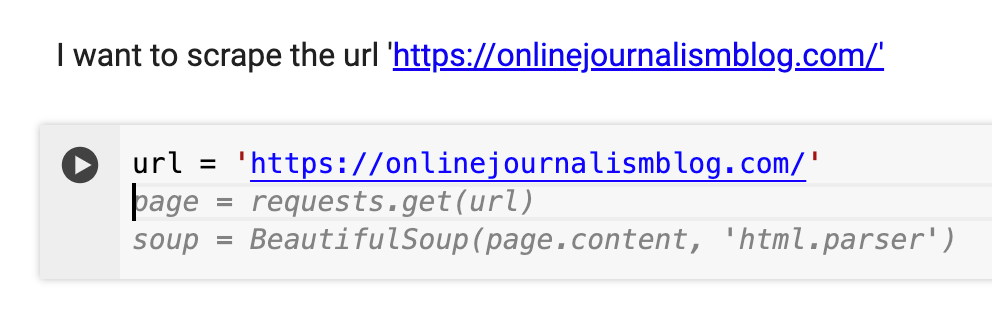

To accept a code suggestion, press the tab key.
To make the most use of this feature, make sure you use the text blocks to describe what you are about to do in the next code block.
Too often when we code, we either treat these descriptions as low-priority, adding text blocks later on (once the code is working), or failing to write them at all. But the potential time-saving in writing them first makes them a much higher priority activity, with the useful byproduct of making out notebooks easier to understand both for other users, and yourself when you revisit the notebook later.
Have you used generative AI to help with any scraping challenges? Please let me know in the comments or on social media.
UPDATES:
The Journalists on Hugging Face community includes the tool ai-scraper which promises to “scrape and summarize web content using advanced AI models without writing any code.”
 Online Journalism Blog