Tag Archives: twitter

Choosing a strategy for content: 4 Ws and a H

Something interesting happened to journalism when it moved from print and broadcast to the web. Aspects of the process that we barely thought about started to be questioned: the ‘story’ itself seemed less than fundamental. Decisions that you didn’t need to make as a journalist – such as what medium you would use – were becoming part of the job.

In fact, a whole raft of new decisions now needed to be made.

For those launching a new online journalism project, these questions are now increasingly tackled with a content strategy, a phrase and approach which, it seems to me, began outside of the news industry (where the content strategy had been settled on so long ago that it became largely implicit) and has steadily been rediscovered by journalists and publishers.

‘Web first’, for example, is a content strategy; the Seattle Times’s decision to focus on creation, curation and community is a content strategy. Reed Business Information’s reshaping of its editorial structures is, in part, a content strategy:

Why does a journalist need a content strategy?

I’ve written previously about the style challenge facing journalists in a multi platform environment: where before a journalist had few decisions to make about how to treat a story (the medium was given, the formats limited, the story supreme), now it can be easy to let old habits restrict the power, quality and impact of reporting.

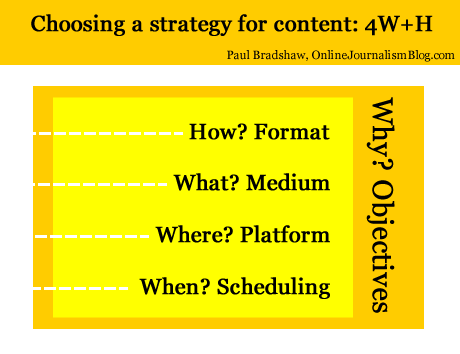
Below, I’ve tried to boil down these new decisions into 4 different types – and one overarching factor influencing them all. These are decisions that often have to be made quickly in the face of changing circumstances – I hope that fleshing them out in this way will help in making those decisions quicker and more effectively.

1. Format (“How?”)

We’re familiar with formats: the news in brief; the interview; the profile; the in-depth feature; and so on. They have their conventions and ingredients. If you’re writing a report you know that you will need a reaction quote, some context, and something to wrap it up (a quote; what happens next; etc.). If you’re doing an interview you’ll need to gather some colour about where it takes place, and how the interviewee reacts at various points.

Formats are often at their most powerful when they are subverted: a journalist who knows the format inside out can play with it, upsetting the reader’s expectations for the most impact. This is the tension between repetition and contrast that underlies not just journalism but good design, and even music.

As online journalism develops dozens of new formats have become available. Here are just a few:

  • the liveblog;
  • the audio slideshow;
  • the interactive map;
  • the app;
  • the podcast;
  • the explainer;
  • the portal;
  • the aggregator;
  • the gallery

Formats are chosen because they suit the thing being covered, its position in the publisher’s news environment, and the resources of the publisher.

Historically, for example, when a story first broke for most publishers a simple report was the only realistic option. But after that, they might commission a profile, interview, or deeper feature or package – if the interest and the resources warranted that.

The subject matter would also be a factor. A broadcaster might be more inclined to commission a package on a story if colourful characters or locations were involved and were accessible. They might also send a presenter down for a two-way.

These factors still come into play now we have access to a much wider range of formats – but a wider understanding of those formats is also needed.

  • Does the event take place over a geographical area, and users will want to see the movement or focus on a particular location? Then a map might be most appropriate.
  • Are things changing so fast that a traditional ‘story’ format is going to be inadequate? Then a liveblog may work better.
  • Is there a wealth of material out there being produced by witnesses? A gallery, portal or aggregator might all be good choices.
  • Have you secured an interview with a key character, and a set of locations or items that tell their own story? Is it an ongoing or recurring story? An audio slideshow or video interview may be the most powerful choice of format.
  • Are you on the scene and raw video of the event is going to have the most impact? Grab your phone and film – or stream.

2. Medium (“What?”)

Depending on what format has been chosen, the medium may be chosen for you too. But a podcast can be audio or video; a liveblog can involve text and multimedia; an app can be accessed on a phone, a webpage, a desktop widget, or Facebook.

This is not just about how you convey information about what’s going on (you’ll notice I avoid the use of ‘story’, as this is just one possible choice of format) but how the user accesses it and uses it.

A podcast may be accessed on the move; a Facebook app on mobile, in a social context; and so on. These are factors to consider as you produce your content.

3. Platform (“Where?”)

Likewise, the platforms where the content is to be distributed need careful consideration.

A liveblog’s reporting might be done through Twitter and aggregated on your own website. A map may be compiled in a Google spreadsheet but published through Google Maps and embedded on your blog.

An audioboo may have subscribers on iTunes or on the Audioboo app itself, and its autoposting feature may attract large numbers of listeners through Twitter.

Some call the choice of platform a choice of ‘channel’ but that does not do justice to the interactive and social nature of many of these platforms. Facebook or Twitter are not just channels for publishing live updates from a blog, but a place where people engage with you and with each other, exchanging information which can become part of your reporting (whether you want it to or not).

(Look at these tutorials for copy editors on Twitter to get some idea of how that platform alone requires its own distinct practices)

Your content strategy will need to take account of what happens on those platforms: which tweets are most retweeted or argued with; reacting to information posted in your blog or liveblog comments; and so on.

[UPDATE, March 25: This video from NowThisNews’s Ed O’Keefe explains how this aspect plays out in his organisation]

4. Scheduling (“When?”)

The choice of platform(s) will also influence your choice of timing. There will be different optimal times for publishing to Facebook, Twitter, email mailing lists, blogs, and websites.

There will also be optimal times for different formats (as the Washington Post found). A short news report may suit morning commuters; an audio slideshow or video may be best scheduled for the evening. Something humorous may play best on a Friday afternoon; something practical on a Wednesday afternoon once the user has moved past the early week slog.

Infographic: The Best Times To Post To Twitter & Facebook

This webcast on content strategy gives a particular insight into how they treat scheduling – not just across the day but across the week.

5. “Why?”

Print and broadcast rest on objectives so implicit that we barely think about them. The web, however, may have different objectives. Instead of attracting the widest numbers of readers, for example, we may want to engage users as much as possible.

That makes a big difference in any content strategy:

  • The rapid rise of liveblogs and explainers as a format can be partly explained by their stickiness when compared to traditional news articles.
  • Demand for video content has exceeded supply for some publishers because it is possible to embed advertising with content in a way which isn’t possible with text.
  • Infographics have exploded as they lend themselves so well to viral distribution.

Distribution is often one answer to ‘why?’, and introduces two elements I haven’t mentioned so far: search engine optimisation and social media optimisation. Blogs as a platform and text as a medium are generally better optimised for search engines, for example. But video and images are better optimised for social network platforms such as Facebook and Twitter.

And the timing of publishing might be informed by analytics of what people are searching for, updating Facebook about, or tweeting about right now.

The objective(s), of course, should recur as a consideration throughout all the stages above. And some stages will have different objectives: for distribution, for editorial quality, and for engagement.

Just to confuse things further, the objectives themselves are likely to change as the business models around online and multiplatform publishing evolve.

If I’m going to sum up all of the above in one line, then, it’s this: “Take nothing for granted.”

I’m looking for examples of content strategies for future editions of the book – please let me know if you’d like yours to be featured.
Choosing a strategy for content: 4 Ws and a H

Choosing a strategy for content: Format, Medium, Platform, Scheduling - and objectives

For this content I chose to write text accompanied by some images and video, published on a blog at a particular moment, for the objective of saving time and gaining feedback.

Something interesting happened to journalism when it moved from print and broadcast to the web. Aspects of the process that we barely thought about started to be questioned: the ‘story’ itself seemed less than fundamental. Decisions that you didn’t need to make as a journalist – such as what medium you would use – were becoming part of the job.

In fact, a whole raft of new decisions now needed to be made.

For those launching a new online journalism project, these questions are now increasingly tackled with a content strategy, a phrase and approach which, it seems to me, began outside of the news industry (where the content strategy had been settled on so long ago that it became largely implicit) and has steadily been rediscovered by journalists and publishers.

‘Web first’, for example, is a content strategy; the Seattle Times’s decision to focus on creation, curation and community is a content strategy. Reed Business Information’s reshaping of its editorial structures is, in part, a content strategy:

Why does a journalist need a content strategy?

I’ve written previously about the style challenge facing journalists in a multi platform environment: where before a journalist had few decisions to make about how to treat a story (the medium was given, the formats limited, the story supreme), now it can be easy to let old habits restrict the power, quality and impact of reporting.

Below, I’ve tried to boil down these new decisions into 4 different types – and one overarching factor influencing them all. These are decisions that often have to be made quickly in the face of changing circumstances – I hope that fleshing them out in this way will help in making those decisions quicker and more effectively. Continue reading

A network infrastructure for journalists online

For some years now, I have started every online journalism course I teach with an introduction to three key tools: RSS readers, social networks, and social bookmarking.

These are, I believe, the basis of a network infrastructure which few modern journalists – whatever their platform – can do without.

The word ‘network’ is key here – because I believe one of the fundamental changes that journalists have to adapt to in the 21st century is the move to networked modes of working.

Firstly, because the newsroom itself is becoming more networked with contributors situated outside of it (the increasingly collaborative nature of journalism).

Secondly, because sources are becoming more networked (formal organisations are increasingly complemented by ad hoc ones formed across Facebook, Twitter, blogs, and so on).

And finally, because distribution of news – which has both commercial and editorial implications – is reliant on networks outside of the journalist or their employer’s control.

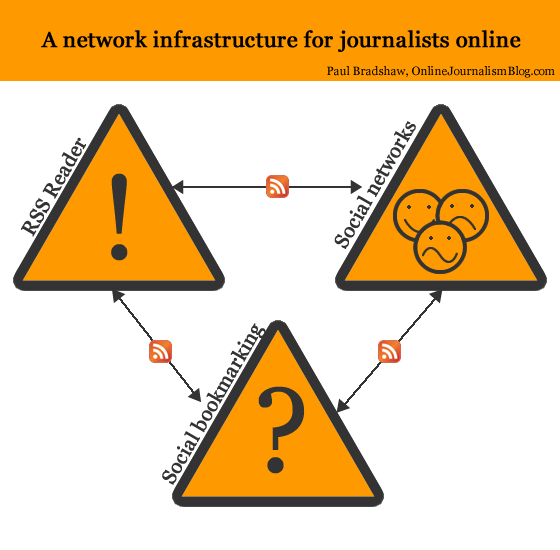
When I describe the network infrastructure outlined below, I outline two levels: the tools themselves, and how they connect to each other. In an attempt to clarify that, I’ve created a diagram.

The icons in the diagram attempt to show clearly the purpose of each tool:

  • The exclamation mark representing RSS readers indicate that the tool is focused on monitoring what’s new;
  • The question mark representing social bookmarking indicate that that tool largely serves to answer questions, providing context and background
  • The facial expressions representing social networks indicate that this tool help provide access to sources who may have stories to tell (positive; negative) or who are asking important questions (confused).

Here is a further breakdown of each element, and how they connect to each other.

RSS Reader

As outlined above, this part of the structure is all about ‘What’s new?’ and is quite often the first thing a journalist checks at the start of the working day (indeed, it’s ideal for checking on a phone on the way to work). It is the modern equivalent of picking up the day’s newspapers and tuning into the first radio and TV broadcasts of the day.

The RSS Reader gathers news feeds from a range of sources. Here are just a few:

  • Formal news organisations
  • Journalistic blogs
  • Organisational blogs
  • Personal blogs of individuals in your field

In addition, an RSS reader allows you to follow customised feeds reporting any mention of key terms, organisations and individuals across a variety of platforms:

  • Google News
  • The blogosphere as a whole
  • Social bookmarking services such as Delicious
  • Forums
  • Microblogging services such as Twitter
  • Video sharing services such as YouTube
  • Photo sharing services such as Flickr
  • Audio sharing services such as Audioboo
  • Social networks such as Facebook Pages

This is how the RSS reader connects to the two other elements of the infrastructure: most social networks have RSS feeds of some kind, as do social bookmarking services (one of the reasons I prefer Delicious over other platforms is the fact that it has an RSS feed for every user, for every item bookmarked with a particular ‘tag’ (explained below), for tags by particular users and for any combination of tags.

These are explained in a bit more detail in my post on ‘Passive-Aggressive Newsgathering‘.

But if you can follow these feeds in an RSS reader, why use a social network at all?

Social networks

Why use a social network? To follow people, not just content, and because your own contributions to those networks are a key factor in gaining access to sources.

With many social networking platforms (Twitter, for example) you can of course find individual users’ RSS feeds in an RSS reader, or a feed of people you are ‘following’ – either of which you can subscribe to in an RSS reader. But there’s little point, and your RSS reader will soon become flooded with updates. Instead, you should use the RSS reader to follow subjects and add the individuals talking about those subjects to your social networks.

The social network provides an added level of serendipity to your newsgathering: increased opportunities to encounter leads, tips and stories that you would not otherwise encounter.

It is also a three-way medium: a platform for you to ask questions or invite experiences relevant to the story you are pursuing, or to follow the public conversations of others asking questions or sharing experiences.

Because of this focus on social networks as a serendipity engine, I adopt an approach of seeing Twitter as a ‘stream, not a pool’ – not worrying about following too many people but rather about following too few, but having my cake and eating it by using Lists as a filter for those I want to miss least.

The final use for social networks is often the first use that journalists think of: distribution. And it is here that social networking also connects to the other 2 parts of the network infrastructure.

If you read something interesting in your RSS reader and wish to share it across social networks, you can often do so with a single click – with a bit of preparation. Twitterfeed is a tool which will automatically tweet updates on your Twitter account – all you need to know is the RSS feed for the updates you want to share. If you’re using Google Reader, for example, that feed is on your Shared Items page.

To tweet something interesting you’ve seen in your RSS Reader all you have to do then is (in the case of Google Reader) click on the ‘Share’ button below that item.

Social bookmarking

The first two parts of the network infrastructure – an RSS reader and social networks – are about the initial stages of newsgathering; the first things you check at the start of a working day.

Social bookmarking, however, is about what you do with information from your RSS reader and social networks – and information you deal with throughout your day.

Today’s news is tomorrow’s context. And social bookmarking allows you to keep a record of that context to make it quickly accessible when needed.

That’s the bookmarking part. The social part also allows you to publish information at the same time as you store it; to discover what information other people with similar interests are bookmarking; and to discover which people are bookmarking similar things to you).

Because social bookmarking is the least immediate element of this network infrastructure, it is also the aspect which the fewest students get their heads around and actually use.

Yet it is, for me, perhaps the most useful element. It takes an upfront investment of time and the development of a habit which initially doesn’t have any obvious reward.

But when you’re up against a deadline and are able to retrieve a dozen useful reports, documents and people within minutes – then you’ll get it.

Here’s the process:

  1. You come across something of interest. It may be a useful article, blog post or official report in your RSS reader – or a document linked to by someone in your social network. You might encounter the thing of interest while working on a story. You may read it – you may not have time.
  2. You bookmark the specific webpage containing it using a service like Delicious. You add ‘tags’ to help you find it later: these might include:
    • the subjects of the webpage (e.g. ‘environment’, ‘health’),
    • its author or publisher (e.g. ‘paulbradshaw’, ‘OJB’),
    • specific organisations or individuals (‘nhs’, ‘davidcameron’),
    • the type of document (‘report’, ‘research’, ‘video’)
    • or information (‘statistics’, ‘contacts’),
    • and even tags you have made up which refer to a specific story or event (‘croatia11′)
  3. You can if you wish add ‘Notes’. Many people copy a key passage from the webpage here, such as a quote (if a passage is selected on the page it will be automatically entered, depending how you are bookmarking it) to help them remember more about the page and why it was important.
  4. You can also mark your bookmark as ‘private’. This means that no one else can see it – it becomes ‘non-social’.
  5. Once you save it, it becomes available for you to retrieve at a future date: a personal search engine of items you once encountered.

The key thing here is to think about how you might look for this in future, and make sure you use those tags. For example, the publisher might not seem important now, but if in future you need to re-read a certain report and can recall that it appeared in the FT, that will help you access it quickly.

UPDATE: I’ve written a post explaining how this works with a particular case study.

Remember also that tags can be combined, so if I want to narrow down my search to items that I bookmarked with both ‘UGC’ and ‘BBC’, I can find those at delicious.com/paulb/UGC+BBC.

This is one of the reasons why a social bookmarking service is more effective than an RSS reader. You can, for example, search your shared or starred items in Google Reader – and you can tag them also – but as you tend to get more results it is harder to find what you are looking for. The use and combination of tags in Delicious narrows things down very effectively – but equally importantly, it allows you to bookmark pages that do not appear in your RSS reader.

That said, if you cannot find what you are looking for in Delicious, Google Reader is another option. It is also worth using a backup service which provides another way to search your bookmarks.Trunk.ly is one that does just that.

Of course, the bookmark only points to the live webpage – and it may be that in future the page is moved, changed, or deleted. If you are dealing with that type of information it is worth copying it to another webspace (I use the quote option on Tumblr) or using a (generally paid-for) social bookmarking service that saves copies of the pages you bookmark (Diigo and Pinboard are just two)

Social bookmarking: networks and cross-publishing

One of the features of social bookmarking services is that you can follow the bookmarks of other users. In Delicious this is called your network – and it’s where social bookmarking not only connects to RSS readers but also becomes a form of social network. Here’s how you build your network:

  1. Look at your bookmarks. Next to each one will be a number indicating how many users have bookmarked this. If you click on this you will see a list of who bookmarked it, and when. (Alternatively, you could also look at all users using a particular tag – if you’re a health correspondent, for example, you might want to look at people who are tagging items with ‘NHS’). Click on any name to see all their public bookmarks.
  2. If you would like to follow that person’s future bookmarks (because they are bookmarking items which relate to your interests), click on ‘Add to my network’
  3. You will now be able to see their bookmarks – and those of anyone else you have added – on your ‘Network’ page. It is, essentially, a mini RSS reader.

Which is why I use Google Reader to follow my network’s bookmarks instead. Because at the bottom of your Delicious Network page is, of course, a link to an RSS feed. Right-click on this and copy the link, then paste it into your RSS reader and you don’t need to keep checking your Delicious Network separately to all your other RSS feeds.

Of course, if you find someone interesting on Delicious, you might find them interesting on Twitter or a blog. If they’ve edited their Delicious public profile (the one you found in step 1 above) it might include a link. Alternatively, there’s a good chance they’ve used the same username on other social networks – so search for them using that.

This is another example of how social bookmarking can connect to social networking.

Here’s another: you can use a service like Twitterfeed (explained above) to auto-publish every item you bookmark – or just those with a particular tag, or a combination of tags. Because Delicious provides RSS feeds for your bookmarks as a whole, those with a particular tag, and any combination of tags.

For example, anything I tag ‘t’ is automatically tweeted by Twitterfeed on my @paulbradshaw Twitter account. Anything I tag ‘hmitwt’ is tweeted the same way – but to my @helpmeinvestig8 account. Editor Marc Reeves uses the same service to tweet all of his bookmarks with “I’m reading…”.

You can use a Facebook app like RSS Graffiti to do the same thing on a Facebook page.

One process across your network infrastructure then starts to look like this:

  1. Read interesting blog post on Google Reader
  2. Bookmark using Delicious – use a tag which is automatically tweeted
  3. Link auto-tweeted on Twitter

Conversely, if you want to automatically bookmark links that you share on Twitter, you can do so by signing up to Packrati.us. Tweeted links will be given the tag ‘packrati.us’ as well as any hashtags that you include in the same tweet (So a link tweeted with the hashtag ‘#crime’ will be tagged ‘crime’).

Another process across your network infrastructure then starts to look like this:

  1. Read interesting link tweeted on Twitter
  2. Retweet it, adding relevant hashtags
  3. Link is auto-bookmarked on Delicious

Listen, connect, publish

This has turned out to be a long post – which is why I think the diagram is needed. The initial set up is simple: sign up to social networks and a social bookmarking service, and set up an RSS reader. Subscribe to feeds, and add people to your networks.

But once you’ve done the technical part, you need to develop the habit of listening and continuing to add to those networks: check your RSS feeds and networks every day (but know when to switch off), and look for new sources. Bookmark useful resources – articles, documents, reports, research and profile pages – and tag them effectively.

Finally, contribute to those networks and connect the different parts together so it is as easy as possible to gather, store, publish and distribute useful information.

As you start to understand the possibilities that RSS feeds open up, you also start to see all sorts of possibilities beyond this. A site like If This Then That (IFTTT) not only showcases those possibilities particularly effectively, it also makes them as easy as they’ve ever been

It is a small – and regular – investment of time. But it will keep you in touch with your field, lead you to new sources and new stories, and help you work faster and deeper in reporting what’s happening.

A network infrastructure for journalists online

RSS reader, social networks and social bookmarking: a Network Infrastructure for journalists online

A network infrastructure for journalists online

For some years now, I have started every online journalism course I teach with an introduction to three key tools: RSS readers, social networks, and social bookmarking.

These are, I believe, the basis of a network infrastructure which few modern journalists – whatever their platform – can do without.

The word ‘network’ is key here – because I believe one of the fundamental changes that journalists have to adapt to in the 21st century is the move to networked modes of working. Continue reading

When will we stop saying “Pictures from Twitter” and “Video from YouTube”?

Image from YouTube

Image from YouTube

Over the weekend the BBC had to deal with the embarrassing ignorance of someone in their complaints department who appeared to believe that images shared on Twitter were “public domain” and “therefore … not subject to the same copyright laws” as material outside social networks.

A blog post, from online communities adviser Andy Mabbett, gathered thousands of pageviews in a matter of hours before the BBC’s Social Media Editor Chris Hamilton quickly responded:

“We make every effort to contact people, as copyright holders, who’ve taken photos we want to use in our coverage.

“In exceptional situations, ie a major news story, where there is a strong public interest in making a photo available to a wide audience, we may seek clearance after we’ve first used it.”

(Chris also published a blog post yesterday expanding on some of the issues, the comments on which are also worth reading)

The copyright issue – and the existence of a member of BBC staff who hadn’t read the Corporation’s own guidelines on the matter – was a distraction. What really rumbled through the 170+ comments – and indeed Andy’s original complaint – was the issue of attribution.

Continue reading

A quick note to Louise Mensch: sunlight is the best disinfectant

Plenty of others have given their own opinion on MP Louise Mensch’s suggestion that authorities should be able to shut down social media during civil unrest, so I just want to add a couple of experiences:

Here’s the first: when rumours spread about children being kidnapped in supermarket toilets, they first spread by text message (not social media). When they spread via the semi-public Facebook, it was easier for others to raise questions or debunk them. On Twitter – a much more public medium – it seems even harder for rumour to get a foothold.

I’ve written before about similar rumours and how journalists can and do play a role in debunking them.

I’ve also written about the potential for automated debunking. The less ‘social’ a medium, the harder it is to create these automated services, and the harder it is to distribute facts.

Finally, I’ve written about how journalists can use the qualities of social media itself to more easily separate rumour from fact.

Gossip and rumour don’t need social media to spread. Removing social media – in my experience (and that of the police, apparently) – just makes it harder to spot, and debunk.

‘Dead’ Osama Bin Laden photos – why have so many news sites published them?

Daily Mail leads with fake dead Bin Laden photo

Both the Daily Mail and the Daily Mirror today – among with several others in the US (including the New York Post, which credits the image to AP) and other countries – published an image purporting to be that of the dead Osama Bin Laden.

It clearly wasn’t.

Any journalist with a drop of cynicism would have questioned the source of the images – even if they did appear on Pakistan television.

It certainly passed the ‘Too good to be true’ test.

Instead, it was users of Reddit and Twitter who first highlighted the dodgy provenance of the image, and the image it was probably based on. Knight News and MSNBC’s Photo blog‘s followed soon after.

It took me all of 10 seconds to verify that it is a fake – by using TinEye to find other instances of the image, I found this example from last April.

But instead of owning up that their image was a fake, both The Daily Mail and Mirror appear to have simply removed the image from their site, leaving that image to circulate amongst their users. Ego, pure and simple.

PS: More on verifying images and other hoax material here.

Twitter & DataSift launch live social data services for under £1 (useful)

Journalists with an interest in realtime data should keep an eye on a forthcoming service from DataSift which promises to allow users to access a feed of Twitter tweets filtered along any combination of over 40 qualities.

In addition – and perhaps more interestingly – the service will also offer extra context:

“from services including Klout (influence metrics), PeerIndex (influence), Qwerly (linked social media accounts) and Lexalytics (text and sentiment analysis). Storage, post-processing and historical snapshots will also be available.”

The pricing puts this well within the reach of not only professional journalists but student ones too: for less than 20p per hour (30 cents) you will be able to apply as many as 10,000 keyword filters.

ReadWriteWeb describe a good example of how this may work out journalistically:

“Want a feed of negative Tweets written by C-level execs about any of 10,000 keywords? Trivial! Basic level service, Halstead says! Want just the Tweets that fit those criteria and are from the North Eastern United States? That you’ll have to pay a little extra for.”

The Charlie Sheen Twitter intern hoax – how it could be avoided

Hoax email Charlie Sheen

image from JonnyCampbell

Various parts of the media were hoaxed this week by Belfast student Jonny Campbell’s claim to have won a Twitter internship with Charlie Sheen. The hoax was well planned, and to be fair to the journalists, they did chase up documentation to confirm it. Where they made mistakes provides a good lesson in online verification.

This post is a duplicate version – see the original in full here.

The Charlie Sheen Twitter intern hoax – how it could be avoided

Jonny Campbell's Charlie Sheen internship hoax

Image from jonnycampbell.com

Various parts of the media were hoaxed this week by Belfast student Jonny Campbell’s claim to have won a Twitter internship with Charlie Sheen. The hoax was well planned, and to be fair to the journalists, they did chase up documentation to confirm it. Where they made mistakes provides a good lesson in online verification.

Where did the journalist go wrong? They asked for the emails confirming the internship, but accepted a screengrab. This turned out to be photoshopped.

They then asked for further emails from earlier in the process, and he sent those (which were genuine) on.

They should have asked the source to forward the original email.

Of course, he could have faked that pretty easily as well (I’m not going to say how here), so you would need to check the IP address of the email against that of the company it was supposed to be from.

An IP address is basically the location of a computer (server). This may be owned by the ISP you are using, or the company which employs you and provides your computer and internet access.

This post explains how to find IP addresses in an email using email clients including Gmail, Yahoo! Mail and Outlook – and then how to track the IP address to a particular location.

This website will find out the IP address for a particular website – the IP address for Internships.com is 204.74.99.100, for example. So you’re looking for a match (assuming the same server is used for mail). You could also check other emails from that company to other people, or ideally to yourself (Watch out for fake websites as well, of course).

And of course, finally, it’s always worth looking at the content the hoaxer has provided and clues that they may have left in it – as Jonny did (see image, left).

For more on verifying online information see Content, context and code: verifying information online, which I’ll continue to update with examples.