

In the fifth of a series of posts from a workshop at the Centre for Investigative Journalism Summer School, I look at using generative AI tools such as ChatGPT and Google Gemini to help with reviewing your work to identify ways it can be improved, from technical tweaks and tightening your writing to identifying jargon.
Having an editor makes you a better writer. At a basic level, an editor is able to look at your work with fresh eyes and without emotional attachment: they will not be reluctant to cut material just because it involved a lot of work, for example.
An editor should also be able to draw on more experience and knowledge — identifying mistakes and clarifying anything that isn’t clear.
But there are good editors, and there are bad editors. There are lazy editors who don’t care about what you’re trying to achieve, and there are editors with great empathy and attention to detail. There are editors who make you a better writer, and those who don’t.
Generative AI can be a bad editor. Ensuring it isn’t requires careful prompting and a focus on ensuring that it’s not just the content that improves, but you as a writer.
Some good rules of thumb to bear in mind along these lines include:
- Provide context about what type of story you are writing, and who the audience is, including the country. Include details about the outlet you are writing for and their general style. GenAI tools tend to default to promotional writing and US style so you need to be explicit if they don’t apply to your story.
- Be specific about what aspect of the text you want it to review: it might be spelling, or grammar. It might be bias. It might be clarity, or succinctness, or the overall structure.
- Ask the genAI tool to draw your attention to what can be improved so you can develop the same ability to identify areas for improvement
- Ask genAI not to make any changes itself, so you retain the final decision about changes and mistakes aren’t introduced into the text
- Focus on one section at a time: you will want different feedback on the beginning, middle and ends of stories, so ask about those separately. GenAI tools often have a limit on the amount of text they can process, too, so this ensures all of each part of text is being looked at.
- Consider copyright, data protection and information security: check if your employer or university has a policy on sharing unpublished material with genAI platforms, or read the section in my post on these challenges.
Here are some suggestions for ways that genAI can be used to review different aspects of your work, with example prompts and advice.
Checking spelling and grammar with generative AI
Different genAI tools have varying success at identifying spelling and grammatical errors in stories. Google Gemini in particular performs very poorly in my experience and I would not recommend using it. ChatGPT performs fairly well, but Claude performs noticeably better.
Here’s an example prompt:
You are a sub editor at a [UK regional newspaper] with years of experience in editing stories so that they are factual, objective, and free of spelling and grammar errors. You like to see journalists become better writers by receiving advice from you on how to improve their stories, and you can be very frank and honest about the changes that they need to make.
Look at the following news article written for an audience in [Sheffield, UK], and provide feedback for the journalist on any spelling or grammar mistakes that need fixing. Do not make any changes to the story.
The initial emphasis here is in giving the AI chatbot the sort of personality we would want in our editor: we don’t want someone who’s going to tell us what they think we want to hear (the default personality of ChatGPT); we want someone honest and frank — and experienced.
And we want someone who gives advice, not someone who just corrects our copy.
In the second part we make it clear what we want, being explicit that changes should not be made. It’s better that we make those changes ourselves: the buck stops with the writer.
Using genAI to identify jargon in your writing
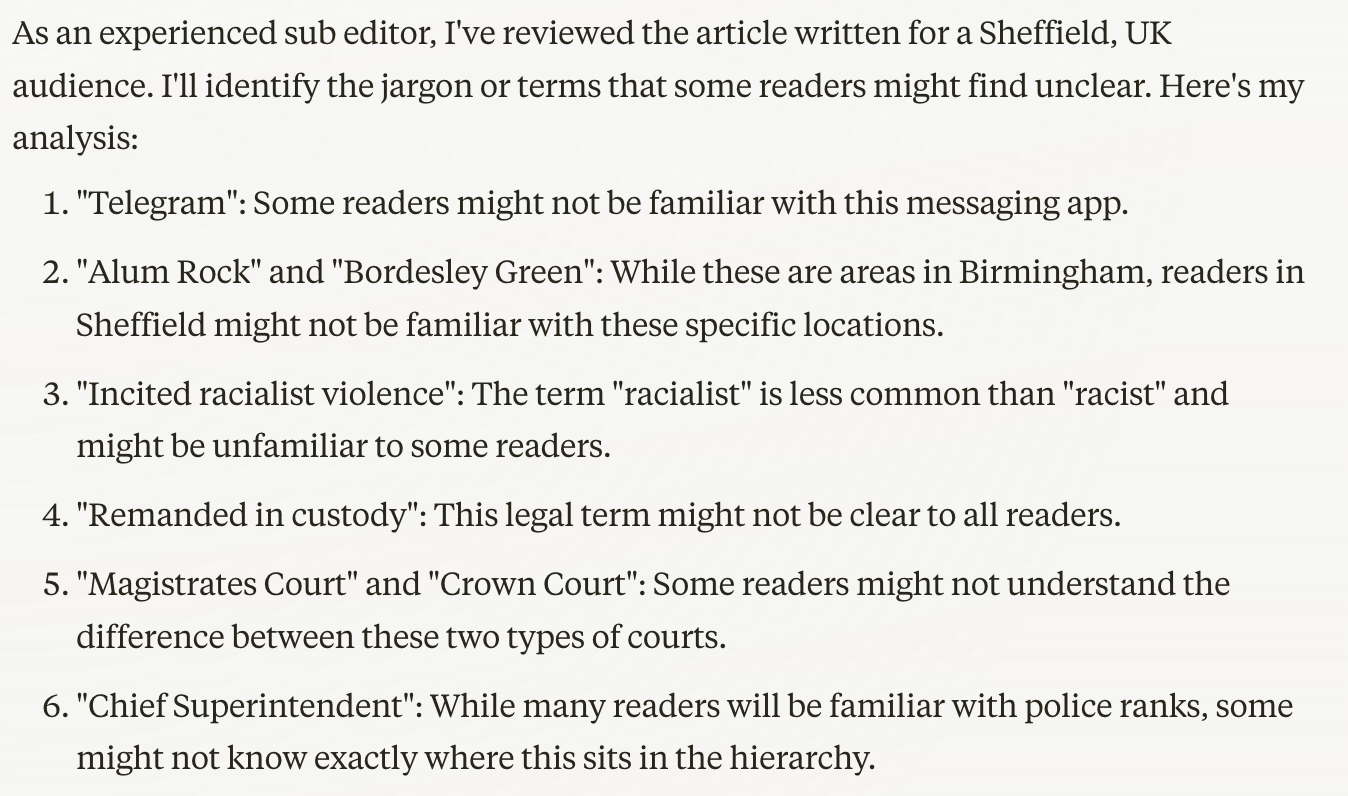
A common mistake in journalism is to use jargon our audience doesn’t understand. This is an area where genAI is especially useful, as even a good sub editor can take understanding for granted.
Repeating the first paragraph of the prompt above, we can adjust the second paragraph to create this template prompt for checking jargon in a piece of writing:
Look at the following news article written for an audience in [Sheffield, UK], and identify any jargon in the story that some readers might not understand. Do not make any changes to the story.
Note: this can also be used as a follow-up prompt in the same chat, as genAI will remember the earlier context.
Again, Claude performs best on this task, identifying not only any terms which audiences may not understand, but also the names of places and organisations that readers may not be familiar with, and the need for contextualisation.
‘Red-teaming’ and factchecking stories with genAI
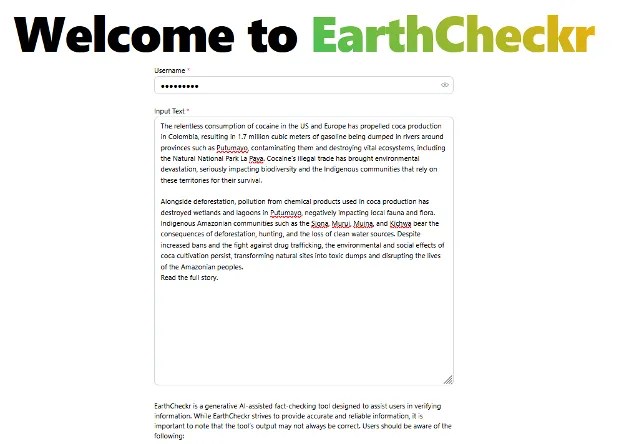
It’s always good practice to identify all the facts in a story in order to systematically check them before publication. Identifying factual statements is a pattern recognition task and requires discipline, so it’s a task that suits genAI well.
However, this is also a high-risk task, requiring 100% accuracy, so I would recommend doing this in parallel with human processes. In other words, a list of facts should be made by a human, and through genAI, separately. The two lists should then be compared to see if any facts were missed by either. The combination of both should achieve higher accuracy than relying solely on one or the other.
A simple prompt might look like this:
You are a professional fact-checker who [add qualifications here which relate to the field the story relates to]. You have been asked to identify all the factual claims made within a draft article by a freelance journalist. Analyse the attached document and produce a table listing each factual claim made, the exact sentence containing the claim, whether the source is named, unnamed, or missing, and any supporting evidence included (e.g. quotes, links, sources). Do not check the facts themselves, or offer to do so.
Note the final negative prompt preventing the AI tool from checking the facts, as this is an entirely separate stage.
A more advanced and effective prompt template might teach the AI what a fact looks like, or which statements are most important to identify. Such a prompt would embed principles from the Global Investigative Journalism Network’s introduction to factchecking, for example (and similar documents/resources), particularly the sections on ‘Critical Fact-Checking Questions’ and ‘Fact-Checking Priorities’.
A good example of this in practice is the Earth Journalism Network’s EarthCheckr, which “systematically extracts ‘verifiable claims’ — statements that require attribution or further scrutiny — highlighting areas that necessitate verification”. The tool was created when “it became clear to us that for small newsrooms and freelancers throughout the Global South, fact-checking is considered a massive luxury.”
Another example is Joe Amditis’s Fact-check assistant prompt.
A similar process is ‘red-teaming‘ a story using genAI: this is a concept from defence and cybersecurity which has been adopted by other fields including journalism. It is also referred to as “stress-testing” a story or playing devil’s advocate.
Red-teaming involves simulating an adversary, such as those who might want to attack your reporting, and it’s another process that suits genAI well because it requires taking a step outside of your own vested interests.
An example of a prompt template for red-teaming can be found here.
Cutting out the flab: tips for AI-informed editing
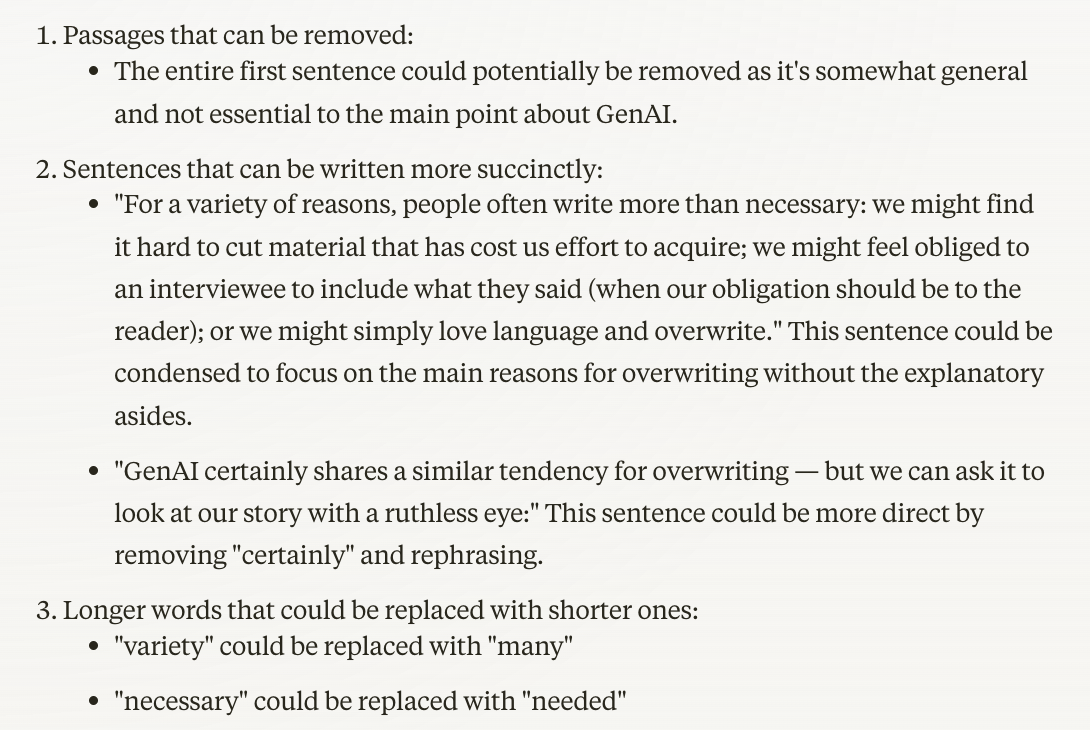
For a variety of reasons, we often write more than is needed: we find it hard to cut material that has cost us effort to acquire; we might feel obliged to a source to include too much of what they said (when our obligation should be to the reader); or we might simply love language and overwrite.
GenAI has a tendency to overwrite, too — but we can ask it to look at our story with a ruthless eye:
The writer of this story has a tendency to overwrite. Do the following:
1. Identify any passages in the story that can be removed without detracting from the story (including quotes);
2. Identify any sentences that can be written more succinctly by removing words or rephrasing
3. Identify any instances where a longer word has been used when a shorter one would do
Do not make any changes to the article
As always, it’s your judgement call whether you change anything that it highlights, but at least you’ll have some idea where to focus your attention.
There are other areas where generative AI can provide even more vital checks on your work: adhering to guidelines, and bias. I’ll cover these in the next post.
Have you used generative AI to help with any editing or reviewing tasks? Please let me know in the comments or on social media.
 Online Journalism Blog
Pingback: Tools: Paul Bradshaw on using AI for sharper editing – AIforJournalists.org
Pingback: Paul Bradshaw on using AI for sharper editing – THE AI NEWSROOM