Tag Archives: onlinejournalismblog

Sports Data Journalism and “Datatainment”

Over the last couple of years, you’ve probably noticed that data has become a Big Thing in commerce (Big Data for business advantage) as well as in the openness/transparency community, with governments and the media joining the party particularly in the context of the latter. But if you’re looking to develop data journalism skills, it’s probably also worth remembering the area of sports journalism, and the wealth of data produced around sporting events.

Part of the attraction of developing learning activities around sports data is that there’s a good chance that it’ll keep on delivering… If you develop a way of analysing or displaying sports data that pulls out interesting features or story elements from a set of sports data, you should be able to keep on using it… To set the scene, here’s a example: Driven By Data: Data Journalism in Sports. For a peek at my own fumblings, I’ve started exploring the automatic creation of F1DataJunkie Stats Graphics reports (still a lot to be done, but it’s a start…)

In the extreme case, you might be able to generate story outlines, or even canned prose… For example, in certain computer games in the sports genre, you might find you’re playing a game along to a “live commentary”, generated from the data being produced by the game. Automatic commentary generation is a form of sports journalism. And automated article generation is already here, as @RobbieAllen describes in How I automated my writing career, a brief overview of Automated Insights, a company that specialises in computer generated visualisations and prose.

See also: Automated Storytelling in Sports: A Rich Domain to Be Explored, Automated Event Recognition for Football Commentary Generation, Three RoboCup Simulation League Commentator Systems, and so on…

Getting hold of data is always an issue, of course, but I suspect that many larger newsrooms will take a subscription to the Press Association sports data feeds, for example…

Anyway, as an exercise, here’s some data to start with, from the Guardian datastore: Premier League’s top scorers: who is scoring the most goals? Is there a correlation with age, perhaps? (Where would you find the age data…?)

As well as sports reporting, I think we’re also likely to see an increase in what Head of Digital at Manchester City FC, Richard Ayers, referes to as datatainment: “where you use data as the primary source of entertainment. You might choose to make the visualisation of raw data entertaining or perhaps use data visualisation as part of the process of entertainment – but there’s definitely a strong editorial control which is focussed on entertaining the audience rather than exposing data.” (Data? Entertainment? You need Datatainment and Defining Data Visualisation, Data Journalism & Data Entertainment).

Devices such as FanVision already blend video and audio streams with data feeds, for example, more and more sports have “live stats apps” associated with them, and it’s not hard to imagine the data crunching that goes on under the hood in things like Optiplay making an appearance on sports analysis and review sites?

I also think that the “data as entertainment” line might work well as a second screen activity. Things like the F1 Live Timing app already demonstrate this:

On the other hand, there’s an opportunity for data focussed sites that go into deep analysis for the hardcore fan. Again looking at Formula One, the Intelligent F1 blog features a data-powered model developed by a rocket scientist that provides engagment oaround a particular race over an extended period, from predicting Sunday race behaviour based on Friday practice data and previous outings, through analysis of practice and qualifying data, to a detailed series of post-race analyses. (Complement this with technical analyses applied to the cars on the Scarbs F1, and you have the ultimate F1 geeks paradise!;-)

PS This also caught my eye: Gametime [Assistant]: Girls’ Lacrosse Game Data, which steps through the design of a “datatainment” app…

PPS as the Lacrosse app suggests, the data collection thing can also improve engagement with a live event. For example, my own doodlings around a motorsport lapcharting app (Thoughts on a Couple of Possible Lap Charting Apps, initial code experiment)

How Might Data Journalists Show Their Working? Sweave

If part of the role of data journalism is to make transparent the justification behind claims that are, or aren’t, backed up by data, there’s good reason to suppose that the journalists should be able to back up their own data-based claims with evidence about how they made use of the data. Posting links to raw data helps to a certain extent – at least third parties can then explore the data themselves and check the claims the press are making – but you could also argue that the journalists should also make their notes available regarding how they worked the data. (The same is true in public reports, where summary statistics and charts are included in a report, along with a link to the raw data, but no transparency in how the summary reports/charts were actually produced from the data.)

In Power Tools for Aspiring Data Journalists: R, I explored how we might use the R statistical programming language to replicate a chart that appeared in one of Ben Goldacre’s Bad Science columns. I included code snippets in the post, along with the figures they generated. But is there a way of getting even closer to the source, as it were, and produce documents that essentially generate their output from some sort of “source code”?

For example, take this view of my working relating to the production of the funnel chart described in Goldacre’s column:

You can find the actual “source code” for that document here: bowel cancer funnel plot working notes If you load it into something like RStudio, you can “run” the code and generate your own PDF from it.

The “source” of the document includes both text and R code. When the Sweave document is processed, the R code contained within the document is executed and the results also included in the document. The charts shown in the report are generated directly from the code included in the document, using data pulled in to the document form a source referenced within the document. If the source data is changed, or the R code is changed, what’s contained in the output document will change as well.

This sort of workflow will be familiar to many experimental scientists, but I wonder: is it something that data journalists have considered, at least as a way of keeping working notes about data related projects they are working on?

PS as well as Sweave, see dexy.it, which generalises the Sweave approach to allow you to create self-documenting software/code. Educators, also take note…;-)

Power Tools for Aspiring Data Journalists: Funnel Plots in R

Picking up on Paul Bradshaw’s post A quick exercise for aspiring data journalists which hints at how you can use Google Spreadsheets to grab – and explore – a mortality dataset highlighted by Ben Goldacre in DIY statistical analysis: experience the thrill of touching real data, I thought I’d describe a quick way of analysing the data using R, a very powerful statistical programming environment that should probably be part of your toolkit if you ever want to get round to doing some serious stats, and have a go at reproducing the analysis using a bit of judicious websearching and some cut-and-paste action…

R is an open-source, cross-platform environment that allows you to do programming like things with stats, as well as producing a wide range of graphical statistics (stats visualisations) as if by magic. (Which is to say, it can be terrifying to try to get your head round… but once you’ve grasped a few key concepts, it becomes a really powerful tool… At least, that’s what I’m hoping as I struggle to learn how to use it myself!)

I’ve been using R-Studio to work with R, a) because it’s free and works cross-platform, b) it can be run as a service and accessed via the web (though I haven’t tried that yet; the hosted option still hasn’t appeared yet, either…), and c) it offers a structured environment for managing R projects.

So, to get started. Paul describes a dataset posted as an HTML table by Ben Goldacre that is used to generate the dots on this graph:
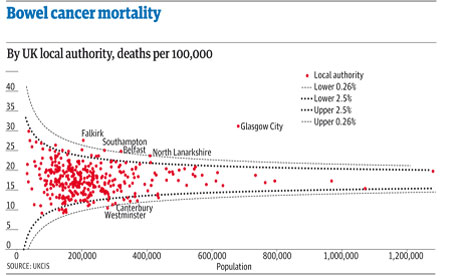
The lines come from a probabilistic model that helps us see the likely spread of death rates given a particular population size.

If we want to do stats on the data, then we could, as Paul suggests, pull the data into a spreadsheet and then work from there… Or, we could pull it directly into R, at which point all manner of voodoo stats capabilities become available to us.

As with the =importHTML formula in Google spreadsheets, R has a way of scraping data from an HTML table anywhere on the public web:

#First, we need to load in the XML library that contains the scraper function
library(XML)
#Scrape the table
cancerdata=data.frame( readHTMLTable( 'http://www.guardian.co.uk/commentisfree/2011/oct/28/bad-science-diy-data-analysis', which=1, header=c('Area','Rate','Population','Number')))

The format is simple: readHTMLTable(url,which=TABLENUMBER) (TABLENUMBER is used to extract the N’th table in the page.) The header part labels the columns (the data pulled in from the HTML table itself contains all sorts of clutter).

We can inspect the data we’ve imported as follows:

#Look at the whole table
cancerdata
#Look at the column headers
names(cancerdata)
#Look at the first 10 rows
head(cancerdata)
#Look at the last 10 rows
tail(cancerdata)
#What sort of datatype is in the Number column?
class(cancerdata$Number)

The last line – class(cancerdata$Number) – identifies the data as type ‘factor’. In order to do stats and plot graphs, we need the Number, Rate and Population columns to contain actual numbers… (Factors organise data according to categories; when the table is loaded in, the data is loaded in as strings of characters; rather than seeing each number as a number, it’s identified as a category.)

#Convert the numerical columns to a numeric datatype
cancerdata$Rate=as.numeric(levels(cancerdata$Rate)[as.integer(cancerdata$Rate)])
cancerdata$Population=as.numeric(levels(cancerdata$Population)[as.integer(cancerdata$Population)])
cancerdata$Number=as.numeric(levels(cancerdata$Number)[as.integer(cancerdata$Number)])

#Just check it worked…
class(cancerdata$Number)
head(cancerdata)

We can now plot the data:

#Plot the Number of deaths by the Population
plot(Number ~ Population,data=cancerdata)

If we want to, we can add a title:
#Add a title to the plot
plot(Number ~ Population,data=cancerdata, main='Bowel Cancer Occurrence by Population')

We can also tweak the axis labels:

plot(Number ~ Population,data=cancerdata, main='Bowel Cancer Occurrence by Population',ylab='Number of deaths')

The plot command is great for generating quick charts. If we want a bit more control over the charts we produce, the ggplot2 library is the way to go. (ggpplot2 isn’t part of the standard R bundle, so you’ll need to install the package yourself if you haven’t already installed it. In RStudio, find the Packages tab, click Install Packages, search for ggplot2 and then install it, along with its dependencies…):

require(ggplot2)
ggplot(cancerdata)+geom_point(aes(x=Population,y=Number))+opts(title='Bowel Cancer Data')+ylab('Number of Deaths')

Doing a bit of searching for the “funnel plot” chart type used to display the ata in Goldacre’s article, I came across a post on Cross Validated, the Stack Overflow/Statck Exchange site dedicated to statistics related Q&A: How to draw funnel plot using ggplot2 in R?

The meta-analysis answer seemed to produce the similar chart type, so I had a go at cribbing the code… This is a dangerous thing to do, and I can’t guarantee that the analysis is the same type of analysis as the one Goldacre refers to… but what I’m trying to do is show (quickly) that R provides a very powerful stats analysis environment and could probably do the sort of analysis you want in the hands of someone who knows how to drive it, and also knows what stats methods can be appropriately applied for any given data set…

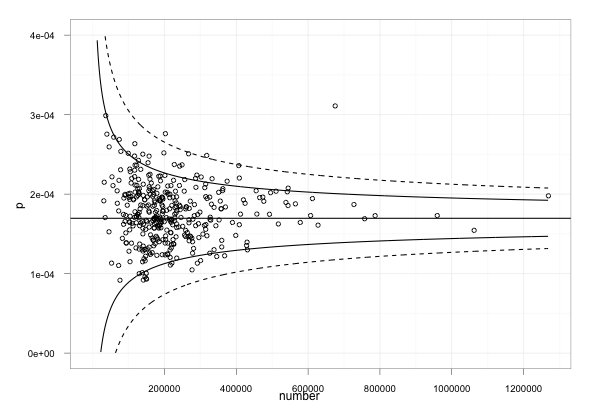
Anyway – here’s something resembling the Goldacre plot, using the cribbed code which has confidence limits at the 95% and 99.9% levels. Note that I needed to do a couple of things:

1) work out what values to use where! I did this by looking at the ggplot code to see what was plotted. p was on the y-axis and should be used to present the death rate. The data provides this as a rate per 100,000, so we need to divide by 100, 000 to make it a rate in the range 0..1. The x-axis is the population.

#TH: funnel plot code from:
#TH: http://stats.stackexchange.com/questions/5195/how-to-draw-funnel-plot-using-ggplot2-in-r/5210#5210
#TH: Use our cancerdata
number=cancerdata$Population
#TH: The rate is given as a 'per 100,000' value, so normalise it
p=cancerdata$Rate/100000

p.se <- sqrt((p*(1-p)) / (number))
df <- data.frame(p, number, p.se)

## common effect (fixed effect model)
p.fem <- weighted.mean(p, 1/p.se^2)

## lower and upper limits for 95% and 99.9% CI, based on FEM estimator
#TH: I'm going to alter the spacing of the samples used to generate the curves
number.seq <- seq(1000, max(number), 1000)
number.ll95 <- p.fem - 1.96 * sqrt((p.fem*(1-p.fem)) / (number.seq))
number.ul95 <- p.fem + 1.96 * sqrt((p.fem*(1-p.fem)) / (number.seq))
number.ll999 <- p.fem - 3.29 * sqrt((p.fem*(1-p.fem)) / (number.seq))
number.ul999 <- p.fem + 3.29 * sqrt((p.fem*(1-p.fem)) / (number.seq))
dfCI <- data.frame(number.ll95, number.ul95, number.ll999, number.ul999, number.seq, p.fem)

## draw plot
#TH: note that we need to tweak the limits of the y-axis
fp <- ggplot(aes(x = number, y = p), data = df) +
geom_point(shape = 1) +
geom_line(aes(x = number.seq, y = number.ll95), data = dfCI) +
geom_line(aes(x = number.seq, y = number.ul95), data = dfCI) +
geom_line(aes(x = number.seq, y = number.ll999, linetype = 2), data = dfCI) +
geom_line(aes(x = number.seq, y = number.ul999, linetype = 2), data = dfCI) +
geom_hline(aes(yintercept = p.fem), data = dfCI) +
scale_y_continuous(limits = c(0,0.0004)) +
xlab("number") + ylab("p") + theme_bw()

fp

As I said above, it can be quite dangerous just pinching other folks’ stats code if you aren’t a statistician and don’t really know whether you have actually replicated someone else’s analysis or done something completely different… (this is a situation I often find myself in!); which is why I think we need to encourage folk who release statistical reports to not only release their data, but also show their working, including the code they used to generate any summary tables or charts that appear in those reports.

In addition, it’s worth noting that cribbing other folk’s code and analyses and applying it to your own data may lead to a nonsense result because some stats analyses only work if the data has the right sort of distribution…So be aware of that, always post your own working somewhere, and if someone then points out that it’s nonsense, you’ll hopefully be able to learn from it…

Given those caveats, what I hope to have done is raise awareness of what R can be used to do (including pulling data into a stats computing environment via an HTML table screenscrape) and also produced some sort of recipe we could take to a statistician to say: is this the sort of thing Ben Goldacre was talking about? And if not, why not?

[If I’ve made any huge – or even minor – blunders in the above, please let me know… There’s always a risk in cutting and pasting things that look like they produce the sort of thing you’re interested in, but may actually be doing something completely different!]

Active Lobbying Through Meetings with UK Government Ministers

In a move that seemed to upset collectors of UK ministerial meeting data, @whoslobbying, on grounds of wasted effort, the Guardian datastore published a spreadsheet last night containing data relating to ministerial meetings between May 2010 and March 2011.

(The first release of the spreadsheet actually omitted the column containing who the meeting was with, but that seems to be fixed now… There are, however, still plenty of character encoding issues (apostrophes, accented characters, some sort of em-dash, etc) that might cripple some plug and play tools.)

Looking over the data, we can use it as the basis for a network diagram with actors (Ministers and lobbiests) with edges representing meetings between Minsiters and lobbiests. There is one slight complication in that where there is a meeting between a Minister and several lobbiests, we ideally need to separate out the separate lobbiests into their own nodes.

UK gov meetings spreadsheet

This probably provides an ideal opportunity to have a play with the Stanford Data Wrangler and try forcing these separate lobbiests onto separate rows, but I didn’t allow myself much time for the tinkering (and the requisite learning!), so I resorted to Python script to read in the data file and split out the different lobbiests. (I also did an iterative step, cleaning the downloaded CSV file in a text editor by replacing nasty characters that caused the script to choke.) You can find the script here (note that it makes use of the networkx network analysis library, which you’ll need to install if you want to run the script.)

The script generates a directed graph with links from Ministers to lobbiests and dumps it to a GraphML file (available here) that can be loaded directly into Gephi. Here’s a view – using Gephi – of the hearth of the network. If we filter the graph to show nodes that met with at least five different Ministers…

Gephi - k-core filter

we can get a view into the heart of the UK lobbying netwrok:

Active Lobbiests

I sized the lobbiest nodes according to eigenvector centrality, which gives an indication of well connected they are in the network.

One of the nice things about Gephi is that it allows for interactive exploration of a graph, For example, I can hover over a lobbiest node – Barclays in this case – to see which Ministers were met:

Bankers connect...

Alternatively, we can see who of the well connected met with the Minister for Welfare Reform:

Welfare meetings...

Looking over the data, we also see how some Ministers are inconsistently referenced within the original dataset:

Multiple mentions

Note that the layout algorithm is such that the different representations of the same name are likely to meet similar lobbiests, which will end up placing the node in a similar location under the force directed layout I used. Which is to say – we may be able to use visual tools to help us identify fractured representations of the same individual. (Note that multiple meetings between the same parties can be visualised using the thickness of the edges, which are weighted according to the number of times the edge is described in the GraphML file…)

Unifying the different representations of the same indivudal is something that Google Refine could help us tidy up with its various clustering tools, although it would be nice if the Datastore folk addressed this at source (or at least, as part of an ongoing data quality enhancement process…;-)

I guess we could also trying reconciling company names against universal company identifiers, for example by using Google Refine’s reconciliation service and the Open Corporates database? Hmmm, which makes me wonder: do MySociety, or Public Whip, offer an MP or Ministerial position reconciliation service that works with Google Refine?

A couple of things I haven’t done: represented the department (which could be done via a node attribute, maybe, at least for the Ministers); represented actual meetings, and what I guess we might term co-lobbying behaviour, where several organisations are in the same meeting.

Data Journalists Engaging in Co-Innovation…

You may or may not have noticed that the Boundary Commission released their take on proposed parliamentary constituency boundaries today.

They could have released the data – as data – in the form of shape files that can be rendered at the click of a button in things like Google Maps… but they didn’t… [The one thing the Boundary Commission quango forgot to produce: a map] (There are issues with publishing the actual shapefiles, of course. For one thing, the boundaries may yet change – and if the original shapefiles are left hanging around, people may start to draw on these now incorrect sources of data once the boundaries are fixed. But that’s a minor issue…)

Instead, you have to download a series of hefty PDFs, one per region, to get a flavour of the boundary changes. Drawing a direct comparison with the current boundaries is not possible.

The make-up of the actual constituencies appears to based on their member wards, data which is provided in a series of spreadsheets, one per region, each containing several sheets describing the ward makeup of each new constituency for the counties in the corresponding region.

It didn’t take long for the data junkies to get on the case though. From my perspective, the first map I saw was on the Guardian Datastore, reusing work by University of Sheffield academic Alasdair Rae, apparently created using Google Fusion Tables (though I haven’t see a recipe published anywhere? Or a link to the KML file that I saw Guardian Datablog editor Simon Rogers/@smfrogers tweet about?)

[I knew I should have grabbed a screen shot of the original map…:-(]

It appears that Conrad Quilty-Harper (@coneee) over at the Telegraph then got on the case, and came up with a comparative map drawing on Rae’s work as published on the Datablog, showing the current boundaries compared to the proposed changes, and which ties the maps together so the zoom level and focus are matched across the maps (MPs’ constituencies: boundary changes mapped):

Telegraph side by side map comparison

Interestingly, I was alerted to this map by Simon tweeting that he liked the Telegraph map so much, they’d reused the idea (and maybe even the code?) on the Guardian site. Here’s a snapshot of the conversation between these two data journalists over the course of the day (reverse chronological order):

Datajournalists in co-operative bootstrapping mode

Here’s the handshake…

Collaborative co-evolution

I absolutely love this… and what’s more, it happened over the course of four or five hours, with a couple of technology/knowledge transfers along the way, as well as evolution in the way both news agencies communicated the information compared to the way the Boundary Commission released it. (If I was evil, I’d try to FOI the Boundary Commission to see how much time, effort and expense went into their communication effort around the proposed changes, and would then try to guesstimate how much the Guardian and Telegraph teams put into it as a comparison…)

At the time of writing (15.30), the BBC have no data driven take on this story…

And out of interest, I also wondered whether Sheffield U had a take…

Sheffiled u media site

Maybe not…

PS By the by, the DataDrivenJournalism.net website relaunched today. I’m honoured to be on the editorial board, along with @paulbradshaw @nicolaskb @mirkolorenz @smfrogers and @stiles, and looking forward to seeing how we can start to drive interest, engagement and skills development in, as well as analysis and (re)use of, and commentary on, public open data through the data journalism route…

PPS if you’re into data journalism, you may also be interested in GetTheData.org, a question and answer site in the model of Stack Overflow, with an emphasis on Q&A around how to find, access, and make use of open and public datasets.

Creating Thematic Maps Based on UK Constituency Boundaries in Google Fusion Tables

I don’t have time to chase this just now, but it could be handy… Over the last few months, several of Alasdair Rae (University of Sheffield) Google Fusion Tables generated maps have been appearing on the Guardian Datablog, including one today showing the UK’s new Parliamentay constituency boundaries.

Looking at Alasdair’s fusion table for English Indices of Deprivation 2010, we can see how it contains various output area codes as well as KML geometry shape files that can be used to draw the boundaries on map.

Google fusion table - UK boundaries

On the to do list, then, is to a set of fusion tables that we can use to generate maps from datatables containing particular sorts of output area code. Because it’s easy to join two fusion tables by a common column, we’d then have a Google Fusion Tables simple recipe for thematic maps:

1) get data containing output area or constituency codes;
2) join with the appropriate mapping fusion table to annotate original data with appropriate shape files;
3) generate map…

I wonder – have Alasdair or anyone from the Guardian Datablog/Datastore team already published such a tutorial?

PS Ah, here’s one example tutorial: Peter Aldhous: Thematic Maps with Google Fusion Tables [PDF]

PPS for constituency boundary shapefiles as KML see http://www.google.com/fusiontables/DataSource?dsrcid=1574396 or the Guardian Datastore’s http://www.google.com/fusiontables/exporttable?query=select+col0%3E%3E1+from+1474106+&o=kmllink&g=col0%3E%3E1

Using Google Spreadsheets as a Database Source for R

I couldn’t contain myself (other more pressing things to do, but…), so I just took a quick time out and a coffee to put together a quick and dirty R function that will let me run queries over Google spreadsheet data sources and essentially treat them as database tables (e.g. Using Google Spreadsheets as a Database with the Google Visualisation API Query Language).

Here’s the function:

library(RCurl)
gsqAPI = function(key,query,gid=0){ return( read.csv( paste( sep="",'http://spreadsheets.google.com/tq?', 'tqx=out:csv','&tq=', curlEscape(query), '&key=', key, '&gid=', gid) ) ) }

It requires the spreadsheet key value and a query; you can optionally provide a sheet number within the spreadsheet if the sheet you want to query is not the first one.

We can call the function as follows:

gsqAPI('tPfI0kerLllVLcQw7-P1FcQ','select * limit 3')

In that example, and by default, we run the query against the first sheet in the spreadsheet.

Alternatively, we can make a call like this, and run a query against sheet 3, for example:
tmpData=gsqAPI('0AmbQbL4Lrd61dDBfNEFqX1BGVDk0Mm1MNXFRUnBLNXc','select A,C where <= 10',3)
tmpData

My first R function

The real question is, of course, could it be useful.. (or even OUseful?!)?

Here’s another example: a way of querying the Guardian Datastore list of spreadsheets:

gsqAPI('0AonYZs4MzlZbdFdJWGRKYnhvWlB4S25OVmZhN0Y3WHc','select * where A contains "crime" and B contains "href" order by C desc limit 10')

What that call does is run a query against the Guardian Datastore spreadsheet that lists all the other Guardian Datastore spreadsheets, and pulls out references to spreadsheets relating to “crime”.

The returned data is a bit messy and requires parsing to be properly useful.. but I haven’t started looking at string manipulation in R yet…(So my question is: given a dataframe with a column containing things like <a href=”http://example.com/whatever”>Some Page</a>, how would I extract columns containing http://example.com/whatever or Some Page fields?)

[UPDATE: as well as indexing a sheet by sheet number, you can index it by sheet name, but you’ll probably need to tweak the function to look end with '&gid=', curlEscape(gid) so that things like spaces in the sheet name get handled properly I’m not sure about this now.. calling sheet by name works when accessing the “normal” Google spreadsheets application, but I’m not sure it does for the chart query language call??? ]

[If you haven’t yet discovered R, it’s an environment that was developed for doing stats… I use the RStudio environment to play with it. The more I use it (and I’ve only just started exploring what it can do), the more I think it provides a very powerful environment for working with data in quite a tangible way, not least for reshaping it and visualising it, let alone doing stats with in. (In fact, don’t use the stats bit if you don’t want to; it provides more than enough data mechanic tools to be going on with;-)]

PS By the by, I’m syndicating my Rstats tagged posts through the R-Bloggers site. If you’re at all interested in seeing what’s possible with R, I recommend you subscribe to R-Bloggers, or at least have a quick skim through some of the posts on there…

PPS The RSpatialTips post Accessing Google Spreadsheets from R has a couple of really handy tips for tidying up data pulled in from Google Spreadsheets; assuming the spreadsheetdata has been loaded into ssdata: a) tidy up column names using colnames(ssdata) <- c("my.Col.Name1","my.Col.Name2",...,"my.Col.NameN"); b) If a column returns numbers as non-numeric data (eg as a string "1,000") in cols 3 to 5, convert it to a numeric using something like: for (i in 3:5) ssdata[,i] <- as.numeric(gsub(",","",ssdata[,i])) [The last column can be identifed as ncol(ssdata) You can do a more aggessive conversion to numbers (assuming no decimal points) using gsub("[^0-9]“,”",ssdata[,i])]

PPPS via Revolutions blog, how to read the https file into R (unchecked):

require(RCurl)
myCsv = getURL(httpsCSVurl)
read.csv(textConnection(myCsv))

Two New Cabinet Office Open Data Consultations: Data Policy and Making Open Data Real

Via the Guardian Datablog, I see that the Cabinet Office has just opened up a couple of consultations around open data:

Consultation on Data Policy for a Public Data Corporation [homepage] [Consultation]

Here are the consultation questions (also available via SurveyMonkey: PDC consultation):

Chapter 4 – Charging for PDC information

  1. How do you think Government should best balance its objectives around increasing access to data and providing more freely available data for re-use year on year within the constraints of affordability? Please provide evidence to support your answer where possible.
  2. Are there particular datasets or information that you believe would create particular economic or social benefits if they were available free for use and re-use? Who would these benefit and how? Please provide evidence to support your answer where possible.
  3. What do you think the impacts of the three options would be for you and/or other groups outlined above? Please provide evidence to support your answer where possible.
  4. A further variation of any of the options could be to encourage PDC and its constituent parts to make better use of the flexibility to develop commercial data products and services outside of their public task. What do you think the impacts of this might be?
  5. Are there any alternative options that might balance Government’s objectives which are not covered here? Please provide details and evidence to support your response where possible.

Chapter 5 – Licensing

  1. To what extent do you agree that there should be greater consistency, clarity and simplicity in the licensing regime adopted by a PDC?
  2. To what extent do you think each of the options set out would address those issues (or any others)? Please provide evidence to support your comments where possible.
  3. What do you think the advantages and disadvantages of each of the options would be? Please provide evidence to support your comments
  4. Will the benefits of changing the models from those in use across Government outweigh the impacts of taking out new or replacement licences?

Chapter 6 – Regulatory oversight

  1. To what extent is the current regulatory environment appropriate to deliver the vision for a PDC?
  2. Are there any additional oversight activities needed to deliver the vision for a PDC and if so what are they?
  3. What would be an appropriate timescale for reviewing a PDC or its constituent parts public task(s)?

And the second consultation (which is probably worth reading in the context of the http://www.cabinetoffice.gov.uk/resource-library/open-public-services-white-paper [white paper PDF, feedback website]?)

Making Open Data Real: A Public Consultation [homepage] [Consultation]

  1. Glossary of key terms [link]
  2. An enhanced right to data: how do we establish stronger rights for individuals, businesses and other actors to obtain, use and re-use data from public service providers? [link]
  3. Setting transparency standards: what would standards that enforce this right to data among public authorities look like? [link]
  4. Corporate and personal responsibility: how would public service providers be held to account for delivering open data through a clear governance and leadership framework at political, organisational and individual level? [link]
  5. Meaningful Open Data: how should we ensure collection and publication of the most useful data, through an approach enabling public service providers to understand the value of the data they hold and helps the public at large know what data is collected? [link]
  6. Government sets the example: in what ways could we make the internal workings of government and the public sector as open as possible? [link]
  7. Innovation with Open Data: to what extent is there a role for government to stimulate enterprise and market making in the use of open data? [link]

I haven’t had chance to read through the consultation docs yet, but I’ll try and comment somewhere, as well as responding…

The way the consultations are presented

As to the way the consultations are presented themselves, two approaches have been taken:

– the PDC consultation embeds documenents at chapter level hosted on Scribd in a preview widget, with questions made available via a Word document or via SurveyMonkey. There doesn’t appear to be an opportunity to comment on the BIS site that is hosting the PDC consultation, even though it’s a WordPress platform running the Commentariat2 theme. To my mind, the way this consultation has be published, it’s not really of the web, and, to use a technical term, feels a little bit horrible to me… Maybe they don’t want flame wars on the bis.gov.uk domain about “Charging for PDC information”?!;-)

– the Making it Real consultation is hosted on the data.gov.uk site, with HTML text split at “chapter” (section) level, and commenting at that level via a single bottom of the page comment box. Where documents take close reading, I think this makes commenting difficult: if you want to refer to specific, detailed points in the consultation document, I’d say it makes sense to be able to see comment at the point of reference. That is, the comment box needs to be where you can see the actual bit of text you are commenting on (which is one reason why we often annotate documents with marginalia, rather than on a separate piece of paper). Where the comment box is fixed at the bottom of the page, you need two windows open to have side by side commenting and viewing of the actual text you are commenting on.

If we hadn’t decided that things had moved on enough in the way consultations were being handled to close WriteToReply (WriteToReply is closing. Come get your data if you want it), I think there’s a good chance we would have hosted both these consultations… Maybe our thinking that WriteToReply had nudged things far enough was a bit hasty? (The digress.it theme is out there, but as yet hasn’t been trialled on a departmental basis, I don’t think, even though we did try to respond to the commissioned accessibility audit. (Are Scribd docs accessible?) Digress.it is running on the JISCPress site though.

(I’m suddenly fired up again by the thought that consultation docs could be so much more “of the web” as well as easier to engage with… Hmmm, when’s the closing date for these consultations? Maybe there is time for one last WriteToReply outing…?)

PS How did I miss out on subscribing to the Government Digital Service? e.g. Neil Williams on A vision for online consultation and policy engagement

Merging Two Different Datasets Containing a Common Column With R and R-Studio

Another way for the database challenged (such as myself!) for merging two datasets that share at least one common column…

This recipe using the cross-platform stats analysis package, R. I use R via the R-Studio client, which provides an IDE wrapper around the R environment.

So for example, here’s how to merge a couple of files sharing elements in a common column…

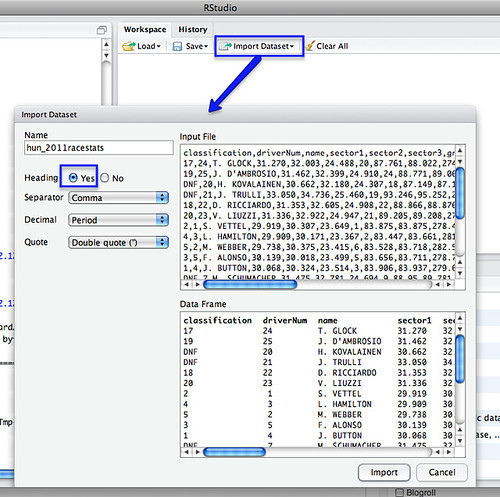
First, load in your two data files – for example, I’m going to load in separate files that contain qualifying and race stats from the last Grand Prix:

R import data

We can merge the datasets using a command of the form:

m=merge(hun_2011racestats,hun_2011qualistats,by="driverNum")

The by parameter identifies which column we want to merge the tables around. (If the two datasets have different column names, you need to set by.x= and by.y= to specify the column from each dataset that is the focus for merging).

So for example, in the simple case where we are merging around two columns of the same name in different tables:

R merge
Merging datasets in R

After the merge, column names for columns from the first table have the .x suffix added, and from the second, .y.

We can then export the combined dataset as a CSV file:

write.csv(m, file = "demoMerge.csv")

fragment of csv file

[If you want to extract a subset of the columns, specify the required columns in an R command of the form: m2=m[c(“driverNum”,”name.x”,”ultimate.x”,”ultimate.y”)] See also: R: subset]

Simples;-)

PS in the above example, the merge table only contains merged rows. If there are elements in the common column of one table, but not the other, that partial data will not be included in the merged table. To include all rows, set all=TRUE. To include all rows from the first table, but not unmatched rows from the second, set all.x=TRUE; (the cells from columns in the unmatched row of the second table will be set to NA). (all.y=TRUE is also legitimate). From the R merge documentation:

In SQL database terminology, the default value of all = FALSE [the default] gives a natural join, a special case of an inner join. Specifying all.x = TRUE gives a left (outer) join, all.y = TRUE a right (outer) join, and both (all=TRUE a (full) outer join. DBMSes do not match NULL records, equivalent to incomparables = NA in R.

For other ways of combining data from two different data sets, see:
Merging Datasets with Common Columns in Google Refine
A Further Look at the Orange Data Playground – Filters and File Merging
Merging CSV data files with Google Fusion Tables

If you know of any other simple ways of joining data files about a common column, please reveal all in the comments:-)

Visualising Twitter Friend Connections Using Gephi: An Example Using the @WiredUK Friends Network

To corrupt a well known saying, “cook a man a meal and he’ll eat it; teach a man a recipe, and maybe he’ll cook for you…”, I thought it was probably about time I posted the recipe I’ve been using for laying out Twitter friends networks using Gephi, not least because I’ve been generating quite a few network files for folk lately, giving them copies, and then not having a tutorial to point them to. So here’s that tutorial…

The starting point is actually quite a long way down the “how did you that?” chain, but I have to start somewhere, and the middle’s easier than the beginning, so that’s where we’ll step in (I’ll give some clues as to how the beginning works at the end…;-)

Here’s what we’ll be working towards: a diagram that shows how the people on Twitter that @wiredUK follows follow each other:

@wireduk innerfriends

The tool we’re going to use to layout this graph from a data file is a free, extensible, open source, cross platform Java based tool called Gephi. If you want to play along, download the datafile. (Or try with a network of your own, such as your Facebook network.)

From the Gephi file menu, Open the appropriate graph file:

Gephi - file open

Import the file as a Directed Graph:

Gephi - import directed graph

The Graph window displays the graph in a raw form:

Gephi -graph view of imported graph

Sometimes a graph may contain nodes that are not connected to any other nodes. (For example, protected Twitter accounts do not publish – and are not published in – friends or followers lists publicly via the Twitter API.) Some layout algorithms may push unconnected nodes far away from the rest of the graph, which can affect generation of presentation views of the network, so we need to filter out these unconnected nodes. The easiest way of doing this is to filter the graph using the Giant Component filter.

Gephi - filter on Giant Component

To colour the graph, I often make us of the modularity statistic. This algorithm attempts to find clusters in the graph by identifying components that are highly interconnected.

Gephi - modularity statistic

This algorithm is a random one, so it’s often worth running it several times to see how many communities typically get identified.

A brief report is displayed after running the statistic:

Gephi - modularity statistic report

While we have the Statistics panel open, we can take the opportunity to run another measure: the HITS algorithm. This generates the well known Authority and Hub values which we can use to size nodes in the graph.

Gephi - HITS statistic

The next step is to actually colour the graph. In the Partition panel, refresh the partition options list and then select Modularity Class.

Gephi - select modularity partition

Choose appropriate colours (right click on each colour panel to select an appropriate colour for each class – I often select pastel colours) and apply them to the graph.

Gephi - colour nodes by modularity class

The next thing we want to do is lay out the graph. The Layout panel contains several different layout algorithms that can be used to support the visual analysis of the structures inherent in the network; (try some of them – each works in a slightly different way; some are also better than others for coping with large networks). For a network this size and this densely connected,I’d typically start out with one of the force directed layouts, that positions nodes according to how tightly linked they are to each other.

Gephi select a layout

When you select the layout type, you will notice there are several parameters you can play with. The default set is often a good place to start…

Run the layout tool and you should see the network start to lay itself out. Some algorithms require you to actually Stop the layout algorithm; others terminate themselves according to a stopping criterion, or because they are a “one-shot” application (such as the Expansion algorithm, which just scales the x and y values by a given factor).

Gephi - forceAtlas 2

We can zoom in and out on the layout of the graph using a mouse wheel (on my MacBook trackpad, I use a two finger slide up and down), or use the zoom slider from the “More options” tab:

Gephi zoom

To see which Twitter ID each node corresponds to, we can turn on the labels:

Gephi - labels

This view is very cluttered – the nodes are too close to each other to see what’s going on. The labels and the nodes are also all the same size, giving the same visual weight to each node and each label. One thing I like to do is resize the nodes relative to some property, and then scale the label size to be proportional to the node size.

Here’s how we can scale the node size and then set the text label size to be proportional to node size. In the Ranking panel, select the node size property, and the attribute you want to make the size proportional to. I’m going to use Authority, which is a network property that we calculated when we ran the HITS algorithm. Essentially, it’s a measure of how well linked to a node is.

Gephi - node sizing

The min size/max size slider lets us define the minimum and maximum node sizes. By default, a linear mapping from attribute value to size is used, but the spline option lets us use a non-linear mappings.

Gephi - node sizing spilne

I’m going with the default linear mapping…

Gephi - size nodes

We can now scale the labels according to node size:

Gephi - scale labels

Note that you can continue to use the text size slider to scale the size of all the displayed labels together.

This diagram is now looking quite cluttered – to make it easier to read, it would be good if we could spread it out a bit. The Expansion layout algorithm can help us do this:

Gephi - expansion

A couple of other layout algorithms that are often useful: the Transformation layout algorithm lets us scale the x and y axes independently (compared to the Expansion algorithm, which scales both axes by the same amount); and the Clockwise Rotate and Counter-Clockwise Rotate algorithm lets us rotate the whole layout (this can be useful if you want to rotate the graph so that it fits neatly into a landscape view.

The expanded layout is far easier to read, but some of the labels still overlap. The Label Adjust layout tool can jiggle the nodes so that they don’t overlap.

gephi - label adjust

(Note that you can also move individual nodes by clicking on them and dragging them.)

So – nearly there… The final push is to generate a good quality output. We can do this from the preview window:

Gephi preview window

The preview window is where we can generate good quality SVG renderings of the graph. The node size, colour and scaled label sizes are determined in the original Overview area (the one we were working in), although additional customisations are possible in the Preview area.

To render our graph, I just want to make a couple of tweaks to the original Default preview settings: Show Labels and set the base font size.

Gephi - preview settings

Click on the Refresh button to render the graph:

Gephi - preview refresh

Oops – I overdid the font size… let’s try again:

gephi - preview resize

Okay – so that’s a good start. Now I find I often enter into a dance between the Preview ad Overview panels, tweaking the layout until I get something I’m satisfied with, or at least, that’s half-way readable.

How to read the graph is another matter of course, though by using colour, sizing and placement, we can hopefully draw out in a visual way some interesting properties of the network. The recipe described above, for example, results in a view of the network that shows:

– groups of people who are tightly connected to each other, as identified by the modularity statistic and consequently group colour; this often defines different sorts of interest groups. (My follower network shows distinct groups of people from the Open University, and JISC, the HE library and educational technology sectors, UK opendata and data journalist types, for example.)
– people who are well connected in the graph, as displayed by node and label size.

Here’s my final version of the @wiredUK “inner friends” network:

@wireduk innerfriends

You can probably do better though…;-)

To recap, here’s the recipe again:

– filter on connected component (private accounts don’t disclose friend/follower detail to the api key i use) to give a connected graph;
– run the modularity statistic to identify clusters; sometimes I try several attempts
– colour by modularity class identified in previous step, often tweaking colours to use pastel tones
– I often use a force directed layout, then Expansion to spread to network out a bit if necessary; the Clockwise Rotate or Counter-Clockwise rotate will rotate the network view; I often try to get a landscape format; the Transformation layout lets you expand or contract the graph along a single axis, or both axes by different amounts.
– run HITS statistic and size nodes by authority
– size labels proportional to node size
– use label adjust and expand to to tweak the layout
– use preview with proportional labels to generate a nice output graph
– iterate previous two steps to a get a layout that is hopefully not completely unreadable…

Got that?!;-)

Finally, to the return beginning. The recipe I use to generate the data is as follows:

  1. grab a list of twitter IDs (call it L); there are several ways of doing this, for example: obtain a list of tweets on a particular topic by searching for a particular hashtag, then grab the set of unique IDs of people using the hashtag; grab the IDs of the members of one or more Twitter lists; grab the IDs of people following or followed by a particular person; grab the IDs of people sending geo-located tweets in a particular area;
  2. for each person P in L, add them as a node to a graph;
  3. for each person P in L, get a list of people followed by the corresponding person, e.g. Fr(P)
  4. for each X in e.g. Fr(P): if X in Fr(P) and X in L, create an edge [P,X] and add it to the graph
  5. save the graph in a format that can be visualised in Gephi.

To make this recipe, I use Tweepy and a Python script to call the Twitter API and get the friends lists from there, but you could use the Google Social API to get the same data. There’s an example of calling that API using Javscript in my “live” Twitter friends visualisation script (Using Protovis to Visualise Connections Between People Tweeting a Particular Term) as well as in the A Bit of NewsJam MoJo – SocialGeo Twitter Map.