Category Archives: SEO

85 wordpress plugins for blogging journalists

Having reached a potential plateau in my addiction to WordPress plugins* I thought I should blog about the plugins I use, those I’ve installed in preparation for potential use, and those I may install at some point in the future. Of the 85 or so plugins installed on my blog I ‘only’ have around 30-40 that are active – the rest have either been used in the past or are ready in case I need them at some point in future. Some are one-click installs; others you need to put PHP in your templates; instructions are generally given on the plugin page. I’d love to know what plugins you find useful on your own blog.

Content plugins

Add Sig allows you to add a custom signature to the bottom of posts – particularly useful if you have a multi-author blog.

Embed iFrames allows you to do just that – useful for embedding any content that uses iFrames, e.g. maps, spreadsheets, widgets etc.

Exec PHP allows you to execute PHP in blog posts. I’ve not had to yet, but you never know…

FeedWordPress is an aggregation plugin that pulls any RSS feeds you specify and publishes them on your blog. Any user clicking on a particular post will be taken to the original. This is very useful if you blog elsewhere or want to aggregate coverage of an event for an eventblog (although there are more specific packages for that now). Previously I’ve used it to pull posts from my Posterous blog so I can blog via email.

In Series is a great plugin if you’re writing a series – this creates a new box when you start writing a post that allows you to assign it to a ‘series’. Sadly the plugin site reports “There have been reports of minor breakage in WordPress 2.6, and complete failure in WordPress 2.7.” So I’m now trying out Organize Series and Series, which claim to do something similar.

Microkid’s Related Posts allows you to manually add related posts.

Postalicious will automatically publish your bookmarks (from deliciousma.gnoliaGoogle ReaderReddit, or Yahoo Pipes) to your blog. You can specify a particular tag, frequency etc.

Star Rating for Reviews allows you to give star ratings in any blog post – ideal for reviews.

Tagaroo will suggest tags based on the content of the post you’re writing, and related Flickr images you could use.

User Photo displays an image of the author next to the post (this takes some tweaking with the template code) – particularly useful for multi-author blogs.

XML Google Maps allows you to easily insert Google Map or Google Earth Plugin Maps into your blog.

Comment plugins

Spam filter plugin Akismet is an absolute must for any blog, filtering out obvious spam and holding back the dubious stuff for moderation.

BackType Connect publishes comments about your blog on other social media sites – so if someone comments on your post on Twitter, Digg, FriendFeed, Hacker News or Reddit and links to it this will pull it onto your site. This sounds like a great solution to a modern problem, but in practice it generally means lots of tweets saying the same thing – ‘here’s a blog post’, so I’ve disabled it until that is addressed.

Capture the Conversation is a similar plugin which uses your post tags to look for related tweets. This gives you more control but means the more tags you add the less likely it is to work, which obviously has implications for search engine optimisation – although you can change the settings to only look for the first tag. It appears to be particularly useful for ‘breaking news’ posts where people are talking about the issue on Twitter and you can see this from the post itself. Presentation could be better – you can customise this a little in settings too.

cForms II allows you to create multiple and customisable contact forms across your blog, including multiple forms on the same page. I’ve never had cause to use it yet, but it’s worth having just in case.

coComment simple integration (direct download) integrates your comments system with the coComment system so users can log in, tag and share comments and keep track of them via coComment.

Intense Debate Comments does the same for the comment management service Intense Debate. I seem to remember this was created for me by Intense Debate so I don’t have a download link, but I disabled the plugin when I realised it had accessibility issues, and made comments invisible from search engines.

DoFollow is a plugin which disables the default ‘nofollow’ setting on WordPress blogs (which tells search engines to disregard any links in comments). This means that links posted in comments benefit from ‘Google juice’. You can set the plugin to only remove ‘nofollow’ after a certain period of time so you can delete spam comments before then. I found that announcing the plugin attracted too many spammers, so I disabled it.

WP-FacebookConnect allows users to login and comment with their Facebook account and publish comments into their Facebook newsfeed. There’s some fiddling required.

outbrain allows users to rank blog posts – WP-postratings did something similar, as did WP-StarRateBox.

Seesmic WordPress plugin allows people to record video comments. I seem to remember this was the plugin that forced me to move to self-hosted WordPress and, amusingly, I’ve only ever had one video comment since.

Subscribe To Comments allows users to receive email updates when an individual post receives a new comment. Simple but extremely useful, and so far used by hundreds of visitors to the blog.

Top Commentators Widget shows which users comment the most on your blog. Sadly it only starts counting once installed, and the presentation needs some attention, so I disabled it, but it’s a nice plugin which showcases the biggest contributors.

WP-Forum creates a forum on your blog – instructions on the plugin page.

Blog management plugins

BackUpWordpress allows you to easily backup your WordPress database – a useful habit to get into in case something goes wrong with your blog hosting or you want to move your blog to another host. The plugin also allows you to schedule regular backups.

Cronless Postie allows you to publish blog posts via email. There are other ways to do this – for example, emailing your post to Posterous and then pulling the RSS feed from there using a syndication plugin like FeedWordPress (see above).

mobileadmin makes it easier to manage your blog via mobile phone as it “gives a mobile-friendly admin UI to browsers by user agent. Includes support for iPhone/iPod-Touch”. However, this is currently disabled as activating it triggers a fatal error (who died?)

Ozh’ Admin Drop Down Menu changes the admin view on WordPress so that it uses drop-down menus, making it easier to manage.

Plugin Manager “lets you to view, download and install plugins from wordpress.org from an AJAX’ed interface, instead of manually downloading, extracting and uploading each plugin.” It’s really very very good.

podPress is a plugin to use WordPress for Podcasting. I’ve never particularly used this, but useful to have if I ever need it.

Post Template allows you to create templates for posts with the same structure – perfect for reviews and series, and also useful to keep a multi-author blog consistent.

Role Manager allows you to assign different levels of access to different contributors to your blog – for example, only allowing a user to contribute to a particular category.

Textplace is “a plugin to include commonly used text across multiple posts, pages and templates”.

WordPress Automatic Upgrade allows you to upgrade to the latest version of WordPress with a few clicks. Essential.

WP Security scans for security vulnerabilities in your WordPress installation.

Presentation and widgets

Bunny’s Print CSS creates a stylesheet for printing so users printing pages from your blog can avoid endless pages of widgets, comments or other page furniture (including design elements).

Easy Popular Posts shows you your most popular posts – useful to install in a sidebar (you’ll need to put a line of PHP in the sidebar template for this).

Get Recent Comments provides extra customisation of the comments widget.

Global Translator “translates a blog in 34 different languages (English, French, Italian, German, Portuguese, Spanish, Japanese, Korean, Chinese, Arabic, Russian, Greek, Dutch, Norwegian,…) by wrapping four different online translation engines (Google Translation Engine, Babelfish Translation Engine, FreeTranslations.com, Promt).” The results are as patchy as you’d imagine, but take a stage out for users who may use Google Translate to read your blog.

Hot Friends creates a blogroll/friends widget based on the number of comments a blog owner makes. I’ve never had the time to set this up properly and it may not suit the nature of the OJB, but it sounds interesting.

KB Advanced RSS Widget gives you additional control over the RSS widget, e.g. which fields of the feed to display and how to format them.

KB Countdown Widget counts “the years/months/days since, until, or between events. Optional bar graph for tracking progress between two dates.” Useful if you’re blogging up to an event, or setting yourself a challenge, or launching something.

Random Redirect allows users to be taken to a random post from your blog.

Related Ways to Take Action “makes it super easy to connect your readers to ways to take action based on the content of your posts. The Plugin identifies the top three keywords for each post and then searches for related campaigns from from Change.org, GlobalGiving.com, Idealist.org, DonorsChoose.org, Kiva, Care2 and over twenty other social change websites. It then automatically loads the top three campaigns for those keywords at the bottom of each of your posts.” In reality the guesses the plugin makes can be a bit hit-and-miss, but on a more campaign-based blog they may be more accurate.

Sort by Comments “Changes the order of posts so that the most recently commented posts show up first. Also displays last comment with the posts.”

Theme Switcher allows users to switch themes. You need to put a line of code in your sidebar to create the dropdown (instructions buried here) – remember you’ll have to do this in every theme you have installed so that users can switch back. You’ll also need to make sure that you’ve deleted any themes that don’t work or you don’t like, as this will pull them all up by default.

WordPress Mobile Edition shows mobile visitors a mobile version of the site. You have to install the theme as well.

WP Web Scraper is “an easy to implement web scraper for WordPress. Display realtime data from any websites directly into your posts, pages or sidebar.” I’ve not had cause to use it yet, but could be very interesting.

RSS and SMS

FeedBurner FeedSmith makes sure that users subscribing to your RSS feed are redirected to your Feedburner feed, allowing you to keep track of numbers of subscribers, etc.

RSScloud is a plugin that allows users to be more quickly updated when you post something. Only one RSS reader supports it, but the technology appears to be gathering speed.

RSS Feed Signature allows you to add a customised signature to the end of your RSS feed. Sadly, the developer link appears to be dead. This is the only alternative I can find.

SMS Text Message allows users to receive text updates from your site – presumably in the US only, where the receiver pays for texts. It creates a widget where users can enter their phone number to subscribe. I’ve just installed this so let me know if it works.

Analytics, SEO and Social Media Marketing

All In One SEO Pack is another top-of-the-list plugin that ensures your blog content is optimised for search engines. In addition to the general settings page this adds a box below your draft posts where you can customise the title, description and metatags on individual posts.

Digg This detects if the user has come from Digg and displays a Digg This badge for them to Digg the story. You’ll have to add a line of PHP in your post template.

Google Analyticator makes it easy to enable Google Analytics on your blog and measure where visitors are coming from, what terms they are searching for, etc.

Google News Sitemap creates a sitemap to help Google News better index your site.

Google XML Sitemaps does the same: generates “a sitemaps.org compatible sitemap of your WordPress blog which is supported by Ask.com, Google, MSN Search and YAHOO”

Landing Sites shows the user posts related to the search they’ve made that brought them to your site.

Permalink Redirect ensures that only one URL is used for each post and users (including search engines) arriving at others are redirected accordingly.

ShareThis creates a button at the bottom of posts for users to bookmark that post on sites like Delicious, Digg, Stumbleupon, Facebook etc. as well as email it to a friend. For me this replaced similar plugins: SociableWP-Email and wp-notable.

TweetMeme Button creates a badge at the top of each post showing how many times it has been tweeted and allowing the user to retweet it themselves.

WordPress.com Stats tells you how many people are reading, what they’re reading, and what searches brought them here.

WP Greet Box shows a different message to visitors “depending on which site they are coming from. For example, you can ask Digg visitors to Digg your post, Google visitors to subscribe to your RSS feed”

WP Super Cache makes your site faster. “If your site is struggling to cope with the daily number of visitors, or if your site appears on Digg.com, Slashdot or any other popular site then this plugin is for you.”

WP_DeliciousPost submits your posts and pages to Delicious, allowing you to include tagging and private links. WP_LinkTools does much the same.

Plugins to make money

Amazon Widgets Shortcodes adds a button to your post editor that allows you to easily insert an Amazon carousel, slideshow, or link to an Amazon product through your affiliate store – very useful if you’re reviewing products.

Buy Me A Beer places a widget at the bottom of every post and in the sidebar allowing users to donate to your PayPal account if they liked your post (there is also a ‘coffee’ option).

Paypal Widget does much the same, but without the rather more affable beer element. I’ve never had cause to enable this, but again, useful to have.

Register Plus creates an enhanced registration page for users to log on to your blog – this opens up opportunities for restricting access if that’s what you want. I never have, so I’ve never used it. The same developers have also made Donate Plus, which has similar potential. And SponsorMe is worth looking at too.

wpLicense-reloaded allows you to select a Creative Commons license for each blog post individually.

*When I started writing this post, it was 61. Some ‘plateau’. And if 85 isn’t enough for you, see my plugin bookmarks on Delicious.
Help correct the damage from the media’s irresponsible coverage of the cervical cancer vaccine

I’ve pointed out that parents using Google to research the cervical cancer jab (in the tragic wake of a schoolgirl’s death) see a mass of negative and inaccurate information linking her death to the vaccine.

She died of an unrelated tumour. But Google’s results will give parents second thoughts about letting their daughters be vaccinated, even though the injection will save hundreds of lives a year. You can help however.

YOU can help do something about this.

If you publish web pages …

Google’s results are influenced by two things –  links to a page, and the text that’s used to link.

So, please, if you can publish a web page (a blog, say), then link to these URLs:

Ideally, use text like cervical cancer jab or cervical cancer vaccine to link to those pages, like this: cervical cancer jab and cervical cancer vaccine and cervical cancer vaccine Q&A.

The more of us who link, the better in Google’s results these pages will do, counteracting the ill-informed scaremongering.

If you can tweet, or you have a friend with a blog

Why not publicize this plan? Tweet it or ask friends with blogs to add a link to the relevant NHS pages.

If you’ve already blogged about this

Already published something about this online? Why not go back to that post and add links to the NHS pages. If you’ve linked to a misleading news story in your outrage, add rel = “nofollow” to your link. That stops Google counting your link as a ‘vote’ for the page.

Look in the HTML view and change something like this:

<a href=”http://tabloid.com/misleadingstory”>cervical cancer jab</a>

to this:

<a href=”http://tabloid.com/misleadingstory&#8221; rel=”nofollow”>cervical cancer jab</a>.

At the moment, many angry bloggers link to the scaremongering tabloid stories, giving them a boost in google’s results. Adding nofollow like this will avoid this problem.

If you need any help

Leave a comment if you want some advice on the best way to help deal with this. You can see all my posts charting the history of this media scaremongering here.

How newspapers SEOed Patrick Swayze’s death

When news breaks, if you want to do well in Google for relevant searches, publish early, publish often and put your keywords at the front.

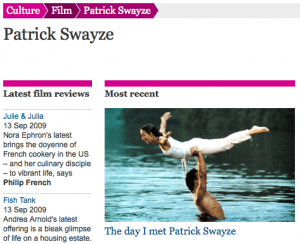
The Guardian's Patrick-Swayze tag page

The Guardian's Patrick-Swayze tag page

From an SEO point of view, the more stories you can pump out targeting different (or even the same) keywords, the more chance you have of appearing at the top of Google’s search results – and scooping up the traffic.

Get it right, and you can appear twice in the web results – and twice in the news results that Google often shows above them for breaking-news-related searches.

Some of the newspapers may have taken this a little bit far with news of Patrick Swayze’s death

  • The Guardian published 15 stories today (Tuesday 15th), all available from its existing Patrick Swayze tag page. Do we really need 15 stories on this?!? About half had a title that began with ‘Patrick Swayze’.
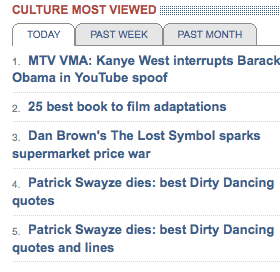
  • The Telegraph published 10 pages, and while it doesn’t have as many tag pages as the Guardian, it did feature one of its two obituaries (here and here) as a link from its ‘hot topics’ list on its home page, giving it a boost in Google’s web-result rankings. The screenshot, below, shows that it may have run out of ideas to get to 10 pages – the two bottom ones shown are very similar. Also, nine out of 10 of these stories have a title beginning with ‘Patrick Swayze’. The other is just called ‘Dirty Dancing – time of your life’. Now that is front-loading keywords.
  • The Mirror pumped out 5 pages today, and also set up a tag page at some point during the day (they didn’t have one before lunch), hoping to target the searches for ‘patrick swayze’ (yes, they forgot to capitalise it in their haste to set it up). The titles of all 5 begin with ‘Patrick Swazye’.
  • The Independent published 4 pages.
  • The Times managed just 3 pages – maybe with a paywall coming they are less interested in SEO these days ..
  • The Sun published only 2 pages.
  • The Mail published just 1 massively long story – on top of its  existing tag page for the actor. Interestingly, the paper recently claimed it wasn’t interested in celeb stories to drive traffic (although I claimed Michael Jackson was behind its June ABCe success).

The papers weren’t all that successful in their SEO efforts.

The 4th and 5th most viewed stories seem a little bit similar ...

The 4th and 5th most viewed stories seem a little bit similar ...

US sites dominated Google’s results for a search on ‘Patrick Swayze’ and ‘Patrick Swayze death’. The Telegraph did though take the top two web search spots for a search on ‘Patrick Swayze obituary’.

Keith Floyd has also died – and it was a similar story in terms of volume of stories. The Telegraph, for instance, has published 8 stories and the Guardian, via its tag page, published 9. The Guardian pipped the Telegraph to win the results for a search on ‘Keith Floyd obituary’.

If you ever want to target what people are searching for around breaking news, I recently compared the different Google tools for a search on X-factor related terms. And if you want to see SEO taken to the dark side, check out this method of newspapers and paid links.

Is the Mirror selling links to Moneyextra.com?

The Mirror wants to watch out – as it looks like it’s selling links, even if it isn’t (as I first posted here and which later went hot on Sphinn). Several stories on the mirror.co.uk site share all these characteristics, and must look extremely suspicious to Google:

  • All the stories contain three links to the same MoneyExtra page.
  • All the links use different anchor text.
  • The text happens to be competitive search terms.
  • MoneyExtra isn’t mentioned in the article itself.
  • They were all published in August.

There’s nothing wrong or illegal about selling links if that is what they’re doing. But it’s likely to get you penalized by Google if they spot it as it’s done to manipulate their search results for SEO reasons (Google counts the number of links to a page as a measure of its importance).

Pages on Mirror.co.uk from August

Now let’s look at several pages from Mirror.co.uk.

Headline: Sorting out the best credit card rate

This page from 20th August contains three links to the MoneyExtra credit cards page, using the link text “best credit card rate in the UK”, “best credit card” and “credit cards”. There is no mention of MoneyExtra in the article.

Headline: Why do credit card providers offer credit cards with 0% interest?

This page from 20th August contains three links to the MoneyExtra credit cards page, using the link text “credit card providers”, “0% credit card interest rates”, and “0% credit card deal”. No mention of MoneyExtra in the article.

Headline: Best credit card transfer: Does one size fit all?

This page from 5th August for once contains, er, three links to the MoneyExtra credit cards page, using the link text “best credit card”, “0% balance transfer rate” and “best credit card balance transfer rate”. Again, no mention of MoneyExtra in the article.

Headline: Is it too late for debt management in England?

This page from 20th August contains, er, three links to the MoneyExtra debt page, using the link text “debt management”, “debt” and “debt advice”. There is no mention of MoneyExtra in the article.

Headline: What is ‘government debt management’?

This page from 20th August contains, guess what, three links to the MoneyExtra debt page, using the link text “Government debt solution”, “debt management plans” and “debt”. There’s no mention of MoneyExtra in the article.

Something a bit different!

This page is a bit different. It’s from the 20th August, naturally. But it contains FOUR links to the MoneyExtra car insurance quotes page – and mentions MoneyExtra in the article!

Some other pages

Other pages from August (not the 20th this time) which contain three links to a specific MoneyExtra page but which don’t mention MoneyExtra in the article include: this one and this one and this one (OK, that one’s only got two links) and this one (as has that one) and this one.

Conclusion

As I say, there’s nothing wrong with selling links, and there’s no actual evidence that that’s what the Mirror is doing. However, this looks like the sort of pattern you’d see with sold links – so the Mirror wants to watch out it doesn’t get hit by a penalty by Google.

Is poor SEO behind thelondonpaper’s failure?

thelondonpaper is closing – with a pre-tax loss of £12.9m last financial year on £14.1m turnover. Maybe if they’d sorted out their SEO strategy, they’d have got more website visitors and sold more adverts? (See this story in video form).

thelondonpaper's poor appearance in google's results

thelondonpaper's poor appearance in google's results

They have no meta descriptions on their pages. Although the meta description doesn’t influence your position in google‘s search results, it does affect users’ propensity to click on each result.

With no meta description, google has to guess what to show in its results – and the picture reveals what it shows for thelondonpaper’s home page.

Would this tempt YOU to click through?

UPDATE: from someone who worked with the website team at thelondonpaper: “The website relaunch included a number of changes to improve the search engine optimisation of the site. These had a pretty substantial positive impact. The issue you raise was a known one and would have been fixed in time. In general though, recent website performance had been good.”

An interview with tynt.com – in movie form

There was a recent post on OJB about the Daily Mail’s ‘feature’ that automatically adds a link and attribution to any text you copy – it turned out to be part of Tracer from Tynt.com, a service that lets you track how people are using content on your site.

I asked Derek from Tynt a few questions – and then I fed the whole lot into Xtranormal.com’s text to movie service. I would have tidied the interview up but I’ve left it verbatim underneath in case you can’t follow the video (which you can see in all its glory here – as this blog’s not quite wide enough to see the full picture!) …

ME: What have the most common use cases – and types of user – turned out to be in practice? Is it large publishers or small bloggers (or both?!?) And what are they using it for (to track, to get links etc)? Continue reading

Did Michael Jackson’s kids make the Daily Mail the most visited UK newspaper site in June?

The Daily Mail surprisingly overtook the Telegraph and Guardian in the June ABCes – with more unique visitors than any other UK newspaper (this is a cross-post of my original June ABCe analysis on my blog).

However it was only 4th in terms of UK visitors. Figures from Compete.com, which tracks Americans’ internet use, show that, of the 4.7 million unique users the Mail added from May to June, 1.2 million were from the USA. American and other foreign visitors searching for Michael Jackson’s kids – the Mail tops google.com for a search on this – drove this overseas growth.

US traffic to UK newspaper sites

Of the big three UK newspaper sites this is what happened to their US traffic from May to June:

This dramatic increase in traffic, compared to its rivals, from May to June helps explains how the Mail leapfrogged the Guardian and Telegraph.

compete-mail-traffic

Google.com was the main referrer to the Mail – responsible for 22.7% of its traffic. More on this below. Next up was drudgereport.com (a large US news aggregation site), followed by Yahoo.com and Facebook.com.

What was behind this rise in US traffic?

So what led to this sudden increase for the Mail? Compete also shows you the main search terms that lead US visitors to sites. Continue reading

MPs expenses data: now it’s The Telegraph’s turn

The Telegraph have finally published their MPs’ expenses data online – and it’s worth the wait. Here are some initial thoughts and reactions:

  • Firstly, they’ve made user behaviour an editorial feature. In plain English: they’re showing the most searched-for MPs and constituencies, which is not only potentially interesting in itself, but also makes it easier for the majority of users who are making those searches (i.e. they can access it with a click rather than by typing)
  • There’s also a table for most expensive MPs. As this is going to remain static, it would be good to see a dedicated page with more information – in the same way the paper did in its weekend supplement.
  • The results page for a particular MP has a search engine-friendly URL. Very often, database-generated pages have poor search engine optimisation, partly because the URLs are full of digits and symbols, and partly because they are dynamically generated. This appears to avoid both problems – the URL for the second home allowance of Khalid Mahmood MP, for example, is http://parliament.telegraph.co.uk/mpsexpenses/second-home/Khalid-Mahmood/mp-11087
  • The uncensored expenses files themselves are embedded using Issuu. This seems a strange choice as it doesn’t allow users to tag or comment – and the email/embed option is disabled for “secret documents”
  • There’s some nice subtle animation on the second home part of expenses, and clear visualisation on other parts.
  • The MP Details page is intelligently related both to the Telegraph site (related articles) and the wider web, with the facility to easily email that MP, go to their Wikipedia entry, and ‘bookmark’.
  • Joy of joys, you can also download the MPs expenses spreadsheet from here (on Google Docs) – although this is for all MPs rather than the one being viewed. Curiously, while viewing you can see who else is viewing and even (as I did) attempt to chat (no, they didn’t chat back).

I’ll most likely update this post later as I get some details from behind the curtain.

And there are more general thoughts around the online treatment of expenses generally which I’ll try to blog at another point.

Telegraph drops to 5th place in Google results for MPs expenses

Google has dropped the Telegraph to 5th place when you search for MPs expenses for some reason, as revealed here.

Last week Google had pages from the BBC 1st and the Telegraph 2nd – even though the Telegraph is the primary source of all this material.

Today the search results are even worse:

  1. In first place, we have the BBC, with one page from yesterday and from October 2004 – is this what seachers want?
  2. Then comes the Guardian, with its MPs’-expenses landing page followed by a story from Saturday. That might be fair enough for 2nd place.
  3. Then theyworkforyou.com – tangentially interesting I suppose, but the page is dated 2004.
  4. Then the Daily Record from Saturday. I’ve nothing against Scottish newspapers. But really – ahead of the Telegraph?
  5. And finally, the Telegraph with one page from Sunday and its MPs’-expenses landing page.

The Telegraph is benefiting from the 3 news stories above the normal results. And Google is probably having trouble identifying the original source because no mainstream news organisations link back to the Telegraph. But for a topical news story, this set of web search results is really bad.

Search results for MPs expenses at Google

Search results for MPs expenses at Google

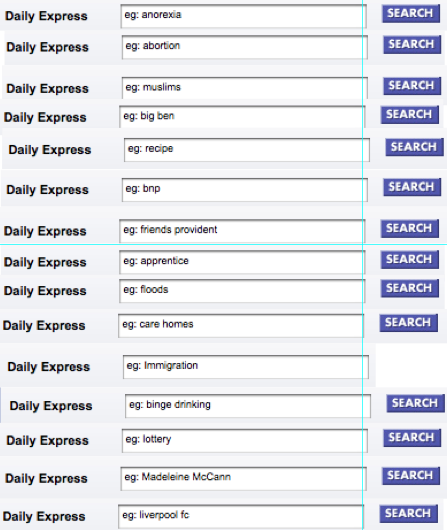
Do Daily Express search suggestions reveal editorial agenda?

Which comes first? A newspaper’s agenda or its readers’ interest in those subjects? The search suggestions at Express.co.uk give a revealing insight into either what its readers are searching for or what the Express wants them to be interested in.

The screenshot below, first published on this blog, is a photomontage of the search box on the Express site. Every time you reload the Express search page, a different ‘example search’ is shown. The list seems to suggest a certain editorial agenda …

Daily Express search suggestions

Daily Express search suggestions

Continue reading