
Sending FOIs to multiple bodies across the country to get the big picture on an issue sounds like a great idea — until the responses start to trickle in. Differences between responses often make mass FOI projects extremely time-consuming as you try to get everything into a format that allows you to ask journalistic questions and compare different authorities. Can AI help?
On one recent project I decided to put together a methodology that made the process less stressful, faster and more accurate. Here’s how it works.
Problem 1: Responses are inconsistent
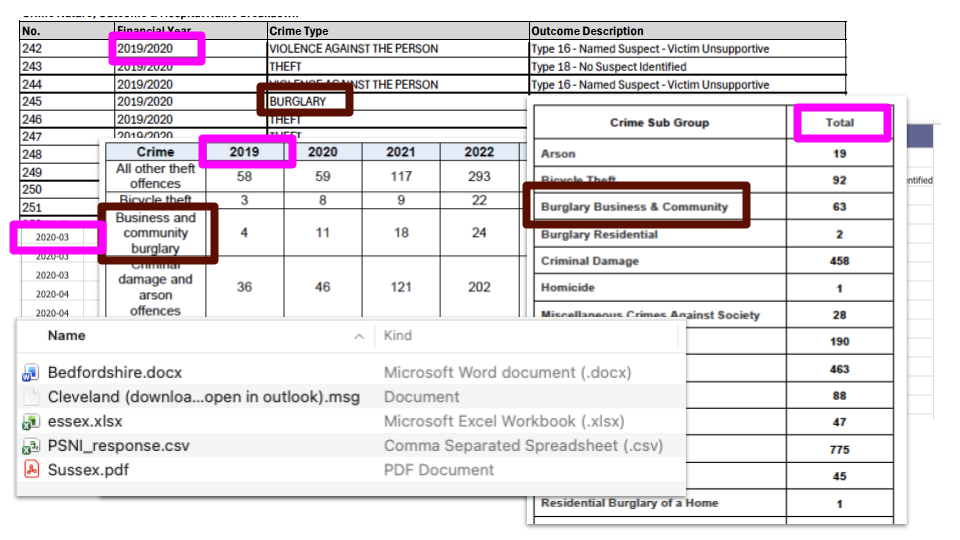
The main problem journalists face with responses to a bulk FOI request is their inconsistency. This can be reduced by specifying the year used (financial or calendar), the format of the response (spreadsheet) and even providing a template, but inevitably some authorities will ignore either or both.
On top of that, authorities will often use slightly different language to refer to the same thing, or different levels of categories. And some
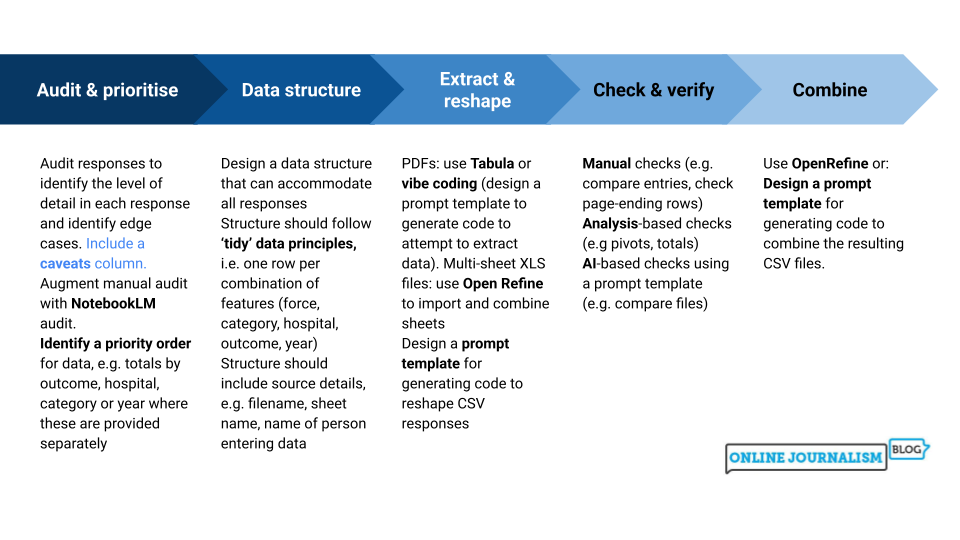
With so many different inconsistencies, it helps to break those down and make a list that you can turn into a series of steps based on priority. For example:
- Inconsistent filetype: we first need to extract data into one format (CSV)
- Inconsistent shape: …then we need to reshape data (wide to long, all fields)
- Inconsistent naming: …then we need to standardise categories or other fields
- Inconsistent timescale: …then we need to make an editorial decision whether to use all responses and, if needed, how to report the use of different timescales
Problem 2: You need to choose a focus
That inconsistency will apply across every question that you asked in the FOI — so before you spend any time making the responses consistent, it makes sense to decide which parts of the responses you’re actually going to need.
This is often shaped by how many questions were answered by authorities, and to what level of detail. In the FOI project I was working on, for example, the request asked for details of crimes in hospitals, but not all forces provided totals that combined crime category and hospital names and outcomes. Our story would have to focus on either categories, or hospitals, or outcomes.
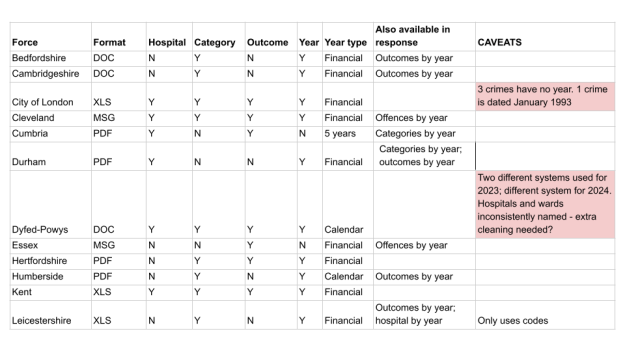
To choose a focus you need to know how many responses answer each question — you need an audit that does the following:
- Browse the FOIs, or a representative sample
- Identify the range of information covered
- Are there any questions which some bodies refused to answer?
- Or levels of detail they couldn’t provide?
- Identify any differences (e.g. financial year vs calendar year)
- Decide what takes priority where multiple tables are given (e.g. offence category, not hospital or outcome)
You can do this manually, but this is also a task for which AI is well suited: a classification and summarisation task to provide an overview of a large document set. Using the Pulitzer Center’s risk assessment this task also sits in AI’s “sweet spot” because it’s not audience-facing and you don’t need high accuracy.
Specifically, it’s well suited to NotebookLM, an AI tool for working with documents using the Gemini LLM.
Those documents will need to be in PDF or Word format, or Google Sheets, and there’s a limit of 50 documents (you can combined PDFs with Adobe Acrobat and other online tools). An alternative is Google Pinpoint.
A prompt template to audit your responses might look like this:
OBJECTIVE: You are a journalist looking to combine data from multiple FOI responses into a single table that can be analysed to identify trends over time and compare categories or bodies.
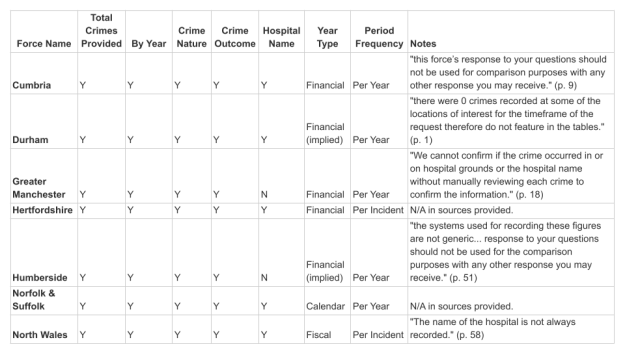
TASK: Audit these responses and produce a table identifying the range of information covered for each authority.
Each column should identify Y/N if they provided that information.
Include a column indicating what type of year was used (e.g. financial vs calendar) and a column indicating whether data is provided for each incident, or per year, month, quarter, another period.
If the response includes any warnings or caveats, quote these and the page number in a caveats column.
The resulting table should give you an idea of the coverage of the FOI responses, including which questions might have the most comprehensive responses, and which questions will have patchier data.
You can now decide on a focus which isn’t going to lead to frustration and having to start over.
Problem 3: You need to extract the data
Now you can start extracting that target data from the FOI requests. For data in Word documents and email tables, or single-sheet XLSX files, copy and paste the specific table you want (not multiple tables) into a spreadsheet and save it as a CSV.
It’s tempting to reach straight for AI tools to tackle trickier formats, but there two tools to try first that are faster, more accurate, more explainable, less energy intensive, and avoid deskilling.
- Try Open Refine to combine sheets from XLSX — or search DuckDuckGo to find other solutions like this
- Try Tabula first for PDF extraction
You should also conduct a security and privacy assessment before reaching for AI: on the whole information provided under FOI laws should not raise issues around security or privacy, but the organisation may have made a mistake, or there could be issues with the particular nature of the information provided that mean you would not want a large language model to be learning from it.
If you need to use AI to extract data from an XLSX file where it has been provided in different sheets (for example one for each year), here’s a template prompt you can adapt:
This XLS file contains a sheet for each financial year. Each sheet has three tables.Extract the second table, in columns D-E, from each sheetCreate a CSV containing the combined tables with the following columns:Offence Code | Total | Year from | Year toIgnore the first two sheets which do not relate to financial years
The prompt should provide context for what is in the sheets, name specific columns or rows, specify the structure and the output, and tell it what not to do.
PDF extraction is more problematic, because there’s an explainability challenge (it’s hard to explain how it extracted the data). I’m going to suggest a way to address this in a moment, but if you have to use AI for PDF extraction, here’s a template prompt for that:
Attached is a PDF. Extract ONLY the table on pages 2 and 3 which shows crime totals by category and year. If any line breaks or hyphenations cause split labels, reconstruct using nearest-neighbor/line-merge logic and re-validate.Export as a CSV.Check you have grabbed rows at the ends and beginnings of pages. Check that figures in the extracted CSV, when totalled match totals in the PDFIf any uncertainty remains (e.g., an OCR-confused label), include a “flags” list with the exact text span and your best-guess normalization.
Again, this names specific columns and rows, and specifies output. It addresses particular problems with PDF extraction: line breaks where column or row titles are split, provides space for uncertainty (AI is ultimately a machine for guessing) and includes a validation step.
That reduces some of the most common risks in using AI for this — but explainability remains a problem: how do we know what it did? And how can we use that to help us verify the results?
A better approach than is to ask an AI tool help us to extract the data — by giving us some code that we can run ourselves in Google Colab (an app in Google Drive, so it requires no installation).
The template prompt for this is long, so I’m not going to paste it here. Instead you can find it on the GitHub repo for my Dataharvest talk on this. But it has a few key elements to highlight:
- Set a clear objective including any prioritisation of data to extract
- Break down the task step by step
- Describe the PDF and the specific pages and tables you want to target, including the structure. Say whether the PDF has gridlines and any text that appears before or after it.
- Provide any extra details
One thing to highlight in the prompt: it should specify that code “be commented so that a non-coder can understand what is happening” (explainability again).
Once the AI tool has provided you with some code, create a Colab notebook and copy and paste that code into the empty code block, then run it by pressing the ‘play’ button to the left.
Once a code block has run, look for an ‘Upload’ button appearing underneath the code block, where you can upload the PDF
Create extra code blocks for further code by clicking the button marked ‘+ Code’ at the top of the notebook (the same button will also appear above or below a block when you hover).
Once you’ve done this for one response, you can adapt the same template prompt for other responses, adjusting any details on the PDF description etc.
For extra confidence (thanks to someone at Dataharvest for suggesting this), you can ask an AI tool to generate code again, but in a different language (you can run R in Colab). This prompt would be the same with one change:
Look at the attached PDF and suggest code in R that will work in Colab notebook (explain how I run R in Colab).
Problem 4: You need to check it’s accurate
After you’ve extracted the data from a response, you need to check that it’s extracted the data correctly. I combined three methods to do this:
- “Eyeball” tests: manual checks for known risks, vulnerabilities and issues
- Analysis tests: calculations such as totals and value counts to cross-check
- AI tests: document comparison and repeat of above tests
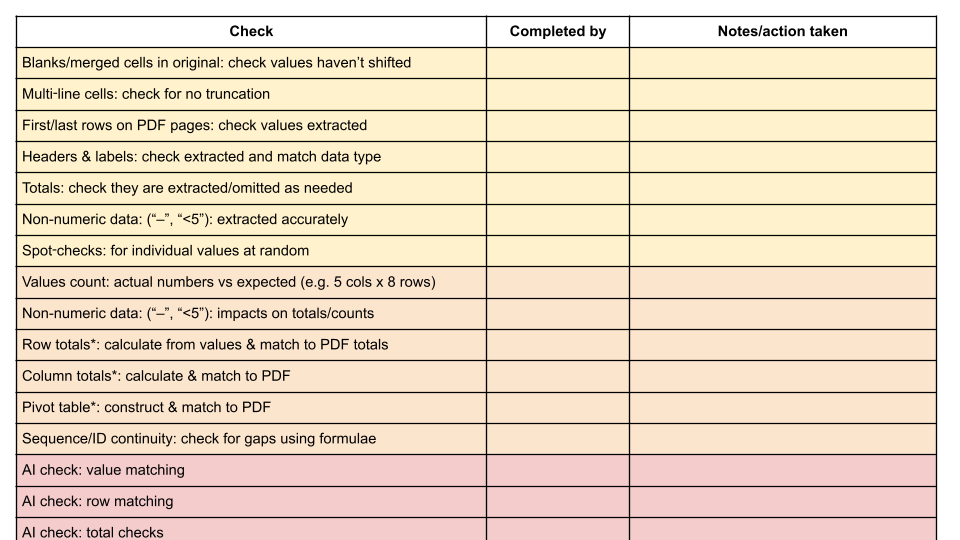
Particular things to check manually (“eyeball” tests) include where the PDF has blank or merged cells (values sometimes get shifted here), where text runs across multiple lines (sometimes only the first line is extracted), and the first and last rows on each page.
Analysis tests are where you don’t compare values directly, but add up all your numbers to see if it matches a total in the original. Any discrepancy is extraction should result in a different figure.
I’ve created a template checklist which lists all the tests I could identify. Using a checklist makes it possible to systematically go through and tick each test (some will not be applicable, e.g. where you don’t have totals in the original PDF).
The AI tests just repeat the above, adding an extra layer on top of the manual checks, which can be useful in identifying human error in your own checks. A prompt template for AI validation is also on the repo (again, it’s too long to paste here).
Problem 5: You need to get the responses into one dataset
Now you have a collection of CSVs with data extracted from FOI responses, and checked against the originals. The next step is to combine those into a single dataset you can question.
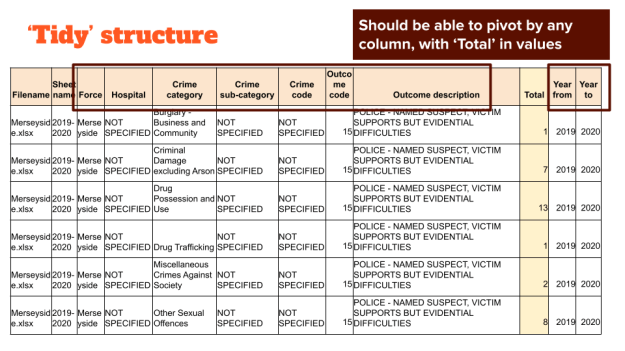
That means deciding on a single structure. It will need to be a structure that can accommodate the variety of responses, and that allows you to ask different questions (e.g. pivot tables). Some tips for that structure include:
- Have columns for filename and authority for traceability/combination
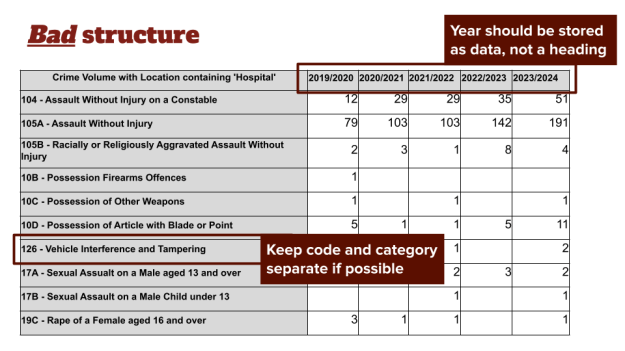
- Have ‘year from’/‘year to’ and store the year as a value, not a column name (the data should be long, not wide)
- Have a column that measures the number of events (e.g. crimes) — or two columns for ‘number from’ and ‘number to’ if organisations are likely to give a range (<5 can be encoded as from 1 to 5, for example)*
- Have a category column that classifies the type of event (e.g. ‘theft’)
- You might have sub-category column as well, or columns for category code, outcome, location, etc.
- Allow columns to have ‘NOT SPECIFIED’ where bodies didn’t provide that level of detail (or combined detail)
Once you’ve identified a structure, you’re going to need to reshape some of your data to fit into that. This is another task that can be done well by AI (there are manual alternatives if you are able to code), but again it is better to ask AI to generate and comment code that you can run, rather than performing the reshaping itself.
A prompt template for reshaping data in this way is available here. It sets an objective, describes the target structure, and describes the task step by step.
You can validate reshaped data against the original using the same checklist as before (or you may decide to only validate at this point). In particular, where data has been reshaped from a pivot table-type response, you can validate it against the original data by generating pivot tables to replicate the original shape for comparison.
Problem 6: You need to clean inconsistent categories or entities
It’s likely that different authorities will have used different language to refer to the same entities or similar categories. This is a problem if you want to tell a story about how many events there were in a particular category (or connected to an entity of interest), or which category or entity ranked top or bottom.
Fixing this problem is best left until you have all the responses in a single dataset, as this makes it easier to identify clusters, and means you only have to clean one dataset, rather than each one.
Once you have a single dataset, generate a list of all the unique categories or entities, and have a quick look to get a feel for the problems it presents. The key here isn’t to see this as a single cleaning job — you’ll need to break it up into multiple cleaning stages, each of which tackles a different problem.
Here are six likely stages you might need to clean for, in the following likely order:
- Mixed data (for example, category and code, or crime category and Act/Section): this might be fixed by using the spreadsheet’s Text to columns tool. This is probably the first stage of cleaning to perform, as it will isolate strings of text for further cleaning.
- Acronyms (for example some authorities using GBH while others use “Grievous bodily harm”): use an
IForEXACTfunction combined withUPPERorREGEXMATCH(Google Sheets only) to identify all-caps entries. - Upper/lower case inconsistency: this can be fixed by using a text formatting function like
PROPER. However, this will also turn acronyms like GBH to “Gbh” so you will need to fix acronyms first, or filter them out while cleaning everything to proper or lower case. - Extra/analogous characters: some responses may use quotation marks, spaces, apostrophes, commas, and currency symbols where others don’t. Or some may be “and” while others use “&”. Using Edit > Find and replace can deal with some of this, as can the
SUBSTITUTEfunction. TheTRIMfunction can get rid of spaces at the start and end, andREGEXREPLACEcan replace certain patterns of text. - Slight variations (e.g. one authority uses “Criminal damage and arson” while another users “Criminal damage and arson offences” or “Starbucks” and “Starbucks Ltd”): Open Refine’s cluster and edit tool is very powerful for tackling this, and you can also sort the categories to bring similar ones together to edit them manually
- Different category level (e.g. some use the top level categories, others sub-category, and others lower level categories): this is the trickiest to deal with, and best left until you’ve cleaned for all the problems above. You will need a lookup dataset with categories at different levels, and then a lookup function to make matches and establish category levels.
Obtaining reference data on categories is extremely useful in general: it helps give you a target for your own data. If there are 12 official top level categories, for example, then you know that you need to get your list into those 12 categories (by assigning sub categories to their parent category, for example)
For crime the Home Office Crime Recording Rules for frontline officers, staff provides a very useful lookup table listing four different levels of category for crime (from specific offences to offence categories, sub classes and classes) as well as their Home Office code, any of which might be used in responses.
You can use AI tools to assist with ‘auditing’ your data along these lines too. A template prompt is suggested here. This also provides code that you can use to run the audit yourself, and role prompting to highlight any potential problems.
The output from that prompt can be used to sort the data for each stage of cleaning. Make sure that you retain the original list of ‘dirty’ terms alongside the progressively cleaned versions. This will give you a lookup table you can use to translate from inconsistent categories to a consistent list.
A major benefit of this approach is that the results are valuable for any future FOI project, too. That lookup from dirty to clean categories can be used and reused.
Finally, the project is ready to answer questions accurately
At this point you’ve broken down and tackled each of the distinctive problems that mass FOI projects involve:
- You’ve extracted information from responses in different formats, and put them in a single format (CSV)
- You’ve converted information in different shapes (wide, long) and put them in a single shape
- You’ve validated that extracted information to check that data is consistent with the source, and is not missing
- You’ve combined data from different responses into a single file
- You’ve standardised the language used in different responses so that answers to questions will be accurate and consistent
Now you should finally have a dataset that can answer questions.
Giving the whole problem to AI agents doesn’t work
One final note: I tried agentic AI tools — ChatGPT’s Codex and Claude Code — on two of these problems, to see how their performance compared with the more hybrid human+AI approach. Both produced plausible outputs that could easily have been mistaken for the data trapped in the FOI responses, but…
When given the task of getting a folder of FOI responses from police forces into a consistent shape, the resulting CSV was missing half of incidents and one third of forces. Most forces were missing incidents.
The same problems were seen when Codex and Claude Code were given the challenge of cleaning up categories with a target table of official categories. Codex only managed to classify 35% of the categories correctly, while Claude Code managed 53%.
More detailed prompting (perhaps drawing on the experiences above) might produce better results, but the results aren’t really the challenge here: the key challenge is how to know that you have all the results, or the correct matches. For that, there still needs to be some manual validation step, especially focused on typical problems with PDF extraction.
This is a work in progress. If you have other tips, or a collection of FOI responses to test with this, let me know.
*Thanks to Martin Rosenbaum for suggesting using two columns for ‘value from’ and ‘value to’ where organisations do not provide a single number.

