
Using visualisation on TV and video is very different to using charts and maps online. In video, the audience has very little time to absorb the information contained in the chart — so you need to get them to that information as quickly as possible.
Every bad example of charts in videos forgets this. And every good example uses two essential techniques: keeping things simple, and adding motion.
Remove to improve: edit your chart ruthlessly
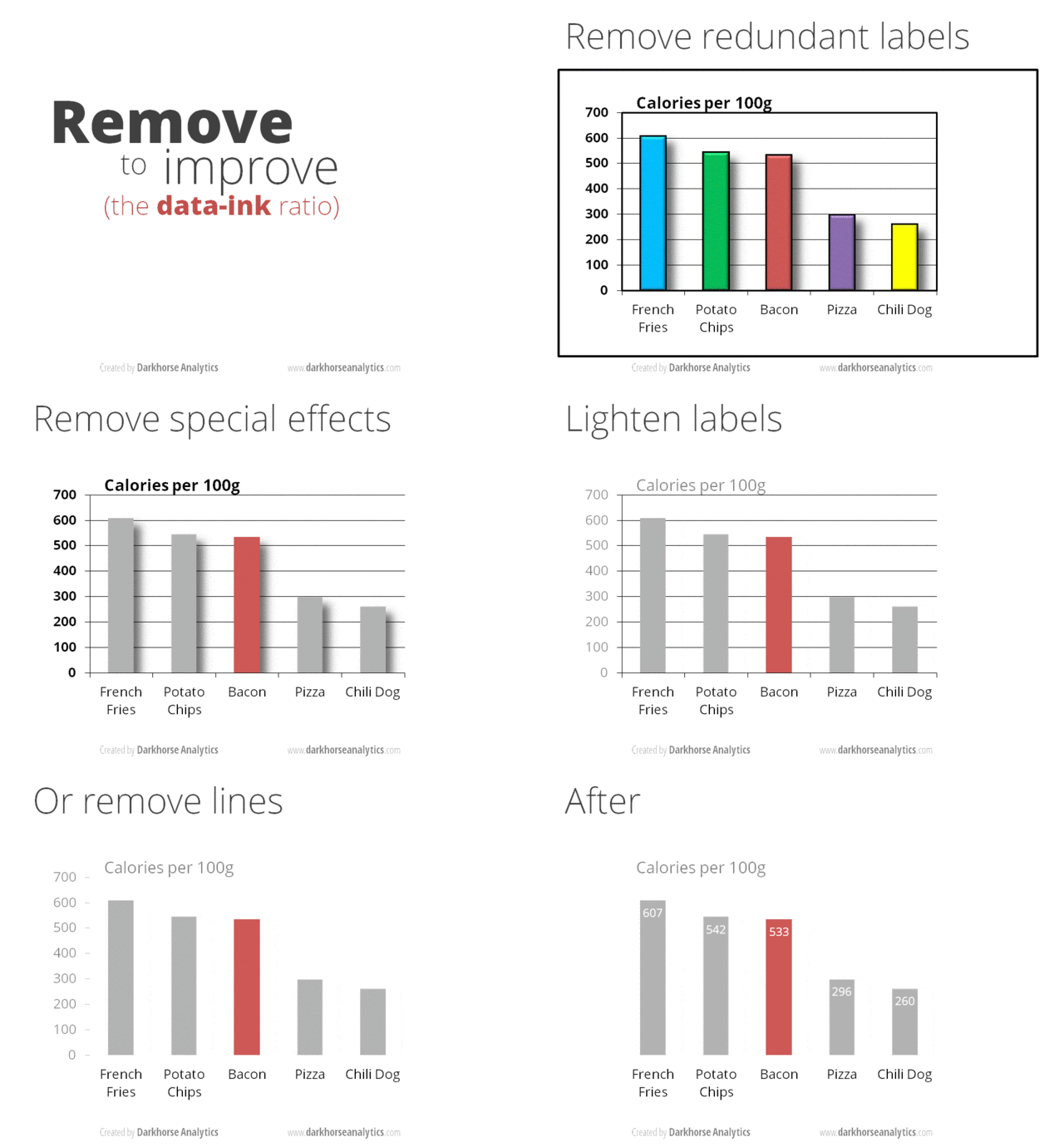
Viewers looking at an on-screen chart have to take in at least three types of information in a short space of time: shapes (bars, slices, lines, etc.), colours, and text (titles, subtitles, labels, annotations and legends).
The more you can reduce the time needed to interpret each of those, the quicker the viewer can understand the chart.
The best place to start is reducing the number of data points to those that are absolutely essential. This will reduce the number of shapes the viewer has to absorb.
If your story is about ranking the worst or best areas for a problem, for example, a top ten is too much for video. Cut back to just the top three or five.
If you are comparing change over time with a multiple line chart, experiment to find out what the smallest number of lines is that you can use and it still work.
If your story is about parts of a whole then, again, you don’t need to break down each part: your pie chart might simply show two slices: the part you are focusing on, and the rest of the whole.
Next, reduce the number of colours: this is good practice generally, but on video it’s especially important: make the element that is the focus of your story (the bar, line or slice that the story is about) a strong colour. Then, make all other elements a neutral or non-colour such as grey or pale blue. This tells the viewer immediately which bar, line or slice they should be looking at.
Good titles remove the need to read labels or axes
Now, reinforce the story with text: edit the title of the chart so that it tells the story, succinctly. For example, a bar chart showing the worst places for pollution that is titled “Worst cities for pollution” or “Pollution in each city” creates unnecessary work for your viewer. A title that says “Scunthorpe is the most polluted city in the UK” tells them precisely what the chart is doing — and what city the highlighted bar relates to, saving them the work of trying to find the label for that bar.
Similarly a title that says “Crime has dropped 10% in the last three years” or “40% of donations to the party came from Company X” allow a viewer to understand a chart without having to check labels or axes compare slices or lines.
You should also remove unnecessary text. For example there’s no need for both a legend and direct labelling of bars: direct labelling is quicker and easier to understand. Likewise, it might be easier to directly label values rather than place them on an axis. Subheadings are likely to be a luxury you can do without. Use trial and error to see how what can be removed or moved — make sure you test drafts on someone unfamiliar with the chart.
You may be able to remove further elements from the chart if they are being narrated in the video, or if animation will add them later.
Direct attention with motion
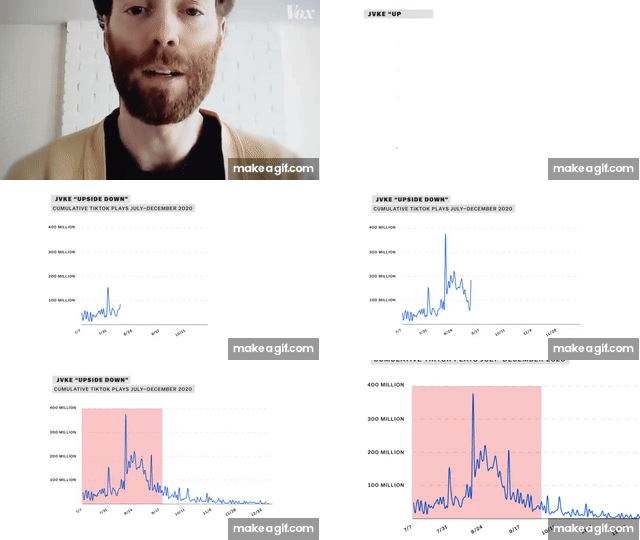
Colour and text are just two techniques for directing attention in data visualisation — but in video there’s a third: motion.
Here are just some of the methods you can use to add motion to a chart:
Zoom: zoom in to a focal data point to direct attention, or to zoom out to put a data point into the bigger picture. Zooming might involve expanding or shrinking the scale to illustrate how a particular data point affects it.
Reveal: instead of the chart appearing fully-drawn, it can be revealed in stages. For example, we might start with the whole amount, and then reveal specific parts (slices) of that amount, one by one. Or we might start with a scatterplot, then add a trend line, then add a highlighted area, and so on. Typically this is accompanied by narration that relates to each reveal.
Wipe: often used with a line chart. The wipe reveals the line from left to right. Because a line chart shows change over time this is particularly effective as we see that line change over time. A vertical wipe can also be used with bar charts and histograms to create the effect of the bar(s) growing upwards or outwards. Wipes can even be used to reveal titles or labels to ‘read’ those out.
Highlight or fade: an element can be highlighted — or the rest of the chart quickly faded — to direct attention to that particular element or series of elements. Conversely, a focal element can be faded back or de-highlighted to indicate that the focus is about to shift to the whole, or to another part (which might then be highlighted in turn).
Removal: instead of revealing elements, you can hide them. So instead of starting with simplicity and gradually adding more detail, we start with complexity and strip it back to focus on something in particular.
Scroll or pan: a more complex chart might need to be revealed vertically, as we scroll down to specific elements of interest. The Economist’s Epstein Files video on TikTok provides one example. Or you might pan across a wide chart horizontally to emphasise a scale.
Counter: often used for scale stories that focus on a single number, this technique uses a counter to draw attention to the final figure that it arrives at.
Annotation: extra text is added on screen to direct attention to a specific element, often with an arrow or circle to connect the text with that element. This is especially useful with scatterplots where the story might need to focus on different data points (you can see an example in this Pudding video at 1’03).
Timelapse: bar chart races are a particularly popular example of animating the transition between multiple ‘snapshots’ of a chart at different points in time, and the same principle can be applied to maps and other charts (Joey Chedarchuk collects a number of examples in this Twitter thread).
Presenter interaction: a common way to add motion with charts on TV is for a presenter to interact with it: pointing to different parts of it, or ‘operating’ the chart via touchscreen, clicker or tablet. A classic example is Hans Rosling’s 200 years in 4 minutes.
A newer form of this on TikTok is for a presenter to appear on top of a particular part the chart and then move to a different point to match the focus of the narration.
Do you know of any other key techniques for using charts in video storytelling? Let me know in the comments or at linkedin.com/in/paulbradshawuk

