Author Archives: Paul Bradshaw

Hacking German foreign aid (guest post)

German foreign aid map, from http://www.maptivism.net/oda-ger/index.html

German foreign aid map, from http://www.maptivism.net/oda-ger/index.html

In a guest post for the Online Journalism Blog, Christiane Schulzki-Haddouti explains how participants at an open data event helped crack open data on German aid spending. This post was originally published in German at Hyperland.

How does the foreign aid of Germany support other countries? The Federal Ministry of Economic Cooperation and Development (BMZ) releases no details, although about 6 billion euros is made available for aid every year. Now the Open Knowledge Foundation in Germany has broken down the data – with the unintended help of the OECD.

Until now it was a mystery to the German public which countries benefit, and to what extent, from their government’s spending on foreign aid: the BMZ publishes only a list of the countries that receive aid (PDF). It was also not known which particular sectors in these countries were being supported.

For the political scientist Christian Kreutz, member of the Open Knowledge Foundation Germany, the BMZ database for development aid was just disappointing:

“The relevant information is scattered, little data is available in open formats and a breakdown of financial data such as project expenses is not yet published.”

An institutional workaround

In the course of the Open Aid Data Conference in Berlin, participants decided to tackle the situation. They noted that there has long been a public database at international level which explains the expenditures at a larger scale: the BMZ regularly reports its data as part of “Official Development Assistance” (ODA) to the Organisation for Economic Co-operation and Development, better known as the OECD.

Now the data is also available on the website Aid Data.

For two days Christian Kreutz wrangled with the data sets, then he presented his first results on a new open-data map. More than half the ODA payments come from the BMZ, the rest come from other ministries. Kreutz concludes: “Hardly any country receives nothing.”

Surprising findings

Interestingly, not only classic developing countries are supported. The lion’s share goes to BRIC countries, namely Brazil, Russia, India and China which have profited from high economic growth for years.

Russia received around 12 billion euros in the years 1995 to 2009, China and India around 6 and 4 billion euros respectively.

Current sites of conflict receive quite a lot of money: Iraq received 7 billion euros, with the majority coming from debt cancellation. A similar situation is found in Nigeria and Cameroon.

In comparison Afghanistan and Pakistan receive only about 1.2 billion euros.

Even authoritarian regimes benefit from German development aid: Syria received around 1 billion euros. A large proportion of the money is spent on debt relief as well as water and education projects.

Interestingly, however, some European states received more money: Poland got 2.8 billion, mainly going into the education sector.

EU aspirants Serbia and Turkey received 2 billion euros each.

Payment information was also combined with data from the Economist on democratic development. Here a kind of rule of thumb can be recognised: countries which are less democratic are encouraged.

Egypt, for example, not only received support for water projects and its textile industry, but also for its border police – by an unspecified federal ministry.

BMZ is opening up

The new aid data map does not break down numbers by donors yet. But it could do so, as the detailed OECD data supports it.

Christian Kreutz has filed a Freedom of Information Act request with the BMZ to get further data. But the ministry is already showing signs of movement: a spokesperson said that project funding data will be published soon on the ministry’s website.

The interesting question is how open and accessible the BMZ data will be. Recipients of ODA funds can not be inferred directly from the OECD database. Open data activists hope that the BMZ will not hide the data behind a restrictive search interface to prevent further analysis, à la Farmsubsidy.

Making it easier to join the dots of government: publicbodies.org

publicBodies.org

publicbodies.org - jargon translation: this could be very useful

If you deal with information on government departments you may want to offer your help in improving a new project that aims to make it easier to combine government data.

Publicbodies.org is attempting to do for government data what OpenCorporates does for company data: create unique resources that allow you to distinguish between similar-sounding departments, and grab extra contextual data along the way.

Created at last week’s Open Government Data Camp in Warsaw, the project currently contains basic data on German, UK and EU public bodies.

In a post introducing the project, Friedrich Lindenberg explains how the seed data for the site was compiled from freedom of information request sites such as WhatDoTheyKnow and AskTheEU.

The project still needs data on government departments in other countries, however.

This is a promising service which already includes a reconciliation service for Google Refine (in other words, if you have a spreadsheet that mentions government departments, you can relatively easily bring in extra data in just a few clicks).

And news organisations wanting to steal a march on their rivals on this front should seriously consider contributing some time to making it better.

Anyone wanting to help can comment on the blog post or find Friedrich @pudo on Twitter.

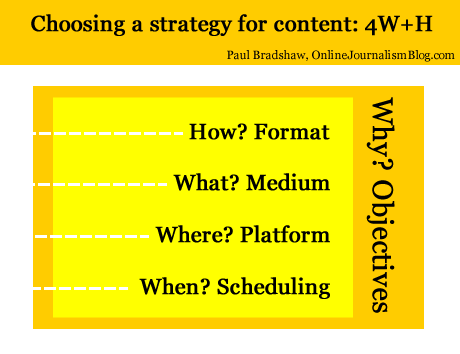
Choosing a strategy for content: 4 Ws and a H

Something interesting happened to journalism when it moved from print and broadcast to the web. Aspects of the process that we barely thought about started to be questioned: the ‘story’ itself seemed less than fundamental. Decisions that you didn’t need to make as a journalist – such as what medium you would use – were becoming part of the job.

In fact, a whole raft of new decisions now needed to be made.

For those launching a new online journalism project, these questions are now increasingly tackled with a content strategy, a phrase and approach which, it seems to me, began outside of the news industry (where the content strategy had been settled on so long ago that it became largely implicit) and has steadily been rediscovered by journalists and publishers.

‘Web first’, for example, is a content strategy; the Seattle Times’s decision to focus on creation, curation and community is a content strategy. Reed Business Information’s reshaping of its editorial structures is, in part, a content strategy:

Why does a journalist need a content strategy?

I’ve written previously about the style challenge facing journalists in a multi platform environment: where before a journalist had few decisions to make about how to treat a story (the medium was given, the formats limited, the story supreme), now it can be easy to let old habits restrict the power, quality and impact of reporting.

Below, I’ve tried to boil down these new decisions into 4 different types – and one overarching factor influencing them all. These are decisions that often have to be made quickly in the face of changing circumstances – I hope that fleshing them out in this way will help in making those decisions quicker and more effectively.

1. Format (“How?”)

We’re familiar with formats: the news in brief; the interview; the profile; the in-depth feature; and so on. They have their conventions and ingredients. If you’re writing a report you know that you will need a reaction quote, some context, and something to wrap it up (a quote; what happens next; etc.). If you’re doing an interview you’ll need to gather some colour about where it takes place, and how the interviewee reacts at various points.

Formats are often at their most powerful when they are subverted: a journalist who knows the format inside out can play with it, upsetting the reader’s expectations for the most impact. This is the tension between repetition and contrast that underlies not just journalism but good design, and even music.

As online journalism develops dozens of new formats have become available. Here are just a few:

  • the liveblog;
  • the audio slideshow;
  • the interactive map;
  • the app;
  • the podcast;
  • the explainer;
  • the portal;
  • the aggregator;
  • the gallery

Formats are chosen because they suit the thing being covered, its position in the publisher’s news environment, and the resources of the publisher.

Historically, for example, when a story first broke for most publishers a simple report was the only realistic option. But after that, they might commission a profile, interview, or deeper feature or package – if the interest and the resources warranted that.

The subject matter would also be a factor. A broadcaster might be more inclined to commission a package on a story if colourful characters or locations were involved and were accessible. They might also send a presenter down for a two-way.

These factors still come into play now we have access to a much wider range of formats – but a wider understanding of those formats is also needed.

  • Does the event take place over a geographical area, and users will want to see the movement or focus on a particular location? Then a map might be most appropriate.
  • Are things changing so fast that a traditional ‘story’ format is going to be inadequate? Then a liveblog may work better.
  • Is there a wealth of material out there being produced by witnesses? A gallery, portal or aggregator might all be good choices.
  • Have you secured an interview with a key character, and a set of locations or items that tell their own story? Is it an ongoing or recurring story? An audio slideshow or video interview may be the most powerful choice of format.
  • Are you on the scene and raw video of the event is going to have the most impact? Grab your phone and film – or stream.

2. Medium (“What?”)

Depending on what format has been chosen, the medium may be chosen for you too. But a podcast can be audio or video; a liveblog can involve text and multimedia; an app can be accessed on a phone, a webpage, a desktop widget, or Facebook.

This is not just about how you convey information about what’s going on (you’ll notice I avoid the use of ‘story’, as this is just one possible choice of format) but how the user accesses it and uses it.

A podcast may be accessed on the move; a Facebook app on mobile, in a social context; and so on. These are factors to consider as you produce your content.

3. Platform (“Where?”)

Likewise, the platforms where the content is to be distributed need careful consideration.

A liveblog’s reporting might be done through Twitter and aggregated on your own website. A map may be compiled in a Google spreadsheet but published through Google Maps and embedded on your blog.

An audioboo may have subscribers on iTunes or on the Audioboo app itself, and its autoposting feature may attract large numbers of listeners through Twitter.

Some call the choice of platform a choice of ‘channel’ but that does not do justice to the interactive and social nature of many of these platforms. Facebook or Twitter are not just channels for publishing live updates from a blog, but a place where people engage with you and with each other, exchanging information which can become part of your reporting (whether you want it to or not).

(Look at these tutorials for copy editors on Twitter to get some idea of how that platform alone requires its own distinct practices)

Your content strategy will need to take account of what happens on those platforms: which tweets are most retweeted or argued with; reacting to information posted in your blog or liveblog comments; and so on.

[UPDATE, March 25: This video from NowThisNews’s Ed O’Keefe explains how this aspect plays out in his organisation]

4. Scheduling (“When?”)

The choice of platform(s) will also influence your choice of timing. There will be different optimal times for publishing to Facebook, Twitter, email mailing lists, blogs, and websites.

There will also be optimal times for different formats (as the Washington Post found). A short news report may suit morning commuters; an audio slideshow or video may be best scheduled for the evening. Something humorous may play best on a Friday afternoon; something practical on a Wednesday afternoon once the user has moved past the early week slog.

Infographic: The Best Times To Post To Twitter & Facebook

This webcast on content strategy gives a particular insight into how they treat scheduling – not just across the day but across the week.

5. “Why?”

Print and broadcast rest on objectives so implicit that we barely think about them. The web, however, may have different objectives. Instead of attracting the widest numbers of readers, for example, we may want to engage users as much as possible.

That makes a big difference in any content strategy:

  • The rapid rise of liveblogs and explainers as a format can be partly explained by their stickiness when compared to traditional news articles.
  • Demand for video content has exceeded supply for some publishers because it is possible to embed advertising with content in a way which isn’t possible with text.
  • Infographics have exploded as they lend themselves so well to viral distribution.

Distribution is often one answer to ‘why?’, and introduces two elements I haven’t mentioned so far: search engine optimisation and social media optimisation. Blogs as a platform and text as a medium are generally better optimised for search engines, for example. But video and images are better optimised for social network platforms such as Facebook and Twitter.

And the timing of publishing might be informed by analytics of what people are searching for, updating Facebook about, or tweeting about right now.

The objective(s), of course, should recur as a consideration throughout all the stages above. And some stages will have different objectives: for distribution, for editorial quality, and for engagement.

Just to confuse things further, the objectives themselves are likely to change as the business models around online and multiplatform publishing evolve.

If I’m going to sum up all of the above in one line, then, it’s this: “Take nothing for granted.”

I’m looking for examples of content strategies for future editions of the book – please let me know if you’d like yours to be featured.

Choosing a strategy for content: 4 Ws and a H

Choosing a strategy for content: Format, Medium, Platform, Scheduling - and objectives

For this content I chose to write text accompanied by some images and video, published on a blog at a particular moment, for the objective of saving time and gaining feedback.

Something interesting happened to journalism when it moved from print and broadcast to the web. Aspects of the process that we barely thought about started to be questioned: the ‘story’ itself seemed less than fundamental. Decisions that you didn’t need to make as a journalist – such as what medium you would use – were becoming part of the job.

In fact, a whole raft of new decisions now needed to be made.

For those launching a new online journalism project, these questions are now increasingly tackled with a content strategy, a phrase and approach which, it seems to me, began outside of the news industry (where the content strategy had been settled on so long ago that it became largely implicit) and has steadily been rediscovered by journalists and publishers.

‘Web first’, for example, is a content strategy; the Seattle Times’s decision to focus on creation, curation and community is a content strategy. Reed Business Information’s reshaping of its editorial structures is, in part, a content strategy:

Why does a journalist need a content strategy?

I’ve written previously about the style challenge facing journalists in a multi platform environment: where before a journalist had few decisions to make about how to treat a story (the medium was given, the formats limited, the story supreme), now it can be easy to let old habits restrict the power, quality and impact of reporting.

Below, I’ve tried to boil down these new decisions into 4 different types – and one overarching factor influencing them all. These are decisions that often have to be made quickly in the face of changing circumstances – I hope that fleshing them out in this way will help in making those decisions quicker and more effectively. Continue reading

#TalkToTeens – When stories are more important than people

Here we go again.

I’ve been re-reading Kovach and Rosenstiel’s ‘Elements of Journalism’ recently and happened to be in the middle of the chapter on ‘Who journalists work for’ when this popped up in my Twitter stream.

Kovach and Rosenstiel make a simple point, and an increasingly important one: we don’t just tell stories for the sake of it; we do so because we are serving a community.

The story about Charlotte Berry, an assistant headteacher who swore in person-to-person conversations on Twitter is one example of a story which misses this point, and as a result has generated a backlash across Twitter, largely inspired by this post (currently read over 15,000 times) that makes some strong points about the public interest value of the story:

“They knew the ‘inappropriate language’ was jokey banter, between grown-ups, entirely unconnected to the school. They knew that’s what people do on Twitter, they joke and swear and let their hair down. Like this tweet from 17 August, after a football match: “Best moment from last night, the dear old lady 3 rows behind…’bowyer you dirty c@#*!” (in case you’re not sure what c@#* means, it’s ‘cunt’). That tweet wasn’t by @talktoteens, by the way. It was by @SamSmith68, the journalist on the Billericay Gazette.”

And about its target and likely effect:

“Charlotte Berry isn’t just any teacher. She’s a wellspring of energy, commitment and ideas, the sort of teacher you dream your kids will end up with. She runs a role model project for teenage girls, enabling them to meet inspiring professional women. She started a Historypin project in the school, bringing younger and older people together to share stories of their lives in the area. Even her Twitter name, @talktoteens, tells you something about her: she’s an advocate of communicating with kids, engaging them, not writing them off.”

These things, of course, didn’t matter. Because it was A Story. And sometimes – too often – we forget that A Story should have A Purpose.

This story, by a student who was helped by Charlotte Berry, is a story with a point, for example.

Credit to the head of Billericay School who responded pithily to the story as follows:

“The member of staff’s Twitter account appears to have been individually targeted, accessing conversations with friends unconnected with the school and taken completely out of context.

And credit to the newspaper for including that, albeit in the final paragraphs, and with comments now disabled. Although there are some interesting comments on the website’s forum

UPDATE: The forum has not approved any comments since Saturday evening – this post about the disconnect between print and online operations may explain why.

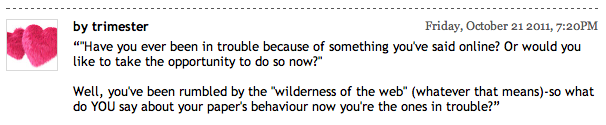
Comment on the story

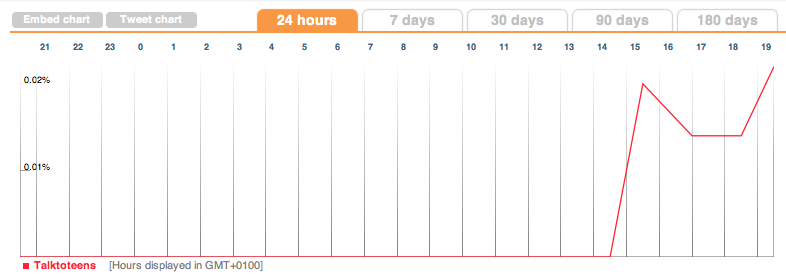
Chart showing tweets mentioning talktoteens during Friday

Chart showing tweets mentioning talktoteens during Friday

Customising your blog – some basic principles (Online Journalism Handbook)

customised car

A customised car. Like a customised blog, only bigger. Image by Steve Metz - click to see original

Although I cover blogging in some depth in my online journalism book, I thought I should write a supplementary section on what happens when you decide to start customising your blog.

Specifically, I want to address 3 key languages which you are likely to encounter, what they do, and how they work.

What’s the difference? HTML, CSS, and PHP

Most blog platforms use a combination of HTML, CSS and PHP (or similar scripting language). These perform very different functions, so it saves you a lot of time and effort if you know which one you might need to customise. Here’s what those functions are:

  • HTML is concerned with content.
  • CSS is concerned with style.
  • And PHP is concerned with functionality.

If you want to change how your blog looks, then, you will need to customise the CSS.

If you want to change what it does, you will need to customise the PHP.

And if you want to change how content is organised or classified, then you need to change the HTML.

All 3 are interrelated: PHP will generate much of the HTML, and the CSS will style the HTML. I’ll explain more about this below.

But before I do so, it’ll help if you have 3 windows open on your computer to see how this works on your own blog. They are:

  1. On your blog, right-click and select ‘View source‘ (or a similar option) so you can see the HTML for that page.
  2. Open another window, log in to your blog, and find the customisation option (you may have to Google around to find out where this option is). You should be able to see a page of code.
  3. Open a third window which you will use to search for useful resources to help you as you customise your blog. Continue reading

AUDIO: Text mining tips from Andy Lehren and Sarah Cohen

Searches made of the Sarah Palin emails

Searches made of the Sarah Palin emails - from a presentation by the New York Times's Andy Lehren

One of the highlights of last week’s Global Investigative Journalism Conference was the session on text mining, where the New York Times’s Andy Lehren talked about his experiences of working with data from Wikileaks and elsewhere, and former Washington Post database editor Sarah Cohen gave her insights into various tools and techniques in text mining.

Andy Lehren’s audio is embedded below. The story mentioned on North Korean missile deals can be found here. Other relevant links: Infomine and NICAR Net Tour.

And here’s Sarah’s talk which covers extracting information from large sets of documents. Many of the tools mentioned are bookmarked ‘textmining’ on my Delicious account.


Active Lobbying Through Meetings with UK Government Ministers

In a move that seemed to upset collectors of UK ministerial meeting data, @whoslobbying, on grounds of wasted effort, the Guardian datastore published a spreadsheet last night containing data relating to ministerial meetings between May 2010 and March 2011.

(The first release of the spreadsheet actually omitted the column containing who the meeting was with, but that seems to be fixed now… There are, however, still plenty of character encoding issues (apostrophes, accented characters, some sort of em-dash, etc) that might cripple some plug and play tools.)

Looking over the data, we can use it as the basis for a network diagram with actors (Ministers and lobbiests) with edges representing meetings between Minsiters and lobbiests. There is one slight complication in that where there is a meeting between a Minister and several lobbiests, we ideally need to separate out the separate lobbiests into their own nodes.

UK gov meetings spreadsheet

This probably provides an ideal opportunity to have a play with the Stanford Data Wrangler and try forcing these separate lobbiests onto separate rows, but I didn’t allow myself much time for the tinkering (and the requisite learning!), so I resorted to Python script to read in the data file and split out the different lobbiests. (I also did an iterative step, cleaning the downloaded CSV file in a text editor by replacing nasty characters that caused the script to choke.) You can find the script here (note that it makes use of the networkx network analysis library, which you’ll need to install if you want to run the script.)

The script generates a directed graph with links from Ministers to lobbiests and dumps it to a GraphML file (available here) that can be loaded directly into Gephi. Here’s a view – using Gephi – of the hearth of the network. If we filter the graph to show nodes that met with at least five different Ministers…

Gephi - k-core filter

we can get a view into the heart of the UK lobbying netwrok:

Active Lobbiests

I sized the lobbiest nodes according to eigenvector centrality, which gives an indication of well connected they are in the network.

One of the nice things about Gephi is that it allows for interactive exploration of a graph, For example, I can hover over a lobbiest node – Barclays in this case – to see which Ministers were met:

Bankers connect...

Alternatively, we can see who of the well connected met with the Minister for Welfare Reform:

Welfare meetings...

Looking over the data, we also see how some Ministers are inconsistently referenced within the original dataset:

Multiple mentions

Note that the layout algorithm is such that the different representations of the same name are likely to meet similar lobbiests, which will end up placing the node in a similar location under the force directed layout I used. Which is to say – we may be able to use visual tools to help us identify fractured representations of the same individual. (Note that multiple meetings between the same parties can be visualised using the thickness of the edges, which are weighted according to the number of times the edge is described in the GraphML file…)

Unifying the different representations of the same indivudal is something that Google Refine could help us tidy up with its various clustering tools, although it would be nice if the Datastore folk addressed this at source (or at least, as part of an ongoing data quality enhancement process…;-)

I guess we could also trying reconciling company names against universal company identifiers, for example by using Google Refine’s reconciliation service and the Open Corporates database? Hmmm, which makes me wonder: do MySociety, or Public Whip, offer an MP or Ministerial position reconciliation service that works with Google Refine?

A couple of things I haven’t done: represented the department (which could be done via a node attribute, maybe, at least for the Ministers); represented actual meetings, and what I guess we might term co-lobbying behaviour, where several organisations are in the same meeting.

How I use social bookmarking for journalism

Delicious logo

Delicious icon by Icon Shock

A few weeks back I wrote about my ‘network infrastructure’ – the combination of social networks, an RSS reader and social bookmarking that can underpin a person’s journalism work.

As I said there, the social bookmarking element is the one that people often fail to get, so I wanted to further illustrate how I use Delicious specifically, with a case study.

Here’s a post I wrote about how sentencing decisions were being covered around the UK riots. The ‘lead’ came through a social network, but if I was to write a post that was informed by more than what I could remember about sentencing, I needed some help.

Here’s where Delicious came in.

I looked to see what webpages I’d bookmarked on Delicious with the tag ‘courts’. This led me on to related tags like ‘courtreporting‘.

The results included:

  • An article by Heather Brooke giving her personal experience of not being able to record her own hearing.
  • A report on the launch of a new website by the Judiciary of Scotland, which I’d completely forgotten about. This also helped me avoid making the common mistake of tarring Scottish courts with the same brush as English ones.
  • Various useful resources for courts data.
  • Some context on the drop in court reporters at a regional level – but also some figures on the drop at a national level, which I hadn’t thought about.
  • A specialist academic who has been researching court reporting.

And all this in the space of 10 minutes or so.

If you look at the resulting post you can see how the first pars are informed by what was coming into my RSS reader and social networks, but after that it’s largely bookmark-informed (as well as some additional research, including speaking to people). The copious links provide an additional level of utility (I hope) which online journalism can do particularly well.

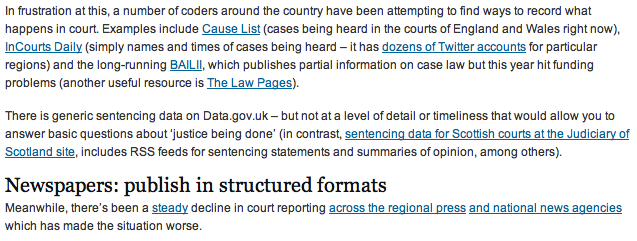
Excerpt from the article - most of these links came from my Delicious bookmarks

Excerpt from the article - most of these links came from my Delicious bookmarks

All about preparation

You can see how building this resource over time can allow you to provide context to a story quicker, and more deeply, than if you had resorted to a quick search on Google.

In addition, it highlights a problem with search: you will largely only find what you’re looking for. Bookmarking on Delicious means you can spot related stories, issues and sources that you might not have thought about – and more importantly, that others might have overlooked too.

Scraping data from a list of webpages using Google Docs

Quite often when you’re looking for data as part of a story, that data will not be on a single page, but on a series of pages. To manually copy the data from each one – or even scrape the data individually – would take time. Here I explain a way to use Google Docs to grab the data for you.

Some basic principles

Although Google Docs is a pretty clumsy tool to use to scrape webpages, the method used is much the same as if you were writing a scraper in a programming language like Python or Ruby. For that reason, I think this is a good quick way to introduce the basics of certain types of scrapers.

Here’s how it works:

Firstly, you need a list of links to the pages containing data.

Quite often that list might be on a webpage which links to them all, but if not you should look at whether the links have any common structure, for example “http://www.country.com/data/australia” or “http://www.country.com/data/country2″. If it does, then you can generate a list by filling in the part of the URL that changes each time (in this case, the country name or number), assuming you have a list to fill it from (i.e. a list of countries, codes or simple addition).

Second, you need the destination pages to have some consistent structure to them. In other words, they should look the same (although looking the same doesn’t mean they have the same structure – more on this below).

The scraper then cycles through each link in your list, grabs particular bits of data from each linked page (because it is always in the same place), and saves them all in one place.

Scraping with Google Docs using =importXML – a case study

If you’ve not used =importXML before it’s worth catching up on my previous 2 posts How to scrape webpages and ask questions with Google Docs and =importXML and Asking questions of a webpage – and finding out when those answers change.

This takes things a little bit further.

In this case I’m going to scrape some data for a story about local history – the data for which is helpfully published by the Durham Mining Museum. Their homepage has a list of local mining disasters, with the date and cause of the disaster, the name and county of the colliery, the number of deaths, and links to the names and to a page about each colliery.

However, there is not enough geographical information here to map the data. That, instead, is provided on each colliery’s individual page.

So we need to go through this list of webpages, grab the location information, and pull it all together into a single list.

Finding the structure in the HTML

To do this we need to isolate which part of the homepage contains the list. If you right-click on the page to ‘view source’ and search for ‘Haig’ (the first colliery listed) we can see it’s in a table that has a beginning tag like so: <table border=0 align=center style=”font-size:10pt”>

We can use =importXML to grab the contents of the table like so:

=Importxml(“http://www.dmm.org.uk/mindex.htm”, ”//table[starts-with(@style, ‘font-size:10pt’)]“)

But we only want the links, so how do we grab just those instead of the whole table contents?

The answer is to add more detail to our request. If we look at the HTML that contains the link, it looks like this:

<td valign=top><a href=”http://www.dmm.org.uk/colliery/h029.htm“>Haig&nbsp;Pit</a></td>

So it’s within a <td> tag – but all the data in this table is, not surprisingly, contained within <td> tags. The key is to identify which <td> tag we want – and in this case, it’s always the fourth one in each row.

So we can add “//td[4]” (‘look for the fourth <td> tag’) to our function like so:

=Importxml(“http://www.dmm.org.uk/mindex.htm”, ”//table[starts-with(@style, ‘font-size:10pt’)]//td[4]“)

Now we should have a list of the collieries – but we want the actual URL of the page that is linked to with that text. That is contained within the value of the href attribute – or, put in plain language: it comes after the bit that says href=”.

So we just need to add one more bit to our function: “//@href”:

=Importxml(“http://www.dmm.org.uk/mindex.htm”, ”//table[starts-with(@style, ‘font-size:10pt’)]//td[4]//@href”)

So, reading from the far right inwards, this is what it says: “Grab the value of href, within the fourth <td> tag on every row, of the table that has a style value of font-size:10pt

Note: if there was only one link in every row, we wouldn’t need to include //td[4] to specify the link we needed.

Scraping data from each link in a list

Now we have a list – but we still need to scrape some information from each link in that list

Firstly, we need to identify the location of information that we need on the linked pages. Taking the first page, view source and search for ‘Sheet 89′, which are the first two words of the ‘Map Ref’ line.

The HTML code around that information looks like this:

<td valign=top>(Sheet 89) NX965176, 54° 32' 35" N, 3° 36' 0" W</td>

Looking a little further up, the table that contains this cell uses HTML like this:

<table border=0 width=”95%”>

So if we needed to scrape this information, we would write a function like this:

=importXML(“http://www.dmm.org.uk/colliery/h029.htm”, “//table[starts-with(@width, ‘95%’)]//tr[2]//td[2]“)

…And we’d have to write it for every URL.

But because we have a list of URLs, we can do this much quicker by using cell references instead of the full URL.

So. Let’s assume that your formula was in cell C2 (as it is in this example), and the results have formed a column of links going from C2 down to C11. Now we can write a formula that looks at each URL in turn and performs a scrape on it.

In D2 then, we type the following:

=importXML(C2, “//table[starts-with(@width, ‘95%’)]//tr[2]//td[2]“)

If you copy the cell all the way down the column, it will change the function so that it is performed on each neighbouring cell.

In fact, we could simplify things even further by putting the second part of the function in cell D1 – without the quotation marks – like so:

//table[starts-with(@width, ‘95%’)]//tr[2]//td[2]

And then in D2 change the formula to this:

=ImportXML(C2,$D$1)

(The dollar signs keep the D1 reference the same even when the formula is copied down, while C2 will change in each cell)

Now it works – we have the data from each of 8 different pages. Almost.

Troubleshooting with =IF

The problem is that the structure of those pages is not as consistent as we thought: the scraper is producing extra cells of data for some, which knocks out the data that should be appearing there from other cells.

So I’ve used an IF formula to clean that up as follows:

In cell E2 I type the following:

=if(D2=””, ImportXML(C2,$D$1), D2)

Which says ‘If D2 is empty, then run the importXML formula again and put the results here, but if it’s not empty then copy the values across

That formula is copied down the column.

But there’s still one empty column even now, so the same formula is used again in column F:

=if(E2=””, ImportXML(C2,$D$1), E2)

A hack, but an instructive one

As I said earlier, this isn’t the best way to write a scraper, but it is a useful way to start to understand how they work, and a quick method if you don’t have huge numbers of pages to scrape. With hundreds of pages, it’s more likely you will miss problems – so watch out for inconsistent structure and data that doesn’t line up.