Author Archives: Paul Bradshaw

Sports Data Journalism and “Datatainment”

Over the last couple of years, you’ve probably noticed that data has become a Big Thing in commerce (Big Data for business advantage) as well as in the openness/transparency community, with governments and the media joining the party particularly in the context of the latter. But if you’re looking to develop data journalism skills, it’s probably also worth remembering the area of sports journalism, and the wealth of data produced around sporting events.

Part of the attraction of developing learning activities around sports data is that there’s a good chance that it’ll keep on delivering… If you develop a way of analysing or displaying sports data that pulls out interesting features or story elements from a set of sports data, you should be able to keep on using it… To set the scene, here’s a example: Driven By Data: Data Journalism in Sports. For a peek at my own fumblings, I’ve started exploring the automatic creation of F1DataJunkie Stats Graphics reports (still a lot to be done, but it’s a start…)

In the extreme case, you might be able to generate story outlines, or even canned prose… For example, in certain computer games in the sports genre, you might find you’re playing a game along to a “live commentary”, generated from the data being produced by the game. Automatic commentary generation is a form of sports journalism. And automated article generation is already here, as @RobbieAllen describes in How I automated my writing career, a brief overview of Automated Insights, a company that specialises in computer generated visualisations and prose.

See also: Automated Storytelling in Sports: A Rich Domain to Be Explored, Automated Event Recognition for Football Commentary Generation, Three RoboCup Simulation League Commentator Systems, and so on…

Getting hold of data is always an issue, of course, but I suspect that many larger newsrooms will take a subscription to the Press Association sports data feeds, for example…

Anyway, as an exercise, here’s some data to start with, from the Guardian datastore: Premier League’s top scorers: who is scoring the most goals? Is there a correlation with age, perhaps? (Where would you find the age data…?)

As well as sports reporting, I think we’re also likely to see an increase in what Head of Digital at Manchester City FC, Richard Ayers, referes to as datatainment: “where you use data as the primary source of entertainment. You might choose to make the visualisation of raw data entertaining or perhaps use data visualisation as part of the process of entertainment – but there’s definitely a strong editorial control which is focussed on entertaining the audience rather than exposing data.” (Data? Entertainment? You need Datatainment and Defining Data Visualisation, Data Journalism & Data Entertainment).

Devices such as FanVision already blend video and audio streams with data feeds, for example, more and more sports have “live stats apps” associated with them, and it’s not hard to imagine the data crunching that goes on under the hood in things like Optiplay making an appearance on sports analysis and review sites?

I also think that the “data as entertainment” line might work well as a second screen activity. Things like the F1 Live Timing app already demonstrate this:

On the other hand, there’s an opportunity for data focussed sites that go into deep analysis for the hardcore fan. Again looking at Formula One, the Intelligent F1 blog features a data-powered model developed by a rocket scientist that provides engagment oaround a particular race over an extended period, from predicting Sunday race behaviour based on Friday practice data and previous outings, through analysis of practice and qualifying data, to a detailed series of post-race analyses. (Complement this with technical analyses applied to the cars on the Scarbs F1, and you have the ultimate F1 geeks paradise!;-)

PS This also caught my eye: Gametime [Assistant]: Girls’ Lacrosse Game Data, which steps through the design of a “datatainment” app…

PPS as the Lacrosse app suggests, the data collection thing can also improve engagement with a live event. For example, my own doodlings around a motorsport lapcharting app (Thoughts on a Couple of Possible Lap Charting Apps, initial code experiment)

VIDEO: Advice for investigative journalists, from the Balkan Investigative Reporters Network Summer School

In September I spoke at the Balkan Investigative Reporters Network (BIRN) Summer School in Croatia. I took the opportunity to film brief interviews with 4 journalists on their tips for investigating companies, bribery and corruption, and finding and analysing data and experts.

These were originally published on the Help Me Investigate blog, but I’m cross-posting them all here for those who don’t follow that.

As always these videos are published under a Creative Commons licence, so you are free to re-edit the material or add it to other work, with attribution. (In fact, these videos were actually re-edited from the original uploads on my own YouTube account – adding simple titles and re-publishing on the Help Me Investigate YouTube channel using the YouTube editor).

Investigating Mubenga’s death (How “citizen journalism” aided two major Guardian scoops part 3)

This is the final part of a guest post by Paul Lewis that originally appeared in the book Investigative Journalism: Dead or Alive? You can read the introduction here and the second part – on the investigation of Ian Tomlinson’s death – here.

Mubenga’s death had been similarly “public”, occurring on a British Airways commercial flight to Angola surrounded by passengers. As with Tomlinson, there was a misleading account of the death put out by the authorities, which we felt passengers may wish to contest. Within days, open journalism established that Mubenga had been handcuffed and heavily restrained by guards from the private security firm G4S. He had been complaining of breathing prior to his collapse. After the investigation was published, three G4S guards were arrested and, at the time of writing, remained on bail and under investigation by the Met’s homicide unit.

Our strategy for finding out more about Mubenga’s death centred on two approaches, both aided by Twitter. The BA flight, which had been due to depart on 12 October, was postponed for 24 hours, and by the time we began investigating the following day the passengers had left Heathrow and were on route to Angola’s capital, Luanda. Raising our interest in the story via Twitter, we asked for help in locating someone who could visit the airport to interview disembarking passengers.

A freelance did just that, and managed to speak to one who said he had seen three security guards forcibly restrain Mubenga in his seat. We instantly shared that breakthrough, in the hope that it would encourage more passengers to come forward. At the same time we were publishing what we knew about the case, while being candidly open about what we did not know.

Hence the very article, published before any passengers had been tracked down, stated: “There was no reliable information about what led to the man’s death of how he became unwell.” It added, perhaps controversially: “In the past, the Home Office’s deportation policy has proved highly controversial.”

The tone was necessarily speculative, and designed to encourage witnesses to come forward. So too were the tweets. “Man dies on Angolan flight as UK tries to deport him. This story could be v big,” said one.

This articles and tweets, contained relevant search-able terms – such as the flight number – so that they could serve as online magnets, easily discoverable for any passengers with important information and access to the internet. Another tweet said: “Please contact me if you were on BA flight 77 to Angola – or know the man in this story.”

One reply came from Twitter user @mlgerstmann, a passenger on the flight who felt inappropriate force was used against Mubenga. He had come across the tweet – and then read the article – after basic Google searches. “I was also there on BA77 and the man was begging for help and I now feel so guilty I did nothing,” he tweeted.

Within hours, his shocking account of Mubenga’s death was published alongside several other passengers who had found us via the internet. An interactive graphic of the seating arrangements on the aircraft was created, enabling users to listen to audio clips of the passengers give personal accounts of what they had seen.

How verification was crucial

As with the Tomlinson investigation, verification, something paid journalists do better than their volunteer counterparts, was crucial. The fact the passengers had disseminated to remote parts of Africa – @mlgerstmann was on an oil-rig – explains why the only way to contact them was through an open, Twitter-driven investigation.

But this methodology also poses problems for authenticating the validity of sources. Journalists are increasingly finding that a danger inherent in opening up the reporting process is that they become more susceptible to attempts to mislead or hoax. This is particularly the case with live-blogs which need regular updates, require authors to make split-second decisions about the reliability of information and take care to caveat material when there are questions.

For journalists with more time, it is incumbent, therefore, to apply an equal if not more rigorous standard of proof when investigating in the open. In the Tomlinson case, when sources were encountered through the internet it was mostly possible to arrange meetings in person. That was not possible when investigating Mubenga, where there was an attempt by a bogus passenger to supply us false information.

In lieu of face to face meetings, we were able to use other means, such as asking prospective sources to send us copies of their airline tickets, to verify their accounts. What the investigations into the deaths of both Tomlinson and Mubenga show is that journalists don’t always need to investigate into the dark. Through sharing what they do know, they are most likely to discover what they don’t.

Disproving the police account of Tomlinson’s death (How “citizen journalism” aided two major Guardian scoops part 2)

This is the second of a three-part guest post by Paul Lewis that originally appeared in the book Investigative Journalism: Dead or Alive? You can read the first part here.

The investigation into Tomlinson’s death began in the hours after his death on 1 April 2009, and culminated, six days later, in the release of video footage showing how he had been struck with a baton and pushed to the ground by a Metropolitan police officer, Simon Harwood. The footage, shot by an American businessman, was accompanied by around twenty detailed witness accounts and photographs of the newspaper seller’s last moments alive and successfully disproved the police’s explanation of the death.

The result was a criminal investigation, a national review of policing, multiple parliamentary inquiries and, by May 2011, an inquest at which a jury concluded Tomlinson had been “unlawfully killed”. At the time of writing, Harwood, who was on the Met’s elite Territorial Support Group, was awaiting trial for manslaughter.

In media studies, the case was viewed as a landmark moment for so-called “citizen journalism”. Sociologists Greer and Laughlin argue the Tomlinson story revealed a changing narrative, in which the powerful – in this case, the police – lost their status of “primary definers” of a controversial event.

Significantly, it was the citizen journalist and news media perspective, rather than the police perspective, that was assimilated into and validated by the official investigations and reports. Ultimately, it was this perspective that determined “what the story was”, structured the reporting of “what had happened and why” and drove further journalistic investigation and criticism of the Metropolitan Police Services.

The initial account of Tomlinson’s death put out by police was that he died of a heart attack while walking home from work in the vicinity of the protests, and that protesters were partly to blame for impeding medics from delivering life-saving treatment. Neither of these claims were true, but they fed into coverage that was favourable to police.

A public relations drive by the Met and City of London police was bolstered by “off the record” briefings to reporters that suggested – also wrongly – that Tomlinson’s family were not surprised by his death and upset by internet speculation it could be suspicious. These briefings contributed to a broader media narrative that endorsed police and criticised protesters.

How the police account left so many questions unanswered

The morning after father of nine died, the newspaper he had been selling outside Monument tube station, the Evening Standard, carried the headline: “Police pelted with bricks as they help dying man.” But it was plain to us, even at an early stage, that there could be more to the story. The overlydefensive police public relations campaign gave the impression there was something to hide. Embedded in the small-print of press releases, there were clues – such as the Independent Police Complaints Commission’s notification of the death – that left unanswered questions.

Most obviously, anyone who had ventured near to the protests near the Bank of England on the evening Tomlinson died would have known he collapsed in the midst of violent clashes with police. It seemed implausible, even unlikely, that the death of a bystander would not have been connected in some way to the violence. But pursuing this hunch was not easy, given the paucity of reliable information being released by police, who at times actively discouraged us from investigating the case.

All that was known about Tomlinson in the 48 hours after his death was that he had been wearing a Millwall football t-shirt. That, though, was enough to begin pursuing two separate lines of inquiry. One involved old school “shoe leather”; trawling through notepads to identify anyone who may have been in the area, or know someone who was, who could identify Tomlinson from press photographs of him lying unconscious on the ground.

That yielded one useful eye-witness, with photographic evidence of Tomlinson alive, with images of him walking in apparent distress, and lying at the feet of riot police 100 yards from where he would eventually collapse. Why was Tomlinson on the ground twice, in the space of just a few minutes? And if those photographs of the father of nine stumbling near police officers, moments before his death, were put online, would anyone make the connection?

Becoming part of a virtual G20 crowd

The answer was yes, as a direct result of the second line of inquiry: by open sharing information online, both through internet stories and Twitter, we became part of a virtual G20 crowd that had coalesced online to question the circumstances of his death. In this environment, valuable contributions to the debate, which were more sceptical in tone than those adopted by other media organisations, worked like online magnets for those who doubted the official version of events. Twitter proved crucial to sharing information with the network of individuals who had begun investigating the death of their own accord.

I had signed-up to the social media website two days before the protest, and became fascinated with the pattern of movement of “newsworthy” tweets. For example, a YouTube video uploaded by two protesters who did not see the assault on Tomlinson, but did witness his collapse minutes later and strongly disputed police claims that officers treating him were attacked with bottles, was recommended to me within seconds of being uploaded. Minutes later, Twitter investigators had identified the protesters in the film and, shortly after that, found their contact details.

Similarly, those concerned to document Tomlinson’s last moments alive, including associates of the anarchist police-monitoring group Fitwatch, were using the internet to organise.

Through Twitter I discovered there were Flickr albums with hundreds of photographs of the vicinity of this death, and dissemination of blog-posts that speculated on how he may have died. None of these images of course could be taken at face value, but they often contained clues, and where necessary the crowd helped locate, and contact, the photographer.

Journalists often mistakenly assume they can harness the wisdom of an online crowd by commanding its direction of travel. On the contrary, in digital journalism, memes (namely, concepts that spread via the internet) take their own shape organically, and often react with hostility to anyone who overtly seeks to control their direction. This is particularly the case with the protest community, which often mistrusts the so-called mainstream media. Hence it was incumbent on me, the journalist, to join the wider crowd on an equal playing-field, and share as much information as I was using as the investigation progressed.

Establishing authenticity and context

There were times, of course, when we had to hold back important material; we resisted publishing images of Tomlinson at the feet of riot police for four days, in order to establish properly their authenticity and context.

Internet contact usually does not suffice for verification, and so I regularly met with sources. I asked the most important witnesses to meet me at the scene of Tomlinson’s death, near the Bank of England, to walk and talk me through what they had seen. We only published images and video that we had retrieved directly from the source and later verified.

A different standard applies to sharing images already released on Twitter, where journalists such as National Public Radio’s Andy Carvin in the US have proven the benefits from sharing information already in the public domain to establish its significance and provenance. The break, though, as with most scoops, was partly the result of good luck, but not unrelated to the fact that our journalism had acquired credibility in the online crowd.

Chris La Jaunie, an investment fund manager, who had recorded the crucial footage of Harwood pushing Tomlinson on a digital camera, had become part of that crowd too, having spent days monitoring coverage on the internet from his office in New York. He knew the footage he had was potentially explosive. The options available to Mr La Jaunie were limited. Fearing a police cover-up, he did not trust handing over the footage. An alternative would have been to release the video onto YouTube, where would it lack context, might go unnoticed for days and even then could not have been reliably verified.

He said he chose to contact me after coming to the conclusion that ours was the news organisation which had most effectively interrogated the police version of events. It was more than a year later that my colleague Matthew Taylor and I began inquiring into the death of Mubenga. By then we had recognised the potential reach of Twitter for investigative journalism and our decision to openly investigate the death of the Angolan failed asylum seeker was a deliberate one.

Not all investigations are suited to transparent digging, and, indeed, many stories still demand top secrecy. This has been true for the three outstanding UK investigations of our times: the Telegraph’s MPs’ expenses scandal and, at the Guardian, the investigations into files obtained by WikiLeaks and phone-hacking by the News of the World. However, Tomlinson had shown that open investigations can succeed, and there were parallels with the death of Mubenga.

In the third and final part, published tomorrow, Lewis explains how he used Twitter to pursue that investigation into the death of Jimmy Mubenga, and the crucial role of verification.

How Might Data Journalists Show Their Working? Sweave

If part of the role of data journalism is to make transparent the justification behind claims that are, or aren’t, backed up by data, there’s good reason to suppose that the journalists should be able to back up their own data-based claims with evidence about how they made use of the data. Posting links to raw data helps to a certain extent – at least third parties can then explore the data themselves and check the claims the press are making – but you could also argue that the journalists should also make their notes available regarding how they worked the data. (The same is true in public reports, where summary statistics and charts are included in a report, along with a link to the raw data, but no transparency in how the summary reports/charts were actually produced from the data.)

In Power Tools for Aspiring Data Journalists: R, I explored how we might use the R statistical programming language to replicate a chart that appeared in one of Ben Goldacre’s Bad Science columns. I included code snippets in the post, along with the figures they generated. But is there a way of getting even closer to the source, as it were, and produce documents that essentially generate their output from some sort of “source code”?

For example, take this view of my working relating to the production of the funnel chart described in Goldacre’s column:

You can find the actual “source code” for that document here: bowel cancer funnel plot working notes If you load it into something like RStudio, you can “run” the code and generate your own PDF from it.

The “source” of the document includes both text and R code. When the Sweave document is processed, the R code contained within the document is executed and the results also included in the document. The charts shown in the report are generated directly from the code included in the document, using data pulled in to the document form a source referenced within the document. If the source data is changed, or the R code is changed, what’s contained in the output document will change as well.

This sort of workflow will be familiar to many experimental scientists, but I wonder: is it something that data journalists have considered, at least as a way of keeping working notes about data related projects they are working on?

PS as well as Sweave, see dexy.it, which generalises the Sweave approach to allow you to create self-documenting software/code. Educators, also take note…;-)

Paul Lewis: How “citizen journalism” aided two major Guardian scoops (guest post)

In a guest post for the Online Journalism Blog, Paul Lewis shows how Twitter helped the Guardian in its investigations into the deaths of news vendor Ian Tomlinson at the London G20 protests and Jimmy Mubenga, the Angolan detainee, while he was being deported from Heathrow.

This originally appeared in the book Investigative Journalism: Dead or Alive?, which also includes another chapter previously published on the blog: Has investigative journalism found its feet online?.

Investigative journalists traditionally work in the shadows, quietly squirrelling away information until they have gathered enough to stand-up their story. That silence reassures sources, guarantees targets do not discover they are being scrutinised and, perhaps most importantly, prevents competitors from pinching the scoop.

But an alternative modus operandi is insurgent. It is counter-intuitive to traditionalist mind-set, but far more consistent with the prevailing way readers are beginning to engage with news.

Investigating in the open means telling the people what you are looking for and asking them to help search. It means telling them what you have found, too, as you find it. It works because the ease with which information can be shared via the internet, where social-media is enabling collaborative enterprise between paid journalists and citizens who are experts in their realm.

Journalism has historically been about the hunt for sources, but this open method reverses that process, creating exchanges of information through which sources can seek out journalists. There are drawbacks, of course. This approach can mean forfeiting the short-term scoop. At times, the journalist must lose control of what is being investigated, how and by whom, and watch from a distance as others make advances on their story.

They have to drop the fallacy that their job title bestows upon them a superior insight to others. But all these are all worthwhile sacrifices in the context of what can be gained.

This is illustrated by Guardian investigations into the deaths of Ian Tomlinson, the newspaper seller who died at the London G20 protests in 2009, and Jimmy Mubenga, the Angolan detainee who died while being deported from Heathrow on 12 October 2010. In both cases, eliciting cooperation through the internet – particularly Twitter – allowed us to successfully challenge the official accounts of the deaths.

In the second part Lewis explains how he used Twitter and Flickr to pursue his investigation into the death of Ian Tomlinson.

UPDATE: The stories described in these posts can also be seen in this video of Paul speaking at the TEDx conference in Thessaloniki:

Power Tools for Aspiring Data Journalists: Funnel Plots in R

Picking up on Paul Bradshaw’s post A quick exercise for aspiring data journalists which hints at how you can use Google Spreadsheets to grab – and explore – a mortality dataset highlighted by Ben Goldacre in DIY statistical analysis: experience the thrill of touching real data, I thought I’d describe a quick way of analysing the data using R, a very powerful statistical programming environment that should probably be part of your toolkit if you ever want to get round to doing some serious stats, and have a go at reproducing the analysis using a bit of judicious websearching and some cut-and-paste action…

R is an open-source, cross-platform environment that allows you to do programming like things with stats, as well as producing a wide range of graphical statistics (stats visualisations) as if by magic. (Which is to say, it can be terrifying to try to get your head round… but once you’ve grasped a few key concepts, it becomes a really powerful tool… At least, that’s what I’m hoping as I struggle to learn how to use it myself!)

I’ve been using R-Studio to work with R, a) because it’s free and works cross-platform, b) it can be run as a service and accessed via the web (though I haven’t tried that yet; the hosted option still hasn’t appeared yet, either…), and c) it offers a structured environment for managing R projects.

So, to get started. Paul describes a dataset posted as an HTML table by Ben Goldacre that is used to generate the dots on this graph:
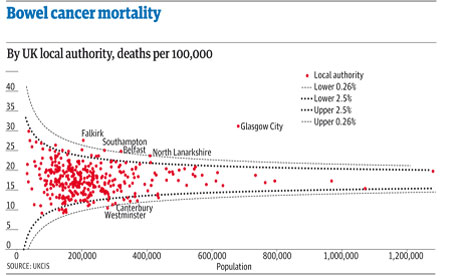
The lines come from a probabilistic model that helps us see the likely spread of death rates given a particular population size.

If we want to do stats on the data, then we could, as Paul suggests, pull the data into a spreadsheet and then work from there… Or, we could pull it directly into R, at which point all manner of voodoo stats capabilities become available to us.

As with the =importHTML formula in Google spreadsheets, R has a way of scraping data from an HTML table anywhere on the public web:

#First, we need to load in the XML library that contains the scraper function
library(XML)
#Scrape the table
cancerdata=data.frame( readHTMLTable( 'http://www.guardian.co.uk/commentisfree/2011/oct/28/bad-science-diy-data-analysis', which=1, header=c('Area','Rate','Population','Number')))

The format is simple: readHTMLTable(url,which=TABLENUMBER) (TABLENUMBER is used to extract the N’th table in the page.) The header part labels the columns (the data pulled in from the HTML table itself contains all sorts of clutter).

We can inspect the data we’ve imported as follows:

#Look at the whole table
cancerdata
#Look at the column headers
names(cancerdata)
#Look at the first 10 rows
head(cancerdata)
#Look at the last 10 rows
tail(cancerdata)
#What sort of datatype is in the Number column?
class(cancerdata$Number)

The last line – class(cancerdata$Number) – identifies the data as type ‘factor’. In order to do stats and plot graphs, we need the Number, Rate and Population columns to contain actual numbers… (Factors organise data according to categories; when the table is loaded in, the data is loaded in as strings of characters; rather than seeing each number as a number, it’s identified as a category.)

#Convert the numerical columns to a numeric datatype
cancerdata$Rate=as.numeric(levels(cancerdata$Rate)[as.integer(cancerdata$Rate)])
cancerdata$Population=as.numeric(levels(cancerdata$Population)[as.integer(cancerdata$Population)])
cancerdata$Number=as.numeric(levels(cancerdata$Number)[as.integer(cancerdata$Number)])

#Just check it worked…
class(cancerdata$Number)
head(cancerdata)

We can now plot the data:

#Plot the Number of deaths by the Population
plot(Number ~ Population,data=cancerdata)

If we want to, we can add a title:
#Add a title to the plot
plot(Number ~ Population,data=cancerdata, main='Bowel Cancer Occurrence by Population')

We can also tweak the axis labels:

plot(Number ~ Population,data=cancerdata, main='Bowel Cancer Occurrence by Population',ylab='Number of deaths')

The plot command is great for generating quick charts. If we want a bit more control over the charts we produce, the ggplot2 library is the way to go. (ggpplot2 isn’t part of the standard R bundle, so you’ll need to install the package yourself if you haven’t already installed it. In RStudio, find the Packages tab, click Install Packages, search for ggplot2 and then install it, along with its dependencies…):

require(ggplot2)
ggplot(cancerdata)+geom_point(aes(x=Population,y=Number))+opts(title='Bowel Cancer Data')+ylab('Number of Deaths')

Doing a bit of searching for the “funnel plot” chart type used to display the ata in Goldacre’s article, I came across a post on Cross Validated, the Stack Overflow/Statck Exchange site dedicated to statistics related Q&A: How to draw funnel plot using ggplot2 in R?

The meta-analysis answer seemed to produce the similar chart type, so I had a go at cribbing the code… This is a dangerous thing to do, and I can’t guarantee that the analysis is the same type of analysis as the one Goldacre refers to… but what I’m trying to do is show (quickly) that R provides a very powerful stats analysis environment and could probably do the sort of analysis you want in the hands of someone who knows how to drive it, and also knows what stats methods can be appropriately applied for any given data set…

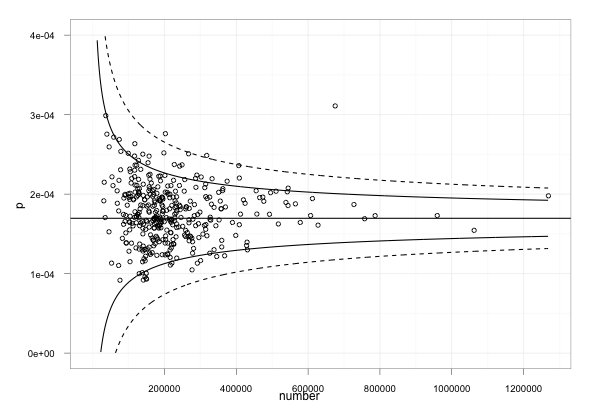
Anyway – here’s something resembling the Goldacre plot, using the cribbed code which has confidence limits at the 95% and 99.9% levels. Note that I needed to do a couple of things:

1) work out what values to use where! I did this by looking at the ggplot code to see what was plotted. p was on the y-axis and should be used to present the death rate. The data provides this as a rate per 100,000, so we need to divide by 100, 000 to make it a rate in the range 0..1. The x-axis is the population.

#TH: funnel plot code from:
#TH: http://stats.stackexchange.com/questions/5195/how-to-draw-funnel-plot-using-ggplot2-in-r/5210#5210
#TH: Use our cancerdata
number=cancerdata$Population
#TH: The rate is given as a 'per 100,000' value, so normalise it
p=cancerdata$Rate/100000

p.se <- sqrt((p*(1-p)) / (number))
df <- data.frame(p, number, p.se)

## common effect (fixed effect model)
p.fem <- weighted.mean(p, 1/p.se^2)

## lower and upper limits for 95% and 99.9% CI, based on FEM estimator
#TH: I'm going to alter the spacing of the samples used to generate the curves
number.seq <- seq(1000, max(number), 1000)
number.ll95 <- p.fem - 1.96 * sqrt((p.fem*(1-p.fem)) / (number.seq))
number.ul95 <- p.fem + 1.96 * sqrt((p.fem*(1-p.fem)) / (number.seq))
number.ll999 <- p.fem - 3.29 * sqrt((p.fem*(1-p.fem)) / (number.seq))
number.ul999 <- p.fem + 3.29 * sqrt((p.fem*(1-p.fem)) / (number.seq))
dfCI <- data.frame(number.ll95, number.ul95, number.ll999, number.ul999, number.seq, p.fem)

## draw plot
#TH: note that we need to tweak the limits of the y-axis
fp <- ggplot(aes(x = number, y = p), data = df) +
geom_point(shape = 1) +
geom_line(aes(x = number.seq, y = number.ll95), data = dfCI) +
geom_line(aes(x = number.seq, y = number.ul95), data = dfCI) +
geom_line(aes(x = number.seq, y = number.ll999, linetype = 2), data = dfCI) +
geom_line(aes(x = number.seq, y = number.ul999, linetype = 2), data = dfCI) +
geom_hline(aes(yintercept = p.fem), data = dfCI) +
scale_y_continuous(limits = c(0,0.0004)) +
xlab("number") + ylab("p") + theme_bw()

fp

As I said above, it can be quite dangerous just pinching other folks’ stats code if you aren’t a statistician and don’t really know whether you have actually replicated someone else’s analysis or done something completely different… (this is a situation I often find myself in!); which is why I think we need to encourage folk who release statistical reports to not only release their data, but also show their working, including the code they used to generate any summary tables or charts that appear in those reports.

In addition, it’s worth noting that cribbing other folk’s code and analyses and applying it to your own data may lead to a nonsense result because some stats analyses only work if the data has the right sort of distribution…So be aware of that, always post your own working somewhere, and if someone then points out that it’s nonsense, you’ll hopefully be able to learn from it…

Given those caveats, what I hope to have done is raise awareness of what R can be used to do (including pulling data into a stats computing environment via an HTML table screenscrape) and also produced some sort of recipe we could take to a statistician to say: is this the sort of thing Ben Goldacre was talking about? And if not, why not?

[If I’ve made any huge – or even minor – blunders in the above, please let me know… There’s always a risk in cutting and pasting things that look like they produce the sort of thing you’re interested in, but may actually be doing something completely different!]

A quick exercise for aspiring data journalists

A funnel plot of bowel cancer mortality rates in different areas of the UK

The latest Ben Goldacre Bad Science column provides a particularly useful exercise for anyone interested in avoiding an easy mistake in data journalism: mistaking random variation for a story (in this case about some health services being worse than others for treating a particular condition):

“The Public Health Observatories provide several neat tools for analysing data, and one will draw a funnel plot for you, from exactly this kind of mortality data. The bowel cancer numbers are in the table below. You can paste them into the Observatories’ tool, click “calculate”, and experience the thrill of touching real data.

“In fact, if you’re a journalist, and you find yourself wanting to claim one region is worse than another, for any similar set of death rate figures, then do feel free to use this tool on those figures yourself. It might take five minutes.”

By the way, if you want an easy way to get that data into a spreadsheet (or any other table on a webpage), try out the =importHTML formula, as explained on my spreadsheet blog (and there’s an example for this data here).

VIDEO: Sunny Hundal’s tips for bloggers

Sunny Hundal is the publisher of the UK political blog Liberal Conspiracy. Two weeks ago I hosted a 30 minute Q&A session between Hundal and students at City University, and also interviewed him briefly myself.

3 video clips of the interview (1-2 minutes each) and one of the Q&A (around 30 minutes) are embedded below. These are also published under a Creative Commons licence so you can remix them if you wish (please let me know if you do).