This is a duplicate post – you can find the original here.
The inverted pyramid of data journalism
40 Replies

This is a duplicate post – you can find the original here.
Expect a lot of sniffy reviews of the Huffington Post today. That’s par for the course: a short, odd-looking interloper is bursting into a roomful of graceful, if elderly brands. Scrappy-Doo at a cocktail party.
It’s a tough crowd. With The Guardian having long ago signed up a number of leading voices to its Comment Is Free platform and niche networks, outlets from The Telegraph to the New Statesman having signed up many other major bloggers, and remaining high profile bloggers having enough traffic and profile to no longer need any help, HuffPo UK looks like it is fighting for scraps.
In the US Arianna Huffington was well known, and HuffPo positioned itself as a liberal alternative to a homogenous mainstream. It was an early mover – and still attracted enormous criticism, with the launch widely seen as a flop.
But success is in the eye of the beholder.
HuffPo UK is launching with a small and relatively low-profile staff, which puts it under less pressure financially and gives it room to look like a growing company.
It is focused on building a news platform from a network, rather than the other way round, which still makes it relatively unique.
And while there are plenty of similar networks covering niches such as science and technology, no one has yet attempted this at a mass market level. There may just be a gap for an effective networked aggregator in the notoriously competitive UK market.
The missing piece of the jigsaw is how much ad sales muscle there will be behind the site. There are some obvious economies of scale in selling ads through staff at both AOL UK and the US Huffington Post, but that approach has flaws. If HuffPo UK comes undone anywhere, it may be at the hands of a competitive UK advertising market.
But its major weakness – the fact that it doesn’t have much of a history – might also be its biggest advantage. The only baggage it carries is the acquisition by AOL. That is not insignificant, but neither is it insurmountable. It is free to build an identity around its users – and if it’s sensible, that’s what it will do. It can no longer pretend to be the outsider it once was.
Launching without a community manager in post is a problem on that front, but it also suggests that they take the role seriously enough to be prepared to take their time in finding the right person. They’ve done well to recruit dozens of bloggers without one, but they need a dedicated staffer on that front fast.
Without that person their approach to bloggers can seem slapdash, with little care paid to explaining why a blogger might want to sign up to the HuffPo UK project, what that project is, or who the people are behind it.
Building that brand, and those relationships, is going to take time. If HuffPo UK is going to work, AOL will need to allow for that, and not expect instant results.
This post was duplicated for some reason: you can find the version with most comments here.
I’ve been focusing so much on blogging the bells and whistles stuff that Google Refine does that I’ve never actually written about its most simple function: cleaning data. So, here’s what it does and how to do it:
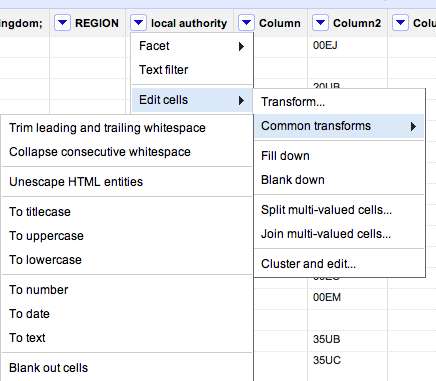
You’ll see there are a range of useful functions here to clean up your data and make sure it is consistent. Here’s why:
Sometimes in the process of entering data, people put a space before or after a name. You won’t be able to see it, but when it comes to counting how many times something is mentioned, or combining two sets of data, you will hit problems, because as far as a computer or spreadsheet is concerned, ” Jones” is different to “Jones”.
Clicking this option will remove those white spaces.
Likewise, sometimes a double space will be used instead of a single space – accidentally or through habit, leading to more inconsistent data. This command solves that problem.
At some point in the process of being collected or published, HTML may be added to data. Typically this represents punctuation of some sort. “"” for example, is the HTML code for quotation marks. (List of this and others here).
This command will convert that cumbersome code into the characters they actually represent.
Another common problem with data is inconsistent formatting – occasionally someone will LEAVE THE CAPS LOCK ON or forget to capitalise a name.
This converts all cells in that column to be consistently formatted, one way or another.
Like the almost-invisible spaces in data entry, sometimes a piece of data can look to you like a number, but actually be formatted as text. And like the invisible spaces, this becomes problematic when you are trying to combine, match up, or make calculations on different datasets.
This command solves that by ensuring that all entries in a particular column are formatted the same way.
Now, I’ve not used that command much and would be a bit careful – especially with dates, where UK and US formatting is different, for example. If you’ve had experiences or tips on those lines let me know.
In addition to the commands listed above under ‘common transforms’ there are others on the ‘Edit cells’ menu that are also useful for cleaning data:
These are useful for getting names and addresses into a format consistent with other data – for example if you want to split an address into street name, city, postcode; or join a surname and forename into a full name.
A particularly powerful cleaning function in Google Refine, this looks at your column data and suggests ‘clusters’ where entries are similar. You can then ask it to change those similar entries so that they have the same value.
There is more than one algorithm (shown in 2 drop-down menus: Method and Keying function) used to cluster – try each one in turn, as some pick up clusters that others miss.
If you have any other tips on cleaning data with Google Refine, please add them.
ProPublica have created a rather wonderful news app around education data. As Nieman reports:
“The app invites both macro and micro analysis, with an implicit focus on personal relevance: You can parse the data by state, or you can drill down to individual schools and districts — the high school you went to, or the one that’s in your neighborhood. And then, even more intriguingly, you can compare schools according to geographical proximity and/or the relative wealth and poverty of their student bodies.”
This is exactly what data journalism is great at.
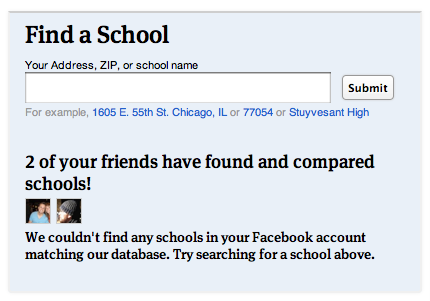
What’s more, the Nieman article talks breathlessly about ProPublica aiming to make data “more social”. What they describe is basically an embedded ‘Share this’ text box (admittedly nicely seamless) and a hashtag. But the news app page actually has a lot more to it: for example, once you’ve given it permission to access your Facebook account, it tells you how many friends have used the app, and appears to try to connect you to schools in your profile. This is how that’s presented on the homepage:

This came as a refreshing relief, because the ‘share this’ strategy reminds me of organisations who say their social media strategy is to ‘get everyone on Twitter’.
Still, it made me think of the range of challenges that Facebook and other social media platforms present. For example, if you land on one of the comparison pages, the offering isn’t so compelling: the reason to install the Facebook app is just “Share this”.
As I’ve written before, technology is a tool, not a strategy, so here are some other opportunities that might be explored:
Competition, fun, campaigning, conversation, collaborating – those are genuinely social applications of technology. It would be interesting to start a discussion about what else might suit a news app’s integration with Facebook. Any ideas?
Cross-posted by Silvia Cobo from her blog.
Eduard Martín-Borregón is a freelance journalist based in Terrassa, a town 30km from Barcelona. The media landscape in this city is quite small: a local newspaper without a website, some local public radio, one local TV station and couple of websites. In contrast, the city have a lively amount of bloggers.
During the last election campaign Eduard wanted to show that was possible to make an informative project connecting politics and citizens, even without big resources: “8 years ago it would have been unthinkable that a single person could do this.”
And so he launched 5x55terrassa.org.
The idea of the project is simple: 5 questions to 55 people from Terrassa. 55 video interviews with different people about the present and future of Terrassa divided on 12 different areas.
The local elections took place on the 21th May. He published the interviews on 5x55terrassa.org daily between March 7 and May 20, using publishing platforms including Tumblr and Vimeo, and social media platforms such as Twitter and Facebook to promote the project.
The result is a mosaic of people’s lives, a picture of those who, in many different ways, make up the city.
But Eduard wanted to go a step further. He had many hours of good quality video interviews with different people from the city. What to do? He decided to transform all this video in a documentary, to be premiered – he hoped – at one of the city’s cinemas. Would people pay to have this document on DVD?
And that’s where the online crowdfunding platform Verkami comes in.
The aim was to cover the cost of publishing the story on DVD. Eduard needed 500 euros and asked for this money on Verkami, offering different ways to sponsor the project, purchasing the DVD and getting a ticket for the cinema release in Terrassa.
He collected the money in 40 days, with 32 people participating.
Eduard is now preparing the script. He says the experience has given him more knowledge about social platforms and the boundaries and narratives that work best online. He admits that the project has also given him greater visibility as a journalist online and in the city of Terrassa.
It’s become a modern catchphrase. When planes are grounded, when cars crash, when computers are hacked, and when the earth shakes. There is, it seems, always a “cost to the economy”.
Today, with a mass strike over pensions in the UK, the cliche is brought forth again:
“The Treasury could save £30m from the pay forfeited by the striking teachers today but business leaders warned that this was hugely outbalanced by the wider cost to the economy of hundreds of thousands of parents having to take the day off.
“The British Chambers of Commerce said disruption will lead to many parents having to take the day off work to look after their children, losing them pay and hitting productivity.”
Statements like these (by David Frost, the director general, it turns out) pass unquestioned (also here, here and elsewhere), but in this case (and I wonder how many others), I think a little statistical literacy is needed.
Beyond the churnalism of ‘he said-she said’ reporting, when costs and figures are mentioned journalists should be asking to see the evidence.
Here’s the thing. In reality, most parents will have taken annual leave today to look after their children. That’s annual leave that they would have taken anyway, so is it really costing the economy any more to take that leave on this day in particular? And specifically, enough to “hugely outbalance” £30m?
Stretching credulity further is the reference to parents losing pay. All UK workers have a statutory right to 5.6 weeks of annual leave paid at their normal rate of pay. If they’ve used all that up halfway into the year (or 3 months into the financial year) – before the start of the school holidays no less – and have to take unpaid leave, then they’re stupid enough to be a cost to the economy without any extra help.
And this isn’t just a fuss about statistics: it’s a central element of one of the narratives around the strikes: that the Government are “deliberately trying to provoke the unions into industrial action so they could blame them for the failure of the Government’s economic strategy.”
If they do, it’ll be a good story. Will journalists let the facts get in the way of it?
UPDATE: An inverse – and equally dubious – claim could be made about the ‘boost’ to the economy from strike action: additional travel and food spending by those attending rallies, and childcare spending by parents who cannot take time off work. It’s like the royal wedding all over again… (thanks to Dan Thornton in the comments for starting this chain of thought)
I’m holding a one-off training day in August on verifying information online and finding sources, in London at the Royal Society of Medicine.
In the context of various straight men pretending to be gay women, it’s quite timely.
The Online Journalism Handbook, written with Liisa Rohumaa, has now been published. You can get it here.
I’ve been blogging throughout the process of writing the book – particularly the chapters on data journalism, blogging and UGC – and you can still find those blog posts under the tag ‘Online Journalism Book‘.
Other chapters cover interactivity, audio slideshows and podcasting, video, law, some of the history that helps in understanding online journalism, and writing for the web (including SEO and SMO).
Meanwhile, I’ve created a blog, Facebook page and Twitter account (@OJhandbook) to provide updates, corrections and additions to the book.
If you spot anything in the book that needs updating or correcting, let me know. Likewise, let me know what you think of the book and anything you’d like to see added in future.

Cross-posted from the BBC College of Journalism blog:
Last week my experiment in running a blog entirely through a Facebook Page quietly came to the end of its allotted four weeks. It’s been a useful exercise, and I’m going to adapt the experiment slightly. Here’s what I’ve learned:
The most popular posts during that month were simple links that dealt with controversy – Isle of Wight council talking about withdrawing accreditation if a blogger refused to pre-moderate comments; and the wider issue of being denied access to public documents or meetings on the basis of blogging.
This isn’t a shock – research into Facebook tends to draw similar conclusions about the value of ‘social’ content.
That said, it’s hard to draw firm conclusions because the Insights data only gives numbers on posts after June 9 (when I posted a book chapter as a series of Notes), and the network effects will have changed as the page accumulated Likes.
UPDATE: Scrolling down the page each update does have impressions and interaction data on it in light grey – I’m not sure why these are not included in the Insights data (perhaps that service only kicks in after a certain number of Likes). But they do confirm that links get much higher traffic than Notes.
With most blogging it’s quite easy to ‘just do it’ and then figure out the bells and whistles later. With a Facebook Page I think a bit of preparation goes a long way – especially to avoid problems later on.
Firstly, there’s the choice whether to start one from scratch or convert an existing Facebook account into a Page.
Secondly, there’s the page name itself: at first you can edit this, but after 100 Likes you can’t. That leaves my ‘Paul Bradshaw’s Online Journalism Blog on FB for 1 month‘ looking a bit silly 5 weeks later. (It would be nice if Facebook warned you that this was happening)
Thirdly, if you want write more than 420 characters, you’ll need to use Notes (ideally, when logged on as the Page itself, which will result in the Note being auto-posted to the wall). And if you want to link phrases without leaving littering the note with ugly URLs, you’ll need to use HTML code.
Next, there’s integration with other online presences. Here are the apps I used:
There’s also Smart Twitter for Pages which publishes page updates to Twitter; or you can use Facebook’s own Twitter page to link pages to Twitter.
Finally, I was thankful that I had used a Feedburner account for the Online Journalism Blog RSS feed. That allowed me to change the settings so that subscribers to the blog would still receive updates from the Facebook page (which also has an RSS feed) – and change it back afterwards.
Although Vadim Lavrusik pointed out that you can find the Facebook page through Google or Facebook’s own search, individual posts are rather more difficult to track down.
The lack of tags and categories also make it difficult to retrieve updates and notes – and highlight the problems for search engine optimisation.
This created a curious tension: on the one hand, short term traffic to individual posts was probably higher than I would normally get on the blog outside Facebook. On the other, there was little opportunity for long term traffic: there was no footprint of inbound links for Google to follow.
This may not be a problem for local, hard news organisations which have a rapid turnover of content, no need to rank in Google News, and little value in the archives.
But there are too many drawbacks for most to move (as Rockville Central’s blog recently did) completely to Facebook. It simply leaves you too isolated, too ephemeral, and too vulnerable to changes in Facebook’s policies.
So in short, while it’s great for short term traffic, it’s bad for traffic long-term. It’s better for ongoing work and linking than more finished articles. It shouldn’t be viewed in isolation from the rest of the web, but rather as one more prong in a distributed strategy: just as I tweet some things, Tumblelog others, and just share or bookmark others, Facebook Pages fit in somewhere amidst all of that.
Now I just need to keep on working out exactly how.
 Online Journalism Blog