The owner of the shop – DecorMyEyes.com – had boasted on consumer complaint forum GetSatisfaction that:
“The more replies you people post, the more business and the more hits and sales I get. My goal is NEGATIVE advertisement.”
A lengthy New York Times article piece on the issue continues:
“It’s all part of a sales strategy, he said. Online chatter about DecorMyEyes, even furious online chatter, pushed the site higher in Google search results, which led to greater sales.
“… Not only has this heap of grievances failed to deter DecorMyEyes, but as [one consumer’s] all-too-cursory Google search demonstrated, the company can show up in the most coveted place on the Internet’s most powerful site.”
The NYT spoke to the owner, Vitaly Borker, who openly admits “I’ve exploited this opportunity because it works.”
“No matter where they post their negative comments, it helps my return on investment. So I decided, why not use that negativity to my advantage?”
Later in the article, after the reporter has doorstepped Borker, he says he ‘stumbled upon the upside of rudeness by accident’:
“”I stopped caring,” he says, and for that he blames customers. They lied and changed their minds in ways that cost him money, he says, and at some point he started telling them off in the bluntest of terms. To his amazement, this seemed to better his standing in certain Google searches, which brought in more sales.
“Before this discovery, he’d hired a search optimization company to burnish his site’s reputation by writing positive things about DecorMyEyes online. Odious behavior, he realized, worked much better, and it didn’t cost him a penny.”
“We developed an algorithmic solution which detects the merchant … along with hundreds of other merchants that, in our opinion, provide an extremely poor user experience.”
For obvious reasons they don’t give details of the solution.
Here’s a useful plugin for bloggers working with data: Datapress allows you to quickly visualise a dataset as a table, timeline, scatter plot, bar chart, ‘intelligent list’ (allowing you to sort by more than one value at once – see this example) or map.
Once installed, the plugin adds a new button to the ‘Upload/Insert’ row in the post edit view which you can click to link to a dataset in the same way as you would embed an image or video.
The plugin is in beta at the moment and takes a bit of getting used to. There’s a convention you have to follow in naming Google spreadsheet columns, for example – this Glasgow Vegan Guide spreadsheet has quite a few of them – but this could add some new visualisation possibilities. It seems particularly nice for lists and maps (if you have lat-long values), although Google spreadsheet’s built-in charts options will obviously be quicker for simple graphs and charts.
UPDATE: I’ve also just learned that the large empty space below the table can be fixed under the ‘Configure Display’ tab in the editing view.
I recently spent 2 days teaching the basics of data journalism to trainee journalists on a broadsheet newspaper. It’s a pretty intensive course that follows a path I’ve explored here previously – from finding data and interrogating it to visualizing it and mashing – and I wanted to record the results.
My approach was both practical and conceptual. Conceptually, the trainees need to be able to understand and communicate with people from other disciplines, such as designers putting together an infographic, or programmers, statisticians and researchers.
They need to know what semantic data is, what APIs are, the difference between a database and open data, and what is possible with all of the above.
They need to know what design techniques make a visualisation clear, and the statistical quirks that need to be considered – or looked for.
But they also need to be able to do it.
The importance of editorial drive
The first thing I ask them to do (after a broad introduction) is come up with a journalistic hypothesis they want to test (a process taken from Mark E Hunter’s excellent ebook Story Based Inquiry). My experience is that you learn more about data journalism by tackling a specific problem or question – not just the trainees but, in trying to tackle other people’s problems, me as well.
So one trainee wants to look at the differences between supporters of David and Ed Miliband in that week’s Labour leadership contest. Another wants to look at authorization of armed operations by a police force (the result of an FOI request following up on the Raoul Moat story). A third wants to look at whether ethnic minorities are being laid off more quickly, while others investigate identity fraud, ASBOs and suicides.
Taking those as a starting point, then, I introduce them to some basic computer assisted reporting skills and sources of data. They quickly assemble some relevant datasets – and the context they need to make sense of them.
For the first time I have to use Open Office’s spreadsheet software, which turns out to be not too bad. The data pilot tool is a worthy free alternative to Excel’s pivot tables, allowing journalists to quickly aggregate & interrogate a large dataset.
Formulae like concatenate and ISNA turn out to be particularly useful in cleaning up data or making it compatible with similar datasets.
The ‘Text to columns’ function comes in handy in breaking up full names into title, forename and surname (or addresses into constituent parts), while find and replace helped in removing redundant information.
It’s not long before the journalists raise statistical issues – which is reassuring. The trainee looking into ethnic minority unemployment, for example, finds some large increases – but the numbers in those ethnicities are so small as to undermine the significance.
Scraping the surface of statistics
Still, I put them through an afternoon of statistical training. Notably, not one of them has studied a maths or science-related degree. History, English and Law dominate – and their educational history is pretty uniform. At a time when newsrooms need diversity to adapt to change, this is a little worrying.
But they can tell a mean from a mode, and deal well with percentages, which means we can move on quickly to standard deviations, distribution, statistical significance and regression analysis.
One thing I do is ask one trainee to toss a coin 30 times and the others to place bets on the largest number of heads to fall in a row. Most plump for around 4 – but the longest run is 8 heads in a row.
The point I’m making is regarding small sample sizes and clusters. (With eerie coincidence, one of them has a map of Bridgend on her screen, which made the news after a cluster of suicides).
That’s about as engaging as this section got – so if you’ve any ideas for bringing statistical subjects to life and making them relevant to journalists, particularly as a practical tool for spotting stories, I’m all ears.
Visualisation – bringing data to life, quickly
Day 2 is rather more satisfying, as – after an overview of various chart types and their strengths and limitations – the trainees turn their hands to visualization tools – Many Eyes, Wordle, Tableau Public, Open Heat Map, and Mapalist.
Suddenly the data from the previous day comes to life. Fraud crime in London boroughs is shown on a handy heat map. A pie chart, and then bar chart, shows the breakdown of Labour leadership voters; and line graphs bring out new possible leads in suicide data (female suicide rates barely change in 5 years, while male rates fluctuate more).
It turns out that Mapalist – normally used for plotting points on Google Maps from a Google spreadsheet – now also does heat maps based on the density of occurrences. ManyEyes has also added mapping visualizations to its toolkit.
Looking through my Delicious bookmarks I rediscover a postcodes API with a hackable URL to generate CSV or XML files with the lat/long, ward and other data from any postcode (also useful on this front is Matthew Somerville’s project MaPit).
Still a print culture
Notably, the trainees bring up the dominance of print culture. “I can see how this works well online,” says one, “but our newsroom will want to see a print story.”
One of the effects of convergence on news production is that a tool traditionally left to designers after the journalist has finished their role in the production line is now used by the journalist as part of their newsgathering role – visualizing data to see the story within it, and possibly publishing that online to involve users in that process too.
A print news story – in this instance – may result from the visualization process, rather than the other way around.
More broadly, it’s another symptom of how news production is moving from a linear process involving division of labour to a flatter, more overlapping organization of processes and roles – which involves people outside of the organization as well as those within.
Mashups
The final session covers mashups. This is an opportunity to explore the broader possibilities of the technology, how APIs and semantic data fit in, and some basic tools and tutorials.
Clearly, a well-produced mashup requires more than half a day and a broader skillset than exists in journalists alone. But by using tools like Mapalist the trainees have actually already created a mashup. Again, like visualization, there is a sliding scale between quick and rough approaches to find stories and communicate them – and larger efforts that require a bigger investment of time and skill.
As the trainees are already engrossed in their own projects, I don’t distract them too much from that course.
You can see what some of the trainees produced at the links below:
As an industry, online publishing has gone through a series of obsessions. From ‘Content is King’ to information architecture (IA), SEO (search engine optimisation) to SMO (social media optimisation).
Most people’s view of online publishing is skewed towards one of these areas. For journalists, it’s likely to be SEO; for designers or developers, it’s probably user experience (UX). As a result, we’re highly influenced by fashion when things aren’t going smoothly, and we tend to ignore potential solutions outside of our area.
Content agency Contentini are blogging about the way they use analytics to look at websites and identify which of the various elements above might be worth focusing on. It’s a useful distillation of problems around sites and equally useful as a prompt for jolting yourself out of falling into the wrong ways to solve them.
The post is worth reading in full, and probably pinning to a wall. But here are the bullet points:
If you have a high bounce rate and people spend little time on your site, it might be an information architecture problem.
If people start things but don’t finish them on your site, it’s probably a UX problem.
If people aren’t sharing your content, it may be a content issue. (Image above. This part of their framework could do with fleshing out)
If you’re getting less than a third of your traffic from search engines, you need to look at SEO
News organisations across the country will today be running stories based on a report by Big Brother Watch into the amount spent on CCTV surveillance by local authorities (PDF). The treatment of this report is a lesson in how journalists approach figures, and why context is more important than raw figures.
BBC Radio WM, for example, led this morning on the fact that Birmingham topped the table of spending on CCTV. But Birmingham is the biggest local authority in the UK by some distance, so this fact alone is not particularly newsworthy – unless, of course, you omit this fact or allow anyone from the council to point it out (ahem).
Much more interesting was the fact that the second biggest spender was Sandwell – also in the Radio WM region. Sandwell spent half as much as Birmingham – but its population is less than a third the size of its neighbour. Put another way, Sandwell spent 80% more per head of population than Birmingham on CCTV (£18 compared to Birmingham’s £10 per head).
Being on a deadline wasn’t an issue here: that information took me only a few minutes to find and work out.
The Press Association’s release on the story focused on the Birmingham angle too – taking the Big Brother Watch statements and fleshing them out with old quotes from those involved in the last big Birmingham surveillance story – the Project Champion scheme – before ending with a top ten list of CCTV spenders.
The Daily Mail, which followed a similar line, at least managed to mention that some smaller authorities (Woking and Breckland) had spent rather a lot of money considering their small populations.
A few outlets also repeated the assertions on how many nurses or police officers the money spent on surveillance would have paid for.
The Daily Mail quoted the report as saying that “The price of providing street CCTV since 2007 would have paid for more than 13,500 police constables on starting salaries of just over £23,000”. The Birmingham Mail, among others, noted that it would have paid the salaries of more than 15,000 nurses.
And here we hit a second problem.
The £314m spent on CCTV since 2007 would indeed pay for 13,500 police officers on £23,000 – but only for one year. On an ongoing basis, it would have paid the wages of 4,500 police officers (it should also be pointed out that the £314m figure only covered 336 local authorities – the CCTV spend of those who failed to respond would increase this number).
Secondly, wages are not the only cost of employment, just as installation is not the only cost of CCTV. The FOI request submitted by Big Brother Watch is a good example of this: not only do they ask for installation costs, but operation and maintenance costs, and staffing costs – including pension liabilities and benefits.
There’s a great ‘Employee True Cost Calculator‘ on the IT Centa website which illustrates this neatly: you have to factor in national insurance, pension contributions, overheads and other costs to get a truer picture.
Don’t blame Big Brother Watch
Big Brother Watch’s report is a much more illuminating, and statistically aware, read than the media coverage. Indeed, there’s a lot more information about Sandwell Council’s history in this area which would have made for a better lead story on Radio WM, juiced up the Birmingham Mail report, or just made for a decent story in the Express and Star (which instead simply ran the PA release UPDATE: they led the print edition with a more in-depth story, which was then published online later – see comments).
There’s also more about spending per head, comparisons between councils of different sizes, and between spending on other things*, and spending on maintenance, staffing (where Sandwell comes top) and new cameras – but it seems most reporters didn’t look beyond the first page, and the first name on the leaderboard.
It’s frustrating to see news organisations pass over important stories such as that in Sandwell for the sake of filling column inches and broadcast time with the easiest possible story to write. The result is a homogenous and superficial product: a perfect example of commodified news.
I bet the people at Big Brother Watch are banging their heads on their desks to see their digging reported with so little depth. And I think they could learn something from Wikileaks on why that might be: they gave it to all the media at the same time.
Wikileaks learned a year ago that this free-to-all approach reduced the value of the story, and consequently the depth with which it was reported. But by partnering with one news organisation in each country Wikileaks not only had stories treated more seriously, but other news organisations chasing new angles jealously.
*While we’re at it, the report also points out that the UK spends more on CCTV per head than 38 countries do on defence, and 5 times more in total than Uganda spends on health. “UK spends more on CCTV than Bangladesh does on defence” has a nice ring to me. That said, those defence spending figures turn out to be from 2004 and earlier, and so are not exactly ideal (Wolfram Alpha is a good place to get quick stats like this – and suggests a much higher per capita spend)
Richard Jones, an experienced broadcast journalist, set up Saddleworth News just nine months ago. He hoped to combine his journalistic ambitions with a demanding routine as a stay-at home-father whilst providing more online information about an area which he claims “was relatively under-served by the traditional media”. Although not an easy task, Jones has successfully used social media as well as local news stories in order to secure an expanding fan base. This post is part of the Hyperlocal Voices series of interviews.
Who were the people behind the blog, and what were their backgrounds?
I set it up myself. I used to be a full-time professional journalist. I graduated from the Broadcast Journalism course in Leeds in 2002, then spent six years at Sky News working in TV and radio.
After we relocated to Manchester because of my wife’s career, I freelanced at various radio stations until we had our first child in September 2009 and I gave up work to become a stay-at-home dad.
What made you decide to set up the blog?
Lots of reasons really, but two main themes. I’ll admit the first was selfishness. I couldn’t really combine irregular hours as a radio journalist with being a full-time dad, but I knew that I wanted to return to full-time work one day, so I needed to do something to keep my hand in.
I was also worried about how I’d fill my days, even with a small baby to look after, so was keen to take on a project to help keep me occupied.
The other reasons were more altruistic. When we were thinking of moving to Saddleworth we realised that there wasn’t actually that much information about the place online. I also noticed that, for an area with such a distinctive character, it was relatively under-served by the traditional media. So I thought I could use my journalism skills to do something positive for the community we were about to move into.
When did you set up the blog and how did you go about it?
We moved to Saddleworth in January 2010 and I started the blog the following month. It’s a self-hosted WordPress site.
I’ve written other blogs before (and continue to write about being a stay-at-home dad at www.likefatherlikedaughter.blogspot.com) using Blogger so I had some very basic experience of running a site and tinkering with HTML a little.
I knew in my head how I felt it should look, so it was just a case of picking a free WordPress theme and after an evening playing around I had it more or less as I wanted. I’ve been very impressed with how user-friendly and reliable WordPress is.
What other blogs, bloggers or websites influenced you?
The main one was Kate Feld’s Manchizzle [interviewed previously in the Hyperlocal Voices series]. When I lived in Manchester I used to go to her blog meet-ups, then got into going to the Social Media Cafe Manchester evenings. When I had the idea of doing a hyperlocal site I got lots of encouragement and ideas from people there.
I think the first hyperlocal site I saw was Linda Preston’s Darwen Reporter, now sadly no longer running. I definitely copied the blog format from her.
I wanted to get away from the typical information-heavy newspaper websites, partly because I think they’re often a bit confusing, but mostly because I didn’t want to feel under pressure to update it more than once a day. And if you do one story a day on a blog, there’s always something new on top of the site to keep it fresh for regular readers.
How did – and do – you see yourself in relation to a traditional news operation?
The similarities are to do with the basic skills of journalism. I still research stories, make phone calls, do interviews, write copy, take pictures, nurture contacts, take editorial decisions, just as I did when I worked in a newsroom. Although I have to compress all that into an hour or two each day during my daughter’s lunchtime nap!
There are plenty of differences, but one main one is that I don’t have to run my story ideas by an editor. So instead of hearing excuses like “I’m interested in that” or “Nobody cares” or “We did that last week/month/year” I can just do whatever I like.
For example, during the election campaign I decided to interview all the candidates standing in the general and local elections, so I went and did it. A local newspaper journalist told me he’d suggested the same thing, but his editor had said there “wasn’t space” in the paper for it. That’s the kind of public service a site like mine can provide.
What have been the key moments in the blog’s development editorially?
By far the biggest story of the year has been the local political situation. We had a bitterly-fought general election, a legal challenge, then the local MP Phil Woolas got found guilty of cheating and was thrown out of parliament.
I covered the campaign in much greater detail than anyone else at the time, and I’ve now built up a huge archive of articles about every aspect of the saga. It’s helped raise the profile and credibility of the site locally, and I’ve also given interviews and help to national journalists who have come to cover the story, which has hopefully given the site a bit of a wider reputation too.
The day of the Woolas verdict was the busiest ever for the site, with 1500 unique visits and a great amount of attention on Twitter. I have to take my daughter out with me on stories, and to their credit Oldham Council’s press team who were controlling the media let me into an ante-room so I could follow the verdict (I was doing Twitter updates with one hand, and trying to entertain her with a toy car in the other) and then into the news conference later.
I also had with me a crew of teenage media students from Oldham College who have been making some video reports for the site. I overheard someone say rather sniffily “Who are they covering it for, CBeebies?” but the fact people in this area are prepared to accept the site as legitimate journalism, no matter how unconventional some aspects of it are, I think says a lot about how far it’s come in such a short time.
What sort of traffic do you get and how has that changed over time?
I was amazed when the site got more than 6,000 unique visits in the first full month. It’s increased steadily since, and last month there were 12,000.
The Woolas verdict means there have already been more than that during November, so it’ll be another new record.
I haven’t spent anything on promotion apart from getting a few business cards printed, but Facebook has been a great way of growing awareness and building a regular audience. There are almost 700 fans on there now.
“Last year, electoral reform opened the door for politics 2.0 by authorizing parties to use social networks to raise campaign donations and participate in streamlined debates”, claims Manuella Ribeiro about the recent Brazilian election that made Dilma Rousseff the new president.
Ribeiro made a compilation of the best online projects that worked on transparency, civic engagement and public policies monitors. Here are my personal favorites:
Eu lembro: “Be a voter with an elephant’s memory. Vote and remember everything that happens to politicians”.
VotenaWeb: “A site where you can approach the decisions of National Congress that directly affect your life. Vote and be heard”. Citizens can compare, with an easy interface, their votes on bills and the votes of politicians. The congressional bills are translated into simple language and you can monitor the voting records of different candidates.
Quanto vale seu candidato?: in English “How much is your candidate worth?” is a nice piece of data journalism with information about the patrimony of candidates.
Eleitor 2010: developed with Ushahidi to monitor the elections, receive and map complaints about electoral crimes through Twitter, SMS, email and social networks.
Adote um Vereador: encourages citizens to “adopt” a city councilman and open blog about their work to keep an eye on them and their parliamentary activities.
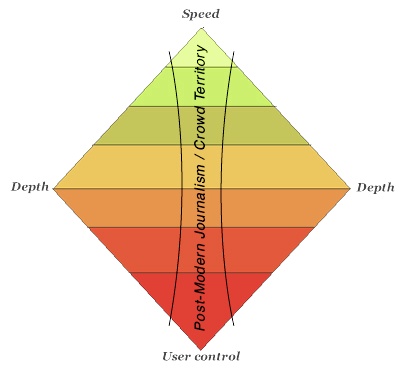
“Let the crowd have the middle of the diamond. Just let it go, our time there is ending. There’s too many of them, they are too fast, they will out man and out maneuver you every time that it matters to them–and if it doesn’t matter to them, I bet there’s not much of a market for it. Just walk away… and watch.”
He finishes by arguing that commercial journalism needs to raise the bar:
“The future of Journalism is not to become public service with the hopes of gratuity, but a professional service with professional expectations and results. If people are going to blogs and the crowd instead of your publications, it’s because your publication is not meeting the expectations of your audience. As a publication you have the choice to evolve to meet those expectations, find a new audience, or leave.”
So let me ask: are you involved in – or study on – a course that covers any aspect of data journalism? That might be statistics, computer assisted reporting, or mashing, or something else. Please comment – I’d really like to know what’s out there.
Cathy Watson, an experienced journalist, first set up the Uckfield News 3 and a half years ago to promote her PR business, which it has since outgrown. The site is “reactive”, says Cathy, both in the directions that it has grown, and in many of the stories that it covers: “Where I see people hunting for information, perhaps on Twitter or Facebook, about traffic hold ups or fires I make the calls to find and post answers but I don’t make the traditional daily calls.”
Who were the people behind the blog, and what were their backgrounds?
I set up the blog but my husband, Paul Watson, now helps with it. We are both journalists.
I have worked as reporter, news editor, sub-editor, deputy editor and acting editor moving, within one company, between the Bury Free Press, Newmarket Journal and Lynn News and Advertiser. After moving to Sussex I worked as a freelance for the Sussex Express.
Paul too worked in all jobs across the newsroom before becoming an editor. He edited free newspapers in King’s Lynn and Wisbech before moving to edit the Middy, (the Mid Sussex Times at Haywards Heath) and then the Sussex Express.
Most recently he has been looking at the future training of journalists in managing a project led by the National Council for the Training of Journalists supported by the Broadcast Journalism Training Council, the Periodicals Training Council and the Society of Editors.
The project has included a survey of employers of journalists, relevant education providers and new entrants to the profession.
He continues to work as an editorial consultant for the NCTJ.
What made you decide to set up the blog?
I started a PR business, wanted to attract the attention of local businesses and thought it would help to have an Uckfield News page on my website. I updated it daily with nibs (news in brief).
When did you set up the blog and how did you go about it?
I started the news page three-and-a-half years ago using the free Microsoft Office Live platform. After about 18 months I altered the focus of the site to Uckfield News and a year ago had a bespoke site built.
What other blogs, bloggers or websites influenced you?
None. I didn’t know people were setting up ‘hyperlocal’ sites. Everything I have done has been reactive, people liked the news so I added more of it, I tested a shopping feature and it led to the listings, the listings are now leading to more features and people who pay to list (so supporting the site) are, where possible, sources for stories.
How did – and do – you see yourself in relation to a traditional news operation?
Uckfield is on the edge of circulation areas of three paid-for newspapers. They cover the town well but can’t pick up the ‘nitty gritty’ because of commitments to other towns.
I’m particularly interested in planning applications, change within the town, shopping and business news. I concentrate on reporting facts, leaving people to add their views in the comment sections at the end of stories, and on Uckfield News Twitter and Facebook pages.
I also mix paid-for ad features in with the news.
Where I see people hunting for information, perhaps on Twitter or Facebook, about traffic hold ups or fires I make the calls to find and post answers but I don’t make the traditional daily calls and tend to avoid “shock, horror, probe”.
What have been the key moments in the blog’s development editorially?
Adding shopping, business and history features. They are a good way of bringing people back to the site on a regular basis.
What sort of traffic do you get and how has that changed over time?
It doesn’t seem long since I was pleased to have four or five visitors a day! Growth has been slow but by the time we launched the new site a year ago we were getting about 1,000 unique visitors a month.
In our most recent peak we hit about 4,500 unique visitors, 9,000 visitors and 25,000 page views. The figures have settled again to about 3,000 unique visitors, 5,000 visits and 14,000 page views a month but the trend is upwards.
Paul and I have the desire to cover everything that moves because old habits die hard! But I am reining back because I don’t want to do this without advertising support. I have just had the site altered to accommodate advertising and hope to start building that side of the business.