Tag Archives: variation

Telling stories with data: more on the difference between ‘variation’ stories and ‘ranking’ angles

7 common angles for data storie: scale, change, ranking, variation, explore, relationships, bad data, leads
The 7 angles. Also available in Norwegian and Finnish.

One of the most common challenges I encounter when teaching people the 7 most common story angles in data journalism is confusion between variation and ranking stories. It all comes down to the difference between process and product.

That’s because both types of story involve ranking as a piece of data analysis.

We might rank the number of specialist teachers in the country’s schools, for example, in order to tell either of the following stories:

  • “There are more specialist science teachers than those in any other subject, new data reveals”
  • “New data reveals stark differences in the number of specialists teaching each subject in secondary schools

The first story reveals which subject has the most teachers — it is a ranking angle because it ranks teachers by subject.

The second story reveals the simple fact that variation exists, without focusing on any particular subject.

Continue reading
A quick exercise for aspiring data journalists

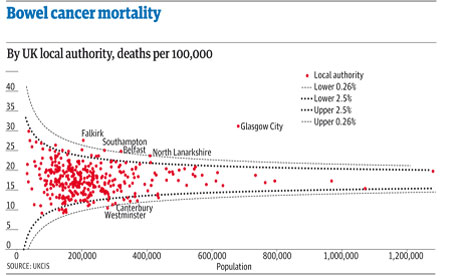
A funnel plot of bowel cancer mortality rates in different areas of the UK

The latest Ben Goldacre Bad Science column provides a particularly useful exercise for anyone interested in avoiding an easy mistake in data journalism: mistaking random variation for a story (in this case about some health services being worse than others for treating a particular condition):

“The Public Health Observatories provide several neat tools for analysing data, and one will draw a funnel plot for you, from exactly this kind of mortality data. The bowel cancer numbers are in the table below. You can paste them into the Observatories’ tool, click “calculate”, and experience the thrill of touching real data.

“In fact, if you’re a journalist, and you find yourself wanting to claim one region is worse than another, for any similar set of death rate figures, then do feel free to use this tool on those figures yourself. It might take five minutes.”

By the way, if you want an easy way to get that data into a spreadsheet (or any other table on a webpage), try out the =importHTML formula, as explained on my spreadsheet blog (and there’s an example for this data here).