
The full version of this post can be found here (this is a duplicate).
When the telephone first entered the newsroom journalists were sceptical. “How can we be sure that the person at the other end is who they say they are?” The question seems odd now, because we have become so used to phone technology that we barely think of it as technology at all – and there are a range of techniques we use, almost unconsciously, to verify what the person on the other end of the phone is saying, from their tone of voice, to the number they are ringing from, and the information they are providing.
Dealing with online sources is no different. How do you know the source is telling the truth? You’re a journalist, for god’s sake: it’s your job to find out.
In many ways the internet gives us extra tools to verify information – certainly more than the phone ever did. The apparent ‘facelessness’ of the medium is misleading: every piece of information, and every person, leaves a trail of data that you can use to build a picture of its reliability.
The following is a three-level approach to verification: starting with the content itself, moving on to the context surrounding it; and finishing with the technical information underlying it. Most of the techniques outlined take very little time at all but the key thing is to look for warning signs and follow those up.
Level 1: Content
At its most basic level, alarm bells should ring if the information you’re looking at is simply too good to be true. The disgruntled sacked employee who makes lights up the exterior of Harrods with a farewell message fits this category. Ask yourself: would this really happen? And if so, who else would have known about it?

The Harrods ‘fuck you’ photo – too good to be true?
If the information is coming through social media you have to ask: is this bait? Jan Moir’s Twitter ‘apology’ is one good example – lending itself to easy retweeting. Peter Serafinowicz’s ‘deleted’ offensive joke is another. So are various Facebook rumours, such as paedophiles who want you to change your profile picture, or party gatecrashers, and the occasional protesting Facebook group. And forum rumours (sometimes placed intentionally to expose journalists who plagiarise without giving their source). And press releases.
Embarrassing emails that go viral can turn out to be PR tricks. Video diaries can be revealed as new forms of narrative. Spectacular video footage can turn out to be more PR (by the way, read through that thread to see how it is infiltrated by a PR person but their identity is challenged). Check the facts, and see what other people have uncovered. And click on all of these links: the more hoaxes you are familiar with, the more likely alarm bells are going to ring at the right time.
The frequency and recency of information will give you a clue as to its veracity: the more recent the information, the more up to date it is likely to be (although it may be based on out of date information – trace it back to its source). And the more frequently a source is updated (over a long period of time), the less likely it is to come from an opportunistic hoaxer. You can get browser bookmarklets that tell you when a webpage was last updated (as well as many other pieces of information).
Finally does the style and personality of the information match the supposed source? Do they write in the same tone? Do they make spelling mistakes?
For images look for cloning and airbrushing. Cloning is the replication and repetition of small areas of a photograph to, for instance, make a crowd look bigger by duplicating faces; make an air attack look more dramatic by adding extra plumes of smoke, or to make an operations room look more active by filling blank screens.
Airbrushing is the removal of details – the Harrods image mentioned above was most likely created in this way, by removing lights so that those remaining spelled out the message. Also worth watching for are composite or staged images, such as the various Google Street View hoaxes.

The Google Street View ‘birth’ – what are the chances of this happening?
This article suggests that inconsistent lighting, eye shapes and light reflections within eyes are all good clues to look for as well. And this related infographic allows you to explore how one image has been retouched. This article by Judith Townend goes into more detail about spotting manipulted images.
Level 2: Context
Social media lends itself particularly well to verification because, in our activity in social networks, we effectively verify each other. If your information comes from a social network account, ask yourself some of these questions:
How long has the account existed? If it’s only existed since a relevant story broke (e.g. Jan Moir’s column; an earthquake where someone claims to be a witness) then it’s likely to be opportunistic.
Who did the person first ‘follow’ or ‘friend’? These should be personal contacts, or fit the type of person you’re dealing with. If their first follow is ReadWriteWeb, then it may be that you’re not actually dealing with a Daily Mail columnist.
Who first followed them? Likewise, it should be their friends and colleagues.
Who has spoken to them online? Ditto.
Who has spoken about them? Here you may find friends and colleagues, but also people who have rumbled them. But don’t take anyone else’s word for their existence unless you can verify them too.
Can you correlate this account with others? The Firefox extension Identify is a useful tool here: it suggests related social network accounts which you can then try to cross-reference. For companies the Chrome extension Polaris Insights does something similar for companies.
For Twitter you might also try other tools including PeerIndex and Klout, both of which use algorithms to give extra information on the ‘human-ness’ and content of particular accounts. On Facebook there is the social commenting plugin which attempts to give a credibility score to commenters.
Finally, of course, you should try to speak to the person. Phone their office or their employer and confirm whether they do indeed have the account in question.
For websites the checks are broadly similar. On Google you can use the advanced search facility to look for other pages that link to the one you’re checking. These might include other website that have rumbled the hoax before you – or are bragging about it.
Similarly look what links the webpage contains to other sites: does this fit what you would expect? The browser bookmarklets mentioned above will collate these for you. At this point we’re starting to move onto the third level…
Level 3: Code
First, look at the website address. If it is purporting to be a governmental website it should end in .gov, .gov.uk etc. Health websites may end in .nhs, police in .police, defence in .mod and so on. Academic websites should end in .ac.uk or .edu but this is no guarantee: less reputable ‘establishments’ have managed to obtain web addresses with these extensions. And of course .com addresses offer no guarantees.
Murray Dick gives more advice on the other elements of a web address, and recommends using an open directory to check your searches, as these are maintained by people, not computers, are less likely to contain hoax websites.
Use a Whois service to find out who the web address is registered to. This isn’t immune to fakery but the hoaxer may not have thought about it, and if the details are hidden you may wonder why. Try variations of the domain – when the viral ‘Labservative’ campaign first began it was not clear who was behind it, and I started by looking at Whois details – the company had kept their details private for the .com address, but they had forgotten to do so for the .co.uk variation. I then called up the company and tried to call their bluff by asking who was managing the campaign.
If you are asking for emails verifying a story, make sure you are forwarded the original email, and not a screengrab, and follow this process to check the IP address of the email against who it’s supposed to be from.
Archives and caches can be useful to compare the latest version of a webpage with older versions. Conducting a relevant Google search and clicking on ‘cache’ next to the relevant result can show up recent changes. The Internet Archive‘s Wayback Machine (recently revamped) can give you snapshots going further back. On Wikipedia and other wiki-based sources, look for ‘history’ and ‘discussion’ links where you can see what changes have been made and the discussions about those.
For images you can check out the EXIF data – this is information about when the image was taken, on which camera, and with what settings. This online tool (there’s a Chrome extension too) allows you to quickly see the EXIF data on any web-based image. This information is best used when speaking to the photographer – ask them when to give you the details that you can verify against the EXIF data. This isn’t a foolproof method but it will screen out most hoaxers.
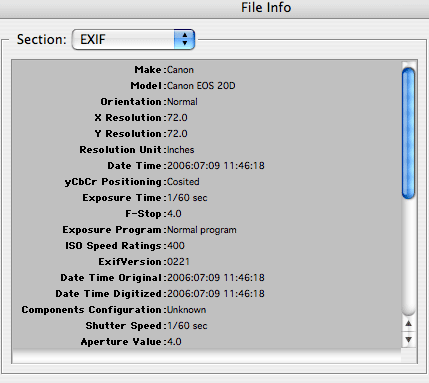
exif data
Some news organisations – such as the BBC, in its UGC hub – have systems that look for Photoshop modification (not necessarily a sign of hoax – a user could simply have cropped or lightened an image). You can also see this yourself by looking under “details” > “origin” > “program name”. JpegSnoop will provide more details on images. Error Level Analysis is another useful tool to detect possible alteration, although it’s not perfect.
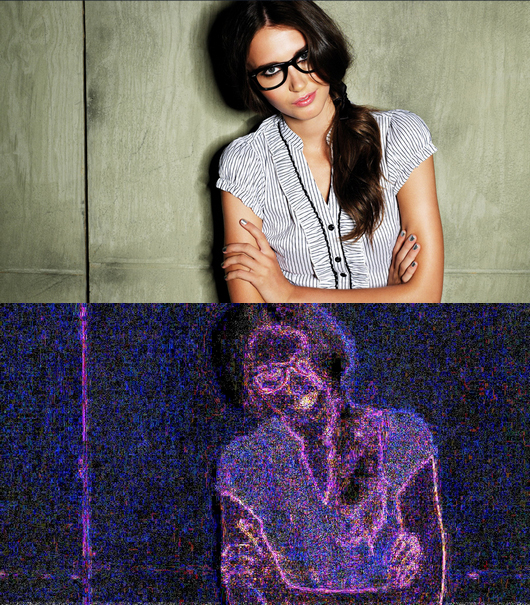
error level analysis highlights parts of an image or video which have been altered
Finally, right-click on the page and view the source code. Occasionally hoaxers intentionally leave clues here, but you can also find other clues such as the author, date, location, and technologies used.
Any other techniques?
Those are just the techniques and tools that I can call to mind but I’m sure there are others I’m not aware of. Any you can suggest?
UPDATE: The BBC College of Journalism’s post on verifying content adds some other useful tips on cross-verification with maps, weather reports and other details.


Hello it’s me, I am also visiting this web site daily, this web site is really good
and the users are truly sharing fastidious thoughts.
Pingback: Should journalists learn how to code? They already do. (And yes, they should) | Online Journalism Blog
Pingback: A digital editor's tale | Taking Twitter/social media for journalists to the next level
Have you seen this exif search engine? http://www.exif-search.com ?
I hadn’t, no – thanks!
Pingback: Gesundheit und Pflege: Die Grundlagen zur Recherche im Internet | Dialog- und Transferzentrum Demenz (DZD)
Pingback: How to hoax the national sports media with nothing more than a red circle | Online Journalism Blog
Pingback: Kuratieren | mikroundmakroblogs
Pingback: Mitä toimittajien tulisi oppia Elisagatesta | Vehkoo
Pingback: Verifying video and other information – crowdsourcing site Bellingcat now open | Online Journalism Blog
Pingback: Guía corta para el trabajo con “breaking news” - Social Media - Spanish - DW.DE
Pingback: Assignment: 《USQ JRN3001: Blog post 3:What constitutes a credible source?》 | Venusstan.com – Daily Blogging & Lifestyle
Pingback: Telling the truth from lies - Verification tips for journalists - Uganda Journalists Resource Centre
Pingback: Lessons from The New York Times Super Tuesday hoax: Five ways to spot fake news – Josh Stearns
Pingback: What Constitutes a Credible Source? | thewolfwrites
Pingback: Médias : veille documentaire 2012 | Philosophie, médias et société