Category Archives: data journalism

Online journalism student RSS reader starter pack: 50 RSS feeds

Teaching has begun in the new academic year and once again I’m handing out a list of recommended RSS feeds. Last year this came in the form of an OPML file, but this year I’m using Google Reader bundles (instructions on how to create one of your own are here). There are 50 feeds in all – 5 feeds in each of 10 categories. Like any list, this is reliant on my own circles of knowledge and arbitrary in various respects. But it’s a start. I’d welcome other suggestions.

Here is the list with links to the bundles. Each list is in alphabetical order – there is no ranking:

5 of the best: Community

A link to the bundle allowing you to add it to your Google Reader is here.

  1. Blaise Grimes-Viort
  2. Community Building & Community Management
  3. FeverBee
  4. ManagingCommunities.com
  5. Online Community Strategist

5 of the best: Data

This was a particularly difficult list to draw up – I went for a mix of visualisation (FlowingData), statistics (The Numbers Guy), local and national data (CountCulture and Datablog) and practical help on mashups (OUseful). I cheated a little by moving computer assisted reporting blog Slewfootsnoop into the 5 UK feeds and 10,000 Words into Multimedia. Bundle link here. Continue reading

Something I wrote for the Guardian Datablog (and caveats)

I’ve written a piece on ‘How to be a data journalist’ for The Guardian’s Datablog. It seems to have proven very popular, but I thought I should blog briefly about it if you haven’t seen one of those tweets.

The post is necessarily superficial – it was difficult enough to cover the subject area for a 12,000-word book chapter, so summarising further into a 1,000 word article was almost impossible.

In the process I had to leave a huge amount out, compensating slightly by linking to webpages which expanded further.

Visualising and mashing, as the more advanced parts of data journalism, suffered most, because it seemed to me that locating and understanding data necessarily took precedence.

Heather Billings, for example, blogged about my “very British footnote [which was the] only nod to visual presentation”. If you do want to know more about visualisation tips, I wrote 1,000 words on that alone here. There’s also this great post by Kaiser Fung – and the diagram below, of which Fung says: “All outstanding charts have all three elements in harmony. Typically, a problematic chart gets only two of the three pieces right.”:

Trifecta checkup

On Monday I blogged the advice on where aspiring data journalists should start in full. There’s also the selection of passages from the book chapter linked above. And my Delicious bookmarks on data journalism, visualisation and mashups. Each has an RSS feed.

I hope that helps. If you do some data journalism as a result, it would be great if you could let me know about it – and what else you picked up.

Open data meets FOI via some nifty automation

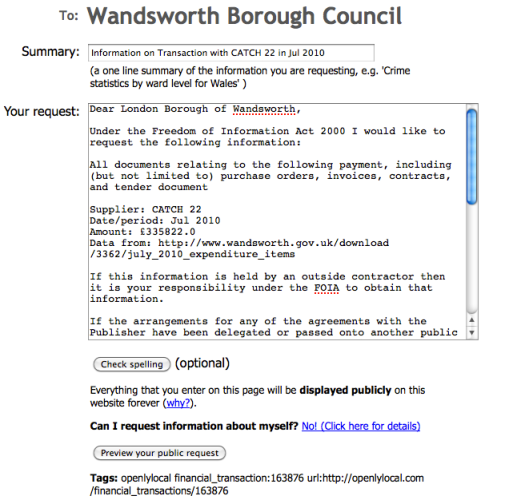
OpenlyLocal generated FOI request

Now this is an example of what’s possible with open data and some very clever thinking. Chris Taggart blogs about a new tool on his OpenlyLocal platform that allows you to send a Freedom of Information (FOI) request based on a particular item of spending. “This further lowers the barriers to armchair auditors wanting to understand where the money goes, and the request even includes all the usual ‘boilerplate’ to help avoid specious refusals.”

It takes around a minute to generate an FOI request.

The function is limited to items of spending above £10,000. Cleverly, it’s also all linked so you can see if an FOI request has already been generated and answered.

Although the tool sits on OpenlyLocalFrancis Irving at WhatDoTheyKnow gets enormous credit for making their side of the operation work with it.

Once again you have to ask why a media organisation isn’t creating these sorts of tools to help generate journalism beyond the walls of its newsroom.

Where should an aspiring data journalist start?

In writing last week’s Guardian Data Blog piece on How to be a data journalist I asked various people involved in data journalism where they would recommend starting. The answers are so useful that I thought I’d publish them in full here.

The Telegraph’s Conrad Quilty-Harper:

Start reading:

http://www.google.com/reader/bundle/user%2F06076274130681848419%2Fbundle%2Fdatavizfeeds

Keep adding to your knowledge and follow other data journalists/people who work with data on Twitter.

Look for sources of data:

ONS stats release calendar is a good start http://www.statistics.gov.uk/hub/release-calendar/index.html Look at the Government data stores (Data.gov, Data.gov.uk, Data.london.gov.uk etc).

Check out What do they know, Freebase, Wikileaks, Manyeyes, Google Fusion charts. Continue reading

"The mass market was a hack": Data and the future of journalism

The following is an unedited version of an article written for the International Press Institute report ‘Brave News Worlds (PDF)

For the past two centuries journalists have dealt in the currency of information: we transmuted base metals into narrative gold. But information is changing.

At first, the base metals were eye witness accounts, and interviews. Later we learned to melt down official reports, research papers, and balance sheets. And most recently our alloys have been diluted by statements and press releases.

But now journalists are having to get to grips with a new type of information: data. And this is a very rich seam indeed.

Data: what, how and why

Data is a broad term so I should define it here: I am not talking here about statistics or numbers in general, because those are nothing new to journalists. When I talk about data I mean information that can be processed by computers.

This is a crucial distinction: it is one thing for a journalist to look at a balance sheet on paper; it is quite another to be able to dig through those figures on a spreadsheet, or to write a programming script to analyse that data, and match it to other sources of information. We can also more easily analyse new types of data, such as live data, large amounts of text, user behaviour patterns, and network connections.

And that, for me, is hugely important. Indeed, it is potentially transformational. Adding computer processing power to our journalistic arsenal allows us to do more, faster, more accurately, and with others. All of which opens up new opportunities – and new dangers. Things are going to change. Continue reading

Why did you get into data journalism?

In researching my book chapter (UPDATE: now published) I asked a group of journalists who worked with data what led them to do so. Here are their answers:

Jonathon Richards, The Times:

The flood of information online presents an amazing opportunity for journalists, but also a challenge: how on earth does one keep up with; make sense of it? You could go about it in the traditional way, fossicking in individual sites, but much of the journalistic value in this outpouring, it seems, comes in aggregation: in processing large amounts of data, distilling them, and exploring them for patterns. To do that – unless you’re superhuman, or have a small army of volunteers – you need the help of a computer.

I ‘got into’ data journalism because I find this mix exciting. It appeals to the traditional journalistic instinct, but also calls for a new skill which, once harnessed, dramatically expands the realm of ‘stories I could possibly investigate…’ Continue reading

The BBC and missed data journalism opportunities

Bar chart: UN progress on eradication of world hunger

I’ve tweeted a couple of times recently about frustrations with BBC stories that are based on data but treat it poorly. As any journalist knows, two occasions of anything in close proximity warrants an overreaction about a “worrying trend”. So here it is.

“One in four council homes fails ‘Decent Homes Standard'”

This is a good piece of newsgathering, but a frustrating piece of online journalism. “Almost 100,000 local authority dwellings have not reached the government’s Decent Homes Standard,” it explained. But according to what? Who? “Government figures seen by BBC London”. Ah, right. Any chance of us seeing those too? No.

The article is scattered with statistics from these figures “In Havering, east London, 56% of properties do not reach Decent Homes Standard – the highest figure for any local authority in the UK … In Tower Hamlets the figure is 55%.”

It’s a great story – if you live in those two local authorities. But it’s a classic example of narrowing a story to fit the space available. This story-centric approach serves readers in those locations, and readers who may be titillated by the fact that someone must always finish bottom in a chart – but the majority of readers will not live in those areas, and will want to know what the figures are for their own area. The article does nothing to help them do this. There are only 3 links, and none of them are deep links: they go to the homepages for Havering Council, Tower Hamlets Council, and the Department of Communities and Local Government.

In the world of print and broadcast, narrowing a story to fit space was a regrettable limitation of the medium; in the online world, linking to your sources is a fundamental quality of the medium. Not doing so looks either ignorant or arrogant.

“Uneven progress of UN Millennium Development Goals”

An impressive piece of data journalism that deserves credit, this looks at the UN’s goals and how close they are to being achieved, based on a raft of stats, which are presented in bar chart after bar chart (see image above). Each chart gives the source of the data, which is good to see. However, that source is simply given as “UN”: there is no link either on the charts or in the article (there are 2 links at the end of the piece – one to the UN Development Programme and the other to the official UN Millennium Development Goals website).

This lack of a link to the specific source of the data raises a number of questions: did the journalist or journalists (in both of these stories there is no byline) find the data themselves, or was it simply presented to them? What is it based on? What was the methodology?

The real missed opportunity here, however, is around visualisation. The relentless onslaught on bar charts makes this feel like a UN report itself, and leaves a dry subject still looking dry. This needed more thought.

Off the top of my head, one option might have been an overarching visualisation of how funding shortfalls overall differ between different parts of the world (allowing you to see that, for example, South America is coming off worst). This ‘big picture’ would then draw in people to look at the detail behind it (with an opportunity for interactivity).

Had they published a link to the data someone else might have done this – and other visualisations – for them. I would have liked to try it myself, in fact.

UPDATE: After reading this post, a link has now been posted to the report (PDF).

Compare this article, for example, with the Guardian Datablog’s treatment of the coalition agreement: a harder set of goals to measure, and they’ve had to compile the data themselves. But they’re transparent about the methodology (it’s subjective) and the data is there in full for others to play with.

It’s another dry subject matter, but The Guardian have made it a social object.

No excuses

The BBC is not a print outlet, so it does not have the excuse of these stories being written for print (although I will assume they were researched with broadcast as the primary outlet in mind).

It should also, in theory, be well resourced for data journalism. Martin Rosenbaum, for example, is a pioneer in the field, and the team behind the BBC website’s Special Reports section does some world class work. The corporation was one of the first in the world to experiment with open innovation with Backstage, and runs a DataArt blog too. But the core newsgathering operation is missing some basic opportunities for good data journalism practice.

In fact, it’s missing just one basic opportunity: link to your data. It’s as simple as that.

On a related note, the BBC Trust wants your opinions on science reporting. On this subject, David Colquhoun raises many of the same issues: absence of links to sources, and anonymity of reporters. This is clearly more a cultural issue than a technical one.

Of all the UK’s news organisations, the BBC should be at the forefront of transparency and openness in journalism online. Thinking politically, allowing users to access the data they have spent public money to acquire also strengthens their ideological hand in the Big Society bunfight.

UPDATE: Credit where it’s due: the website for tonight’s Panorama on public pay includes a link to the full data.

When crowdsourcing is your only option

Crowdsourced map - the price of weed

PriceOfWeed.com is a great example of when you need to turn to crowdsourcing to obtain data for your journalism. As Paul Kedrosky writes, it’s “Not often that you get to combine economics, illicit substances, map mashups and crowd-sourcing in one post like this.” The resulting picture is surprisingly clear.

And news organisations could learn a lot from the way this has been executed. Although the default map view is of the US, the site detects your location and offers you prices nearest to you. It’s searchable and browsable. Sadly, the raw data isn’t available – although it would be relatively straightforward to scrape it.

As the site expands globally it is also adding extra data on the social context – tolerance and  law enforcement. (via)

A First – Not Very Successful – Look at Using Ordnance Survey OpenLayers…

What’s the easiest way of creating a thematic map, that shows regions coloured according to some sort of measure?

Yesterday, I saw a tweet go by from @datastore about Carbon emissions in every local authority in the UK, detailing those emissions for a list of local authorities (whatever they are… I’ll come on to that in a moment…)

Carbon emissions data table

The dataset seemed like a good opportunity to try out the Ordnance Survey’s OpenLayers API, which I’d noticed allows you to make use of OS boundary data and maps in order to create thematic maps for UK data:

OS thematic map demo

So – what’s involved? The first thing was to try and get codes for the authority areas. The ONS make various codes available (download here) and the OpenSpace website also makes available a list of boundary codes that it can render (download here), so I had a poke through the various code files and realised that the Guardian emissions data seemed to identify regions that were coded in different ways? So I stalled there and looked at another part f the jigsaw…

…specifically, OpenLayers. I tried the demo – Creating thematic boundaries – got it to work for the sample data, then tried to put in some other administrative codes to see if I could display boundaries for other area types… hmmm…. No joy:-) A bit of digging identified this bit of code:

boundaryLayer = new OpenSpace.Layer.Boundary("Boundaries", {
strategies: [new OpenSpace.Strategy.BBOX()],
area_code: ["EUR"],
styleMap: styleMap });

which appears to identify the type of area codes/boundary layer required, in this case “EUR”. So two questions came to mind:

1) does this mean we can’t plot layers that have mixed region types? For example, the emissions data seemed to list names from different authority/administrative area types?
2) what layer types are available?

A bit of digging on the OpenLayers site turned up something relevant on the Technical FAQ page:

OS OpenSpace boundary DESCRIPTION, (AREA_CODE) and feature count (number of boundary areas of this type)

County, (CTY) 27
County Electoral Division, (CED) 1739
District, (DIS) 201
District Ward, (DIW) 4585
European Region, (EUR) 11
Greater London Authority, (GLA) 1
Greater London Authority Assembly Constituency, (LAC) 14
London Borough, (LBO) 33
London Borough Ward, (LBW) 649
Metropolitan District, (MTD) 36
Metropolitan District Ward, (MTW) 815
Scottish Parliament Electoral Region, (SPE) 8http://ouseful.wordpress.com/wp-admin/edit.php
Scottish Parliament Constituency, (SPC) 73
Unitary Authority, (UTA) 110
Unitary Authority Electoral Division, (UTE) 1334
Unitary Authority Ward, (UTW) 1464
Welsh Assembly Electoral Region, (WAE) 5
Welsh Assembly Constituency, (WAC) 40
Westminster Constituency, (WMC) 632

so presumably all those code types can be used as area_code arguments in place of “EUR”?

Back to one of the other pieces of the jigsaw: the OpenLayers API is called using official area codes, but the emissions data just provides the names of areas. So somehow I need to map from the area names to an area code. This requires: a) some sort of lookup table to map from name to code; b) a way of doing that.

Normally, I’d be tempted to use a Google Fusion table to try to join the emissions table with the list of boundary area names/codes supported by OpenSpace, but then I recalled a post by Paul Bradshaw on using the Google spreadsheets VLOOKUP formula (to create a thematic map, as it happens: Playing with heat-mapping UK data on OpenHeatMap), so thought I’d give that a go… no joy:-( For seem reason, the vlookup just kept giving rubbish. Maybe it was happy with really crappy best matches, even if i tried to force exact matches. It almost felt like formula was working on a differently ordered column to the one it should have been, I have no idea. So I gave up trying to make sense of it (something to return to another day maybe; I was in the wrong mood for trying to make sense of it, and now I am just downright suspicious of the VLOOKUP function!)…

…and instead thought I’d give the openheatmap application Paul had mentioned a go…After a few false starts (I thought I’d be able to just throw a spreadsheet at it and then specify the data columns I wanted to bind to the visualisation, (c.f. Semantic reports), but it turns out you have to specify particular column names, value for the data value, and one of the specified locator labels) I managed to upload some of the data as uk_council data (quite a lot of it was thrown away) and get some sort of map out:

openheatmap demo

You’ll notice there are a few blank areas where council names couldn’t be identified.

So what do we learn? Firstly, the first time you try out a new recipe, it rarely, if ever, “just works”. When you know what you’re doing, and “all you have to do is…”, all is a little word. When you don’t know what you’re doing, all is a realm of infinite possibilities of things to try that may or may not work…

We also learn that I’m not really that much closer to getting my thematic map out… but I do have a clearer list of things I need to learn more about. Firstly, a few hello world examples using the various different OpenLayer layers. Secondly, a better understanding of the differences between the various authority types, and what sorts of mapping there might be between them. Thirdly, I need to find a more reliable way of reconciling data from two tables and in particular looking up area codes from area names (in two ways: code and area type from area name; code from area name and area type). VLOOKUP didn’t work for me this time, so I need to find out if that was my problem, or an “issue”.

Something else that comes to mind is this: the datablog asks: “Can you do something with this data? Please post your visualisations and mash-ups on our Flickr group”. IF the data had included authority codes, I would have been more likely to persist in trying to get them mapped using OpenLayers. But my lack of understanding about how to get from names to codes meant I stumbled at this hurdle. There was too much friction in going from area name to OpenLayer boundary code. (I have no idea, for example, whether the area names relate to one administrative class, or several).

Although I don’t think the following is the case, I do think it is possible to imagine a scenario where the Guardian do have a table that includes the administrative codes as well as names for this data, or an environment/application/tool for rapidly and reliably generating such a table, and that they know this makes the data more valuable because it means they can easily map it, but others can’t. The lack of codes means that work needs to be done in order to create a compelling map from the data that may attract web traffic. If it was that easy to create the map, a “competitor” might make the map and get the traffic for no real effort. The idea I’m fumbling around here is that there is a spectrum of stuff around a data set that makes it more or less easy to create visualiations. In the current example, we have area name, area code, map. Given an area code, it’s presumably (?) easy enough to map using e.g. OpenLayers becuase the codes are unambiguous. Given an area name, if we can reliably look up the area code, it’s presumably easy to generate the map from the name via the code. Now, if we want to give the appearance of publishing the data, but make it hard for people to use, we can make it hard for them to map from names to codes, either by messing around with the names, or using a mix of names that map on to area codes of different types. So we can taint the data to make it hard for folk to use easily whilst still be being seen to publish the data.

Now I’m not saying the Guardian do this, but a couple of things follow: firstly, obfuscating or tainting data can help you prevent casual use of it by others whilst at the same time ostensibly “open it up” (it can also help you track the data; e.g. mapping agencies that put false artefacts in their maps to help reveal plagiarism); secondly, if you are casual with the way you publish data, you can make it hard for people to make effective use of that data. For a long time, I used to hassle folk into publishing RSS feeds. Some of them did… or at least thought they did. For as soon as I tried to use their feeds, they turned out to be broken. No-one had ever tried to consume them. Same with data. If you publish your data, try to do something with it. So for example, the emissions data is illustrated with a Many Eyes visualisation of it; it works as data in at least that sense. From the place names, it would be easy enough to vaguely place a marker on a map showing a data value roughly in the area of each council. But for identifying exact administrative areas – the data is lacking.

It might seem as is if I’m angling against the current advice to councils and government departments to just “get their data out there” even if it is a bit scrappy, but I’m not… What I am saying (I think) is that folk should just try to get their data out, but also:

– have a go at trying to use it for something themselves, or at least just demo a way of using it. This can have a payoff in at least a three ways I can think of: a) it may help you spot a problem with the way you published the data that you can easily fix, or at least post a caveat about; b) it helps you develop your own data handling skills; c) you might find that you can encourage reuse of the data you have just published in your own institution…

– be open to folk coming to you with suggestions for ways in which you might be able to make the data more valuable/easier to use for them for little effort on your own part, and that in turn may help you publish future data releases in an ever more useful way.

Can you see where this is going? Towards Linked Data… 😉

PS just by the by, a related post (that just happens to mention OUseful.info:-) on the Telegraph blogs about Open data ‘rights’ require responsibility from the Government led me to a quick chat with Telegraph data hack @coneee and the realisation that the Telegraph too are starting to explore the release of data via Google spreadsheets. So for example, a post on Councils spending millions on website redesigns as job cuts loom also links to the source data here: Data: Council spending on websites.

A Quick Play with Google Static Maps: Dallas Crime

A couple of days ago I got an email from Jennifer Okamato of the Dallas News, who had picked up on one my mashup posts describing how to scrape tabluar data from a web page and get it onto an embeddable map (Data Scraping Wikipedia with Google Spreadsheets). She’d been looking at live crime incident data from the Dallas Police, and had managed to replicate my recipe in order to get the data into a map embedded on the Dallas News website:

Active Dallas Police calls

But there was a problem: the data being displayed on the map wasn’t being updated reliably. I’ve always known there were cacheing delays inherent in the approach I’d described, which involves Google Spreadsheets, Yahoo Pipe, Google Maps, as well as local browsers all calling on each other an all potentially cacheing the data, but never really worried about them. But for this example, where the data was changing on a minute by minute basis, the delays were making the map display feel too out of date to be useful. What’s needed is a more real time solution.

I haven’t had chance to work on a realtime chain yet, but I have started dabbling around the edges. The first thing was to get the data from the Dallas Police website.

Dallas police - live incidents

(You’ll notice the data includes elements relating to the time of incident, a brief description of it, its location as an address, the unit handling the call and their current status, and so on.)

A tweet resulted in a solution from @alexbilbie that uses a call to YQL (which may introduce a cacheing delay?) to scrape the table and generate a JSON feed for it, and a PHP handler script to display the data (code).

I tried the code on the OU server that ouseful.open.ac.uk works on, but as it runs PHP4, rather than the PHP5 Alex coded for, it fell over on the JSON parsing stakes. A quick Google turned up a fix in the form of a PEAR library for handling JSON, and a stub of code to invoke it in the absence of native JSON handling routines:

//JSON.php library from http://abeautifulsite.net/blog/2008/05/using-json-encode-and-json-decode-in-php4/
include("JSON.php");

// Future-friendly json_encode
if( !function_exists('json_encode') ) {
    function json_encode($data) {
        $json = new Services_JSON();
        return( $json->encode($data) );
    }
}

// Future-friendly json_decode
if( !function_exists('json_decode') ) {
    function json_decode($data) {
        $json = new Services_JSON();
        return( $json->decode($data) );
    }
}

I then started to explore ways of getting the data onto a Google Map…(I keep meaning to switch to OpenStreetMap, and I keep meaning to start using the Mapstraction library as a proxy that could in principle cope with OpenStreetMap, Google Maps, or various other mapping solutions, but I was feeling lazy, as ever, and defaulted to the Goog…). Two approaches came to mind:

– use the Google static maps API to just get the markers onto a static map. This has the advantage of being able to take a list of addresses in the image URL which then then be automatically geocoded; but it has the disadvantage of requiring a separate key area detailing the incidents associated with each marker:

Dallas crime static map demo

– use the interactive Google web maps API to create a map and add markers to it. In order to place the markers, we need to call the Google geocoding API once for each address. Unfortunately, in a quick test, I couldn’t get the version 3 geolocation API to work, so I left this for another day (and maybe a reversion to the version 2 geolocation API, which requires a user key and which I think I’ve used successfully before… err, maybe?!;-).

So – the static maps route it is.. how does it work then? I tried a couple of routes: firstly, generating the page via a PHP script. Secondly, on the client side using a version of the JSON feed from Alex’s scraper code.

I’ll post the code at the end, but for now will concentrate on how the static image file is generated. As with the Google Charts API, it’s all in the URL.

For example, here’s a static map showing a marker on Walton Hall, Milton Keynes:

OU static map

Here’s the URL:

http://maps.google.com/maps/api/staticmap?
center=Milton%20Keynes
&zoom=12&size=512×512&maptype=roadmap
&markers=color:blue|label:X|Walton%20Hall,%20Milton%20Keynes
&sensor=false

You’ll notice I haven’t had to provide latitude/longitude data – the static map API is handling the geocoding automatically from the address (though if you do have lat/long data, you can pass that instead). The URL can also carry more addresses/more markers – simply add another &markers= argument for each address. (I’m not sure what the limit is? It may be bound by the length of the URL?)

So -remember the original motivation for all this? Finding a way of getting recent crime incident data onto a map on the Dallas News website? Jennifer managed to get the original Google map onto the Dallas News page, so it seems that if she has the URL for a web page containing (just) the map, she can get it embedded in an iframe on the Dallas News website. But I think it’s unlikely that she’d be able to get Javascript embedded in the parent Dallas News page, and probably unlikely that she could get PHP scripts hosted on the site. The interactive map is obviously the preferred option, but a static map may be okay in the short term.

Looking at the crude map above, I think it could be nice to be able to use different markers (either different icons, or different colours – maybe both?) to identify the type of offence, its priority and its status. Using the static maps approach – with legend – it would be possible to colour code different incidents too, or colour or resize them if several units were in attendance? One thing I don;’t do is cluster duplicate entries (where maybe more than one unit is attending?)

It would be nice if the service was a live one, with the map refreshing every couple of minutes or so, for example by pulling a refreshed JSON feed into the page, and updating the map with new markers, and letting old markers fade over time. This would place a load on the original screenscraping script, so it’d be worth revisiting that and maybe implementing some sort of cache so that it plays nicely with the Dallas Police website (e.g. An Introduction to Compassionate Screen Scraping could well be my starter for 10). If the service was running as a production one, API rate limiting might be an issue too, particularly if the map was capable of being updated (I’m not sure what rate limiting applies to the static maps api, the Google maps API, or the Google geolocation API? In the short term (less coding) it might make sense to try to offload this to the client (i.e. let the browser call Google to geocode the markers), but a more efficient solution might be for a script on the server to geocode each location and then pass the lat/long data as part of the JSON feed.

Jennifer also mentioned getting a map together for live fire department data, which could also provide another overlay (and might be useful for identifiying major fire incidents?) In that case, it might be necessary to dither markers, so e.g. police and fire department markers didn’t sit on top of and mask each other. (Not sure how to do this in static maps, where we geocoding by address? Would maybe have to handle things logically, and use a different marker type for events attended by just police units, just fire units, or both types? If we’re going for real time, it might also be interesting to overlay recent geotagged tweets from twitter?

Anything else I’m missing? What would YOU do next?

PS if you want to see the code, here it is:

Firstly, the PHP solution [code]:

<html>
<head><title>Static Map Demo</title>
</head><body>

<?php

error_reporting(-1);
ini_set('display_errors', 'on');

include("json.php");

// Future-friendly json_encode
if( !function_exists('json_encode') ) {
    function json_encode($data) {
        $json = new Services_JSON();
        return( $json->encode($data) );
    }
}

// Future-friendly json_decode
if( !function_exists('json_decode') ) {
    function json_decode($data) {
        $json = new Services_JSON();
        return( $json->decode($data) );
    }
}

$response = file_get_contents("http://query.yahooapis.com/v1/public/yql?q=select%20*%20from%20html%20where%20url%3D%22http%3A%2F%2Fwww.dallaspolice.net%2Fmediaaccess%2FDefault.aspx%22%20and%0A%20%20%20%20%20%20xpath%3D'%2F%2F*%5B%40id%3D%22grdData_ctl01%22%5D%2Ftbody'&format=json");

$json = json_decode($response);

$reports = array();

if(isset($json->query->results))
{
    $str= "<img src='http://maps.google.com/maps/api/staticmap?center=Dallas,Texas";
    $str.="&zoom=10&size=512x512&maptype=roadmap";

    $ul="<ul>";

	$results = $json->query->results;

	$i = 0;

	foreach($results->tbody->tr as $tr)
	{

		$reports[$i]['incident_num'] = $tr->td[1]->p;
		$reports[$i]['division'] = $tr->td[2]->p;
		$reports[$i]['nature_of_call'] = $tr->td[3]->p;
		$reports[$i]['priority'] = $tr->td[4]->p;
		$reports[$i]['date_time'] = $tr->td[5]->p;
		$reports[$i]['unit_num'] = $tr->td[6]->p;
		$reports[$i]['block'] = $tr->td[7]->p;
		$reports[$i]['location'] = $tr->td[8]->p;
		$reports[$i]['beat'] = $tr->td[9]->p;
		$reports[$i]['reporting_area'] = $tr->td[10]->p;
		$reports[$i]['status'] = $tr->td[11]->p;

	    $addr=$reports[$i]['block']." ".$reports[$i]['location'];
	    $label=chr(65+$i);
	    $str.="&markers=color:blue|label:".$label."|".urlencode($addr);
	    $str.=urlencode(",Dallas,Texas");

	    $ul.="<li>".$label." - ";
	    $ul.=$reports[$i]['date_time'].": ".$reports[$i]['nature_of_call'];
	    $ul.", incident #".$reports[$i]['incident_num'];
	    $ul.=", unit ".$reports[$i]['unit_num']." ".$reports[$i]['status'];
	    $ul.=" (priority ".$reports[$i]['priority'].") - ".$reports[$i]['block']." ".$reports[$i]['location'];
	    $ul.="</li>";

		$i++;

	}

	$str.="&sensor=false";
    $str.="'/>";
    echo $str;

    $ul.="</ul>";
    echo $ul;
}
?>
</body></html>

And here are a couple of JSON solutions. One that works using vanilla JSON [code], and as such needs to be respectful of browser security policies that say the JSON feed needs to be served from the same domain as the web page that’s consuming it:

<html>
<head><title>Static Map Demo - client side</title>

<script src="http://code.jquery.com/jquery-1.4.2.min.js"></script>

<script type="text/javascript">

function getData(){
    var str; var msg;
    str= "http://maps.google.com/maps/api/staticmap?center=Dallas,Texas";
    str+="&zoom=10&size=512x512&maptype=roadmap";

    $.getJSON('dallas2.php', function(data) {
      $.each(data, function(i,item){
        addr=item.block+" "+item.location;
	    label=String.fromCharCode(65+i);
        str+="&markers=color:blue|label:"+label+"|"+encodeURIComponent(addr);
	    str+=encodeURIComponent(",Dallas,Texas");

	    msg=label+" - ";
        msg+=item.date_time+": "+item.nature_of_call;
	    msg+=", incident #"+item.incident_num;
	    msg+=", unit "+item.unit_num+" "+item.status;
	    msg+=" (priority "+item.priority+") - "+item.block+" "+item.location;
        $("<li>").html(msg).appendTo("#details");

      })
      str+="&sensor=false";
      $("<img/>").attr("src", str).appendTo("#map");

    });

}
</script>
</head><body onload="getData()">

<div id="map"></div>
<ul id="details"></ul>
</body></html>

And a second approach that uses JSONP [code], so the web page and the data feed can live on separate servers. What this really means is that you can grab the html page, put it on your own server (or desktop), hack around with the HTML/Javascript, and it should still work…

<html>
<head><title>Static Map Demo - client side</title>

<script src="http://code.jquery.com/jquery-1.4.2.min.js"></script>

<script type="text/javascript">

function dallasdata(json){
    var str; var msg;
    str= "http://maps.google.com/maps/api/staticmap?center=Dallas,Texas";
    str+="&zoom=10&size=512x512&maptype=roadmap";

      $.each(json, function(i,item){
        addr=item.block+" "+item.location;
	    label=String.fromCharCode(65+i);
        str+="&markers=color:blue|label:"+label+"|"+encodeURIComponent(addr);
	    str+=encodeURIComponent(",Dallas,Texas");

	    msg=label+" - ";
        msg+=item.date_time+": "+item.nature_of_call;
	    msg+=", incident #"+item.incident_num;
	    msg+=", unit "+item.unit_num+" "+item.status;
	    msg+=" (priority "+item.priority+") - "+item.block+" "+item.location;
        $("<li>").html(msg).appendTo("#details");

      })
      str+="&sensor=false";
      $("<img/>").attr("src", str).appendTo("#map");

}

function cross_domain_JSON_call(url){
 url="http://ouseful.open.ac.uk/maps/dallas2.php?c=true";
 $.getJSON(
   url,
   function(data) { dallasdata(data); }
 )
}

$(document).ready(cross_domain_JSON_call(url));

</script>
</head><body>

<div id="map"></div>
<ul id="details"></ul>
</body></html>