The £10,000 question: who benefits most from a tax threshold change?

UPDATE [Feb 14 2012]: Full Fact picked up the challenge and dug into the data:

“The crucial difference is in methodology – while the TPA used individuals as its basis, the IFS used households as provided by the Government data.

“This led to substantially different conclusions. The IFS note that using household income as a measure demonstrates increased gains for households with two or more earners. As they state:

“”families with two taxpayers would gain more than families with one taxpayer, who tend to be worse off. Thus, overall, better-off families (although not the very richest) would tend to gain most in cash terms from this reform…””

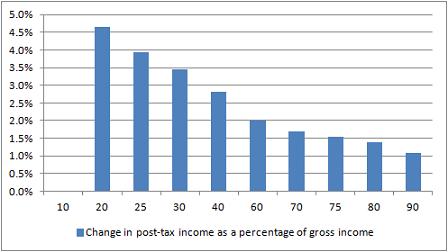
Here’s a great test for eagle-eyed journalists, tweeted by Guardian’s James Ball. It’s a tale of two charts that claim to show the impact of a change in the income tax threshold to £10,000. Here’s the first:

Change in post-tax income as a percentage of gross income

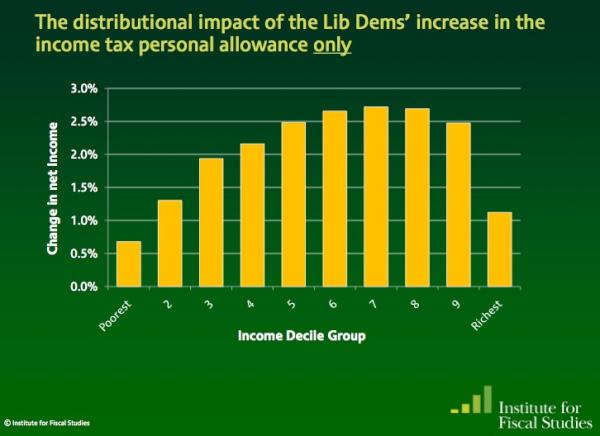
And here’s the second:

Net impact of income tax threshold change on incomes - IFS

So: same change, very different stories. In one story (Institute for Fiscal Studies) it is the the wealthiest that appear to benefit the most; but in the other (Taxpayers’ Alliance via Guido Fawkes) it’s the poorest who are benefiting.

Did you spot the difference? The different y axis is a slight clue – the first chart covers a wider range of change – but it’s the legend that gives the biggest hint: one is measuring change as a percentage of gross income (before, well, taxes); the other as a change in net income (after tax).

James’s colleague Mary Hamilton put it like this: “4.5% of very little is of course much less than 1% of loads.” Or, more specifically: 4.6% of £10,853 (the second decile mentioned in Fawkes’ post) is £499.24; 1.1% of £47,000 (the 9th decile according to the same ONS figures) is £517. (Without raw data, it’s hard to judge what figures are being used – if you include earnings over that £47k marker then it changes things, for example, and there’s no link to the net earnings).

In a nutshell, like James, I’m not entirely sure why they differ so strikingly. So, further statistical analysis welcome.

UPDATE: Seems a bit of a Twitter fight erupted between Guido Fawkes and James Ball over the source of the IFS data. James links to this pre-election document containing the chart and this one on ‘Budget 2011’. Guido says the chart’s “projections were based on policy forecasts that didn’t pan out”. I’ve not had the chance to properly scrutinise the claims of either James or Guido. I’ve also yet to see a direct link to the Taxpayers’ Alliance data, so that is equally in need of unpicking.

In this post, however, my point isn’t to do with the specific issue (or who is ‘right’) but rather how it can be presented in different ways, and the importance of having access to the raw data to ‘unspin’ it.

A new Scottish datablog (and a treemap in Liverpool)

The Scotsman has a newish data blog, set up (I’m rather proud to say) by one of my former PA/Telegraph trainees: Jennifer O’Mahony. This is particularly important as so much data covered in the ‘national’ press tends to be English-only due to devolution.

The Department of Education, for example, only publishes English education data. If you want Scottish education data you need to go to the Scottish Government website or Education ScotlandOfsted inspects schools in England; for Scottish schools reports you need to visit HM Inspectorate of Education. (Meanwhile, the National Statistics site, publishes data from England, Scotland, Wales and Northern Ireland).

So if there’s any Scottish data – or that of Wales or Northern Ireland – that you want me to help with, let me or Jennifer know. By way of illustrating the process, here’s a post over on Help Me Investigate: Education on how I helped Jennifer collect data on free school meals in Scotland.

A treemap in Liverpool

On the same note of non-national data journalism, here’s a particularly nice bit of data visualisation at the Liverpool Post. It’s not often you see treemaps on a local newspaper website – this one was designed by Ilan Sheady based on data gathered by City Editor David Bartlett after a day’s data journalism training.

Infographic showing the huge scale of the £5.5bn Liverpool Waters scheme


Word cloud or bar chart?

Bar charts preferred over word clouds

One of the easiest ways to get someone started on data visualisation is to introduce them to word clouds (it also demonstrates neatly how not all data is numerical).

Using tools like Wordle and Tagxedo, you can paste in a major speech and see it visualised within a minute or so.

But is a word cloud the best way of visualising speeches? The New York Times appear to think otherwise. Their visualisation (above) comparing President Obama’s State of the Union address and speeches by Republican presidential candidates chooses to use something far less fashionable: the bar chart.

Why did they choose a bar chart? The key is the purpose of the chart: comparison. If your objective is to capture the spirit of a speech, or its key themes, then a word cloud can still work well, if you clean the data (see this interactive example that appeared on the New York Times in 2009).

But if you want to compare it to speeches of others – and particularly if you want to compare on specific issues such as employment or tax – then bar charts are a better choice. Compare, for example, ReadWriteWeb’s comparison of inaugural speeches, and how effective that is compared to the bar charts.

In short, don’t always reach for the obvious chart type – and be clear what you’re trying to communicate.

UPDATE: More criticism of word clouds by New York Times software architect here (via Harriet Bailey)

Obama inaugural speech word cloud by ReadWriteWeb

Obama inaugural speech word cloud by ReadWriteWeb

via Flowing Data

Report: Social Media and News

Report: Social Media and NewsLast year I was commissioned to write a report on ‘Social Media and News’ for the Open Society Media Program, as part of the ‘Mapping Digital Media’ series. The report is now available here (PDF).

As I say in the introduction, I focused on “the areas that are most strongly contested and hold the most importance for the development of news reporting”, namely:

  • competition over copyright between individuals, news organisations, and social media platforms;
  • the move to hyperlocal and international-scope publishing;
  • the tensions between privacy and freedom of speech; and
  • attempts by governments and corporations to control what happens online.

These and other developments (such as the growth of APIs which “connect the information that we consume with the information we increasingly embody”) are then explored with specific reference to issues of editorial independence, public interest and public service, pluralism and diversity, accountability, and freedom of expression.

That’s quite a lot to cover in 4,000 words. So for those who want to explore some of the issues or cases in more detail – or follow recent updates (and a lot has happened even since finishing the report) – I’ve been collecting related links at this Delicious ‘stack’, and on an ongoing basis at this tag.

Data journalism awards

Yesterday saw the launch of the first (surprisingly) international data journalism awards, backed by the European Journalism Centre*, Google, and the Global Editors Network.

There are 6 awards – 3 categories, each split into national/international and local/regional subcategories: investigative journalism; visualisation; and apps.

Each comes with prize money of 7,500 euros.

The closing date for entries is April 10. It’s particularly good to see a jury and pre-jury that isn’t dominated by Anglo-American traditional media, so if your work is unconventionally innovative it stands a decent chance of making it through. There’s also no specification on where your work is published, so students and independent journalists can enter.

The one thing I’d like to see in future years is the ‘visualisation and storytelling’ category expanded to include non-visual storytelling – there’s a tendency to reach for visualisation as a way to communicate data when other methods could be just as, or more, engaging.

*Declaration of interest: I am on the editorial board for the EJC’s Data Driven Journalism project.

Comment call: Objectivity and impartiality – a newsroom policy for student projects

I’ve been updating a newsroom policy guide for a project some of my students will be working on, with a particular section on objectivity and impartiality. As this has coincided with the debate on fact-checking stirred by the New York Times public editor Arthur Brisbane, I thought I would reproduce the guidelines here, and invite comments on whether you think it hits the right note:

Objectivity and impartiality: newsroom policy

Objectivity is a method, not an element of style. In other words:

  • Do not write stories that give equal weight to each ‘side’ of an argument if the evidence behind each side of the argument is not equal. Doing so misrepresents the balance of opinions or facts. Your obligation is to those facts, not to the different camps whose claims may be false.
  • Do not simply report the assertions of different camps. As a journalist your responsibility is to check those assertions. If someone misrepresents the facts, do not simply say someone else disagrees, make a statement along the lines of “However, the actual wording of the report…” or “The official statistics do not support her argument” or “Research into X contradict this.” And of course, link to that evidence and keep a copy for yourself (which is where transparency comes in).

Lazy reporting of assertions without evidence is called the ‘View From Nowhere’ – you can read Jay Rosen’s Q&A or the Wikipedia entry, which includes this useful explanation:

“A journalist who strives for objectivity may fail to exclude popular and/or widespread untrue claims and beliefs from the set of true facts. A journalist who has done this has taken The View From Nowhere. This harms the audience by allowing them to draw conclusions from a set of data that includes untrue possiblities. It can create confusion where none would otherwise exist.”

Impartiality is dependent on objectivity. It is not (as subjects of your stories may argue) giving equal coverage to all sides, but rather promising to tell the story based on objective evidence rather than based on your own bias or prejudice. All journalists will have opinions and preconceived ideas of what a story might be, but an impartial journalist is prepared to change those opinions, and change the angle of the story. In the process they might challenge strongly-held biases of the society they report on – but that’s your job.

The concept of objectivity comes from the sciences, and this provides a useful guideline: scientists don’t sit between two camps and repeat assertions without evaluating them. They identify a claim (hypothesis) and gather the evidence behind it – both primary and secondary.

Claims may, however, already be in the public domain and attracting a lot of attention and support. In those situations reporting should be open about the information the journalist does not have. For example:

  • “His office, however, were unable to direct us to the evidence quoted”, or
  • “As the report is yet to be published, it is not possible to evaluate the accuracy of these claims”, or
  • “When pushed, X could not provide any documentation to back up her claims”.

Thoughts?

Sockpuppetry and Wikipedia – a PR transparency project

Wikipedia image by Octavio Rojas

Wikipedia image by Octavio Rojas

Last month you may have read the story of lobbyists editing Wikipedia entries to remove criticism of their clients and smear critics. The story was a follow-up to an undercover report by the Bureau of Investigative Journalism and The Independent on claims of political access by Bell Pottinger, written as a result of investigations by SEO expert Tim Ireland.

Ireland was particularly interested in reported boasts by executives that they could “manipulate Google results to ‘drown out’ negative coverage of human rights violations and child labour”. His subsequent digging resulted in the identification of a number of Wikipedia edits made by accounts that he was able to connect with Bell Pottinger, an investigation by Wikipedia itself, and the removal of edits made by suspect accounts (also discussed on Wikipedia itself here).

This month the story reverted to an old-fashioned he-said-she-said report on conflict between Wikipedia and the PR industry as Jimmy Wales spoke to Bell Pottinger employees and was criticised by co-founder Tim (Lord) Bell.

More insightfully, Bell’s lack of remorse has led Tim Ireland to launch a campaign to change the way the PR industry uses Wikipedia, by demonstrating directly to Lord Bell the dangers of trying to covertly shape public perception:

“Mr Bell needs to learn that the age of secret lobbying is over, and while it may be difficult to change the mind of someone as obstinate as he, I think we have a jolly good shot at changing the landscape that surrounds him in the attempt.

“I invite you to join an informal lobbying group with one simple demand; that PR companies/professionals declare any profile(s) they use to edit Wikipedia, name and link to them plainly in the ‘About Us’ section of their website, and link back to that same website from their Wikipedia profile(s).”

The lobbying group will be drawing attention to Bell Pottinger’s techniques by displacing some of the current top ten search results for ‘Tim Bell’ (“absurd puff pieces”) with “factually accurate and highly relevant material that Tim Bell would much rather faded into the distance” – specifically, the contents of an unauthorised biography of Bell, currently “largely invisible” to Google.

Ireland writes that:

“I am hoping that the prospect of dealing with an unknown number of anonymous account holders based in several different countries will help him to better appreciate his own position, if only to the extent of having him revise his policy on covert lobbying.”

…and from there to the rest of the PR industry.

It’s a fascinating campaign (Ireland’s been here before, using Google techniques to demonstrate factual inaccuracies to a Daily Mail journalist) and one that we should be watching closely. The PR industry is closely tied to the media industry, and sockpuppetry in all its forms is something journalists should do more than merely complain about.

It also highlights again how distribution has become a role of the journalist: if a particular piece of public interest reporting is largely invisible to Google, we should care about it.

UPDATE: See the comments for further exploration of the issues raised by this, in particular: if you thought someone had edited a Wikipedia entry to promote a particular cause or point of view, would you seek to correct it? Is that what Tim Ireland is doing here, but on the level of search results?

SFTW: Scraping data with Google Refine

For the first Something For The Weekend of 2012 I want to tackle a common problem when you’re trying to scrape a collection of webpage: they have some sort of structure in their URL like this, where part of the URL refers to the name or code of an entity:

  1. http://www.ltscotland.org.uk/scottishschoolsonline/schools/freemealentitlement.asp?iSchoolID=5237521
  2. http://www.ltscotland.org.uk/scottishschoolsonline/schools/freemealentitlement.asp?iSchoolID=5237629
  3. http://www.ltscotland.org.uk/scottishschoolsonline/schools/freemealentitlement.asp?iSchoolID=5237823

In this instance, you can see that the URL is identical apart from a 7 digit code at the end: the ID of the school the data refers to.

There are a number of ways you could scrape this data. You could use Google Docs and the =importXML formula, but Google Docs will only let you use this 50 times on any one spreadsheet (you could copy the results and select Edit > Paste Special > Values Only and then use the formula a further 50 times if it’s not too many – here’s one I prepared earlier).

And you could use Scraperwiki to write a powerful scraper – but you need to understand enough coding to do so quickly (here’s a demo I prepared earlier).

A middle option is to use Google Refine, and here’s how you do it.

Assembling the ingredients

With the basic URL structure identified, we already have half of our ingredients. What we need  next is a list of the ID codes that we’re going to use to complete each URL.

An advanced search for “list seed number scottish schools filetype:xls” brings up a link to this spreadsheet (XLS) which gives us just that.

The spreadsheet will need editing: remove any rows you don’t need. This will reduce the time that the scraper will take in going through them. For example, if you’re only interested in one local authority, or one type of school, sort your spreadsheet so that you can delete those above or below them.

Now to combine  the ID codes with the base URL.

Bringing your data into Google Refine

Open Google Refine and create a new project with the edited spreadsheet containing the school IDs.

At the top of the school ID column click on the drop-down menu and select Edit column > Add column based on this column…

In the New column name box at the top call this ‘URL’.

In the Expression box type the following piece of GREL (Google Refine Expression Language):

http://www.ltscotland.org.uk/scottishschoolsonline/schools/freemealentitlement.asp?iSchoolID=”+value

(Type in the quotation marks yourself – if you’re copying them from a webpage you may have problems)

The ‘value’ bit means the value of each cell in the column you just selected. The plus sign adds it to the end of the URL in quotes.

In the Preview window you should see the results – you can even copy one of the resulting URLs and paste it into a browser to check it works. (On one occasion Google Refine added .0 to the end of the ID number, ruining the URL. You can solve this by changing ‘value’ to value.substring(0,7) – this extracts the first 7 characters of the ID number, omitting the ‘.0’) UPDATE: in the comment Thad suggests “perhaps, upon import of your spreadsheet of IDs, you forgot to uncheck the importer option to Parse as numbers?”

Click OK if you’re happy, and you should have a new column with a URL for each school ID.

Grabbing the HTML for each page

Now click on the top of this new URL column and select Edit column > Add column by fetching URLs…

In the New column name box at the top call this ‘HTML’.

All you need in the Expression window is ‘value’, so leave that as it is.

Click OK.

Google Refine will now go to each of those URLs and fetch the HTML contents. As we have a couple thousand rows here, this will take a long time – hours, depending on the speed of your computer and internet connection (it may not work at all if either isn’t very fast). So leave it running and come back to it later.

Extracting data from the raw HTML with parseHTML

When it’s finished you’ll have another column where each cell is a bunch of HTML. You’ll need to create a new column to extract what you need from that, and you’ll also need some GREL expressions explained here.

First you need to identify what data you want, and where it is in the HTML. To find it, right-click on one of the webpages containing the data, and search for a key phrase or figure that you want to extract. Around that data you want to find a HTML tag like <table class=”destinations”> or <div id=”statistics”>. Keep that open in another window while you tweak the expression we come onto below…

Back in Google Refine, at the top of the HTML column click on the drop-down menu and select Edit column > Add column based on this column…

In the New column name box at the top give it a name describing the data you’re going to pull out.

In the Expression box type the following piece of GREL (Google Refine Expression Language):

value.parseHtml().select(“table.destinations”)[0].select(“tr”).toString()

(Again, type the quotation marks yourself rather than copying them from here or you may have problems)

I’ll break down what this is doing:

value.parseHtml()

parse the HTML in each cell (value)

.select(“table.destinations”)

find a table with a class (.) of “destinations” (in the source HTML this reads <table class=”destinations”>. If it was <div id=”statistics”> then you would write .select(“div#statistics”) – the hash sign representing an ‘id’ and the full stop representing a ‘class’.

[0]

This zero in square brackets tells Refine to only grab the first table – a number 1 would indicate the second, and so on. This is because numbering (“indexing”) generally begins with zero in programming.

.select(“tr”)

Now, within that table, find anything within the tag <tr>

.toString()

And convert the results into a string of text.

The results of that expression in the Preview window should look something like this:

<tr> <th></th> <th>Abbotswell School</th> <th>Aberdeen City</th> <th>Scotland</th> </tr> <tr> <th>Percentage of pupils</th> <td>25.5%</td> <td>16.3%</td> <td>22.6%</td> </tr>

This is still HTML, but a much smaller and manageable chunk. You could, if you chose, now export it as a spreadsheet file and use various techniques to get rid of the tags (Find and Replace, for example) and split the data into separate columns (the =SPLIT formula, for example).

Or you could further tweak your GREL code in Refine to drill further into your data, like so:

value.parseHtml().select(“table.destinations”)[0].select(“td”)[0].toString()

Which would give you this:

<td>25.5%</td>

Or you can add the .substring function to strip out the HTML like so (assuming that the data you want is always 5 characters long):

value.parseHtml().select(“table.destinations”)[0].select(“td”)[0].toString().substring(5,10)

When you’re happy, click OK and you should have a new column for that data. You can repeat this for every piece of data you want to extract into a new column.

Then click Export in the upper right corner and save as a CSV or Excel file.

More on how this data was used on Help Me Investigate Education.

Different Speeches? Digital Skills Aren’t just About Coding…

Secretary of State for Education, Michael Gove, gave a speech yesterday on rethinking the ICT curriculum in UK schools. You can read a copy of the speech variously on the Department for Education website, or, err, on the Guardian website.

Seeing these two copies of what is apparently the same speech, I started wondering:

a) which is the “best” source to reference?
b) how come the Guardian doesn’t add a disclaimer about the provenance of, and link, to the DfE version? [Note the disclaimer in the DfE version – “Please note that the text below may not always reflect the exact words used by the speaker.”]
c) is the Guardian version an actual transcript, maybe? That is, does the Guardian reprint the “exact words” used by the speaker?

And that made me think I should do a diff… About which, more below…

Before that, however, here’s a quick piece of reflection on how these two things – the reinvention of the the IT curriculum, and the provenance of, and value added to, content published on news and tech industry blog sites – collide in my mind…

So for example, I’ve been pondering what the role of journalism is, lately, in part because I’m trying to clarify in my own mind what I think the practice and role of data journalism are (maybe I should apply for a Nieman-Berkman Fellowship in Journalism Innovation to work on this properly?!). It seems to me that “communication” is one important part (raising awareness of particular issues, events, or decisions), and holding governments and companies to account is another. (Actually, I think Paul Bradshaw has called me out on that, before, suggesting it was more to do with providing an evidence base through verification and triangulation, as well as comment, against which governments and companies could be held to account (err, I think? As an unjournalist, I don’t have notes or a verbatim quote against which to check that statement, and I’m too lazy to email/DM/phone Paul to clarify what he may or may not have said…(The extent of my checking is typically limited to what I can find on the web or in personal archives…which appear to be lacking on this point…))

Another thing I’ve been mulling over recently in a couple of contexts relates to the notion of what are variously referred to as digital or information skills.

The first context is “data journalism”, and the extent to which data journalists need to be able to do programming (in the sense of identifying the steps in a process that can be automated and how they should be sequenced or organised) versus writing code. (I can’t write code for toffee, but I can read it well enough to copy, paste and change bits that other people have written. That is, I can appropriate and reuse other people’s code, but can’t write it from scratch very well… Partly because I can’t ever remember the syntax and low level function names. I can also use tools such as Yahoo Pipes and Google Refine to do coding like things…) Then there’s the question of what to call things like URL hacking or (search engine) query building?

The second context is geeky computer techie stuff in schools, the sort of thing covered by Michael Gove’s speech at the BETT show on the national ICT curriculum (or lack thereof), and about which the educational digerati were all over on Twitter yesterday. Over the weekend, houseclearing my way through various “archives”, I came across all manner of press clippings from 2000-2005 or so about the activities of the OU Robotics Outreach Group, of which I was a co-founder (the web presence has only recently been shut down, in part because of the retirement of the sys admin on whose server the websites resided.) This group ran an annual open meeting every November for several years hosting talks from the educational robotics community in the UK (from primary school to HE level). The group also co-ordinated the RoboCup Junior competition in the UK, ran outreach events, developed various support materials and activities for use with Lego Mindstorms, and led the EPSRC/AHRC Creative Robotics Research Network.

At every robotics event, we’d try to involve kids and/or adults in elements of problem solving, mechanical design, programming (not really coding…) based around some sort of themed challenge: a robot fashion show, for example, or a treasure hunt (both variants on edge following/line following;-) Or a robot rescue mission, as used in a day long activity in the “Engineering: An Active Introduction” (TXR120) OU residential school, or the 3 hour “Robot Theme Park” team building activity in the Masters level “Team Engineering” (T885) weekend school. [If you’re interested, we may be able to take bookings to run these events at your institution. We can make them work at a variety of difficulty levels from KS3-4 and up;-)]

Given that working at the bits-atoms interface is where the a lot of the not-purely-theoretical-or-hardcore-engineering innovation and application development is likely to take place over the next few years, any mandate to drop the “boring” Windows training ICT stuff in favour of programming (which I suspect can be taught in not only a really tedious way, but a really confusing and badly delivered way too) is probably Not the Best Plan.

Slightly better, and something that I know is currently being mooted for reigniting interest in computing, is the Raspberry Pi, a cheap, self-contained, programmable computer on a board (good for British industry, just like the BBC Micro was…;-) that allows you to work at the interface between the real world of atoms and the virtual world of bits that exists inside the computer. (See also things like the OU Senseboard, as used on the OU course “My Digital Life” (TU100).)

If schools were actually being encouraged to make a financial investment on a par with the level of investment around the introduction of the BBC Micro, back in the day, I’d suggest a 3D printer would have more of the wow factor…(I’ll doodle more on the rationale behind this in another post…) The financial climate may not allow for that (but I bet budget will manage to get spent anyway…) but whatever the case, I think Gove needs to be wary about consigning kids to lessons of coding hell. And maybe take a look at programming in a wider creative context, such as robotics (the word “robotics” is one of the reason why I think it’s seen as a very specialised, niche subject; we need a better phrase, such as “Creative Technologies”, which could combine elements of robotics, games programming, photoshop, and, yex, Powerpoint too… Hmm… thinks.. the OU has a couple of courses that have just come to the end of their life that between them provide a couple of hundred hours of content and activity on robotics (T184) and games programming (T151), and that we delivered, in part, to 6th formers under the OU’s Young Applicants in Schools Scheme.

Anyway, that’s all as maybe… Because there are plenty of digital skills that let you do coding like things without having to write code. Such as finding out whether there are any differences between the text in the DfE copy of Gove’s BETT speech, and the Guardian copy.

Copy the text from each page into a separate text file, and save it. (You’ll need a text editor for that..) Then, if you haven’t already got one, find yourself a good text editor. I use Text Wrangler on a Mac. (Actually, I think MS Word may have a diff function?)

FInding diffs between txt doccs in Text Wrangler

The difference’s all tend to be in the characters used for quotation marks (character encodings are one of the things that can make all sorts of programmes fall over, or misbehave. Just being aware that they may cause a problem, as well as how and why, would be a great step in improving the baseline level understanding of folk IT. Some of the line breaks don’t quite match up either, but other than that, the text is the same.

Now, this may be because Gove was a good little minister and read out the words exactly as they had been prepared. Or it may be the case that the Guardian just reprinted the speech without mentioning provenance, or the disclaimer that he may not actually have read the words of that speech (I have vague memories of an episode of Yes, Minister, here…;-)

Whatever the case, if you know: a) that it’s even possible to compare two documents to see if they are different (a handy piece of folk IT knowledge); and b) know a tool that does it (or how to find a tool that does it, or a person that may have a tool that can do it), then you can compare the texts for yourself. And along the way, maybe learn that churnalism, in a variety of forms, is endemic in the media. Or maybe just demonstrate to yourself when the media is acting in a purely comms, rather than journalistic, role?

PS other phrases in the area: “computational thinking”. Hear, for example: A conversation with Jeannette Wing about computational thinking

PPS I just remembered – there’s a data journalism hook around this story too… from a tweet exchange last night that I was reminded of by an RT:

josiefraser: RT @grmcall: Of the 28,000 new teachers last year in the UK, 3 had a computer-related degree. Not 3000, just 3.
dlivingstone: @josiefraser Source??? Not found it yet. RT @grmcall: 28000 new UK teachers last year, 3 had a computer-related degree. Not 3000, just 3
josiefraser: That ICT qualification teacher stat RT @grmcall: Source is the Guardian http://www.guardian.co.uk/education/2012/jan/09/computer-studies-in-schools

I did a little digging and found the following document on the General Teaching Council of England website – Annual digest of statistics 2010–11 – Profiles of registered teachers in England [PDF] – that contains demographic stats, amongst others, for UK teachers. But no stats relating to subject areas of degree level qualifications held, which is presumably the data referred to in the tweet. So I’m thinking: this is partly where the role of data journalist comes in… They may not be able to verify the numbers by checking independent sources, but they may be able to shed some light on where the numbers came from and how they were arrived at, and maybe even secure their release (albeit as a single point source?)

The test of data journalism: checking the claims of lobbyists via government

Day 341 - Pull The Wool Over My Eyes - image by Simon James

Day 341 - Pull The Wool Over My Eyes - image by Simon James

While the public image of data journalism tends to revolve around big data dumps and headline-grabbing leaks, there is a more important day-to-day application of data skills: scrutinising the claims regularly made in support of spending public money.

I’m blogging about this now because I recently came across a particularly good illustration of politicians being dazzled by numbers from lobbyists (that journalists should be checking) in this article by Simon Jenkins, from which I’ll quote at length:

“This government, so draconian towards spending in public, is proving as casual towards dodgy money in private as were Tony Blair and Gordon Brown. Earlier this month the Olympics boss, Lord Coe, moseyed into Downing Street and said that his opening and closing ceremonies were looking a bit mean at £40m. Could he double it to £81m for more tinsel? Rather than scream and kick him downstairs, David Cameron said: my dear chap, but of course. I wonder what the prime minister would have said if his lordship had been asking for a care home, a library or a clinic.

“Much of the trouble comes down to the inexperience of ingenue ministers, and their susceptibility to the pestilence of lobbying now infecting Westminster. On this occasion the hapless Olympics minister, Hugh Robertson, claimed that the extra £41m was “worth £2-5bn in advertising revenue alone”, a rate of return so fanciful as to suggest a lobbyist’s lunch beyond all imagining. Robertson also claimed to need another £271m for games security (not to mention 10,000 troops, warships and surface-to-air missiles), despite it being “not in response to any specific security threat”. It was just money.

“This was merely the climax of naivety. In their first month in office, ministers were told – and believed – that it would be “more expensive” to cancel two new aircraft carriers than to build them. Ministers were told it would cost £2bn to cancel Labour’s crazy NHS computer rather than dump it in the nearest skip. Chris Huhne, darling of the renewables industry, wants to give it £8bn a year to rescue the planet, one of the quickest ways of transferring money from poor consumer to rich landowner yet found. The chancellor, George Osborne, was told by lobbyists he could save £3bn a year by giving away commercial planning permissions. All this was statistical rubbish.

“If local government behaved as credulously as Whitehall it would be summoned before the audit commission and subject to surcharge.”

And if you want to keep an eye on such claims, try a Google News search like this one.