Tag Archives: threads

The third edition of the Online Journalism Handbook is now out!

The online journalism handbook: skills to survive and thrive in the digital age, by Paul Bradshaw

A new, third, edition of the Online Journalism Handbook is now out.

A comprehensive update to the 2017 second edition, it sees the addition of a new chapter on writing for email and chat.

There are new sections on formats from scrollytelling and charticles to threads, vertical Stories, social audio and audiograms, plus advice on how to use gifs, memes and emoji professionally as a journalist.

One notable development of the last few years reflected in the book is the improvement in accessibility provision — which is covered alongside techniques for better inclusivity and diversity in journalism practice.

Developments around harassment and online abuse, misinformation, news avoidance, and trust are all covered — and, of course, the impact of the pandemic on journalistic practices, including remote interviewing tips.

I’ll be publishing extracts and the material I had to leave out (it’s 20,000 words longer than the last edition) in the coming months.
A guide to Slack for journalism students (and lecturers)

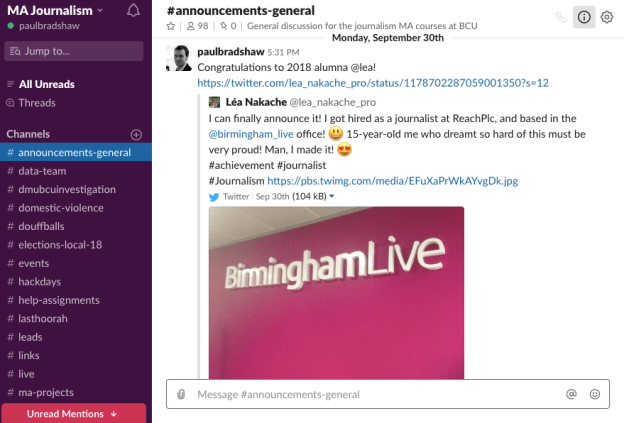
Slack screengrab showing channels on left

A screenshot of the Slack group for MA journalism students at Birmingham City University

For a number of years I’ve been using Slack with students on both the MA in Multiplatform and Mobile Journalism, and the MA in Data Journalism at Birmingham City University. As a new academic year begins, here are some tips I’ve picked up over the years – whether you are a lecturer considering integrating Slack into your teaching, or a student considering using it in a journalism project.

First things first: why Slack?

Slack is a professional chat app used widely in the media industry to organise projects. It has a number of advantages over other options for communicating between colleagues, whether that’s chat apps such as WhatsApp, or traditional email. These include:

  • The ability to take control over opting in or out of communications (rather than being endlessly ccd in on unimportant messages)
  • The ability to have ‘office hours’ and customise notifications based on your priorities and availability (rather than getting notifications for all communications)
  • A particularly powerful search functionality for finding documents or messages from previous communications
  • The ability to set yourself reminders
  • Automation of aspects of work, such as alerts

When it comes to teaching and learning there are two obvious selling points: firstly it empowers students to manage their own communication (with attendant benefits for mental health).

And secondly, it teaches them how to use an important industry tool. Continue reading