How “organised” was the Jan Moir campaign?

Was the campaign against Jan Moir that crashed the PCC website “heavily orchestrated”? Jan Moir herself thinks so. Was it “organised”? The deputy editor of the Telegraph said it was.

If this was the case, who was organising this? “The big gay who runs the internet“? Stephen Fry?

And what do they mean by organised?

Let’s start with 3 definitions:

  1. Functioning within a formal structure, as in the coordination and direction of activities.
  2. Affiliated in an organization, especially a union.
  3. Efficient and methodical.

Of the 3 descriptions, the only one that might apply in this case is the third, and here’s the rub. Imagine the Jan Moir fuss in a world without Twitter: here’s how it unfolded:

  1. Some people read the Jan Moir article and are offended; they forward it to their friends to express disgust.
  2. People complain to the PCC. They also complain to advertisers.
  3. After a while the expressions of disgust reach a celebrity, and a columnist.
  4. The celebrity mentions the article during a public appearance; the columnist writes a column about it. The columnist mentions the parts of the Press Complaints Commission code that the article breaks. Politicians pick it up too.
  5. More people complain. They also complain to advertisers.
  6. The ‘offence’ over the article now becomes a story in itself; the celebrity angle is key to selling the story.
  7. More people complain. They also complain to advertisers.

In a world without Twitter the above might unfold over a series of days. The difference in a world with Twitter is that the above process is accelerated beyond the ability of many people to see, and they think Step 4 is where it begins.

But why does it matter if it’s organised?

But of course this isn’t about definitions, but about the discourse of what ‘organised’ means in this context. It means ‘not spontaneous’; it means ‘not genuine’; it means ‘not valid’.

Although different people may have different (oppositional, negotiated) readings I would argue this is the dominant one, where the discourse of ‘organised’ is being used to marginalise the protests. I will make a bet here that the PCC use that discourse in how they deal with the record numbers of complaints.

Stef Lewandowski hit the nail on the head when he said that it sounded “like the argument from design applied to social media”.

Help me investigate this

But what would be really interesting here is to test the hypotheses against some evidence: I want to see just how organised the ‘campaign’ was. How important were the celebrities and the formal organisations?

I’m using Help Me Investigate to see if we can work out what level of organisation there was in the campaign. So far, thanks to Kevin Sablan we have a key part of the evidence: all the #janmoir tweets since October 14. And some suggestions on how to analyse that from Ethan Zuckerman (who’s been here before): “grab all #janmoir tweets, do word freq. analysis esp on RTs, look to see if it’s grassroots or one instigator, amplified…”

If you need an invite, let me know.

And if you have any ideas how you can measure the organisation of a campaign like this, I’d welcome them.

Notes on #janmoir – don’t ‘blame’ Fry

I’ve seen a few media reports now on yesterday’s unprecedented new media revolt against the Daily Mail.

Of all of them the Huffington Post’s takes the biscuit for ‘worst take’. They reckon it’s about a fight between the Daily Mail and The Guardian. Seriously. I suspect a showbizzy intern selected their quote heavy, googled contribution.

A meme in practically all the reports is the role of Stephen Fry. This has now culminated in a Telegraph piece titled ‘Don’t laugh – Stephen Fry is giving the orders now.’

Those, like Fry, who are “deeply dippy about all things digital”, argue that the internet is the ultimate tool of democracy. But it could just be that historians – if they are so permitted – might look back on this period as the moment when the techno-savvy few seized control of the minds of the many.

The blogger Guido Fawkes seems effectively to run British politics. Ashton Kutcher – actor and tweeter with over three million followers: “life isn’t tied with a bow, but it’s still a gift” – is our spiritual leader. And Fry? Well, he’s bigger than both of them.

Where to start? Iain Dale has a lot more blog traffic than Guido. Not sure what Kutcher’s in there for save to keep the ‘celeb’s rule’ idea going (and his Twitter following like that of other Hollywood celebs doesn’t seem to translate to followers automatically watching their shows). And as for Fry?

I was actually dipping in-and-out of the #janmoir Twitter stream yesterday and very, very few of the tweets were Fry Retweets. Sure, his numbers are huge but the ‘Twitosphere’ is far, far, far huger. Presumably far too huge for most journalist’s to get their minds around.

By 2010, 26 Million (1 in 7) U.S. Adults Will Use Twitter Monthly.

Edited to add: Thanks to to commentator Ian Hopkinson for pointing to some evidence.

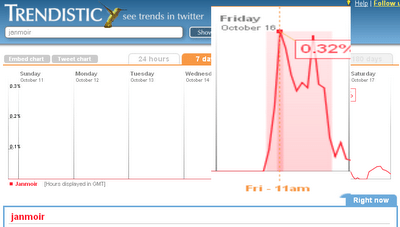
Here’s the trendastic tracking of #janmoir

Showing it peaking at 11am – @stephenfry first tweet on #janmoir was at 12:27pm.

What the ubiquitous Fry mentions in their reports are about is a journalistic laziness and the ever-present need for a celeb mention. A real piece of good work would be to actually track #janmoir all the way from where the first rock was thrown out to the furthest reach of the ripples.

Such as the excellent American analyst Evgeny Morozov‘s tweet:

notes on the new public sphere: Twitter has shrunk the Atlantic and purely local UK scandals are now global news

That’s why HuffPost bothered putting Gately on the front page – #janmoir was number one or two trending topic when they woke up, and it had that celeb angle they love. 

It’s notable that they’ve ignored what it by far the most game-changing event on Twitter this week, #trafigura – something which Gill Hornby in the Telegraph thinks is also down to Mr Fry.

From his palm-top device .. he struck a major blow for press freedom – when the Dutch company Trafigura won an order preventing the press from discussing the impact of its pollutants on the African coast, Fry tweeted the details to his vast audience and the gag was lifted.

Sigh.

How to spot a hoax Twitter account – a case study

Fake Jan Moir tweets on Twitter

The fake Jan Moir lays some too-good-to-be-true bait on Twitter

If you were following the Jan Moir-Stephen Gateley story that was all over Twitter today you may have come across a Twitter account claiming to be Jan Moir herself – @janmoir_uk. It wasn’t her – but it was a convincing attempt, and I thought it might be worth picking out how I and other Twitter users tried to work out the account’s legitimacy.

The too-good-to-be-true test

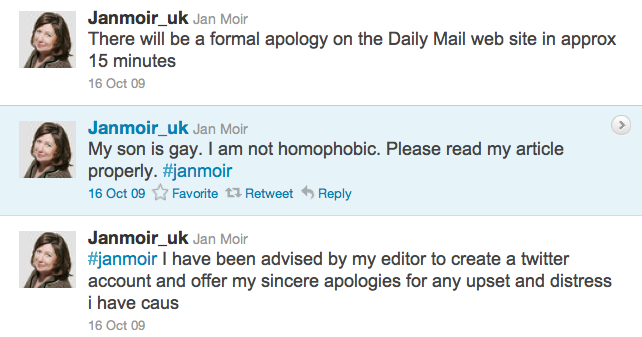
The first test in these cases is the too-good-to-be-true test, and this works on a number of levels. Jan Moir tweeting in itself was a great story – but not completely unbelievable. Her second tweet said “I have been advised by my editor to create a twitter account and offer my sincere apologies for any upset and distress i have caus” [sic] – a superficially plausible story. Would you buy it?

But there were some other too-good-to-be-true claims in her tweets. One said “My son is gay. I am not homophobic. Please read my article properly.” Does Jan Moir have a son? Is he gay? Would she announce it on Twitter? Continue reading

Jan Moir is a heterosexist

Now anyone whose reads me knows I like video .. So watch this …

N’kay. All done?

Jan Moir is a Daily Mail columnist whose printed words have today caused her to reach for her boss’ PR agency (because of an Internet revolt that Twitter was at the heart of that blew up the Press Complaints Commission’s website) in order to say she’s not what you think she is.

That is significant. Today was significant. Social media made this happen – apparently the Mail doesn’t usually respond within hours to outrage at its contents.

But listen to what Richard Yates, from black experience, is telling you – focus on what they said, not who you think they are.

And this is very relevant to this situation. The Mail, and others, publish Moir’s sort of rant all the time. In the official ‘process’ it will be judged on what she said, not who she is accused of being.

If what we want is what she (and others) write banished from the mainstream, not to silence but to place them firmly on the fringes, then how is that achieved?

How do we define her words? I ask, is what she wrote heterosexist or is it homophobic?

Cue Wikipedia:

Heterosexism is a term that applies to negative attitudes, bias, and discrimination in favor of opposite-sex sexuality and relationships. It can include the presumption that everyone is heterosexual or that opposite-sex attractions and relationships are the norm and therefore superior.

Homophobia (from Greek homós: one and the same; phóbos: fear, phobia) is defined as an “irrational fear of, aversion to, or discrimination against homosexuality or homosexuals”, or individuals perceived to be homosexual; it is also defined as “unreasoning fear of or antipathy toward homosexuals and homosexuality”, “fear of or contempt for lesbians and gay men”, as well as “behavior based on such a feeling”.

I don’t think Jan Moir is about fear, she’s about superiority. I think this because that’s what she wrote.

Yates is laying out for us how, exactly, we undermine the sort of power which a Moir (there’s a type) wields, especially including their power in claims of ‘victim’ or ‘silencing’. Here’s a template, from other minorities, which should be grasped in order to define her as ‘fringe’, ‘extreme’, someone who says she’s superior.

Drop ‘Moir is homophobic’ for ‘Moir is heterosexist’.

That’s my contribution to the aftermath of today: Learn from others and be precise in attacking power.

Make them go look ‘heterosexist’ up and in the process completely change the coming debate over ‘silencing free speech’, the ‘power of the mob’ and the ubiquitous raising of that cop-out phrase ‘PC’.

Pluck out your eyes: the anatomy of a super injunction

Super injunctions – those that don’t just order a newspaper not to report something, but forbid it from reporting the existence of the reporting restrictions – are on the rise.

The Guardian has been served with at least 12 notices of injunctions that could not be reported so far this year, compared with six in the whole of 2006 and five the year before.

And Carter Ruck continue their kafkaesque moves to stop reporting about Trafigura and the Minton report (their latest attempt is to write to Parliament saying it can’t discuss the matter, at the same time as saying they’re not trying to forbid anyone reporting what Parliament discusses. That’s because there wouldn’t be anything to discuss).

So what does a super injunction look like? I’ve got hold of one – I obviously can’t say which and I’ve had to leave out the juicy bits. But here’s what it says. Continue reading

How to make interactive geographical timelines using Google Calendar and Yahoo Pipes

I was recently given a task where my job was to create a calendar holding around 50 events. Each event also needed to be mapped, and have a corresponding blog post.

Mapping calendar entries made me think, if this could be used for other stuff than simply putting events on a map, – which is quite useful in it’s own way. I thought it would be cool if you could create an interactive map-timeline, controlled dynamically by a (shared)calendar.

Yahoo Pipes by default uses Yahoo Maps, which is great when it comes to narratives. As you can see from the map below (If you don’t see it, click here), each entry has a little arrow that let’s you navigate from marker to marker in a specific order. Each marker also has a number indicating it’s place in a sequence. This is nothing more than entries in a Google Calender with time/date stamps, geo info and a description, mapped automatically using Yahoo Pipes.

{“pipe_id”:”ed13a198a2a83050dd4ace10d12eae16″,”_btype”:”map”,”pipe_params”:{“Curl”:”http://kaspersorensen.com/wp-content/uploads/files/icalyahoopipes.ics”}}

Here’s how you do it.

1. Create a Google Calendar

Simply go to your Google Calendar and create or import a new calendar. You can do this from the settings page under calendars.

2. Make it public

You need to make the calendar public, otherwise Yahoo Pipes won’t have access to it. You can do this while you create it, or afterwards by ticking the box ‘Make this calendar public’ from the sharing settings on your specific calendar. To access the settings for a specific calendar, you click the little arrow in the box on the left hand side that contains your calendars (My Calendars).

3. Create events

Now you simply start adding events to your calendar. Specify what happened, where it happened, when and add the description. You don’t have to add the entries chronologically, they will be sorted by date/time automatically.

4. Feed the iCal file to the Pipe

Go to your calendar settings page, not the general Calendar settings, but the settings for your specific calendar. You will see a section called ‘Calendar address’ with three buttons. Click the green ICAL button and copy the link that pops up. Now go to Mapping Google Calendar Events Pipe and paste it into the ‘Calendar iCal URL’ field and hit ‘Run Pipe’. – Your events are now mapped.

5. Embed on your website

To embed the timeline/map on your website, simply select ‘Get as badge’ just above the map. This will allow you to insert it on your blog or website.

I’m sure there are ways to make this more stable. So if you know how to optimize the pipe, please feel free to do so and let me know.

As Google Maps is already a part of Google Calendar, you would think that there was a nifty way to quickly put a whole calendar on a map, but no. And after failing to use what looked like a saviour, I bumped into a post by Tony Hurst on how to display Google Calendar events on a Google Map. Unfortunately it turns out that the XML feed Tony uses, only parses the 25 most recent calendar entries.

Google Calendar releases their event-entries in iCal format which contains all events. And with a little customization of Tony’s pipe, I managed to come up with a way to map all events from a calendar.

I think this could be potentially useful for developing stories, especially if you can collaborate on the calendar. You end up with data that can be used for nearly anything, not just maps. And if locations aren’t relevant for the story, you could simply take your iCal file and make a normal timeline.

85 wordpress plugins for blogging journalists

Having reached a potential plateau in my addiction to WordPress plugins* I thought I should blog about the plugins I use, those I’ve installed in preparation for potential use, and those I may install at some point in the future. Of the 85 or so plugins installed on my blog I ‘only’ have around 30-40 that are active – the rest have either been used in the past or are ready in case I need them at some point in future. Some are one-click installs; others you need to put PHP in your templates; instructions are generally given on the plugin page. I’d love to know what plugins you find useful on your own blog.

Content plugins

Add Sig allows you to add a custom signature to the bottom of posts – particularly useful if you have a multi-author blog.

Embed iFrames allows you to do just that – useful for embedding any content that uses iFrames, e.g. maps, spreadsheets, widgets etc.

Exec PHP allows you to execute PHP in blog posts. I’ve not had to yet, but you never know…

FeedWordPress is an aggregation plugin that pulls any RSS feeds you specify and publishes them on your blog. Any user clicking on a particular post will be taken to the original. This is very useful if you blog elsewhere or want to aggregate coverage of an event for an eventblog (although there are more specific packages for that now). Previously I’ve used it to pull posts from my Posterous blog so I can blog via email.

In Series is a great plugin if you’re writing a series – this creates a new box when you start writing a post that allows you to assign it to a ‘series’. Sadly the plugin site reports “There have been reports of minor breakage in WordPress 2.6, and complete failure in WordPress 2.7.” So I’m now trying out Organize Series and Series, which claim to do something similar.

Microkid’s Related Posts allows you to manually add related posts.

Postalicious will automatically publish your bookmarks (from deliciousma.gnoliaGoogle ReaderReddit, or Yahoo Pipes) to your blog. You can specify a particular tag, frequency etc.

Star Rating for Reviews allows you to give star ratings in any blog post – ideal for reviews.

Tagaroo will suggest tags based on the content of the post you’re writing, and related Flickr images you could use.

User Photo displays an image of the author next to the post (this takes some tweaking with the template code) – particularly useful for multi-author blogs.

XML Google Maps allows you to easily insert Google Map or Google Earth Plugin Maps into your blog.

Comment plugins

Spam filter plugin Akismet is an absolute must for any blog, filtering out obvious spam and holding back the dubious stuff for moderation.

BackType Connect publishes comments about your blog on other social media sites – so if someone comments on your post on Twitter, Digg, FriendFeed, Hacker News or Reddit and links to it this will pull it onto your site. This sounds like a great solution to a modern problem, but in practice it generally means lots of tweets saying the same thing – ‘here’s a blog post’, so I’ve disabled it until that is addressed.

Capture the Conversation is a similar plugin which uses your post tags to look for related tweets. This gives you more control but means the more tags you add the less likely it is to work, which obviously has implications for search engine optimisation – although you can change the settings to only look for the first tag. It appears to be particularly useful for ‘breaking news’ posts where people are talking about the issue on Twitter and you can see this from the post itself. Presentation could be better – you can customise this a little in settings too.

cForms II allows you to create multiple and customisable contact forms across your blog, including multiple forms on the same page. I’ve never had cause to use it yet, but it’s worth having just in case.

coComment simple integration (direct download) integrates your comments system with the coComment system so users can log in, tag and share comments and keep track of them via coComment.

Intense Debate Comments does the same for the comment management service Intense Debate. I seem to remember this was created for me by Intense Debate so I don’t have a download link, but I disabled the plugin when I realised it had accessibility issues, and made comments invisible from search engines.

DoFollow is a plugin which disables the default ‘nofollow’ setting on WordPress blogs (which tells search engines to disregard any links in comments). This means that links posted in comments benefit from ‘Google juice’. You can set the plugin to only remove ‘nofollow’ after a certain period of time so you can delete spam comments before then. I found that announcing the plugin attracted too many spammers, so I disabled it.

WP-FacebookConnect allows users to login and comment with their Facebook account and publish comments into their Facebook newsfeed. There’s some fiddling required.

outbrain allows users to rank blog posts – WP-postratings did something similar, as did WP-StarRateBox.

Seesmic WordPress plugin allows people to record video comments. I seem to remember this was the plugin that forced me to move to self-hosted WordPress and, amusingly, I’ve only ever had one video comment since.

Subscribe To Comments allows users to receive email updates when an individual post receives a new comment. Simple but extremely useful, and so far used by hundreds of visitors to the blog.

Top Commentators Widget shows which users comment the most on your blog. Sadly it only starts counting once installed, and the presentation needs some attention, so I disabled it, but it’s a nice plugin which showcases the biggest contributors.

WP-Forum creates a forum on your blog – instructions on the plugin page.

Blog management plugins

BackUpWordpress allows you to easily backup your WordPress database – a useful habit to get into in case something goes wrong with your blog hosting or you want to move your blog to another host. The plugin also allows you to schedule regular backups.

Cronless Postie allows you to publish blog posts via email. There are other ways to do this – for example, emailing your post to Posterous and then pulling the RSS feed from there using a syndication plugin like FeedWordPress (see above).

mobileadmin makes it easier to manage your blog via mobile phone as it “gives a mobile-friendly admin UI to browsers by user agent. Includes support for iPhone/iPod-Touch”. However, this is currently disabled as activating it triggers a fatal error (who died?)

Ozh’ Admin Drop Down Menu changes the admin view on WordPress so that it uses drop-down menus, making it easier to manage.

Plugin Manager “lets you to view, download and install plugins from wordpress.org from an AJAX’ed interface, instead of manually downloading, extracting and uploading each plugin.” It’s really very very good.

podPress is a plugin to use WordPress for Podcasting. I’ve never particularly used this, but useful to have if I ever need it.

Post Template allows you to create templates for posts with the same structure – perfect for reviews and series, and also useful to keep a multi-author blog consistent.

Role Manager allows you to assign different levels of access to different contributors to your blog – for example, only allowing a user to contribute to a particular category.

Textplace is “a plugin to include commonly used text across multiple posts, pages and templates”.

WordPress Automatic Upgrade allows you to upgrade to the latest version of WordPress with a few clicks. Essential.

WP Security scans for security vulnerabilities in your WordPress installation.

Presentation and widgets

Bunny’s Print CSS creates a stylesheet for printing so users printing pages from your blog can avoid endless pages of widgets, comments or other page furniture (including design elements).

Easy Popular Posts shows you your most popular posts – useful to install in a sidebar (you’ll need to put a line of PHP in the sidebar template for this).

Get Recent Comments provides extra customisation of the comments widget.

Global Translator “translates a blog in 34 different languages (English, French, Italian, German, Portuguese, Spanish, Japanese, Korean, Chinese, Arabic, Russian, Greek, Dutch, Norwegian,…) by wrapping four different online translation engines (Google Translation Engine, Babelfish Translation Engine, FreeTranslations.com, Promt).” The results are as patchy as you’d imagine, but take a stage out for users who may use Google Translate to read your blog.

Hot Friends creates a blogroll/friends widget based on the number of comments a blog owner makes. I’ve never had the time to set this up properly and it may not suit the nature of the OJB, but it sounds interesting.

KB Advanced RSS Widget gives you additional control over the RSS widget, e.g. which fields of the feed to display and how to format them.

KB Countdown Widget counts “the years/months/days since, until, or between events. Optional bar graph for tracking progress between two dates.” Useful if you’re blogging up to an event, or setting yourself a challenge, or launching something.

Random Redirect allows users to be taken to a random post from your blog.

Related Ways to Take Action “makes it super easy to connect your readers to ways to take action based on the content of your posts. The Plugin identifies the top three keywords for each post and then searches for related campaigns from from Change.org, GlobalGiving.com, Idealist.org, DonorsChoose.org, Kiva, Care2 and over twenty other social change websites. It then automatically loads the top three campaigns for those keywords at the bottom of each of your posts.” In reality the guesses the plugin makes can be a bit hit-and-miss, but on a more campaign-based blog they may be more accurate.

Sort by Comments “Changes the order of posts so that the most recently commented posts show up first. Also displays last comment with the posts.”

Theme Switcher allows users to switch themes. You need to put a line of code in your sidebar to create the dropdown (instructions buried here) – remember you’ll have to do this in every theme you have installed so that users can switch back. You’ll also need to make sure that you’ve deleted any themes that don’t work or you don’t like, as this will pull them all up by default.

WordPress Mobile Edition shows mobile visitors a mobile version of the site. You have to install the theme as well.

WP Web Scraper is “an easy to implement web scraper for WordPress. Display realtime data from any websites directly into your posts, pages or sidebar.” I’ve not had cause to use it yet, but could be very interesting.

RSS and SMS

FeedBurner FeedSmith makes sure that users subscribing to your RSS feed are redirected to your Feedburner feed, allowing you to keep track of numbers of subscribers, etc.

RSScloud is a plugin that allows users to be more quickly updated when you post something. Only one RSS reader supports it, but the technology appears to be gathering speed.

RSS Feed Signature allows you to add a customised signature to the end of your RSS feed. Sadly, the developer link appears to be dead. This is the only alternative I can find.

SMS Text Message allows users to receive text updates from your site – presumably in the US only, where the receiver pays for texts. It creates a widget where users can enter their phone number to subscribe. I’ve just installed this so let me know if it works.

Analytics, SEO and Social Media Marketing

All In One SEO Pack is another top-of-the-list plugin that ensures your blog content is optimised for search engines. In addition to the general settings page this adds a box below your draft posts where you can customise the title, description and metatags on individual posts.

Digg This detects if the user has come from Digg and displays a Digg This badge for them to Digg the story. You’ll have to add a line of PHP in your post template.

Google Analyticator makes it easy to enable Google Analytics on your blog and measure where visitors are coming from, what terms they are searching for, etc.

Google News Sitemap creates a sitemap to help Google News better index your site.

Google XML Sitemaps does the same: generates “a sitemaps.org compatible sitemap of your WordPress blog which is supported by Ask.com, Google, MSN Search and YAHOO”

Landing Sites shows the user posts related to the search they’ve made that brought them to your site.

Permalink Redirect ensures that only one URL is used for each post and users (including search engines) arriving at others are redirected accordingly.

ShareThis creates a button at the bottom of posts for users to bookmark that post on sites like Delicious, Digg, Stumbleupon, Facebook etc. as well as email it to a friend. For me this replaced similar plugins: SociableWP-Email and wp-notable.

TweetMeme Button creates a badge at the top of each post showing how many times it has been tweeted and allowing the user to retweet it themselves.

WordPress.com Stats tells you how many people are reading, what they’re reading, and what searches brought them here.

WP Greet Box shows a different message to visitors “depending on which site they are coming from. For example, you can ask Digg visitors to Digg your post, Google visitors to subscribe to your RSS feed”

WP Super Cache makes your site faster. “If your site is struggling to cope with the daily number of visitors, or if your site appears on Digg.com, Slashdot or any other popular site then this plugin is for you.”

WP_DeliciousPost submits your posts and pages to Delicious, allowing you to include tagging and private links. WP_LinkTools does much the same.

Plugins to make money

Amazon Widgets Shortcodes adds a button to your post editor that allows you to easily insert an Amazon carousel, slideshow, or link to an Amazon product through your affiliate store – very useful if you’re reviewing products.

Buy Me A Beer places a widget at the bottom of every post and in the sidebar allowing users to donate to your PayPal account if they liked your post (there is also a ‘coffee’ option).

Paypal Widget does much the same, but without the rather more affable beer element. I’ve never had cause to enable this, but again, useful to have.

Register Plus creates an enhanced registration page for users to log on to your blog – this opens up opportunities for restricting access if that’s what you want. I never have, so I’ve never used it. The same developers have also made Donate Plus, which has similar potential. And SponsorMe is worth looking at too.

wpLicense-reloaded allows you to select a Creative Commons license for each blog post individually.

*When I started writing this post, it was 61. Some ‘plateau’. And if 85 isn’t enough for you, see my plugin bookmarks on Delicious.


Mugging the lawyers

If the famous media gaggers, the libel law firm Carter-Ruck, scourge of Private Eye, thought they’d scored another famous victory suppressing news (these guys are big on bragging) they hadn’t reckoned with social media.

#trafigura is as I type the #1 trending topic on Twitter (that’s in the whole world). The Spectator has already broken the wall between what the blogs will say and what the print media thinks it can get away with … and many, many more people are now aware of the very story a very rich set of people running a polluting company is paying them – presumably – many millions to kill.

In a few hours American bloggers will start picking up on the story enmasse. What’s Carter-Ruck going to do then? As @ElrikMerlin just pointed out to me ‘this is Streisand Effect in action’ – something which I have blogged about before.

When Uzbek billionaire Alisher Usmanov tried the same trick, and created the same effect, it generated this quote from Boris Johnson (one of those inadvertently whacked by Usmanov’s ‘take-down’ action):

We live in a world where internet communication is increasingly vital, and this is a serious erosion of free speech.

This is what Carter-Ruck did: Continue reading

Text still rules

This is a really excellent reminder of a web basic, which is unfortunately often forgotten as websites add and add and add and in the process become bloated.

“Think of your Web audience as lazy, selfish and ruthless,” said Michael Gold, West Gold Editorial principal quoting usability guru Jakob Nielsen’s apt description of today’s impatient, task-oriented Web audience during his remarks at a recent ONA panel. “Web audiences are on a mission—they’re task-oriented.”

Text matters on the Web from Martin Ricard on Vimeo.

HT: ONA

@Guardiantech accounts for 78% of the growth in national newspaper Twitter accounts

National UK newspapers had 1,665,202 followers of their Twitter accounts at the start of October – an increase of 193,266 on September 1st (when they had 1,471,936).

The rate of growth has slowed, however. This is a monthly increase of 13.1%, compared with 17% from August 1 to September 1, and also from July 1 to August 1.

What’s more, 151,555 of the increase (or 78% of the total) is down to just one account – that of @guardiantech (which owes its popularity to its place on the Twitter Suggested User List). Indeed, of the 131 accounts I’m tracking, 51 have fewer followers than me (@malcolmcoles)!

You can see the full table here, or below (although the iframe isn’t behaving properly, so you’re better off clicking here).
Continue reading