New UK open data moves: following the money and other curiosities

Tim Davies has done a wonderful job of combing through the fine print of the UK government’s Autumn statement open data measures (PDF), highlighting the dynamics that appear to be driving it, and the data conspicuous by its absence.

Here are the passages most relevant for journalists. Firstly, following the money and accountability:

“The [Data Strategy Board] body seeking public data will be reliant upon the profitability of the PDG [Public Data Group] in order to have the funding it needs to secure the release of data that, if properly released in free forms, would likely undermine the current trading revenue model of the PDG. That doesn’t look like the foundation for very independent and effective governance or regulation to open up core reference data!

“Furthermore, whilst the proposed terms for the DSB [Data Strategy Board] terms state that “Data users from outside the public sector, including representatives of commercial re-users and the Open Data community, will represent at least 30% of the members of DSB”, there are also challenges ahead to ensure data users from civil society interests are represented on the board”

Secondly, the emphasis on clinical data and issues surrounding privacy and the sale of personal data:

“The first measures in the Cabinet Office’s paper are explicitly not about open data as public data, but are about the restricted sharing of personal medical records with life-science research firms – with the intent of developing this sector of the economy. With a small nod to “identifying specified datasets for open publication and linkage”, the proposals are more centrally concerned with supporting the development of a Clinical Practice Research Datalink (CPRD) which will contain interlinked ‘unidentifiable, individual level’ health records, by which I interpret the ability to identify a particular individual with some set of data points recorded on them in primary and secondary care data, without the identity of the person being revealed.

“The place of this in open data measures raises a number of questions, such as whether the right constituencies have been consulted on these measures and why such a significant shift in how the NHS may be handing citizens personal data is included in proposals unlikely to be heavily scrutinised by patient groups? In the past, open data policies have been very clear that ‘personal data’ is out of scope – and the confusion here raises risks to public confidence in the open data agenda. Leaving this issue aside for the moment, we also need to critically explore the evidence that the release of detailed health data will “reinforce the UK’s position as a global centre for research and analytics and boost UK life sciences”. In theory, if life science data is released digitally and online, then the firms that can exploit it are not only UK firms – but the return on the release of UK citizens personal data could be gained anywhere in the world where the research skills to work with it exist.”

UPDATE: More on that in The Guardian.

Thirdly, it looks like this data will allow journalists to scrutinise welfare and credit (so plenty of material for the tabloids and mid-market press), but not data that scrutinises corporations or governments:

“When we look at the other administrative datasets proposed for release in the Measures the politicisation of open data release is evident: Fit Note Data; Universal Credit Data; and Welfare Data (again discussed for ‘linking’ implying we’re not just talking about aggregate statistics) are all proposed for increased release, with specific proposals to “increase their value to industry”. By contrast, no mention of releasing more details on the tax share paid by corporations, where the UK issues arms export licenses, or which organisations are responsible for the most employment law violations. Although the stated aims of the Measures include increasing “transparency and accountability” it would not be unreasonable to read the detail of the measures as very one-sided on this point: and emphasising industry exploitation of data far more than good governance and citizen rights with respect to data.

“The blurring of the line between ‘personal data’ and ‘open data’, and the state’s assumption of the right to share personal data for industrial gain should give cause for concern, and highlights the need for build a stronger constituency scrutinising government open data action.”

It’s nice to see a data initiative being greeted with a critical eye rather than Three Cheers for the Numbers.

UPDATE: On a similar note, Access Info Europe highlights problems with the Open Government Partnership, which “must significantly improve its internal access to information policy to meet the standards it is advancing”. Specifically:

“The policy should be reformed to incorporate basic open data principles such as that information will be made available in a machine-readable, electronic format free of restrictions on reuse.”

“A key problem is the lack of detail in the policy, which has the result of leaving important matters to the discretion of the OGP. Other key problems include:
» The failure of the policy to recognise the fundamental human right to information;
» The significantly overbroad and discretionary regime of exceptions;
» The failure of the draft Policy to put in place a system of protections and sanctions.”
FAQ: Niche blogs vs mainstream media outlets

Here’s another collection of questions answered here to avoid duplication. This time from a final year student at UCLAN:

Blogs are often based on niche subject areas and created by individuals from a community. Do you think mainstream media outlets are limited by resources to compete? Or are there signs they are adapting?

I think they are more limited by passion, and by commercial imperatives. Niche blogs tend to be driven by passion initially, and sometimes by the commercial imperative to target those niches, whereas mainstream outlets are built on scale and mass audiences – or affluent audiences who still don’t really qualify as a niche.

They are adapting as the commercial drive changes and advertisers look for measurements of engagement, but it’s hard, as your next question fleshes out…

Communities by nature need conversation, and this often visible online in forums, blog comments etc. Can it be argued niche blogs are better at engaging communities and providing a platform for conversation?

…yes, but more because they often build those communities from the ground up, whereas established media platforms are having to start with a mass audience and carve niches out of those. It’s like trying to hold a community meeting in the middle of a busy high street, compared to doing it in a community centre.

… If so, do you think the success of blogs are as a result of people wanting conversation instead of a ‘lecture from journalists?

Not necessarily – I think blogs succeed (and fail) for all sorts of reasons. One of those is that blogs have made it easier to connect with likeminded people across the platform (in comments, for example, without having to fight through hundreds of comments from idiots), another is the ability for users to input into the journalistic process rather than merely consuming a story, and another is the ability to focus on elements of an issue which may not be accessible enough to justify coverage by a mass audience publication – and I’m sure there are as many other reasons as there are blogs.

Finally, with the emergence of Twitter, along with other methods of contact, are journalists now becoming more involved in conversation with communities of interest or is there still a reluctance from journalists to be involved?

Some recent research in the US suggested that Twitter is still being used overwhelmingly as a broadcast platform by journalists and news brands. But there are also an increasing number of journalists who are using it particularly effectively as a way to talk with users. My own research into blogging suggested a similar effect. So yes, there is reluctance (talking to sources is hard work, after all, whether it’s on Twitter, the phone, or face to face – and for many journalists it’s easier to avoid it) but the culture is changing slowly.

Teaching liveblogging

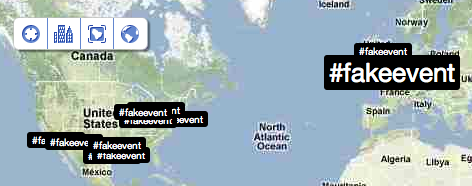
Liveblogging exercise trending on Twitter

Liveblogging exercise trending on Twitter

In the final part of a trilogy of articles on liveblogging I wanted to talk about a recent experiment I conducted in teaching liveblogging, where I decided to abandon most of my planned lecture on the topic and stage a live ‘event’ instead.

I’d also like to this post to provide a space to share your own experiences of teaching liveblogging and mobile journalism.

One of the biggest problems in teaching liveblogging – and of much of online journalism in fact – is getting students to ‘unlearn’ assumptions about journalism production learned in an analogue context. You can talk about the need to operate across a network, to multitask and to look for where the need lies – but there’s nothing like experience to drill that home.

image by @mattclinch81

Casting the panel: image by @mattclinch81

The event

I decided to recreate one of the less interesting events to liveblog: a committee hearing. I could have chosen to recreate a demonstration or a riot, but aside from the obvious potential for things to go horribly wrong, recreating something less ‘eventful’ meant I could communicate some important lessons about those sorts of events – more on which below.

Specifically, I took the transcript from one of the committee hearings into the MPs’ expenses scandal in the UK. Specifically, I chose the evidence of a husband and wife, providing as it did a little extra colour.

Image by @andrewstuart

Image by @andrewstuart

Precautions

Because the event was going to be tweeted live and in public, I had to make sure that there was no chance of libel. And so the names of all participants were changed to quite obviously false ones: the MP was Alan Fiction (Fiction, Al – see what I did there?) and the various committee members had names that made them sound like Mr Men characters (“Dr Fashionabletrousers”).

Normally hashtags emerge organically but I decided to specify a hashtag up front to make the nature of the event explicit, and so #FAKEevent was born.

With those precautions in place I needed to give the event some dynamics that would show the students the issues they would have to deal with in a live situation. Specifically: multiple sources of information; unexpected events; and incomplete information.

Image by @iamdjcarlo

Image by @iamdjcarlo

The roles

The room (over 200 students) was split into 4 main groups: over half made up a group playing the role of journalists. These were asked to move so that they were all sat in the central column of seats. To further mix things up, I gave them different editorial contexts: one quarter was working for a left-leaning broadsheet; another for a right-leaning one; a third quarter was working for a public broadcaster; and a final one for a commercial broadcaster.

20 more students each made up a pro-MP group, and an anti-MP group, who occupied the left and right columns of seats respectively. A final group of 10 or so students were ‘bystanders‘, occupying the back row.

In addition, a group of 10 or so took the roles of the committee itself, the MP and his ‘wife’.

These groups were now given the following materials:

  • The committee/MP/wife: an edited transcript of the hearing which they were to use as a script. Also: instructions for particular actions that individuals should do at specific times (more below)
  • The journalists: briefing notes: the members of the panel; background on the MP
  • Pro-MP group: instructions that they should try to steer coverage in a positive direction, and details of the website that they could use to do so.
  • Anti-MP group: instructions that they should try to steer coverage in a negative direction, and details of the website that they could use to do so.
  • The bystanders: instructions on who they were, and the roles they would play (more below).

I had also approached 3 students beforehand to play specific roles within those groups: one student each as the ‘editor’ of the pro- and anti-MP websites, who had already been assigned admin access to their particular blog and so could give other students publishing rights; and a third student who would act as the major ‘disruption’ to the event.

And I had told all students ahead of the event to bring either a laptop or mobile phone from which they could publish to the web.

A series of unfortunate events

The transcript formed the backdrop to a number of other events which I wanted to use as a device for demonstrating the skills they would need as livebloggers:

  • One member of the panel would begin to fall asleep after a minute. This was to test how many were only paying attention to the testimony.
  • Another member would shout ‘Snake!’ after 2 minutes, waking the first person up. Again, who would be paying attention? Would they have made a note of who he was?
  • A third member would stare intently at the wife throughout – a small detail; who would notice?
  • After 5 minutes or so, my ‘plant’ would storm into the back of the room and shout a loud accusation at the MP, then be calmly escorted out. Most journalists would not have seen what happened (because it was behind them), and so would have to reconstruct events from the bystanders in the back row, some of whom had their own agendas and some of whom had recorded it.

In all, the exercise took some time to organise (here are my notes): around 20-25 minutes to get everyone into their groups and around 7 minutes for the event itself (actually longer as my interruption held back for some time, waiting for a nod). A livestream of tweets (using Twitterfall) was put up on the projector – if you had a phone set up with Qik or Bambuser you could also stream the video.

image by @nicky_henderson

image of sleeping panel member by @nicky_henderson

The lessons

Choosing a staged event like a committee hearing that wasn’t particularly eventful meant that the students had to do a number of things over and above reacting to events.

Firstly, they had to concentrate on what was taking place because it was easy to lose concentration when nothing interesting was happening.

Secondly, they had to make things interesting. Many resorted to opinion and wit – entertaining, but not particularly informative, although that was excusable given that the event and the actors were fictional, and there was no background knowledge (other than that in the briefing notes) to draw on.

Still, the point wasn’t what they did but rather what they learned, and the frustrations of needing that background were a useful teaching tool in themselves.

Finally, they had to be proactive: seek out information, find out what had happened.

At the end of the exercise I asked them what they had learned, and pointed out some things I’d noticed myself about how they’d dealt with the challenge:

  • Some noted the difficulties of taking in information from both the event itself and on Twitter. This is a skill that comes from practice – or if you have the resources, partnering up with another journalist.
  • Not a single student got up from their seat and moved – either to hear the proceedings more clearly (at least one tweeted that they couldn’t hear what was being said) or to speak to the bystanders
  • Only one found out the name of the protestor. None picked up on his hashtagged tweets. None traced his blog where his accusations were fleshed out.
  • Most journalists did not follow what was being said about the event, and put it into context
  • Few took images or other multimedia

Once again: the point wasn’t that they do things right; in many ways they were set up to fail, and the discussion at the end was about reflecting on those rather than playing a blame game.

‘Failure’ was used as a teaching tool: instead of telling them what they should do, expecting them to remember, and giving them an exercise to do that, I wanted to give them an exercise up front, to experience and internalise that desire to do better, and use that as the context for the lessons, so they could connect it to their own experience of liveblogging rather than experiences of, for example, live broadcast or print reporting. (It seemed to work – a couple of students took the time to express their thanks for the nature of the lesson.)

So although that left me much less time to pass on a lesson, it did, I hope, leave the students learning more and with a higher motivation to continue learning (the full presentation, by the way, was available for those who wanted to go through it).

On the motivation side, the hashtag for the event also trended not only in the UK but in the US too, which I think the students rather enjoyed.

More Dabblings With Local Sentencing Data

In Accessing and Visualising Sentencing Data for Local Courts I posted a couple of quick ways in to playing with Ministry of Justice sentencing data for the period July 2010-June 2011 at the local court level. At the end of the post, I wondered about how to wrangle the data in R so that I could look at percentage-wise comparisons between different factors (Age, gender) and offence type and mentioned that I’d posted a related question to to the Cross Validated/Stats Exchange site (Casting multidimensional data in R into a data frame).

Courtesy of Chase, I have an answer🙂 So let’s see how it plays out…

To start, let’s just load the Isle of Wight court sentencing data into RStudio:

require(ggplot2)
require(reshape2)
iw = read.csv("http://dl.dropbox.com/u/1156404/wightCrimRecords.csv")

Now we’re going to shape the data so that we can plot the percentage of each offence type by gender (limited to Male and Female options):

iw.m = melt(iw, id.vars = "sex", measure.vars = "Offence_type")
iw.sex = ddply(iw.m, "sex", function(x) as.data.frame(prop.table(table(x$value))))
ggplot(subset(iw.sex,sex=='Female'|sex=='Male')) + geom_bar(aes(x=Var1,y=Freq)) + facet_wrap(~sex)+ opts(axis.text.x=theme_text(angle=-90)) + xlab('Offence Type')

Here’s the result:

Splitting down offences by percentage and gender

We can also process the data over a couple of variables. So for example, we can look to see how female recorded sentences break down by offence type and age range, displaying the results as a percentage of how often each offence type on its own was recorded by age:

iw.m2 = melt(iw, id.vars = c("sex","Offence_type" ), measure.vars = "AGE")
iw.off=ddply(iw.m2, c("sex","Offence_type"), function(x) as.data.frame(prop.table(table(x$value))))

ggplot(subset(iw.off,sex=='Female')) + geom_bar(aes(x=Var1,y=Freq)) + facet_wrap(~Offence_type) + opts(axis.text.x=theme_text(angle=-90)) + xlab('Age Range (Female)')

Offence type broken down by age and gender

Note that this graphic may actually be a little misleading because percentage based reports donlt play well with small numbers…: whilst there are multiple Driving Offences recorded, there are only two Burglaries, so the statistical distribution of convicted female burglars is based over a population of size two… A count would be a better way of showing this

PS I was hoping to be able to just transmute the variables and generate a raft of other charts, but I seem to be getting an error, maybe because some rows are missing? So: anyone know where I’m supposed to post R library bug reports?

10 liveblogging ideas (and 31 liveblogging tips)

Liveblogging image by Dustin Diaz on Flickr

Liveblogging image by Dustin Diaz on Flickr

Following my previous post about the rise of liveblogging, I wanted to provide a simple list of ideas for student journalists wanting to get some liveblogging experience. Some people assume that you need to wait for a big news event to start a liveblog, but the format has proved particularly flexible in serving a whole range of editorial demands. Here are just a few:

1. A protest or demonstration

Let’s start with the obvious one. Protests and demonstrations are normally planned and announced in advance, so use a tool like Google Alerts to receive emails when the terms are mentioned, as well as following local campaigning groups and local branches of national campaigns. Issues to consider:

  • There will be conflicting versions of events so seek to verify as much as possible – from both demonstrators and police, and any other parties, such as counter-demonstrations.
  • Know as many key facts ahead of time as possible to be able to contextualise any claims from any side. Have links to hand – Delicious is particularly useful as a way of organising these.
  • Make contacts ahead of the event to find out who will be recording it and how those records will be published (e.g. livestream, YouTube, Flickr, Google Maps etc). Make sure you have mobile phone numbers in your contacts book and are following those people on the relevant social network. Try to anticipate where you will be needed most – where will the gaps in coverage be?
  • Don’t just cover the event on the day – build up to it and plan for the aftermath. Walk round the route to plan for the event – and post a photoblog while you’re at it. Interview key participants for profiles while you make contact. Join online forums and Facebook groups and engage with discussions on key issues.
  • Summarise regularly to help those just joining find their feet (thanks to Ed Walker in the comments for this one – more tips in his blog post on liveblogging)

2. An industry conference

Whether you’re reporting on a particular location or a shared interest there will be industries that play a key role in that. And industries have conferences. Use a quick Google search or some of the specialist events listing and organisation services like Exhibitions.co.uk to find them.

Issues to consider:

  • Industries have jargon. Try to familiarise yourself with that ahead of time (follow the specialist press and key figures on social media) or you’ll mis-hear key words and phrases.
  • There are often different events happening at the same time. Plan your schedule so you know where your priorities are.
  • Don’t follow the crowd. Often you will add more value by missing a session in order to conduct an interview or post some deeper analysis. This will also require preparation: organise to meet key individuals ahead of time; read up on the key issues.
  • As above, you’ll also need to know what’s going to be covered well and who’s going to be publishing online at the event. Build-ups will also be useful.

3. A meeting

Council or board meetings, hearings, committees and other public and semi-public meetings often have significant implications for local communities, sections of society or particular industries. They are also often poorly covered. This provides a real opportunity for enterprising individuals to add value to their readership.

In addition, there are more informal meetings of small groups which you can find on sites such as Upcoming and Eventbrite.

Issues to consider:

  • These meetings can easily pass under the radar so make sure you know when they’re taking place. For council meetings, Openly Local’s listings are particularly useful.
  • Many meetings have to publish their minutes – keep up to date with these (ask for them if you have to – use the Freedom of Information Act if you cannot get them any other way) so you know the background.
  • Know who’s who – and make sure you know which is which. Write down their names and where they’re sitting so you can attribute quotes correctly.
  • Prepare for nothing much to happen, most of the time. Concentration is key: newsworthy nuggets will be hidden in dull proceedings – and they won’t be clearly signposted. One advantage of liveblogging is that others can bring your attention to issues you might miss in the flow of reporting.

4. The build up to an event

Anticipation of an event can be an event in itself. The Birmingham Mail’s Friday afternoon liveblogs previewing the weekend’s football fixture are a particularly successful example of this. Really, this is a live chat, with the liveblog format providing the editorial urgency to give it a news twist.

Issues to consider:

  • Have prompts ready to get things started and inject new momentum when conversation dries up – prepare as you would for an interview, only with 100 possible interviewees.
  • Anticipate the main questions and have key facts and links to hand.
  • Get the tone right: can you have a bit of banter? It might be worth preparing a joke or two, or looking for opportunities to make them.

5. Breaking news

While you cannot plan for the exact timing of breaking news, you can prepare for some news events. At the most basic level, you should know how to quickly launch a liveblog once you know you need to do so. Other issues to consider:

6. Your own journey

You don’t need someone else to organise something for you to start a liveblog: you can do something yourself, and liveblog your progress. Considerations:

  • Ideally it should be something with a beginning, a middle and an end over a limited period of time: running a marathon, for example (if you can hold the mobile phone), or collecting 1,000 signatures for a campaign.
  • It should also involve others: the liveblog format lends itself to outside contributions.
  • You’ll have to work harder to make it interesting, so don’t update unless something has changed, and prepare material so you have interesting things to fill the gaps with.

7. A press conference

A familiar sight on 24 hour news channels, press conferences are an obvious candidate for liveblog treatment. You can also add to this similar political events such as the Budget, debates, or Prime Minister’s Questions. The main consideration is that you will be covering the conference alongside other journalists, so your coverage needs to be distinctive. Here are some things to consider:

  • Controlled as they are, press conferences don’t often generate a constant supply of newsworthy quotes, so when a spokesperson is trotting out platitudes or steering questions back to the particular angle she wants to sell, tell us about other things going on in the room: how is the journalist reacting? What is the PR rep doing?
  • If the situation is likely to be tightly controlled, you have a better chance of predicting what will be said, and to prepare for that. In particular, if a person is going to try to ‘spin’ facts in a particular direction, have the facts and evidence ready to ‘unspin’ them – as always, including links.
  • If you want to use one of your question opportunities to give your audience a voice, do so.
  • Likewise, tap into the wit and intelligence of users to liveblog their reactions outside the room to the questions and answers being exchanged inside.

8. A staged event

A liveblog is an obvious choice for a live event, and there are plenty of sporting and cultural events to cover. The obvious candidates – football matches, popular Olympic events – should be avoided, as existing and live coverage will be more than sufficient, so look to less well-covered sports, concerts, performances, fashion shows, exhibitions and other events. Think about:

  • Be aware of rights deals and other restrictions. Live coverages of certain popular sports, such as Premiership football, may be limited. There may be restrictions on taking photographs of cultural events, or recording audio or video at a music event.
  • As with meetings (above) it’s crucial to know who’s who and have a crib sheet of related facts.
  • Be descriptive and engage the senses. Tell us about the atmosphere, smells, sounds, and other elements that make people feel like they’re there.

9. A launch or opening

Product launches and store opening can be very dull affairs, but occasionally generate significant interest – particularly among technology and fashion fans. The interest doesn’t generally make for a sustained news event, so your liveblog is likely to be use that interest as the basis for some broader editorial angles. The tips on a ‘build up to an event’ above, apply again here, as that is essentially what this is, with the following differences:

  • Launches and openings are social gatherings, so try focusing on the people there: interview them, paint a picture of how diverse or similar they are. Tap into their expertise or enthusiasm; work with them.
  • Think about what people might want to know after the launch/opening: tips and tricks on using new technology? The items that are flying off the shelves? Have experts and inside sources on call.

10. Add your own here

Like blogging generally, liveblogs are just a platform, with the flexibility to adapt to a range of circumstances. If Popjustice can liveblog “Things we can learn from Greg James’ interview with Lady Gaga” then you can liveblog anything. If you’ve used them for a purpose not listed here, please let me know and I’ll add it to the list.

Likewise, if you have any tips to add from your own experiences of covering events, please add them in the comments.

UPDATE (November 2014): The Birmingham Mail used liveblogging to commemorate an anniversary:

“From the morning of Friday November 21, the Mail will be live blogging and live tweeting in ‘real time’ the events of the day, from the stories of those preparing for a night out on the town, to the moment the bomb warning was phoned through to the Post and Mail, to the reaction of the emergency services.”

The strikes and the rise of the liveblog

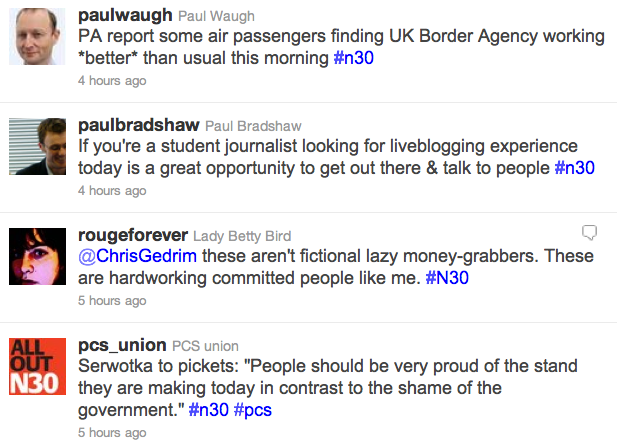
Liveblogging the strikes: Twitter's #n30 stream

Liveblogging the strikes: Twitter's #n30 stream

Today sees the UK’s biggest strike in decades as public sector workers protest against pension reforms. Most news organisations are covering the day’s events through liveblogs: that web-native format which has so quickly become the automatic choice for covering rolling news.

To illustrate just how dominant the liveblog has become take a look at the BBCChannel 4 News, The Guardian’s ‘Strikesblog‘ or The TelegraphThe Independent’s coverage is hosted on their own live.independent.co.uk subdomain while Sky have embedded their liveblog in other articles. There’s even a separate Storify liveblog for The Guardian’s Local Government section, and on Radio 5 Live you can find an example of radio reporters liveblogging.

Regional newspapers such as the Chronicle in the north east and the Essex County Standard are liveblogging the local angle; while the Huffington Post liveblog the political face-off at Prime Minister’s Question Time and the PoliticsHome blog liveblogs both. Leeds Student are liveblogging too. And it’s not just news organisations: campaigning organisation UK Uncut have their own liveblog, as do the public sector workers union UNISON and Pensions Justice (on Tumblr).

So dominant so quickly

The format has become so dominant so quickly because it satisfies both editorial and commercial demands: liveblogs are sticky – people stick around on them much longer than on traditional articles, in the same way that they tend to leave the streams of information from Twitter or Facebook on in the background of their phone, tablet or PC – or indeed, the way that they leave on 24 hour television when there are big events.

It also allows print outlets to compete in the 24-hour environment of rolling news. The updates of the liveblog are equivalent to the ‘time-filling’ of 24-hour television, with this key difference: that updates no longer come from a handful of strategically-placed reporters, but rather (when done well) hundreds of eyewitnesses, stakeholders, experts, campaigners, reporters from other news outlets, and other participants.

The results (when done badly) can be more noise than signal – incoherent, disconnected, fragmented. When done well, however, a good liveblog can draw clarity out of confusion, chase rumours down to facts, and draw multiple threads into something resembling a canvas.

At this early stage liveblogging is still a form finding its feet. More static than broadcast, it does not require the same cycle of repetition; more dynamic than print, it does, however, demand regular summarising.

Most importantly, it takes place within a network. The audience are not sat on their couches watching a single piece of coverage; they may be clicking between a dozen different sources; they may be present at the event itself; they may have friends or family there, sending them updates from their phone. If they are hearing about something important that you’re not addressing, you have a problem.

The list of liveblogs above demonstrates this particularly well, and it doesn’t include the biggest liveblog of all: the #n30 thread on Twitter (and as Facebook users we might also be consuming a liveblog of sorts of our friends’ updates).

More than documenting

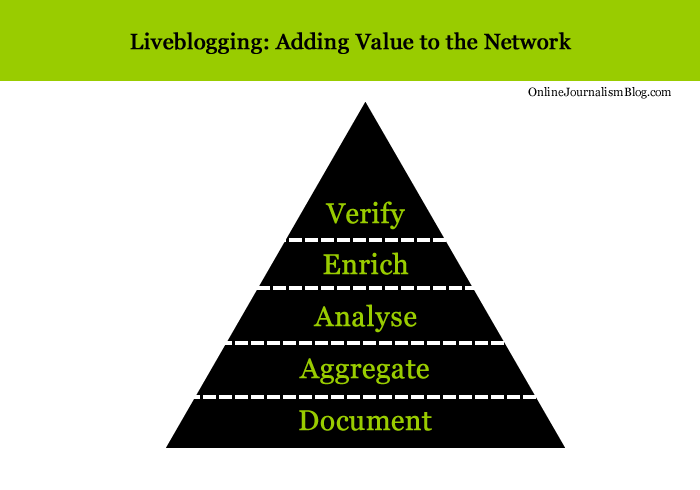
In this situation the journalist is needed less to document what is taking place, and more to build on the documentation that is already being done: by witnesses, and by other journalists. That might mean aggregating the most important updates, or providing analysis of what they mean. It might mean enriching content by adding audio, video, maps or photography. Most importantly, it may mean verifying accounts that hold particular significance.

Liveblogging: adding value to the network

Liveblogging: adding value to the network

These were the lessons that I sought to teach my class last week when I reconstructed an event in the class and asked them to liveblog it (more in a future blog post). Without any briefing, they made predictable (and planned) mistakes: they thought they were there purely to document the event.

But now, more than ever, journalists are not there solely to document.

On a day like today you do not need to be journalist to take part in the ‘liveblog’ of #n20. If you are passionate about current events, if you are curious about news, you can be out there getting experience in dealing with those events – not just reporting them, but speaking to the people involved, recording images and audio to enrich what is in front of you, creating maps and galleries and Storify threads to aggregate the most illuminating accounts. Seeking reaction and verification to the most challenging ones.

The story is already being told by hundreds of people, some better than others. It’s a chance to create good journalism, and be better at it. I hope every aspiring journalist takes it, and the next chance, and the next one.

How to deal with a PR man who emails like a lawyer

There’s a fascinating case study going on across some skeptics blogs on dealing with legal threats from another country.

The Quackometer and Rhys Morgan have – among others – received emails from Marc Stephens, who claims to “represent” the Burzynski Clinic in Houston, Texas, and threatens them with legal action for libel, among other things.

What is notable is how both have researched both Stephens and the law, and composed their responses accordingly. From Rhys Morgan:

“I have carried out some internet research, and I have not been able to establish whether or not Mr. Stephens is a lawyer; certainly he does not appear to be a member of the California Bar nor the Texas Bar in the light of my visit to the California Bar Association’s and the State Bar of Texas’s websites.”

From Quackometer:

“This foam-flecked angry rant did not look like the work of a lawyer to me. And indeed it is not. Marc Stephens appears to work for Burzynski in the form of PR, marketing and sponsorship.”

There’s plenty more in each post, including reference to case law and the pre-action defamation protocol, which provide plenty of material if you’re ever in a similar situation – or hosting a classroom discussion on libel law.

via Neurobonkers

Accessing and Visualising Sentencing Data for Local Courts

A recent provisional data release from the Ministry of Justice contains sentencing data from English(?) courts, at the offence level, for the period July 2010-June 2011: “Published for the first time every sentence handed down at each court in the country between July 2010 and June 2011, along with the age and ethnicity of each offender.” Criminal Justice Statistics in England and Wales [data]

In this post, I’ll describe a couple of ways of working with the data to produce some simple graphical summaries of the data using Google Fusion Tables and R…

…but first, a couple of observations:

– the web page subheading is “Quarterly update of statistics on criminal offences dealt with by the criminal justice system in England and Wales.”, but the sidebar includes the link to the 12 month set of sentencing data;
– the URL of the sentencing data is http://www.justice.gov.uk/downloads/publications/statistics-and-data/criminal-justice-stats/recordlevel.zip, which does not contain a time reference, although the data is time bound. What URL will be used if data for the period 7/11-6/12 is released in the same way next year?

The data is presented as a zipped CSV file, 5.4MB in the zipped form, and 134.1MB in the unzipped form.

The unzipped CSV file is too large to upload to a Google Spreadsheet or a Google Fusion Table, which are two of the tools I use for treating large CSV files as a database, so here are a couple of ways of getting in to the data using tools I have to hand…

Unix Command Line Tools

I’m on a Mac, so like Linux users I have ready access to a Console and several common unix commandline tools that are ideally suited to wrangling text files (on Windows, I suspect you need to install something like Cygwin; a search for windows unix utilities should turn up other alternatives too).

In Playing With Large (ish) CSV Files, and Using Them as a Database from the Command Line: EDINA OpenURL Logs and Postcards from a Text Processing Excursion I give a couple of examples of how to get started with some of the Unix utilities, which we can crib from in this case. So for example, after unzipping the recordlevel.csv document I can look at the first 10 rows by opening a console window, changing directory to the directory the file is in, and running the following command:

head recordlevel.csv

Or I can pull out rows that contain a reference to the Isle of Wight using something like this command:

grep -i wight recordlevel.csv > recordsContainingWight.csv

(The -i reads: “ignoring case”; grep is a command that identifies rows contain the search term (wight in this case). The > recordsContainingWight.csv says “send the result to the file recordsContainingWight.csv” )

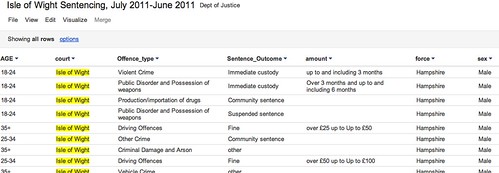
Having extracted rows that contain a reference to the Isle of Wight into a new file, I can upload this smaller file to a Google Spreadsheet, or as Google Fusion Table such as this one: Isle of Wight Sentencing Fusion table.

Isle fo wight sentencing data

Once in the fusion table, we can start to explore the data. So for example, we can aggregate the data around different values in a given column and then visualise the result (aggregate and filter options are available from the View menu; visualisation types are available from the Visualize menu):

Visualising data in google fusion tables

We can also introduce filters to allow use to explore subsets of the data. For example, here are the offences committed by females aged 35+:

Data exploration in Google FUsion tables

Looking at data from a single court may be of passing local interest, but the real data journalism is more likely to be focussed around finding mismatches between sentencing behaviour across different courts. (Hmm, unless we can get data on who passed sentences at a local level, and look to see if there are differences there?) That said, at a local level we could try to look for outliers maybe? As far as making comparisons go, we do have Court and Force columns, so it would be possible to compare Force against force and within a Force area, Court with Court?

R/RStudio

If you really want to start working the data, then R may be the way to go… I use RStudio to work with R, so it’s a simple matter to just import the whole of the reportlevel.csv dataset.

Once the data is loaded in, I can use a regular expression to pull out the subset of the data corresponding once again to sentencing on the Isle of Wight (i apply the regular expression to the contents of the court column:

recordlevel <- read.csv("~/data/recordlevel.csv")
iw=subset(recordlevel,grepl("wight",court,ignore.case=TRUE))

We can then start to produce simple statistical charts based on the data. For example, a bar plot of the sentencing numbers by age group:

age=table(iw$AGE)
barplot(age, main="IW: Sentencing by Age", xlab="Age Range")

R - bar plot

We can also start to look at combinations of factors. For example, how do offence types vary with age?

ageOffence=table(iw$AGE, iw$Offence_type)
barplot(ageOffence,beside=T,las=3,cex.names=0.5,main="Isle of Wight Sentences", xlab=NULL, legend = rownames(ageOffence))

R barplot - offences on IW

If we remove the beside=T argument, we can produce a stacked bar chart:

barplot(ageOffence,las=3,cex.names=0.5,main="Isle of Wight Sentences", xlab=NULL, legend = rownames(ageOffence))

R - stacked bar chart

If we import the ggplot2 library, we have even more flexibility over the presentation of the graph, as well as what we can do with this sort of chart type. So for example, here’s a simple plot of the number of offences per offence type:

require(ggplot2)
#You may need to install ggplot2 as a library if it isn't already installed
ggplot(iw, aes(factor(Offence_type)))+ geom_bar() + opts(axis.text.x=theme_text(angle=-90))+xlab('Offence Type')

GGPlot2 in R

Alternatively, we can break down offence types by age:

ggplot(iw, aes(AGE))+ geom_bar() +facet_wrap(~Offence_type)

ggplot facet barplot

We can bring a bit of colour into a stacked plot that also displays the gender split on each offence:

ggplot(iw, aes(AGE,fill=sex))+geom_bar() +facet_wrap(~Offence_type)

ggplot with stacked factor

One thing I’m not sure how to do is rip the data apart in a ggplot context so that we can display percentage breakdowns, so we could compare the percentage breakdown by offence type on sentences awarded to males vs. females, for example? If you do know how to do that, please post a comment below 😉

PS HEre’s an easy way of getting started with ggplot… use the online hosted version at http://www.yeroon.net/ggplot2/ using this data set: wightCrimRecords.csv; download the file to your computer then upload it as shown below:

yeroon.net/ggplot2

PPS I got a little way towards identifying percentage breakdowns using a crib from here. The following command:
iwp=tapply(iw$Offence_type,iw$sex,function(x){prop.table(table(x))})
generates a (multidimensional) array for the responseVar (Offence) about the groupVar (sex). I don’t know how to generate a single data frame from this, but we can create separate ones for each sex as follows:
iwpMale=data.frame(iwp['Male'])
iwpFemale=data.frame(iwp['Female'])

We can then plot these percentages using constructions of the form:
ggplot(iwp2)+geom_bar(aes(x=Male.x,y=Male.Freq))
What I haven’t worked out how to do is elegantly map from the multidimensional array to a single data.frame? If you know how, please add a comment below…(I also posted a question on Cross Validated, the stats bit of Stack Exchange…)

Maps “in the public interest” now exempt from Google Maps API charge

If you thought you couldn’t use the Google Maps API any more as a journalist, this update to the Google Geo Developers Blog should make you reconsider. From Nieman Journalism Lab:

“Certain web apps will be given blanket exemptions from charging. Here’s Google: “Maps API applications developed by non-profit organisations, applications deemed by Google to be in the public interest, and applications based in countries where we do not support Google Checkout transactions or offer Maps API Premier are exempt from these usage limits.” So nonprofit news orgs look to be in the clear, and Google could declare other news org maps apps to be “in the public interest” and free to run. (It also notes that nonprofits could be eligible for a free Maps API Premier license, which comes with extra goodies around advertising and more.)”

The best piece of Bad Journalism debunking I’ve ever seen

I’ve just stumbled across Neurobonkers’s blog post The worst piece of drugs reporting I have ever read and wanted to share it here.

The post uses an animated Prezi presentation to take the reader through 10 errors in an article in the Hull Daily Mail on the dangers of a “cheap new drug” (notably, the article is no longer online). I won’t add spoilers by revealing what those errors are – but this is a particularly engaging way to teach journalism students not only about accuracy in reporting on stories such as these, but why it’s important.

Enjoy the presentation.

.prezi-player { width: 550px; } .prezi-player-links { text-align: center; }