Has News International really registered TheSunOnSunday.com?

A number of news outlets – including the BBC, Guardian and Channel 4 News – mentioned yesterday in their coverage of the closure of the News Of The World that TheSunOnSunday.com had been registered just two days ago. (It was also mentioned by Hugh Grant on last night’s Question Time.)

It’s a convenient piece of information for a conspiracy theory – but a little bit of digging suggests it’s unlikely to have been registered by News International as part of some grand plan.

When I tweeted the claim yesterday two people immediately pointed out key bits of contextual information from the WHOIS records:

Firstly, it is unlikely that News International would use 123-reg to register a domain name. @bigdaddymerk noted, News International “use http://bit.ly/cWSHia for their .coms and have their own IPS tag for .co.uk”

Murray Dick added that it would “be odd for big corporation to withhold info on whois record”

And – not that this is a big issue given recent events – according to @bigdaddymerk “in the case of the .co.uk registering as a UK individual would be whois abuse.” (UPDATE: The specific abuse is detailed here)

You might argue that the above might be explained by News International covering their tracks, but if were covering their tracks it’s unlikely they’d do it like this.

UPDATE: From Malc. in the comments: more digging has been done at Loutish – note the comments as well.

UPDATE 2: It seems there are other web addresses registered by other companies, too. This post points out, however, potential trademark issues (none has been registered) and conflict with Trinity Mirror.

UPDATE 3: Those other addresses are now registered to News International – but not the .com domains.

UPDATE 4: I think News Corp missed an opportunity with FoxNewsUK.com

The timeline

Anyway, digging further into the timeline of the ‘Sunday Sun’ casts further doubt on any conspiracy connected to News Of The World.

For example, it was reported over a week ago that The Sun was moving to 7-day production (thanks to Roo Reynolds, again on Twitter).

Between that announcement and the registration of TheSunOnSunday.com, anyone with a habit of domain squatting could have grabbed the domain in the hope that it would become valuable in the future.

Either way, even if it has been registered by someone at News International, the timings just don’t add up to a News Of The World-related conspiracy. Certainly it will have been a factor in deciding to close the NOTW, and plans to launch a Sun On Sunday are now likely to be accelerated (I’m amazed that they hadn’t registered the domains before, at least as a defensive move) – but it’s pretty clear that those plans pre-date the closure of NOTW.

So, as I wrote yesterday, a ‘Sunday Sun’ is not a rebranding of News Of The World. They have just closed the country’s biggest selling newspaper – its most profitable tabloid – and made 200 people redundant.

Note: this post was udpated to correct an error: the NOTW is not the highest selling English language newspaper in the world (that is probably The Times of India). Thanks to Paul Carvill in the comments for highlighting.

The inverted pyramid of data journalism

UPDATE: A new version of the inverted pyramid, with resources on each stage, is now available.  Also available in GermanSpanish, Portuguese, FinnishRussian and Ukrainian.

I’ve been working for some time on picking apart the many processes which make up what we call data journalism. Indeed, if you read the chapter on data journalism (blogged draft) in my Online Journalism Handbook, or seen me speak on the subject, you’ll have seen my previous diagram that tries to explain those processes.

I’ve now revised that considerably, and what I’ve come up with bears some explanation. I’ve cheekily called it the inverted pyramid of data journalism, partly because it begins with a large amount of information which becomes increasingly focused as you drill down into it until you reach the point of communicating the results.

What’s more, I’ve also sketched out a second diagram that breaks down how data journalism stories are communicated – an area which I think has so far not been very widely explored. But that’s for a future post.

I’m hoping this will be helpful to those trying to get to grips with data, whether as journalists, developers or designers. This is, as always, work in progress so let me know if you think I’ve missed anything or if things might be better explained.

UPDATE: Also in Spanish, German, Finnish, Russian and Ukrainian.).

The inverted pyramid of data journalism

Inverted pyramid of data journalism

Here are the stages explained: Continue reading

The death of the News Of The World

What an incredible few days. The PCC’s statement yesterday was extraordinary – even if it turns out to be merely a cosmetic exercise. Today’s announcement that the News of the World will end as a brand is, as its mooted replacement would say, a “stunner”.

It took almost exactly 3 days – 72 hours – to kill off a 168-year-old brand. Yes, there were other allegations and two years in the lead up to The Guardian’s revelation that Milly Dowler was targeted by the newspaper. But Milly Dowler and the various other ordinary people who happened to be caught up in newsworthy events (kidnappings, victims of terrorist attacks, families of dead soldiers), were what turned the whole affair.

That story was published at 16.29 on Monday. Incredible.

We talk a lot about the disintermediation of the press – the fact that companies, governments and celebrities can communicate directly with the public. The targeting of the News Of The World’s advertisers, and the rapid mobilisation of thousands of signatures supporting an inquiry, demonstrated that that disintermediation works the other way too. Where once the media could have acted as a dampener on how public protest appeared to advertisers and Parliament, their powers to do so now are more limited. [UPDATE: Paul Mason puts this particularly well here]

So while The Sun may be moving to 7-day production, that doesn’t make this a rebranding or a relaunch. As of Monday, The News of the World brand is dead, 168 years of journalistic history (not to mention 200 jobs) offered up as a sacrifice.

Whether that sacrifice is accepted, and to what extent, is yet to be seen. In the meantime, the significance of this shouldn’t be underestimated.

This post originally appeared on the blog Facebook page

Visualising Twitter Friend Connections Using Gephi: An Example Using the @WiredUK Friends Network

To corrupt a well known saying, “cook a man a meal and he’ll eat it; teach a man a recipe, and maybe he’ll cook for you…”, I thought it was probably about time I posted the recipe I’ve been using for laying out Twitter friends networks using Gephi, not least because I’ve been generating quite a few network files for folk lately, giving them copies, and then not having a tutorial to point them to. So here’s that tutorial…

The starting point is actually quite a long way down the “how did you that?” chain, but I have to start somewhere, and the middle’s easier than the beginning, so that’s where we’ll step in (I’ll give some clues as to how the beginning works at the end…;-)

Here’s what we’ll be working towards: a diagram that shows how the people on Twitter that @wiredUK follows follow each other:

@wireduk innerfriends

The tool we’re going to use to layout this graph from a data file is a free, extensible, open source, cross platform Java based tool called Gephi. If you want to play along, download the datafile. (Or try with a network of your own, such as your Facebook network.)

From the Gephi file menu, Open the appropriate graph file:

Gephi - file open

Import the file as a Directed Graph:

Gephi - import directed graph

The Graph window displays the graph in a raw form:

Gephi -graph view of imported graph

Sometimes a graph may contain nodes that are not connected to any other nodes. (For example, protected Twitter accounts do not publish – and are not published in – friends or followers lists publicly via the Twitter API.) Some layout algorithms may push unconnected nodes far away from the rest of the graph, which can affect generation of presentation views of the network, so we need to filter out these unconnected nodes. The easiest way of doing this is to filter the graph using the Giant Component filter.

Gephi - filter on Giant Component

To colour the graph, I often make us of the modularity statistic. This algorithm attempts to find clusters in the graph by identifying components that are highly interconnected.

Gephi - modularity statistic

This algorithm is a random one, so it’s often worth running it several times to see how many communities typically get identified.

A brief report is displayed after running the statistic:

Gephi - modularity statistic report

While we have the Statistics panel open, we can take the opportunity to run another measure: the HITS algorithm. This generates the well known Authority and Hub values which we can use to size nodes in the graph.

Gephi - HITS statistic

The next step is to actually colour the graph. In the Partition panel, refresh the partition options list and then select Modularity Class.

Gephi - select modularity partition

Choose appropriate colours (right click on each colour panel to select an appropriate colour for each class – I often select pastel colours) and apply them to the graph.

Gephi - colour nodes by modularity class

The next thing we want to do is lay out the graph. The Layout panel contains several different layout algorithms that can be used to support the visual analysis of the structures inherent in the network; (try some of them – each works in a slightly different way; some are also better than others for coping with large networks). For a network this size and this densely connected,I’d typically start out with one of the force directed layouts, that positions nodes according to how tightly linked they are to each other.

Gephi select a layout

When you select the layout type, you will notice there are several parameters you can play with. The default set is often a good place to start…

Run the layout tool and you should see the network start to lay itself out. Some algorithms require you to actually Stop the layout algorithm; others terminate themselves according to a stopping criterion, or because they are a “one-shot” application (such as the Expansion algorithm, which just scales the x and y values by a given factor).

Gephi - forceAtlas 2

We can zoom in and out on the layout of the graph using a mouse wheel (on my MacBook trackpad, I use a two finger slide up and down), or use the zoom slider from the “More options” tab:

Gephi zoom

To see which Twitter ID each node corresponds to, we can turn on the labels:

Gephi - labels

This view is very cluttered – the nodes are too close to each other to see what’s going on. The labels and the nodes are also all the same size, giving the same visual weight to each node and each label. One thing I like to do is resize the nodes relative to some property, and then scale the label size to be proportional to the node size.

Here’s how we can scale the node size and then set the text label size to be proportional to node size. In the Ranking panel, select the node size property, and the attribute you want to make the size proportional to. I’m going to use Authority, which is a network property that we calculated when we ran the HITS algorithm. Essentially, it’s a measure of how well linked to a node is.

Gephi - node sizing

The min size/max size slider lets us define the minimum and maximum node sizes. By default, a linear mapping from attribute value to size is used, but the spline option lets us use a non-linear mappings.

Gephi - node sizing spilne

I’m going with the default linear mapping…

Gephi - size nodes

We can now scale the labels according to node size:

Gephi - scale labels

Note that you can continue to use the text size slider to scale the size of all the displayed labels together.

This diagram is now looking quite cluttered – to make it easier to read, it would be good if we could spread it out a bit. The Expansion layout algorithm can help us do this:

Gephi - expansion

A couple of other layout algorithms that are often useful: the Transformation layout algorithm lets us scale the x and y axes independently (compared to the Expansion algorithm, which scales both axes by the same amount); and the Clockwise Rotate and Counter-Clockwise Rotate algorithm lets us rotate the whole layout (this can be useful if you want to rotate the graph so that it fits neatly into a landscape view.

The expanded layout is far easier to read, but some of the labels still overlap. The Label Adjust layout tool can jiggle the nodes so that they don’t overlap.

gephi - label adjust

(Note that you can also move individual nodes by clicking on them and dragging them.)

So – nearly there… The final push is to generate a good quality output. We can do this from the preview window:

Gephi preview window

The preview window is where we can generate good quality SVG renderings of the graph. The node size, colour and scaled label sizes are determined in the original Overview area (the one we were working in), although additional customisations are possible in the Preview area.

To render our graph, I just want to make a couple of tweaks to the original Default preview settings: Show Labels and set the base font size.

Gephi - preview settings

Click on the Refresh button to render the graph:

Gephi - preview refresh

Oops – I overdid the font size… let’s try again:

gephi - preview resize

Okay – so that’s a good start. Now I find I often enter into a dance between the Preview ad Overview panels, tweaking the layout until I get something I’m satisfied with, or at least, that’s half-way readable.

How to read the graph is another matter of course, though by using colour, sizing and placement, we can hopefully draw out in a visual way some interesting properties of the network. The recipe described above, for example, results in a view of the network that shows:

– groups of people who are tightly connected to each other, as identified by the modularity statistic and consequently group colour; this often defines different sorts of interest groups. (My follower network shows distinct groups of people from the Open University, and JISC, the HE library and educational technology sectors, UK opendata and data journalist types, for example.)
– people who are well connected in the graph, as displayed by node and label size.

Here’s my final version of the @wiredUK “inner friends” network:

@wireduk innerfriends

You can probably do better though…;-)

To recap, here’s the recipe again:

– filter on connected component (private accounts don’t disclose friend/follower detail to the api key i use) to give a connected graph;
– run the modularity statistic to identify clusters; sometimes I try several attempts
– colour by modularity class identified in previous step, often tweaking colours to use pastel tones
– I often use a force directed layout, then Expansion to spread to network out a bit if necessary; the Clockwise Rotate or Counter-Clockwise rotate will rotate the network view; I often try to get a landscape format; the Transformation layout lets you expand or contract the graph along a single axis, or both axes by different amounts.
– run HITS statistic and size nodes by authority
– size labels proportional to node size
– use label adjust and expand to to tweak the layout
– use preview with proportional labels to generate a nice output graph
– iterate previous two steps to a get a layout that is hopefully not completely unreadable…

Got that?!;-)

Finally, to the return beginning. The recipe I use to generate the data is as follows:

  1. grab a list of twitter IDs (call it L); there are several ways of doing this, for example: obtain a list of tweets on a particular topic by searching for a particular hashtag, then grab the set of unique IDs of people using the hashtag; grab the IDs of the members of one or more Twitter lists; grab the IDs of people following or followed by a particular person; grab the IDs of people sending geo-located tweets in a particular area;
  2. for each person P in L, add them as a node to a graph;
  3. for each person P in L, get a list of people followed by the corresponding person, e.g. Fr(P)
  4. for each X in e.g. Fr(P): if X in Fr(P) and X in L, create an edge [P,X] and add it to the graph
  5. save the graph in a format that can be visualised in Gephi.

To make this recipe, I use Tweepy and a Python script to call the Twitter API and get the friends lists from there, but you could use the Google Social API to get the same data. There’s an example of calling that API using Javscript in my “live” Twitter friends visualisation script (Using Protovis to Visualise Connections Between People Tweeting a Particular Term) as well as in the A Bit of NewsJam MoJo – SocialGeo Twitter Map.

AOL needs to be patient with UK’s Huffington Post

Expect a lot of sniffy reviews of the Huffington Post today. That’s par for the course: a short, odd-looking interloper is bursting into a roomful of graceful, if elderly brands. Scrappy-Doo at a cocktail party.

It’s a tough crowd. With The Guardian having long ago signed up a number of leading voices to its Comment Is Free platform and niche networks, outlets from The Telegraph to the New Statesman having signed up many other major bloggers, and remaining high profile bloggers having enough traffic and profile to no longer need any help, HuffPo UK looks like it is fighting for scraps.

In the US Arianna Huffington was well known, and HuffPo positioned itself as a liberal alternative to a homogenous mainstream. It was an early mover – and still attracted enormous criticism, with the launch widely seen as a flop.

But success is in the eye of the beholder.

HuffPo UK is launching with a small and relatively low-profile staff, which puts it under less pressure financially and gives it room to look like a growing company.

It is focused on building a news platform from a network, rather than the other way round, which still makes it relatively unique.

And while there are plenty of similar networks covering niches such as science and technology, no one has yet attempted this at a mass market level. There may just be a gap for an effective networked aggregator in the notoriously competitive UK market.

The missing piece of the jigsaw is how much ad sales muscle there will be behind the site. There are some obvious economies of scale in selling ads through staff at both AOL UK and the US Huffington Post, but that approach has flaws. If HuffPo UK comes undone anywhere, it may be at the hands of a competitive UK advertising market.

But its major weakness – the fact that it doesn’t have much of a history – might also be its biggest advantage. The only baggage it carries is the acquisition by AOL. That is not insignificant, but neither is it insurmountable. It is free to build an identity around its users – and if it’s sensible, that’s what it will do. It can no longer pretend to be the outsider it once was.

Launching without a community manager in post is a problem on that front, but it also suggests that they take the role seriously enough to be prepared to take their time in finding the right person. They’ve done well to recruit dozens of bloggers without one, but they need a dedicated staffer on that front fast.

Without that person their approach to bloggers can seem slapdash, with little care paid to explaining why a blogger might want to sign up to the HuffPo UK project, what that project is, or who the people are behind it.

Building that brand, and those relationships, is going to take time. If HuffPo UK is going to work, AOL will need to allow for that, and not expect instant results.

Cleaning data using Google Refine: a quick guide

I’ve been focusing so much on blogging the bells and whistles stuff that Google Refine does that I’ve never actually written about its most simple function: cleaning data. So, here’s what it does and how to do it:

  1. Download and install Google Refine if you haven’t already done so. It’s free.
  2. Run it – it uses your default browser.
  3. In the ‘Create a new project’ window click on ‘Choose file‘ and find a spreadsheet you’re working with. If you need a sample dataset with typical ‘dirty data’ problems I’ve created one you can download here.
  4. Give it a project name and click ‘Create project‘. The spreadsheet should now open in Google Refine in the browser.
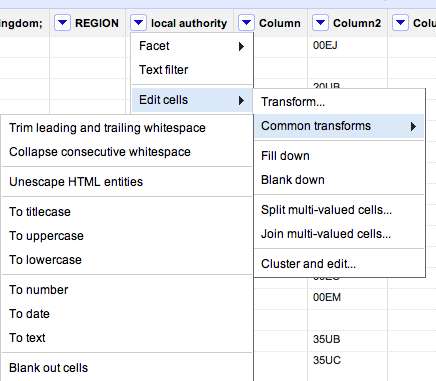
  5. At the top of each column you’ll see a downward-pointing triangle/arrow. Click on this and a drop-down menu opens with options including Facet; Text filter; Edit cells; and so on.
  6. Click on Edit cells and a further menu appears.
  7. The second option on this menu is Common transforms. Click on this and a final menu appears (see image below).

You’ll see there are a range of useful functions here to clean up your data and make sure it is consistent. Here’s why:

Trim leading and trailing whitespace

Sometimes in the process of entering data, people put a space before or after a name. You won’t be able to see it, but when it comes to counting how many times something is mentioned, or combining two sets of data, you will hit problems, because as far as a computer or spreadsheet is concerned, ” Jones” is different to “Jones”.

Clicking this option will remove those white spaces.

Collapse consecutive whitespace

Likewise, sometimes a double space will be used instead of a single space – accidentally or through habit, leading to more inconsistent data. This command solves that problem.

Unescape HTML entities

At some point in the process of being collected or published, HTML may be added to data. Typically this represents punctuation of some sort. “"” for example, is the HTML code for quotation marks. (List of this and others here).

This command will convert that cumbersome code into the characters they actually represent.

To titlecase/To uppercase/To lowercase

Another common problem with data is inconsistent formatting – occasionally someone will LEAVE THE CAPS LOCK ON or forget to capitalise a name.

This converts all cells in that column to be consistently formatted, one way or another.

To number/To date/To text

Like the almost-invisible spaces in data entry, sometimes a piece of data can look to you like a number, but actually be formatted as text. And like the invisible spaces, this becomes problematic when you are trying to combine, match up, or make calculations on different datasets.

This command solves that by ensuring that all entries in a particular column are formatted the same way.

Now, I’ve not used that command much and would be a bit careful – especially with dates, where UK and US formatting is different, for example. If  you’ve had experiences or tips on those lines let me know.

Other transforms

In addition to the commands listed above under ‘common transforms’ there are others on the ‘Edit cells’ menu that are also useful for cleaning data:

Split / Join multi-valued cells…

These are useful for getting names and addresses into a format consistent with other data – for example if you want to split an address into street name, city, postcode; or join a surname and forename into a full name.

Cluster and edit…

A particularly powerful cleaning function in Google Refine, this looks at your column data and suggests ‘clusters’ where entries are similar. You can then ask it to change those similar entries so that they have the same value.

There is more than one algorithm (shown in 2 drop-down menus: Method and Keying function) used to cluster – try each one in turn, as some pick up clusters that others miss.

If you have any other tips on cleaning data with Google Refine, please add them.

Can we go beyond ‘Share on Facebook’?

ProPublica have created a rather wonderful news app around education data. As Nieman reports:

“The app invites both macro and micro analysis, with an implicit focus on personal relevance: You can parse the data by state, or you can drill down to individual schools and districts — the high school you went to, or the one that’s in your neighborhood. And then, even more intriguingly, you can compare schools according to geographical proximity and/or the relative wealth and poverty of their student bodies.”

This is exactly what data journalism is great at.

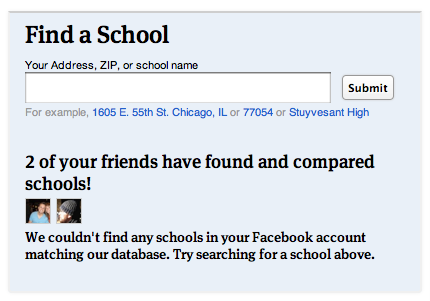
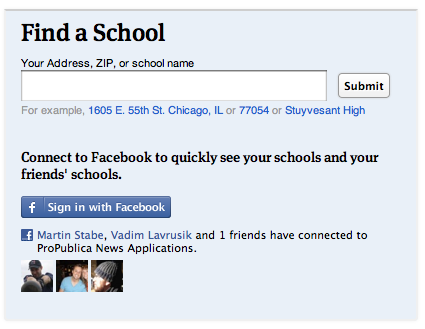
What’s more, the Nieman article talks breathlessly about ProPublica aiming to make data “more social”. What they describe is basically an embedded ‘Share this’ text box (admittedly nicely seamless) and a hashtag. But the news app page actually has a lot more to it: for example, once you’ve given it permission to access your Facebook account, it tells you how many friends have used the app, and appears to try to connect you to schools in your profile. This is how that’s presented on the homepage:

This came as a refreshing relief, because the ‘share this’ strategy reminds me of organisations who say their social media strategy is to ‘get everyone on Twitter’.

Still, it made me think of the range of challenges that Facebook and other social media platforms present. For example, if you land on one of the comparison pages, the offering isn’t so compelling: the reason to install the Facebook app is just “Share this”.

As I’ve written before, technology is a tool, not a strategy, so here are some other opportunities that might be explored:

  1. Publish your school’s scores to Facebook graphically, not just the generic link. Images work particularly well in news feeds, and would be much better than the dry list of names that is generated by the ‘Share this’ button.
  2. Turn conventional news values on their head: be positive. This is a curious one: positive headlines seem to get shared more on social media, so could users celebrate their school’s ratings as much as bemoan them? Could they generate a virtual report card with a ‘Try harder!’ line? Imagine a Facebook editor who asks “Where can we put the exclamation mark?” Yes, I know, it makes me feel uncomfortable too – but I also hear Yoda’s voice saying “You must unlearn what you have learned…”
  3. Build on where they’ve come from: if a friend has used the app to send them to a comparison page, can you build on that in the way you invite the user to connect through Facebook? Could they add something to what the friend has done, and correspond back and forth?
  4. A Facebook-based quiz which sees how well you guess where your school rates on different scales. Perhaps you could compete against your current or former classmates…
  5. A campaigning tool that would allow people to use data on their local school to petition for more support –
  6. Or a collaboration tool to help parents and students raise money, or organise provision.

Competition, fun, campaigning, conversation, collaborating – those are genuinely social applications of technology. It would be interesting to start a discussion about what else might suit a news app’s integration with Facebook. Any ideas?

Crowdfunding in Spanish journalism: 5×55 Terrassa

Cross-posted by Silvia Cobo from her blog.

Eduard Martín-Borregón is a freelance journalist based in Terrassa, a town 30km from Barcelona. The media landscape in this city is quite small: a local newspaper without a website, some local public radio, one local TV station and couple of websites. In contrast, the city have a lively amount of bloggers.

During the last election campaign Eduard wanted to show that was possible to make an informative project connecting politics and citizens, even without big resources: “8 years ago it would have been unthinkable that a single person could do this.”

And so he launched 5x55terrassa.org.

5×55

The idea of the project is simple: 5 questions to 55 people from Terrassa. 55 video interviews with different people about the present and future of Terrassa divided on 12 different areas.

The local elections took place on the 21th May. He published the interviews on 5x55terrassa.org daily between March 7 and May 20, using publishing platforms including Tumblr and Vimeo, and social media platforms such as Twitter and Facebook to promote the project.

The result is a mosaic of people’s lives, a picture of those who, in many different ways, make up the city.

But Eduard wanted to go a step further. He had many hours of good quality video interviews with different people from the city. What to do? He decided to transform all this video in a documentary, to be premiered – he hoped – at one of the city’s cinemas. Would people pay to have this document on DVD?

Crowdfunding the DVD

And that’s where the online crowdfunding platform Verkami comes in.

The aim was to cover the cost of publishing the story on DVD. Eduard needed 500 euros and asked for this money on Verkami, offering different ways to sponsor the project, purchasing the DVD and getting a ticket for the cinema release in Terrassa.

He collected the money in 40 days, with 32 people participating.

Eduard is now preparing the script. He says the experience has given him more knowledge about social platforms and the boundaries and narratives that work best online. He admits that the project has also given him greater visibility as a journalist online and in the city of Terrassa.