Category Archives: data journalism

Can we go beyond ‘Share on Facebook’?

ProPublica have created a rather wonderful news app around education data. As Nieman reports:

“The app invites both macro and micro analysis, with an implicit focus on personal relevance: You can parse the data by state, or you can drill down to individual schools and districts — the high school you went to, or the one that’s in your neighborhood. And then, even more intriguingly, you can compare schools according to geographical proximity and/or the relative wealth and poverty of their student bodies.”

This is exactly what data journalism is great at.

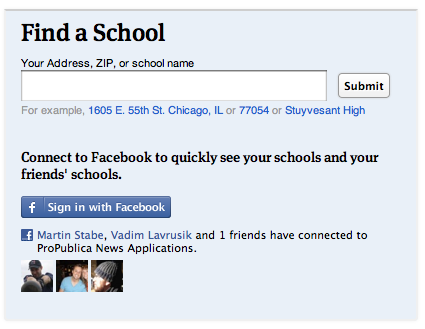
What’s more, the Nieman article talks breathlessly about ProPublica aiming to make data “more social”. What they describe is basically an embedded ‘Share this’ text box (admittedly nicely seamless) and a hashtag. But the news app page actually has a lot more to it: for example, once you’ve given it permission to access your Facebook account, it tells you how many friends have used the app, and appears to try to connect you to schools in your profile. This is how that’s presented on the homepage:
This came as a refreshing relief, because the ‘share this’ strategy reminds me of organisations who say their social media strategy is to ‘get everyone on Twitter’.

Still, it made me think of the range of challenges that Facebook and other social media platforms present. For example, if you land on one of the comparison pages, the offering isn’t so compelling: the reason to install the Facebook app is just “Share this”.

As I’ve written before, technology is a tool, not a strategy, so here are some other opportunities that might be explored:

  1. Publish your school’s scores to Facebook graphically, not just the generic link. Images work particularly well in news feeds, and would be much better than the dry list of names that is generated by the ‘Share this’ button.
  2. Turn conventional news values on their head: be positive. This is a curious one: positive headlines seem to get shared more on social media, so could users celebrate their school’s ratings as much as bemoan them? Could they generate a virtual report card with a ‘Try harder!’ line? Imagine a Facebook editor who asks “Where can we put the exclamation mark?” Yes, I know, it makes me feel uncomfortable too – but I also hear Yoda’s voice saying “You must unlearn what you have learned…”
  3. Build on where they’ve come from: if a friend has used the app to send them to a comparison page, can you build on that in the way you invite the user to connect through Facebook? Could they add something to what the friend has done, and correspond back and forth?
  4. A Facebook-based quiz which sees how well you guess where your school rates on different scales. Perhaps you could compete against your current or former classmates…
  5. A campaigning tool that would allow people to use data on their local school to petition for more support –
  6. Or a collaboration tool to help parents and students raise money, or organise provision.

Competition, fun, campaigning, conversation, collaborating – those are genuinely social applications of technology. It would be interesting to start a discussion about what else might suit a news app’s integration with Facebook. Any ideas?

Why the “Cost to the economy” of strike action could be misleading

It’s become a modern catchphrase. When planes are grounded, when cars crash, when computers are hacked, and when the earth shakes. There is, it seems, always a “cost to the economy”.

Today, with a mass strike over pensions in the UK, the cliche is brought forth again:

“The Treasury could save £30m from the pay forfeited by the striking teachers today but business leaders warned that this was hugely outbalanced by the wider cost to the economy of hundreds of thousands of parents having to take the day off.

“The British Chambers of Commerce said disruption will lead to many parents having to take the day off work to look after their children, losing them pay and hitting productivity.”

Statements like these (by David Frost, the director general, it turns out) pass unquestioned (also here, here and elsewhere), but in this case (and I wonder how many others), I think a little statistical literacy is needed.

Beyond the churnalism of ‘he said-she said’ reporting, when costs and figures are mentioned journalists should be asking to see the evidence.

Here’s the thing. In reality, most parents will have taken annual leave today to look after their children. That’s annual leave that they would have taken anyway, so is it really costing the economy any more to take that leave on this day in particular? And specifically, enough to “hugely outbalance” £30m?

Stretching credulity further is the reference to parents losing pay. All UK workers have a statutory right to 5.6 weeks of annual leave paid at their normal rate of pay. If they’ve used all that up halfway into the year (or 3 months into the financial year) – before the start of the school holidays no less – and have to take unpaid leave, then they’re stupid enough to be a cost to the economy without any extra help.

And this isn’t just a fuss about statistics: it’s a central element of one of the narratives around the strikes: that the Government are “deliberately trying to provoke the unions into industrial action so they could blame them for the failure of the Government’s economic strategy.”

If they do, it’ll be a good story. Will journalists let the facts get in the way of it?

UPDATE: An inverse – and equally dubious – claim could be made about the ‘boost’ to the economy from strike action: additional travel and food spending by those attending rallies, and childcare spending by parents who cannot take time off work. It’s like the royal wedding all over again… (thanks to Dan Thornton in the comments for starting this chain of thought)

My online journalism book is now out

The Online Journalism Handbook, written with Liisa Rohumaa, has now been published. You can get it here.

I’ve been blogging throughout the process of writing the book – particularly the chapters on data journalism, blogging and UGC – and you can still find those blog posts under the tag ‘Online Journalism Book‘.

Other chapters cover interactivity, audio slideshows and podcasting, video, law, some of the history that helps in understanding online journalism, and writing for the web (including SEO and SMO).

Meanwhile, I’ve created a blog, Facebook page and Twitter account (@OJhandbook) to provide updates, corrections and additions to the book.

If you spot anything in the book that needs updating or correcting, let me know. Likewise, let me know what you think of the book and anything you’d like to see added in future.

How I hacked my journalism workflow (#jcarn)

I’ve been meaning to write a post for some time breaking down all the habits and hacks I’ve acquired over the years – so this month’s Carnival of Journalism question on ‘Hacking your journalism workflow’ gave me the perfect nudge.

Picking those habits apart is akin to an act of archaeology. What might on the surface look very complicated is simply the accumulation of small acts over several years. Those acts range from the habits themselves to creating simple shortcuts and automated systems, and learning from experience. So that’s how I’ve broken it down:

1. Shortcuts

Shortcuts are such a basic part of my way of working that it’s easy to forget they’re there: bookmarks in the browser bar, for example. Or using the Chrome browser because its address bar also acts as a search bar for previous pages.

I realise I use Twitter lists as a shortcut of sorts – to zoom in on particular groups of people I’m interested in at a particular time, such as experts in a particular area, or a group of people I’m working with. Likewise, I use folders in Google Reader to periodically check on a particular field – such as data journalism – or group – such as UK journalists. Continue reading

Merging Datasets with Common Columns in Google Refine

It’s an often encountered situation, but one that can be a pain to address – merging data from two sources around a common column. Here’s a way of doing it in Google Refine…

Here are a couple of example datasets to import into separate Google Refine projects if you want to play along, both courtesy of the Guardian data blog (pulled through the Google Spreadsheets to Yahoo pipes proxy mentioned here):

University fees data (CSV via pipes proxy)

University HESA stats, 2010 (CSV via pipes proxy)

We can now merge data from the two projects by creating a new column from values an existing column within one project that are used to index into a similar column in the other project. Looking at the two datasets, both HESA Code and institution/University look like candidates for merging the data. Which should we go with? I’d go with the unique identifier (i.e. HESA code in the case) every time…

First, create a new column:

Now do the merge, using the cell.cross GREL (Google Refine Expression Language) command. Trivially, and pinching wholesale from the documentation example, we might use the following command to bring in Average Teaching Score data from the second project into the first:

cell.cross("Merge Test B", "HESA code").cells["Average Teaching Score"].value[0]

Note that there is a null entry and an error entry. It’s possible to add a bit of logic to tidy things up a little:

if (value!='null',cell.cross("Merge Test B", "HESA code").cells["Average Teaching Score"].value[0],'')

Here’s the result:

Coping with not quite matching key columns

Another situation that often arises is that you have two columns that almost but don’t quite match. For example, this dataset has a different name representation that the above datasets (Merge Test C):

There are several text processing tools that we can use to try to help us match columns that differ in well-structured ways:

In the above case, where am I creating a new column based on the contents of the Institution column in Merge Test C, I’m using a couple of string processing tricks… The GREL expression may look complicated, but if you build it up in a stepwise fashion it makes more sense.

For example, the command replace(value,"this", "that") will replace occurrences of “this” in the string defined by value with “that”. If we replace “this” with an empty string (” (two single quotes next to each other) or “” (two double quotes next to each other)), we delete it from value: replace(value,"this", "")

The result of this operation can be embedded in another replace statement: replace(replace(value,"this", "that"),"that","the other"). In this case, the first replace will replace occurrences of “this” with “that”; the result of this operation is passed to the second (outer) replace function, which replaces “that” with “the other”). Try building up the expression in realtime, and see what happens. First use:
toLowercase(value)
(what happens?); then:
replace(toLowercase(value),'the','')
and then:
replace(replace(toLowercase(value),'the',''),'of','')

The fingerprint() function then separates out the individual words that are left, orders them, and returns the result (more detail). Can you see how this might be used to transform a column that originally contains “The University of Aberdeen” to “aberdeen university”, which might be a key in another project dataset?

When trying to reconcile data across two different datasets, you may find you need to try to minimise the distance between almost common key columns by creating new columns in each dataset using the above sorts of technique.

Be careful not to create false positive matches though; and also be mindful that not everything will necessarily match up (you may get empty cells when using cell.cross; (to mitigate this, filter rows using a crossed column to find ones where there was no match and see if you can correct them by hand). Even if you don’t completely successful cross data from one project to another, you might manage to automate the crossing of most of the rows, minimising the amount of hand crafted copying you might have to do to tidy up the real odds and ends…

So for example, here’s what I ended up using to create a “Pure key” column in Merge Test C:
fingerprint(replace(replace(replace(toLowercase(value),'the',''),'of',''),'university',''))

And in Merge Test A I create a “Complementary Key” column from the University column using fingerprint(value)

From the Complementary Key column in Merge Test A we call out to Merge Test C: cell.cross("Merge Test C", "Pure key").cells["UCAS ID"].value[0]

Obviously, this approach is far from ideal (and there may be more “correct” and/or efficient ways of doing this!) and the process described above is admittedly rather clunky, but it does start to reveal some of what’s involved in trying to bring data across to one Google Refine project from another using columns that don’t quite match in the original dataset, although they do (nominally) refer to the same thing, and does provide a useful introductory exercise to some of the really quite powerful text processing commands in Google Refine …

First Play With R and R-Studio – F1 Lap Time Box Plots

Last summer, at the European Centre for Journalism round table on data driven journalism, I remember saying something along the lines of “your eyes can often do the stats for you”, the implication being that our perceptual apparatus is good at pattern detection, and can often see things in the data that most of us would miss using the very limited range of statistical tools that we are either aware of, or are comfortable using.

I don’t know how good a statistician you need to be to distinguish between Anscombe’s quartet, but the differences are obvious to the eye:

Anscombe's quartet /via Wikipedia

Another shamistician (h/t @daveyp) heuristic (or maybe it’s a crapistician rule of thumb?!) might go something along the lines of: “if you use the right visualisations, you don’t necessarily need to do any statistics yourself”. In this case, the implication is that if you choose a viualisation technique that embodies or implements a statistical process in some way, the maths is done for you, and you get to see what the statistical tool has uncovered.

Now I know that as someone working in education, I’m probably supposed to uphold the “should learn it properly” principle… But needing to know statistics in order to benefit from the use of statistical tools seems to me to be a massive barrier to entry in the use of this technology (statistics is a technology…) You just need to know how to use the technology appropriately, or at least, not use it “dangerously”…

So to this end (“democratising access to technology”), I thought it was about time I started to play with R, the statistical programming language (and rival to SPSS?) that appears to have a certain amount of traction at the moment given the number of books about to come out around it… R is a command line language, but the recently released R-Studio seems to offer an easier way in, so I thought I’d go with that…

Flicking through A First Course in Statistical Programming with R, a book I bought a few weeks ago in the hope that the osmotic reading effect would give me some idea as to what it’s possible to do with R, I found a command line example showing how to create a simple box plot (box and whiskers plot) that I could understand enough to feel confident I could change…

Having an F1 data set/CSV file to hand (laptimes and fuel adjusted laptimes) from the China 2001 grand prix, I thought I’d see how easy it was to just dive in… And it was 2 minutes easy… (If you want to play along, here’s the data file).

Here’s the command I used:
boxplot(Lap.Time ~ Driver, data=lapTimeFuel)

Remembering a comment in a Making up the Numbers blogpost (Driver Consistency – Bahrain 2010) about the effect on laptime distributions from removing opening, in and out lap times, a quick Google turned up a way of quickly stripping out slow times. (This isn’t as clean as removing the actual opening, in and out lap times – it also removes mistake laps, for example, but I’m just exploring, right? Right?!;-)

lapTime2 <- subset(lapTimeFuel, Lap.Time < 110.1)

I could then plot the distribution in the reduced lapTime2 dataset by changing the original boxplot command to use (data=lapTime2). (Note that as with many interactive editors, using your keyboard’s up arrow displays previously entered commands in the current command line; so you can re-enter a previously entered command by hitting the up arrow a few times, then entering return. You can also edit the current command line, using the left and right arrow keys to move the cursor, and the delete key to delete text.)

Prior programming experience suggests this should also work…

boxplot(Lap.Time ~ Driver, data=subset(lapTimeFuel, Lap.Time < 110))

Something else I tried was to look at the distribution of fuel weight adjusted laptimes (where the time penalty from the weight of the fuel in the car is removed):

boxplot(Fuel.Adjusted.Laptime ~ Driver, data=lapTimeFuel)

Looking at the release notes for the latest version of R-Studio suggests that you can build interactive controls into your plots (a bit like Mathematica supports?). The example provided shows how to change the x-range on a plot:
manipulate(
plot(cars, xlim=c(0,x.max)),
x.max=slider(15,25))

Hmm… can we set the filter value dynamically I wonder?

manipulate(
boxplot(Lap.Time ~ Driver, data=subset(lapTimeFuel, Lap.Time < maxval)),
maxval=slider(100,140))

Seems like it…?:-) We can also combine interactive controls:

manipulate(boxplot(Lap.Time ~ Driver, data=subset(lapTimeFuel, Lap.Time < maxval),outline=outline),maxval=slider(100,140),outline = checkbox(FALSE, "Show outliers"))

Okay – that’s enough for now… I reckon that with a handful of commands on a crib sheet, you can probably get quite a lot of chart plot visualisations done, as well as statistical visualisations, in the R-Studio environment; it also seems easy enough to build in interactive controls that let you play with the data in a visually interactive way…

The trick comes from choosing visual statistics approaches to analyse your data that don’t break any of the assumptions about the data that the particular statistical approach relies on in order for it to be applied in any sensible or meaningful way.

[This blog post is written, in part, as a way for me to try to come up with something to say at the OU Statistics Group’s one day conference on Visualisation and Presentation in Statistics. One idea I wanted to explore was: visualisations are powerful; visualisation techniques may incorporate statistical methods or let you “see” statistical patterns; most people know very little statistics; that shouldnlt stop them being able to use statistics as a technology; so what are we going to do about it? Feedback welcome… Err….?!]

Fragments: Glueing Different Data Sources Together With Google Refine

I’m working on a new pattern using Google Refine as the hub for a data fusion experiment pulling together data from different sources. I’m not sure how it’ll play out in the end, but here are some fragments….

Grab Data into Google Refine as CSV from a URL (Proxied Google Spreadsheet Query via Yahoo Pipes)

Firstly, getting data into Google Refine… I had hoped to be able to pull a subset of data from a Google Spreadsheet into Google Refine by importing CSV data obtained from the spreadsheet via a query generated using my Google Spreadsheet/Guardian datastore explorer (see Using Google Spreadsheets as a Database with the Google Visualisation API Query Language for more on this) but it seems that Refine would rather pull the whole of the spreadsheet in (or at least, the whole of the first sheet (I think?!)).

Instead, I had to tweak create a proxy to run the query via a Yahoo Pipe (Google Spreadsheet as a database proxy pipe), which runs the spreadsheet query, gets the data back as CSV, and then relays it forward as JSON:

Here’s the interface to the pipe – it requires the Google spreadsheet public key id, the sheet id, and the query… The data I’m using is a spreadsheet maintained by the Guardian datastore containing UK university fees data (spreadsheet.

You can get the JSON version of the data out directly, or a proxied version of the CSV, as CSV via the More options menu…

Using the Yahoo Pipes CSV output URL, I can now get a subset of data from a Google Spreadsheet into Google Refine…

Here’s the result – a subset of data as defined by the query:

We can now augment this data with data from another source using Google Refine’s ability to import/fetch data from a URL. In particular, I’m going to use the Yahoo Pipe described above to grab data from a different spreadsheet and pass it back to Google Refine as a JSON data feed. (Google spreadsheets will publish data as JSON, but the format is a bit clunky…)

To test out my query, I’m going to create a test query in my datastore explorer using the Guardian datastore HESA returns (2010) spreadsheet URL (http://spreadsheets1.google.com/spreadsheet/ccc?hl&key=tpxpwtyiYZwCMowl3gNaIKQ#gid=0) which also has a column containing HESA numbers. (Ultimately, I’m going to generate a URL that treats the Guardian datastore spreadsheet as a database that lets me get data back from the row with a particular HESA code column value. By using the HESA number column in Google Refine to provide the key, I can generate a URL for each institution that grabs its HESA data from the Datastore HESA spreadsheet.)

Hit “Preview Table Headings”, then scroll down to try out a query:

Having tested my query, I can now try the parameters out in the Yahoo pipe. (For example, my query is select D,E,H where D=21 and the key is tpxpwtyiYZwCMowl3gNaIKQ; this grabs data from columns D, E and H where the value of D (HESA Code) is 21). Grab the JSON output URL from the pipe, and use this as a template for the URL template in Google Refine. Here’s the JSON output URL I obtained:

http://pipes.yahoo.com/pipes/pipe.run?_id=4562a5ec2631ce242ebd25a0756d6381
&_render=json&key=tpxpwtyiYZwCMowl3gNaIKQ
&q=select+D%2CE%2CH+where+D%3D21

Remember, the HESA code I experiment with was 21, so this is what we want to replace in the URL with the value from the HESA code column in Google Refine…

Here’s how we create the URLs built around/keyed by an appropriate HESA code…

Google Refine does its thing and fetches the data…

Now we process the JSON response to generate some meaningful data columns (for more on how to do this, see Tech Tips: Making Sense of JSON Strings – Follow the Structure).

First say we want to create a new column based on the imported JSON data:

Then parse the JSON to extract the data field required in the new column.

For example, from the HESA data we might extract the Expenditure per student /10:

value.parseJson().value.items[0]["Expenditure per student / 10"]

or the Average Teaching Score (value.parseJson().value.items[0]["Average Teaching Score"]):

And here’s the result:

So to recap:

– we use a Yahoo Pipe to query a Google spreadsheet and get a subset of data from it;
– we take the CSV output from the pipe and use it to create a new Google Refine database;
– we note that the data table in Google Refine has a HESA code column; we also note that the Guardian datastore HESA spreadsheet has a HESA code column;
– we realise we can treat the HESA spreadsheet as a database, and further that we can create a query (prototyped in the datastore explorer) as a URL keyed by HESA code;
– we create a new column based on HESA codes from a generated URL that pulls JSON data from a Yahoo pipe that is querying a Google spreadsheet;
– we parse the JSON to give us a couple of new columns.

And there we have it – a clunky, but workable, route for merging data from two different Google spreadsheets using Google Refine.

Data for journalists: JSON for beginners

Following the post earlier this week on XML and RSS for journalists I wanted to look at another important format for journalists working with data: JSON.

JSON is a data format which has been rising in popularity over the past few years. Quite often it is offered alongside – or instead of – XML by various information services, such as Google Maps, the UK Postcodes API and the Facebook Graph API.

Because of this, in practice JSON is more likely to be provided in response to a specific query (“Give me geographical and political data about this location”) than a general file that you access (“Give me all geographical data about everywhere”).

I’ll describe how you supply that query below. Continue reading

Guest post: visualising mobile phone data – the data retention app

datarentention_app

In a guest post Lorenz Matzat, editor of ZEIT Online’s Open Data Blog, writes about the background to their online app exploring the issues around data retention by mobile phone companies.

It’s not very often that one can follow the direct impact of an article, let alone a piece of data journalism. But the visualization of the cellphone data of Malte Spitz from the Green party in Germany led to visible repercussions in the US.

Following a piece in the New York Times about Spitz and the data app, some days ago two senators wrote a letter to the 4 main US-carriers for information about their data retention policy.

After publishing the app in German one month ago (and 20 days later the English version), the feedback was overhelming. We didn’t think that so many people would be so interested in it. But Twitter and Facebook in Germany went wild with it for some days – along with coverage in many major tech websites.

Probably this is why data journalism works: Making an abstract notion everybody knows about visible: that every position of you, and every connection of your mobile phone does is – or could be – logged. Every call, text message and data connection.

The background

Around February 1st, ZEIT Online asked me if I had an idea what do do with the dataset of Malte Spitz (read the background story about the legal action of Spitz to get the data here). Continue reading