Category Archives: data journalism

What inflation has to do with the price of fish

Inflation image by Gregor Rohrig

Inflation image by Gregor Rohrig - click to see source

One of the forms of data that journalists frequently have to deal with is prices. And while it’s one thing to say that things are getting more expensive, making a meaningful comparison between what things cost now and what things cost then is a different kettle of fish altogether.

Factoring in inflation can make all the difference between arbitrary comparisons that provide no insight whatsoever, and genuinely meaningful reporting.

Thanks to computing power it’s actually quite easy for journalists to factor inflation into their reporting – by using an inflation calculator. It’s also easier to find historical price data with data-driven search engines like Wolfram Alpha.

But inflation is only half of the calculation you need. The other is earnings.

Professor Ian Stewart illustrates this perfectly in this article in The Telegraph:

“[A] 1991 pint cost around £1.40, which is £1.80 in today’s money. The current price is around £2.80, so beer really is more expensive. On the other hand, the average salary in 1991 was £19,000, and today it is £38,000. Relative to what we earn, a pint costs exactly the same as it did 19 years ago.

“Our house? That would be £125,000 today, so it has gone up by 84 per cent. Relative to average earnings, however, the increase is only 10 per cent.

“The Guardian knows about inflation, and said that the pub pint has increased by 68 per cent in real terms. But this compares the real increase in new money with the original price in old money. If I did the calculation like that for my house it would have gone up by 850 per cent. Calculated sensibly, the rise in the price of beer is about 55 per cent relative to inflation, and zero per cent relative to earnings.”

Of course the danger in averages is that they only illustrate aggregate change, and if you’re talking about a purchase that a particular section of the population makes – or you’re only talking to a particular region – then a national average may not be as meaningful a comparison to make.

If the poor are getting poorer and the rich richer then a pint of beer really is more expensive for some – and cheaper for others – than it used to be. Likewise, particular parts of the country might be suffering more from house price increases than others because of local average wages and local house prices.

It’s also worth pointing out that, when talking about financial data, a median is a much more useful measure to take than a mean.

Finally, aside from the statistical considerations it’s worth coming back to some of the basics of pricing. Ian again:

“There are two things to remember about prices. One is basic economics: if something gets too expensive for people to buy it, they don’t. So prices and wages have to stay in step, broadly speaking – though with big fluctuations in some commodities, such as housing. The other is inflation. We all know it exists, but we forget that when we start comparing prices. ‘My God! A Ford Anglia cost only £295 in 1940!’ True, but the average salary then was £370. The equivalent price today is £30,000, which will buy you a Jaguar XF.”

First Dabblings With Scraperwiki – All Party Groups

Over the last few months there’s been something of a roadshow making its way around the country giving journalists, et al. hands-on experience of using Scraperwiki (I haven’t been able to make any of the events, which is shame:-(

So what is Scraperwiki exactly? Essentially, it’s a tool for grabbing data from often unstructured webpages, and putting it into a simple (data) table.

And how does it work? Each wiki page is host to a screenscraper – programme code that can load in web pages, drag information out of them, and pop that information into a simple database. The scraper can be scheduled to run every so often (once a day, once a week, and so on) which means that it can collect data on your behalf over an extended period of time.

Scrapers can be written in a variety of programming languages – Python, Ruby and PHP are supported – and tutorials show how to scrape data from PDF and Escel documents, as well as HTML web pages. But for my first dabblings, I kept it simple: using Python to scrape web pages.

The task I set myself was to grab details of the membership of UK Parliamentary All Party Groups (APGs) to see which parliamentarians were members of which groups. The data is currently held on two sorts of web pages. Firstly, a list of APGs:

All party groups - directory

Secondly, pages for each group, which are published according to a common template:

APG - individual record

The recipe I needed goes as follows:
– grab the list of links to the All Party Groups I was interested in – which was subject based ones rather than country groups;
– for each group, grab it’s individual record page and extract the list of 20 qualifying members
– add records to the scraperwiki datastore of the form (uniqueID, memberName, groupName)

So how did I get on? (You can see the scraper here: ouseful test – APGs). Let’s first have a look at the directory page – this is the bit where it starts to get interesting:

View source: list of APGs

If you look carefully, you will notice two things:
– the links to the country groups and the subject groups look the same:
<p xmlns=”http://www.w3.org/1999/xhtml&#8221; class=”contentsLink”>
<a href=”zimbabwe.htm”>Zimbabwe</a>
</p>

<p xmlns=”http://www.w3.org/1999/xhtml&#8221; class=”contentsLink”>
<a href=”accident-prevention.htm”>Accident Prevention</a>
</p>

– there is a header element that separates the list of country groups from the subject groups:
<h2 xmlns=”http://www.w3.org/1999/xhtml”>Section 2: Subject Groups</h2>

Since scraping largely relies on pattern matching, I took the strategy of:
– starting my scrape proper after the Section 2 header:

def fullscrape():
    # We're going to scrape the APG directory page to get the URLs to the subject group pages
    starting_url = 'http://www.publications.parliament.uk/pa/cm/cmallparty/register/contents.htm'
    html = scraperwiki.scrape(starting_url)

    soup = BeautifulSoup(html)
    # We're interested in links relating to <em>Subject Groups</em>, not the country groups that precede them
    start=soup.find(text='Section 2: Subject Groups')
    # The links we want are in p tags
    links = start.findAllNext('p',"contentsLink")

    for link in links:
        # The urls we want are in the href attribute of the a tag, the group name is in the a tag text
        #print link.a.text,link.a['href']
        apgPageScrape(link.a.text, link.a['href'])

So that function gets a list of the page URLs for each of the subject groups. The subject group pages themselves are templated, so one scraper should work for all of them.

This is the bit of the page we want to scrape:

APG - qualifying members

The 20 qualifying members’ names are actually contained in a single table row:

APG - qualifying members table

def apgPageScrape(apg,page):
    print "Trying",apg
    url="http://www.publications.parliament.uk/pa/cm/cmallparty/register/"+page
    html = scraperwiki.scrape(url)
    soup = BeautifulSoup(html)
    #get into the table
    start=soup.find(text='Main Opposition Party')
    # get to the table
    table=start.parent.parent.parent.parent
    # The elements in the number column are irrelevant
    table=table.find(text='10')
    # Hackery...:-( There must be a better way...!
    table=table.parent.parent.parent
    print table

    lines=table.findAll('p')
    members=[]

    for line in lines:
        if not line.get('style'):
            m=line.text.encode('utf-8')
            m=m.strip()
            #strip out the party identifiers which have been hacked into the table (coalitions, huh?!;-)
            m=m.replace('-','–')
            m=m.split('–')
            # I was getting unicode errors on apostrophe like things; Stack Overflow suggested this...
            try:
                unicode(m[0], "ascii")
            except UnicodeError:
                m[0] = unicode(m[0], "utf-8")
            else:
                # value was valid ASCII data
                pass
            # The split test is another hack: it dumps the party identifiers in the last column
            if m[0]!='' and len(m[0].split())>1:
                print '...'+m[0]+'++++'
                members.append(m[0])

    if len(members)>20:
        members=members[:20]

    for m in members:
        #print m
        record= { "id":apg+":"+m, "mp":m,"apg":apg}
        scraperwiki.datastore.save(["id"], record)
    print "....done",apg

So… hacky and horrible… and I don’t capture the parties which I probably should… But it sort of works (though I don’t manage to handle the <br /> tag that conjoins a couple of members in the screenshot above) and is enough to be going on with… Here’s what the data looks like:

Scraped data

That’s the first step then – scraping the data… But so what?

My first thought was to grab the CSV output of the data, drop the first column (the unique key) via a spreadsheet, then treat the members’ names and group names as nodes in a network graph, visualised using Gephi (node size reflects the number of groups an individual is a qualifying member of):

APG memberships

(Not the most informative thing, but there we go… At least we can see who can be guaranteed to help get a group up and running;-)

We can also use an ego filter depth 2 to see which people an individual is connected to by virtue of common group membership – so for example (if the scraper worked correctly (and I haven’t checked that it did!), here are John Stevenson’s APG connections (node size in this image relates to the number of common groups between members and John Stevenson):

John Stevenson - APG connections

So what else can we do? I tried to export the data from scraperwiki to Google Docs, but something broke… Instead, I grabbed the URL of the CSV output and used that with an =importData formula in a Google Spreadsheet to get the data into that environment. Once there it becomes a database, as I’ve described before (e.g. Using Google Spreadsheets Like a Database – The QUERY Formula and Using Google Spreadsheets as a Database with the Google Visualisation API Query Language).

I published the spreadsheet and tried to view it in my Guardian Datastore explorer, and whilst the column headings didnlt appear to display properly, I could still run queries:

APG membership

Looking through the documentation, I also notice that Scraperwiki supports Python Google Chart, so there’s a local route to producing charts from the data. There are also some geo-related functions which I probably should have a play with…(but before I do that, I need to have a tinker with the Ordnance Survey Linked Data). Ho hum… there is waaaaaaaaay to much happening to keep up (and try out) with at the mo….

PS Here are some immediate thoughts on “nice to haves”… The current ability to run the scraper according to a schedule seems to append data collected according to the schedule to the original database, but sometimes you may want to overwrite the database? (This may be possible via the programme code using something like fauxscraperwiki.datastore.empty() to empty the database before running the rest of the script?) Adding support for YQL queries by adding e.g. Python-YQL to the supported libraries might also be handy?

Discovering Co-location Communities – Twitter Maps of Tweets Near Wherever…

As privacy erodes further and further, and more and more people start to reveal where they using location services, how easy is it to identify communities based on location, say, or postcode, rather than hashtag? That is, how easy is it to find people who are colocated in space, rather than topic, as in the hashtag communities? Very easy, it turns out…

One of the things I’ve been playing with lately is “community detection”, particularly in the context of people who are using a particular hashtag on Twitter. The recipe in that case runs something along the lines of: find a list of twitter user names for people using a particular hashtag, then grab their Twitter friends lists and look to see what community structures result (e.g. look for clusters within the different twitterers). The first part of that recipe is key, and generalisable: find a list of twitter user names

So, can we create a list of names based on co-location? Yep – easy: Twitter search offers a “near:” search limit that lets you search in the vicinity of a location.

Here’s a Yahoo Pipe to demonstrate the concept – Twitter hyperlocal search with map output:

Pipework for twitter hyperlocal search with map output

[UPDATE: since grabbing that screenshot, I’ve tweaked the pipe to make it a little more robust…]

And here’s the result:

Twitter local trend

It’s easy enough to generate a widget of the result – just click on the Get as Badge link to get the embeddable widget code, or add the widget direct to a dashboard such as iGoogle:

Yahoo pipes map badge

(Note that this pipe also sets the scene for a possible demo of a “live pipe”, e.g. one that subscribes to searches via pubsubhubbub, so that whenever a new tweet appears it’s pushed to the pipe, and that makes the output live, for example by using a webhook.)

You can also grab the KML output of the pipe using a URL of the form:
http://pipes.yahoo.com/pipes/pipe.run?_id=f21fb52dc7deb31f5fffc400c780c38d&_render=kml&distance=1&location=YOUR+LOCATION+STRING
and post it into a Google maps search box… like this:

Yahoo pipe in google map

(If you try to refresh the Google map, it may suffer from result cacheing.. in which case you have to cache bust, e.g. by changing the distance value in the pipe URL to 1.0, 1.00, etc…;-)

Something else that could be useful for community detection is to search through the localised/co-located tweets for popular hashtags. Whilst we could probably do this in a separate pipe (left as an exercise for the reader), maybe by using a regular expression to extract hashtags and then the unique block filtering on hashtags to count the reoccurrences, here’s a Python recipe:

import simplejson, urllib

def getYahooAppID():
  appid='YOUR_YAHOO_APP_ID_HERE'
  return appid

def placemakerGeocodeLatLon(address):
  encaddress=urllib.quote_plus(address)
  appid=getYahooAppID()
  url='http://where.yahooapis.com/geocode?location='+encaddress+'&flags=J&appid='+appid
  data = simplejson.load(urllib.urlopen(url))
  if data['ResultSet']['Found']>0:
    for details in data['ResultSet']['Results']:
      return details['latitude'],details['longitude']
  else:
    return False,False

def twSearchNear(tweeters,tags,num,place='mk7 6aa,uk',term='',dist=1):
  t=int(num/100)
  page=1
  lat,lon=placemakerGeocodeLatLon(place)
  while page<=t:
    url='http://search.twitter.com/search.json?geocode='+str(lat)+'%2C'+str(lon)+'%2C'+str(1.0*dist)+'km&rpp=100&page='+str(page)+'&q=+within%3A'+str(dist)+'km'
    if term!='':
      url+='+'+urllib.quote_plus(term)

    page+=1
    data = simplejson.load(urllib.urlopen(url))
    for i in data['results']:
     if not i['text'].startswith('RT @'):
      u=i['from_user'].strip()
      if u in tweeters:
        tweeters[u]['count']+=1
      else:
        tweeters[u]={}
        tweeters[u]['count']=1
      ttags=re.findall("#([a-z0-9]+)", i['text'], re.I)
      for tag in ttags:
        if tag not in tags:
    	  tags[tag]=1
    	else:
    	  tags[tag]+=1

  return tweeters,tags

''' Usage:
tweeters={}
tags={}
num=100 #number of search results, best as a multiple of 100 up to max 1500
location='PLACE YOU WANT TO SEARCH AROUND'
term='OPTIONAL SEARCH TERM TO NARROW DOWN SEARCH RESULTS'
tweeters,tags=twSearchNear(tweeters,tags,num,location,searchTerm)
'''

What this code does is:
– use Yahoo placemaker to geocode the address provided;
– search in the vicinity of that area (note to self: allow additional distance parameter to be set; currently 1.0 km)
– identify the unique twitterers, as well as counting the number of times they tweeted in the search results;
– identify the unique tags, as well as counting the number of times they appeared in the search results.

Here’s an example output for a search around “Bath University, UK”:

Having got the list of Twitterers (as discovered by a location based search), we can then look at their social connections as in the hashtag community visualisations:

Community detected around Bath U.. Hmm,,, people there who shouldnlt be?!

And wondering why the likes @pstainthorp and @martin_hamilton appear to be in Bath? Is the location search broken, picking up stale data, or some other error….? Or is there maybe a UKOLN event on today I wonder..?

PS Looking at a search near “University of Bath” in the web based Twitter search, it seems that: a) there arenlt many recent hits; b) the search results pull up tweets going back in time…

Which suggests to me:
1) the code really should have a time window to filter the tweets by time, e.g. excluding tweets that are more than a day or even an hour old; (it would be so nice if Twitter search API offered a since_time: limit, although I guess it does offer since_id, and the web search does offer since: and until: limits that work on date, and that could be included in the pipe…)
2) where there aren’t a lot of current tweets at a location, we can get a profile of that location based on people who passed through it over a period of time?

UPDATE: Problem solved…

The location search is picking up tweets like this:

Twitter locations...

but when you click on the actual tweet link, it’s something different – a retweet:

Twitter reweets pass through the original location

So “official” Twitter retweets appear to pass through the location data of the original tweet, rather than the person retweeting… so I guess my script needs to identify official twitter retweets and dump them…

Manchester Police tweets and the MEN – local data journalism part 2

Manchester Evening News visualisation of Police incident tweets

A week ago I blogged about how the Manchester Evening News were using data visualisation to provide a deeper analysis of the local police force’s experiment in tweeting incidents for 24 hours. In that post Head of Online Content Paul Gallagher said he thought the real benefit would “come afterwards when we can also plot the data over time”.

Now that data has been plotted, and you can see the results here.

In addition, you can filter the results by area, type (crime or ‘social work’) and category (specific sort of crime or social issue). To give the technical background: Carl Johnstone put the data into a mysql database, wrote some code in Perl for the filters and used a Flash applet for the graphs. Continue reading

Mapping the budget cuts

budget cuts map

Richard Pope and Jordan Hatch have been building a very useful site tracking recent budget cuts, building up to this week’s spending review.

Where Are The Cuts? uses the code behind the open source Ushahidi platform (covered previously on OJB by Claire Wardle) to present a map of the UK representing where cuts are being felt. Users can submit their own reports of cuts, or add details to others via a comments box.

It’s early days in the project – currently many of the cuts are to national organisations with local-level impacts yet to be dug out.

Closely involved is the public expenditure-tracking site Where Does My Money Go? which has compiled a lot of relevant data.

Meanwhile, in Birmingham a couple of my MA Online Journalism students have set up a hyperlocal blog for the 50,000 public sector workers in the region, primarily to report those budget cuts and how they are affecting people. Andy Watt, who – along with Hedy Korbee – is behind the site, has blogged about the preparation for the site’s launch here. It’s a good example of how journalists can react to a major issue with a niche blog. Andy and Hedy will be working with the local newspapers to combine expertise.

Stories hidden in the data, stories in the comments

the tax gap

My attention was drawn this week by David Hayward to a visualisation by David McCandless of the tax gap (click on image for larger version). McCandless does some beautiful stuff, but what was particularly interesting in this graphic was how it highlighted areas that rarely make the news agenda.

Tax avoidance and evasion, for example, account for £7.4bn each, while benefit fraud and benefit system error account for £1.5 and £1.6bn respectively.

Yet while the latter dominate the news agenda, and benefit cheats subject to regular exposure, tax avoidance and evasion are rare guests on the pages of newspapers.

In other words, the data is identifying a news hole of sorts. There are many reasons for this – Galtung & Ruge would have plenty of ideas, for example – but still: there it is.

The comments

But that’s only part of what makes this so interesting. By publishing the data and having built the healthy community that exists around the data blog, McCandless and The Guardian benefit from some very useful comments (aside from the odd political one) on how to improve both the data and the visualisation.

This is a great example of how the newspaper is stealing an enormous march on its rivals in working beyond its newsroom in collaboration with users – benefiting from what Clay Shirky would call cognitive surplus. Data is not just an informational object, but a social one too.

Online journalism student RSS reader starter pack: 50 RSS feeds

Teaching has begun in the new academic year and once again I’m handing out a list of recommended RSS feeds. Last year this came in the form of an OPML file, but this year I’m using Google Reader bundles (instructions on how to create one of your own are here). There are 50 feeds in all – 5 feeds in each of 10 categories. Like any list, this is reliant on my own circles of knowledge and arbitrary in various respects. But it’s a start. I’d welcome other suggestions.

Here is the list with links to the bundles. Each list is in alphabetical order – there is no ranking:

5 of the best: Community

A link to the bundle allowing you to add it to your Google Reader is here.

  1. Blaise Grimes-Viort
  2. Community Building & Community Management
  3. FeverBee
  4. ManagingCommunities.com
  5. Online Community Strategist

5 of the best: Data

This was a particularly difficult list to draw up – I went for a mix of visualisation (FlowingData), statistics (The Numbers Guy), local and national data (CountCulture and Datablog) and practical help on mashups (OUseful). I cheated a little by moving computer assisted reporting blog Slewfootsnoop into the 5 UK feeds and 10,000 Words into Multimedia. Bundle link here. Continue reading

Something I wrote for the Guardian Datablog (and caveats)

I’ve written a piece on ‘How to be a data journalist’ for The Guardian’s Datablog. It seems to have proven very popular, but I thought I should blog briefly about it if you haven’t seen one of those tweets.

The post is necessarily superficial – it was difficult enough to cover the subject area for a 12,000-word book chapter, so summarising further into a 1,000 word article was almost impossible.

In the process I had to leave a huge amount out, compensating slightly by linking to webpages which expanded further.

Visualising and mashing, as the more advanced parts of data journalism, suffered most, because it seemed to me that locating and understanding data necessarily took precedence.

Heather Billings, for example, blogged about my “very British footnote [which was the] only nod to visual presentation”. If you do want to know more about visualisation tips, I wrote 1,000 words on that alone here. There’s also this great post by Kaiser Fung – and the diagram below, of which Fung says: “All outstanding charts have all three elements in harmony. Typically, a problematic chart gets only two of the three pieces right.”:

Trifecta checkup

On Monday I blogged the advice on where aspiring data journalists should start in full. There’s also the selection of passages from the book chapter linked above. And my Delicious bookmarks on data journalism, visualisation and mashups. Each has an RSS feed.

I hope that helps. If you do some data journalism as a result, it would be great if you could let me know about it – and what else you picked up.

Open data meets FOI via some nifty automation

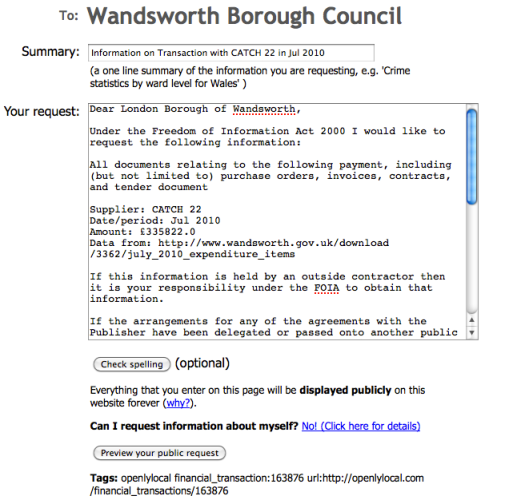
OpenlyLocal generated FOI request

Now this is an example of what’s possible with open data and some very clever thinking. Chris Taggart blogs about a new tool on his OpenlyLocal platform that allows you to send a Freedom of Information (FOI) request based on a particular item of spending. “This further lowers the barriers to armchair auditors wanting to understand where the money goes, and the request even includes all the usual ‘boilerplate’ to help avoid specious refusals.”

It takes around a minute to generate an FOI request.

The function is limited to items of spending above £10,000. Cleverly, it’s also all linked so you can see if an FOI request has already been generated and answered.

Although the tool sits on OpenlyLocalFrancis Irving at WhatDoTheyKnow gets enormous credit for making their side of the operation work with it.

Once again you have to ask why a media organisation isn’t creating these sorts of tools to help generate journalism beyond the walls of its newsroom.

Where should an aspiring data journalist start?

In writing last week’s Guardian Data Blog piece on How to be a data journalist I asked various people involved in data journalism where they would recommend starting. The answers are so useful that I thought I’d publish them in full here.

The Telegraph’s Conrad Quilty-Harper:

Start reading:

http://www.google.com/reader/bundle/user%2F06076274130681848419%2Fbundle%2Fdatavizfeeds

Keep adding to your knowledge and follow other data journalists/people who work with data on Twitter.

Look for sources of data:

ONS stats release calendar is a good start http://www.statistics.gov.uk/hub/release-calendar/index.html Look at the Government data stores (Data.gov, Data.gov.uk, Data.london.gov.uk etc).

Check out What do they know, Freebase, Wikileaks, Manyeyes, Google Fusion charts. Continue reading