One of the great things about aggregating local spending data from different councils in the same place – such as on OpenlyLocal – is that you can start to explore structural relations in the way different public bodies of a similar type spend money with each other.
On the local spend with corporates scraper on Scraperwiki, which I set up to scrape how different councils spent money with particular suppliers, I realised I could also use the scraper to search for how councils spent money with other councils, by searching for suppliers containing phrases such as “district council” or “town council”. (We could also generate views to to see how councils wre spending money with different police authorities, for example.)
(The OpenlyLocal API doesn’t seem to work with the search, so I scraped the search results HTML pages instead. Results are paged, with 30 results per page, and what seems like a maximum of 1500 (50 pages) of results possible.)
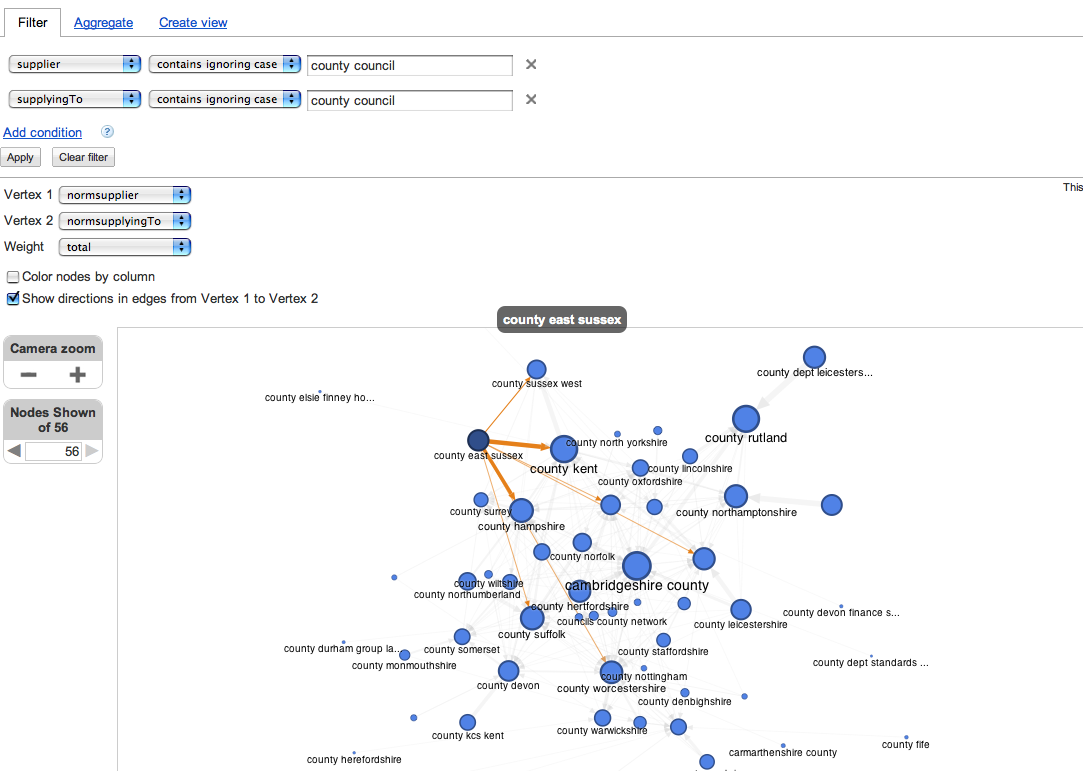
The publicmesh table on the scraper captures spend going to a range of councils (not parish councils) from other councils. I also uploaded the data to Google Fusion tables (public mesh spending data), and then started to explore it using the new network graph view (via the Experiment menu). So for example, we can get a quick view over how the various county councils make payments to each other:
Hovering over a node highlights the other nodes its connected to (though it would be good if the text labels from the connected nodes were highlighted and labels for unconnected nodes were greyed out?)
(I think a Graphviz visualisation would actually be better, eg using Canviz, because it can clearly show edges from A to B as well as B to A…)
As with many exploratory visualisations, this view helps us identify some more specific questions we might want to ask of the data, rather than presenting a “finished product”.
As well as the experimental network graph view, I also noticed there’s a new Experimental View for Google Fusion Tables. As well as the normal tabular view, we also get a record view, and (where geo data is identified?) a map view:
What I’d quite like to see is a merging of map and network graph views…
One thing I noticed whilst playing with Google Fusion Tables is that getting different aggregate views is rather clunky and relies on column order in the table. So for example, here’s an aggregated view of how different county councils supply other councils:
In order to aggregate by supplied council, we need to reorder the columns (the aggregate view aggregates columns as thet appear from left to right in the table view). From the Edit column, Modify Table:
(In my browser, I then had to reload the page for the updated schema to be reflected in the view). Then we can get the count aggregation:
It would be so much easier if the aggregation view allowed you to order the columns there…
PS no time to blog this properly right now, but there are a couple of new javascript libraries that are worth mentioning in the datawrangling context.
In part coming out of the Guardian stable, Misoproject is “an open source toolkit designed to expedite the creation of high-quality interactive storytelling and data visualisation content”. The initial dataset library provides a set of routines for: loading data into the browser from a variety of sources (CSV, Google spreadsheets, JSON), including regular polling; creating and managing data tables and views of those tables within the browser, including column operations such as grouping, statistical operations (min, max, mean, moving average etc); playing nicely with a variety of client side graphics libraries (eg d3.js, Highcharts, Rickshaw and other JQuery graphics plugins).
Recline.js is a library from Max Ogden and the Open Knowledge Foundation that if its name is anything to go by is positioning itself as an alternative (or complement?) to Google Refine. To my mind though, it’s more akin to a Google Fusion Tables style user interface (“classic” version) wherever you need it, via a Javascript library. The data explorer allows you to import and preview CSV, Excel, Google Spreadsheet and ElasticSearch data from a URL, as well as via file upload (so for example, you can try it with the public spend mesh data CSV from Scraperwiki). Data can be sorted, filtered and viewed by facet, and there’s a set of integrated graphical tools for previewing and displaying data too. Refine.js views can also be shared and embedded, which makes this an ideal tool for data publishers to embed in their sites as a way of facilitating engagement with data on-site, as I expect we’ll see on the Data Hub before too long.
More reviews of these two libraries later…
PPS These are also worth a look in respect of generating visualisations based on data stored in Google spreadsheets: DataWrapper and Freedive (like my old Guardian Datastore explorer, but done properly… Wizard led UI that helps you create your own searchable and embeddable database view direct from a Google Spreadsheet).
In a guest post Alexandra Stark, Swiss journalist and Head of Studies at MAZ – the Swiss School of Journalism, argues that it’s time for journalists to take action on business models for supporting journalism. Stark proposes a broadened set of skills and a new structure to enable greater involvement from journalists, while also fostering further teaching of such skills.
Ask a journalist if his or her job will remain important in the future: “Of course,” he or she will answer while privately thinking, “What a stupid question!” Try changing this stupid question just a bit, asking: “How will it be possible that you’ll still be able to do a good job in the future?” It’s likely you won’t receive an answer at all. Continue reading →
In a guest post for OJB, cross-posted from her blog, Franzi Baehrle reviews a new German TV show which operates across broadcast, web and mobile.
There’s a big experiment going on in German television. And I have to admit that I was slightly surprised that the rather conservative “Bayerischer Rundfunk” (BR, a public service broadcaster in Bavaria), would be the one to start it.
Blogger and journalist Richard Gutjahr was approached by BR to develop a format merging internet and TV. On Monday night the “Rundshow” was aired for the first time at 11pm German time, and will be running Mondays-Thursdays for the next four weeks. Continue reading →
A bill is proposed to record every contact (and possibly search) made by every UK citizen, to be available to law enforcement agencies and stored by communication service providers
I’m worried about 1. because of 2. And tonight’s Dispatches: Watching the Detectives does a particularly good job of illustrating why. It is “the ease and extent to which the unregulated private investigation industry is willing to acquire personal data for a price” – not just from the police services, but the health services, benefits system, and other bodies, including commercial ones such as communications service providers (for an illustration of the data security of private companies, witness the Information Commissioner’s Office targeting them after a series of data protection breaches).
If you’re a journalist, student journalist or blogger with any interest in protecting your sources, you should be watching the Communications Data Bill closely and understanding how it affects your job.
1) What inspired you to become a blogger? Have you ever found it difficult to keep up regular posts/ stay dedicated to the same topic area?
As someone teaching online journalism, I felt I should be exploring the medium myself. What inspired me to continue, however, was the community I found along the way.
Yes, I sometimes find it difficult to post, but the great thing about blogging is that you have no deadlines to hit or boss to please, so if I can’t post for a while, I don’t – but as long as I have something to share, I can. Continue reading →
Online multimedia production has for a few years now come with the guidance to ‘chunk’ content: instead of producing linear content, as you would for a space in a linear broadcast schedule, you split your content into specific chunks of material that each tackles a different aspect of the issue or story being covered. Interfaces like these show the idea in practice best:
The concept is particularly well explained by Mindy McAdams (on text), and Andy Dickinson (on video, below): Continue reading →
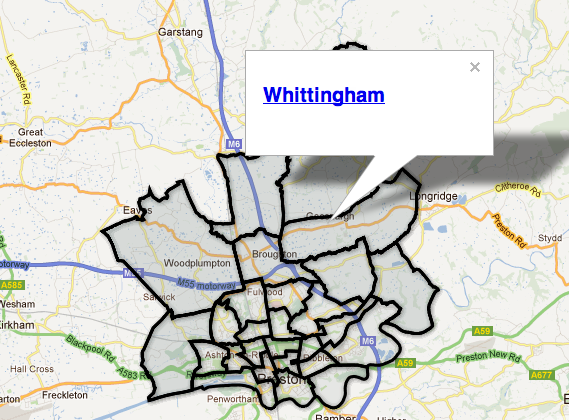
With local elections looming this is a great 20-30 minute project for any journalist wanting to create an interactive Google map of council ward boundaries.
Whether you need an image for your blog post, a soundtrack to your video or that YouTube clip for your documentary, if you’re dealing with multimedia it’s likely you’ll end up using – or wanting to use – someone else’s work as part of your own.
Here are some basic tips on finding and using multimedia across the web in a way that won’t (hopefully) land you in hot water.
The public domain myth
One of the mistakes that has repeatedly landed journalists and their employers in trouble is confusion over the term “public domain“.
Public domain has two possible meanings. In copyright terms, public domain refers to work whose copyright has expired, meaning that anyone can use it without having to ask the copyright holder. Disney – a fierce lobbyist itself for extending copyright – has used ‘public domain’ material as the basis for most of its cartoons, from the work of the Grimm Brothers to a host of other fairy tales, myths and legends.
For example, pretty much every piece of media, almost by definition, is “in the public domain”. Newspapers and magazines sit on the newsstands; television and radio reports are broadcast on huge city centre screens and speakers.
But if you take that content and reproduce it in its entirety without permission, you are breaking copyright law.
The $7,500 copyright scam
If you need any persuading about this, read this post about a copyright scam whereby images are pushed to the top of Google Images search results pages, and then bloggers sued for using them without permission.
It seems odd that media organisations so used to protecting their own, very public, content, should think that another person’s photo, or video, or report, should be fair game because it is “in the public domain”. But they do.
If you want public domain (in the sense of ‘copyright expired’) content, there are some useful sources. The Public Domain Review, for example, publishes a range of public domain work and has this guide to finding them. And Angela Grantwrites here about finding public domain video, among other things (note that Angela refers to US law, not that of other countries).
But never assume something is public domain because it is “in public”.
One point to make: while an image, story, or composition may be out of copyright, its performance, re-design or re-telling may not.
Just ask Disney.
Creative Commons – making UGC copyright explicit
If you’re dealing with content that’s been published on a platform like Flickr or YouTube, you may be able to find out the copyright status of that content relatively easily.
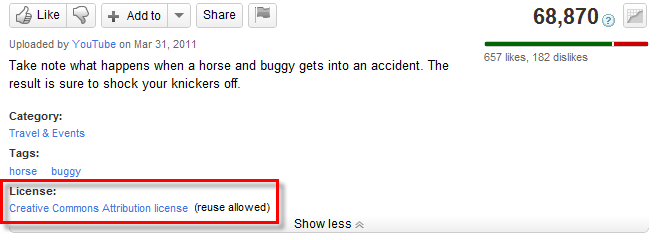
Both allow users to easily establish copyright through the Creative Commons licence. You can either look for that licence in the relevant part of the page hosting the content.
On YouTube it is under the video:
Where to find a YouTube video’s licensing information – image from YouTube.
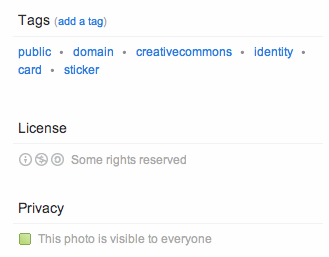
On Flickr this is on the right hand side under License:
Look for an image’s licensing information on Flickr on the right hand column.
Make sure you click on that licence to find out what terms it requires.
Creative Commons, for example, has a number of elements:
Whether the material can be used only in noncommercial contexts, or for commercial use as well
Whether the material can be adapted and changed, or must be left unchanged
Whether you must use the same CC licence if you use this material (e.g. you cannot use a noncommercial licence but then allow your work to be used commercially)
Whether you must attribute the work (this is where many people breach the licence)
If you’re unsure of where your work fits against those criteria (for example, whether it’s considered as “commercial”), then approach the copyright holder for clarity. Remember that the CC licence is only a default position, and can be negotiated. Also, if you cannot get any response and decide to publish anyway, your attempts to contact the copyright holder will be important if there are any legal proceedings.
If you want others to publish their content under a CC licence, it helps if you publish at least some of your own work under a CC licence too. Indeed, if it contains other CC material, their licences may require you to.
Flickr and YouTube aren’t the only sites that use Creative Commons licences, of course. To search for media under a CC licence (including on those sites), use the search facility on the Creative Commons site and select the engine you want to search through.
If you’re running a hyperlocal site, or any site that needs images of places, check out Geograph, which hosts Creative Commons-licensed images of locations around the UK.
There are also specialist sites for sharing music under CC, such as Freesound.
Even if the media you are interested in using does not use a CC licence, of course, you can still approach the copyright holder for permission to use it.
Attribution does not cover you for copyright
Another mistake that some people make is to believe that simply linking to the source, or naming the photographer/source, is enough to avoid copyright issues.
This is only the case if the licence for the material says so.
Copyright has two elements: moral rights, and economic rights.
The moral right is the right to be identified as the author of a piece of work. This is the attribution which is in pretty much every copyright licence, Creative Commons or otherwise.
But it’s not the right that most people sue over.
The economic right is the right to right to “allow or prevent the copying of their work or the performance of their work in public” (IPO). This translates into the ability to earn money from a piece of work. And this is what people largely sue over.
Attributing a photo only covers the moral right. It does not mean you won’t be sued.
If, then, you have used an image, video or audio without the permission of the rights holder (granted through a Creative Commons licence or directly to you through correspondence) then you are still probably breaking copyright law.
Embedding versus re-broadcasting
If the media is hosted on a platform like YouTube, you may be able to embed it on a webpage without seeking permission at all: if the creator* has enabled embedding then they would have little argument in suing for breach of copyright because:
By enabling embedding they have given an ‘implied’ right; and
They could stop you publishing it instantly by disabling embedding.
Also, your embedding of their media would not lead to any loss of revenue (as advertising can be embedded too), so it is unlikely that there would be any damages to sue for.
*note: this does not apply to video created by other people and uploaded by someone other than the copyright holder.
“In essence, anyone will be able to visit Getty Images’ library of content, select an image and copy an embed HTML code to use that image on their own websites. Getty Images will serve the image in a embedded player – very much like YouTube currently does with its videos – which will include the full copyright information and a link back to the image’s dedicated licensing page on the Getty Images website.”
Reality bites
Of course, it’s one thing to talk about the strict legal position, and another to talk about what actually happens. Journalists regularly publish content that breaks the law – but make a judgement about the likelihood of ending up in court over that. For example, I can say that the Queen is corrupt (a defamatory statement) and be almost certain that the Queen is not going to sue me (because she has a history of not doing so).
Media lawyers are not just there to advise publishers on their strict legal position, but on the balance of risk involved, and how to reduce those risks. While you cannot always avoid risks, you can avoid them in simple ways:
Always try to establish the copyright situation regarding any media you use: who holds the copyright (there may be more than one copyright owner: for example, performer and composer), and what are the terms of the licence?
Try to contact the copyright holder if you’re in any doubt – even if you can’t contact them your efforts to do so will help you if you do end up in court.
Always attribute authorship and link to the source (this can be done in title credits, captions and/or links on the host webpage). Copyright claims normally revolve around loss of earnings: anything that may have contributed to that (i.e. not linking to the source) will likely add to damages.
Minimal cost and royalty free
‘Royalty free’ is a vague term which is often confused with, simply, ‘free’. It most often refers to media which is paid for once and can then be used multiple times in different contexts.
For example, you might pay for a CD of ‘royalty free’ music or sound effects which can be used across multiple video projects – saving you the hassle of acquiring permissions every time for different music.
Or you might buy a CD of royalty free images (clip art, for example) that you can use across various design projects.
If you’re studying in a school of media, or working in a large media organisation, they will probably have some royalty free media for students or employees to use – so ask around to find out what’s available.
But don’t use it for the sake of it: the quality can vary. In addition, many other media projects may have relied on the same libraries, so you can lose distinctiveness.
You should also be aware that the licences of even so-called ‘royalty free’ material can be restrictive: the Wikipedia entry on royalty free music notes that “the royalty-free music license at SmartSound states “You must obtain a “mechanical” license for replication of quantities in excess of 10,000 units.” (Read the licence here)
Thankfully for those who want more diversity, the internet has made new types of royalty free media – and new pricing – possible, as a wider range of photographers and other media creators can now sell their work through online marketplaces.
Pond5 has sound effects, photos, video, illustrations, music and even After Effects projects from $2 up – as well as occasional free material. iStockphoto covers most of those, and adds Flash files too – again at often very cheap prices. Quality, however, does cost more.
Stock.XCHNG deserves special mention, boasting that it is the world’s “leading free stock photo site” and hosting thousands of royalty free images. Even if the image is ‘free’, however, it’s only free under the terms of the licence – so always check them.
You can find many more sources by searching for articles like this on the ‘best places to get free images’.
If you know of other sources or issues to consider in finding material for multimedia, I’d love to know.
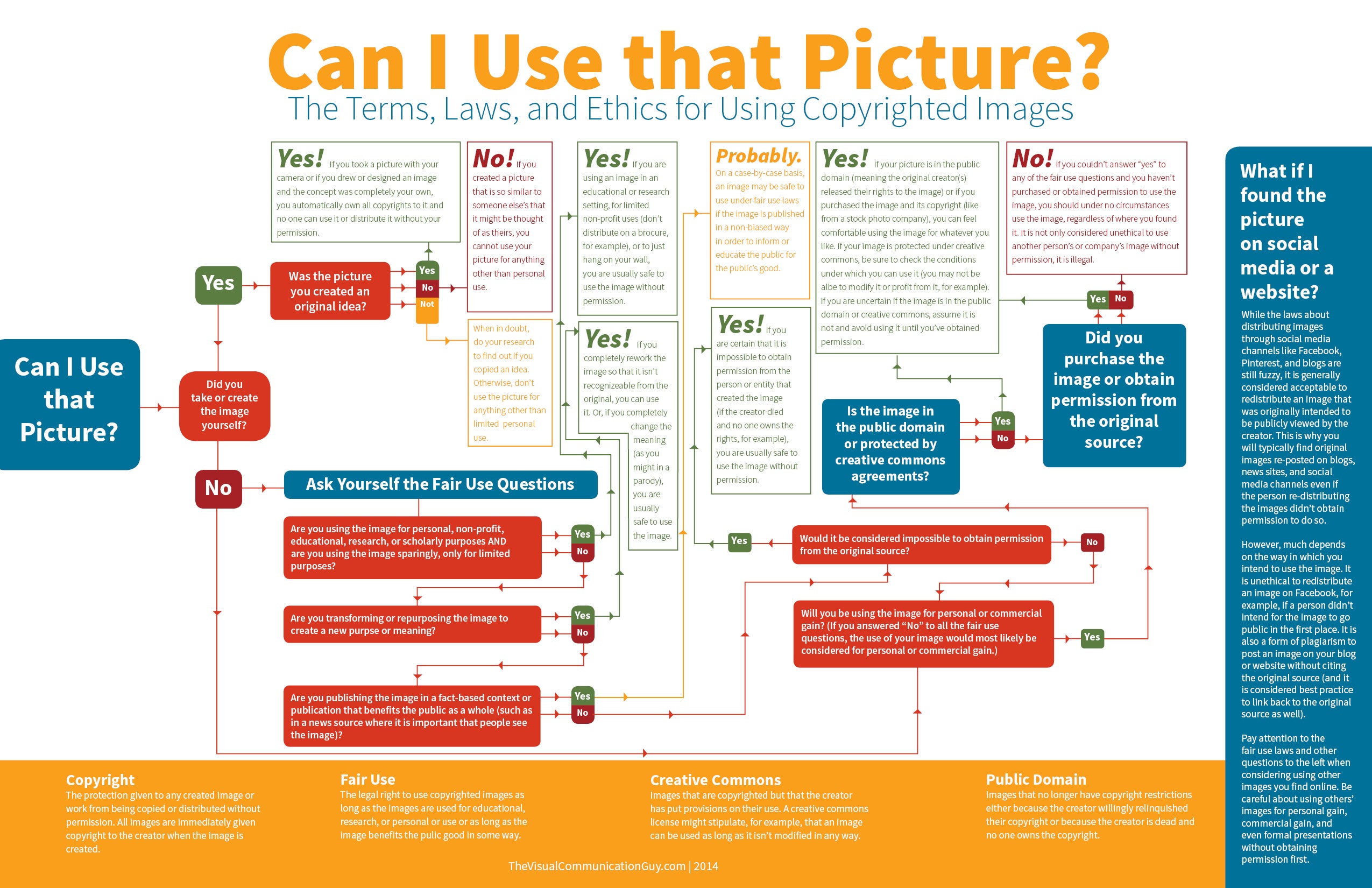
UPDATE: Here’s a useful flow chart on copyright via Mau Gris – although note that this is based on US law, which is more forgiving on images used for satirical purposes.
Whether you need an image for your blog post, a soundtrack to your video or that YouTube clip for your documentary, if you’re dealing with multimedia it’s likely you’ll end up using – or wanting to use – someone else’s work as part of your own.
Here are some basic tips on finding and using multimedia across the web in a way that won’t (hopefully) land you in hot water. Continue reading →
One of the most frequently encountered ways of sharing small datasets is in the form of Excel spreadsheet (.xls) files, notwithstanding all that can be said In Praise of CSV😉 The natural application for opening these files is Microsoft Excel, but what if you don’t have a copy of Excel available?
There are other desktop office suites that can open spreadsheet files, of course, such as Open Office. As long as they’re not too big, spreadsheet files can also be uploaded to and then opened using a variety of online services, such as Google Spreadsheets, Google Fusion Tables or Zoho Sheet. But spreadsheet applications aren’t the only data wrangling tools that can be used to open xls files… Here are a couple more that should be part of every data wrangler’s toolbox…
(If you want to play along, the file I’m going to play with is a spreadsheet containing the names and locations of GP practices in England. The file can be found on the NHS Indicators portal – here’s the actual spreadsheet.)
Firstly, Google Refine. Google Refine is a cross-platform, browser based tool that helps with many of the chores relating to getting a dataset tidied up so that you can use it elsewhere, as well as helping out with data reconcilation or augmenting rows with annotations provided by separate online services. You can also use it as a quick-and-dirty tool for opening an xls spreadsheet from a URL, knocking the data into shape, and dumping it to a CSV file that you can use elsewhere. To start with, choose the option to create a project by importing a file from a web address (the XLS spreadsheet URL):
Once loaded, you get a preview view..
You can tidy up the data that you are going to use in your project via the preview panel. In this case, I’m going to ignore the leading lines and just generate a dataset that I can export directly as a CSV file once I’ve got the data into my project.
If I then create a project around this dataset, I can trivially export it again using a format of my own preference:
So that’s one way of using Google Refine as a simple file converter service that allows you to preview and to a certain extent shape the data in XLS spreadsheet, as well as converting it to other file types.
The second approach I want to mention is to use a really handy Python software library (xlrd – Excel Reader) in Scraperwiki. The Scraperwiki tutorial on Excel scraping gives a great example of how to get started, which I cribbed wholesale to produce the following snippet.
import scraperwiki
import xlrd

#cribbing https://scraperwiki.com/docs/python/python_excel_guide/
def cellval(cell):
    if cell.ctype == xlrd.XL_CELL_EMPTY:    return None
    return cell.value

def dropper(table):
    if table!='':
        try: scraperwiki.sqlite.execute('drop table "'+table+'"')
        except: pass

def reGrabber():
    #dropper('GPpracticeLookup')
    url = 'https://indicators.ic.nhs.uk/download/GP%20Practice%20data/summaries/demography/Practice%20Addresses%20Final.xls'
    xlbin = scraperwiki.scrape(url)
    book = xlrd.open_workbook(file_contents=xlbin)

    sheet = book.sheet_by_index(0)

    keys = sheet.row_values(8)
    keys[1] = keys[1].replace('.', '')
    print keys

    for rownumber in range(9, sheet.nrows):
        # create dictionary of the row values
        values = [ cellval(c) for c in sheet.row(rownumber) ]
        data = dict(zip(keys, values))
        #print data
        scraperwiki.sqlite.save(table_name='GPpracticeLookup',unique_keys=['Practice Code'], data=data)

#Uncomment the next line if you want to regrab the data from the original spreadsheet
reGrabber()
You can find my scraper here: UK NHS GP Practices Lookup. What’s handy about this approach is that having scraped the spreadsheet data into a Scraperwiki database, I can now query it as database data via the Scraperwiki API.
(Note that the Google Visualisation API query language would also let me treat the spreadsheet data as a database if I uploaded it to Google Spreadsheets.)
So, if you find yourself with an Excel spreadsheet, but no Microsoft Office to hand, fear not… There are plenty of other tools other there you can appropriate to help you get the data out of the file and into a form you can work with:-)
PS R is capable of importing Excel files, I think, but the libraries I found don’t seem to compile onto Max OS/X?
PPS ***DATA HEALTH WARNING*** I haven’t done much testing of either of these approaches using spreadsheets containing multiple workbooks, complex linked formulae or macros. They may or may not be appropriate in such cases… but for simple spreadsheets, they’re fine…






 Online Journalism Blog