Two New Cabinet Office Open Data Consultations: Data Policy and Making Open Data Real

Via the Guardian Datablog, I see that the Cabinet Office has just opened up a couple of consultations around open data:

Consultation on Data Policy for a Public Data Corporation [homepage] [Consultation]

Here are the consultation questions (also available via SurveyMonkey: PDC consultation):

Chapter 4 – Charging for PDC information

  1. How do you think Government should best balance its objectives around increasing access to data and providing more freely available data for re-use year on year within the constraints of affordability? Please provide evidence to support your answer where possible.
  2. Are there particular datasets or information that you believe would create particular economic or social benefits if they were available free for use and re-use? Who would these benefit and how? Please provide evidence to support your answer where possible.
  3. What do you think the impacts of the three options would be for you and/or other groups outlined above? Please provide evidence to support your answer where possible.
  4. A further variation of any of the options could be to encourage PDC and its constituent parts to make better use of the flexibility to develop commercial data products and services outside of their public task. What do you think the impacts of this might be?
  5. Are there any alternative options that might balance Government’s objectives which are not covered here? Please provide details and evidence to support your response where possible.

Chapter 5 – Licensing

  1. To what extent do you agree that there should be greater consistency, clarity and simplicity in the licensing regime adopted by a PDC?
  2. To what extent do you think each of the options set out would address those issues (or any others)? Please provide evidence to support your comments where possible.
  3. What do you think the advantages and disadvantages of each of the options would be? Please provide evidence to support your comments
  4. Will the benefits of changing the models from those in use across Government outweigh the impacts of taking out new or replacement licences?

Chapter 6 – Regulatory oversight

  1. To what extent is the current regulatory environment appropriate to deliver the vision for a PDC?
  2. Are there any additional oversight activities needed to deliver the vision for a PDC and if so what are they?
  3. What would be an appropriate timescale for reviewing a PDC or its constituent parts public task(s)?

And the second consultation (which is probably worth reading in the context of the http://www.cabinetoffice.gov.uk/resource-library/open-public-services-white-paper [white paper PDF, feedback website]?)

Making Open Data Real: A Public Consultation [homepage] [Consultation]

  1. Glossary of key terms [link]
  2. An enhanced right to data: how do we establish stronger rights for individuals, businesses and other actors to obtain, use and re-use data from public service providers? [link]
  3. Setting transparency standards: what would standards that enforce this right to data among public authorities look like? [link]
  4. Corporate and personal responsibility: how would public service providers be held to account for delivering open data through a clear governance and leadership framework at political, organisational and individual level? [link]
  5. Meaningful Open Data: how should we ensure collection and publication of the most useful data, through an approach enabling public service providers to understand the value of the data they hold and helps the public at large know what data is collected? [link]
  6. Government sets the example: in what ways could we make the internal workings of government and the public sector as open as possible? [link]
  7. Innovation with Open Data: to what extent is there a role for government to stimulate enterprise and market making in the use of open data? [link]

I haven’t had chance to read through the consultation docs yet, but I’ll try and comment somewhere, as well as responding…

The way the consultations are presented

As to the way the consultations are presented themselves, two approaches have been taken:

– the PDC consultation embeds documenents at chapter level hosted on Scribd in a preview widget, with questions made available via a Word document or via SurveyMonkey. There doesn’t appear to be an opportunity to comment on the BIS site that is hosting the PDC consultation, even though it’s a WordPress platform running the Commentariat2 theme. To my mind, the way this consultation has be published, it’s not really of the web, and, to use a technical term, feels a little bit horrible to me… Maybe they don’t want flame wars on the bis.gov.uk domain about “Charging for PDC information”?!;-)

– the Making it Real consultation is hosted on the data.gov.uk site, with HTML text split at “chapter” (section) level, and commenting at that level via a single bottom of the page comment box. Where documents take close reading, I think this makes commenting difficult: if you want to refer to specific, detailed points in the consultation document, I’d say it makes sense to be able to see comment at the point of reference. That is, the comment box needs to be where you can see the actual bit of text you are commenting on (which is one reason why we often annotate documents with marginalia, rather than on a separate piece of paper). Where the comment box is fixed at the bottom of the page, you need two windows open to have side by side commenting and viewing of the actual text you are commenting on.

If we hadn’t decided that things had moved on enough in the way consultations were being handled to close WriteToReply (WriteToReply is closing. Come get your data if you want it), I think there’s a good chance we would have hosted both these consultations… Maybe our thinking that WriteToReply had nudged things far enough was a bit hasty? (The digress.it theme is out there, but as yet hasn’t been trialled on a departmental basis, I don’t think, even though we did try to respond to the commissioned accessibility audit. (Are Scribd docs accessible?) Digress.it is running on the JISCPress site though.

(I’m suddenly fired up again by the thought that consultation docs could be so much more “of the web” as well as easier to engage with… Hmmm, when’s the closing date for these consultations? Maybe there is time for one last WriteToReply outing…?)

PS How did I miss out on subscribing to the Government Digital Service? e.g. Neil Williams on A vision for online consultation and policy engagement

7 books that journalists working online should read?

Image by B_Zedan

While it’s one thing to understand interactive storytelling, community management, or the history of online journalism, the changes that are affecting journalism are wider than the industry itself. So although I’ve written previously on essential books about online journalism, I wanted to also compile a list of books which I think are essential for those wanting to gain an understanding of wider dynamics affecting the media industries and, by extension, journalism.

These are books that provide historical context to the hysteria surrounding technologies; that give an insight into the cultural movements changing society; that explore key philosophical issues such as privacy; or that explore the commercial dynamics driving change.

But they’re just my choices – please add your own.

Continue reading

Merging Two Different Datasets Containing a Common Column With R and R-Studio

Another way for the database challenged (such as myself!) for merging two datasets that share at least one common column…

This recipe using the cross-platform stats analysis package, R. I use R via the R-Studio client, which provides an IDE wrapper around the R environment.

So for example, here’s how to merge a couple of files sharing elements in a common column…

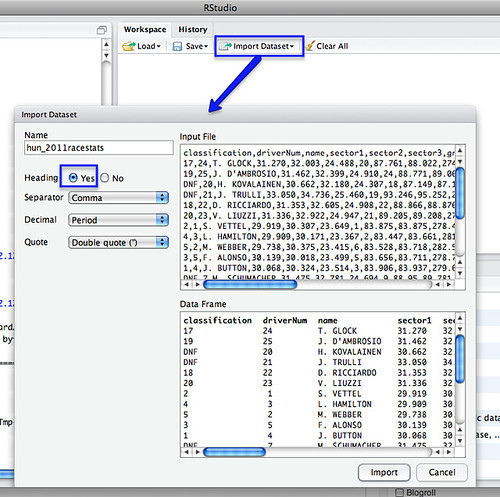
First, load in your two data files – for example, I’m going to load in separate files that contain qualifying and race stats from the last Grand Prix:

R import data

We can merge the datasets using a command of the form:

m=merge(hun_2011racestats,hun_2011qualistats,by="driverNum")

The by parameter identifies which column we want to merge the tables around. (If the two datasets have different column names, you need to set by.x= and by.y= to specify the column from each dataset that is the focus for merging).

So for example, in the simple case where we are merging around two columns of the same name in different tables:

R merge
Merging datasets in R

After the merge, column names for columns from the first table have the .x suffix added, and from the second, .y.

We can then export the combined dataset as a CSV file:

write.csv(m, file = "demoMerge.csv")

fragment of csv file

[If you want to extract a subset of the columns, specify the required columns in an R command of the form: m2=m[c(“driverNum”,”name.x”,”ultimate.x”,”ultimate.y”)] See also: R: subset]

Simples;-)

PS in the above example, the merge table only contains merged rows. If there are elements in the common column of one table, but not the other, that partial data will not be included in the merged table. To include all rows, set all=TRUE. To include all rows from the first table, but not unmatched rows from the second, set all.x=TRUE; (the cells from columns in the unmatched row of the second table will be set to NA). (all.y=TRUE is also legitimate). From the R merge documentation:

In SQL database terminology, the default value of all = FALSE [the default] gives a natural join, a special case of an inner join. Specifying all.x = TRUE gives a left (outer) join, all.y = TRUE a right (outer) join, and both (all=TRUE a (full) outer join. DBMSes do not match NULL records, equivalent to incomparables = NA in R.

For other ways of combining data from two different data sets, see:
Merging Datasets with Common Columns in Google Refine
A Further Look at the Orange Data Playground – Filters and File Merging
Merging CSV data files with Google Fusion Tables

If you know of any other simple ways of joining data files about a common column, please reveal all in the comments:-)

Q: Who owns a journalist’s Twitter account? A: The users

Screengrab of Laura Kuenssberg's Twitter settings renamed to ITV

image from Tom Callow's Wall blog

When Laura Kuenssberg announced she was leaving the BBC for ITV, much was made of what might happen to her Twitter account. Was @BBCLauraK owned by her employer? (After all, it was branded as such, promoted on TV, and tweets were ‘processed’ by BBC producers). Or should Laura be able to take it with her? (After all, it was Laura that people were following, rather than a generic BBC political news feed).

The implications for the ‘journalist as brand‘ meme were well explored too, while newly empowered journalists may have been concerned to read that companies are inserting social media clauses into contracts:

“To keep hold of the good will created by a brand personality. Recruiters, for example, are often required to hand over their LinkedIn accounts upon leaving, so their contacts remain with the employer.”

Amidst all the speculation, Tom Callow stood out in offering some hard facts:

“When she had earlier tweeted the details of a new separate ITV account to her then 59,000 followers, only around 1,000 of them started following the new account.”

This sounds compelling until you remember that tweets are only seen for a relatively brief period of time by those followers who happen to be watching at that moment, and that a significant proportion of followers of celebrity/high profile accounts are likely to be idle or spam.

Still, it also highlights the fundamental weakness in all the debates about who ‘owns’ a Twitter account. One very important party is not being represented: the users.

Much of the commentary on Laura Kuenssberg’s move treated her 60,000 followers as an “audience”. But of course, they are not: they are users.

Some will be personal acquaintances; some will be fans of the BBC’s political coverage; and yes, some will be spam accounts or accounts set up by curious BBC viewers who forgot their password the next day. Some will follow her to ITV, some will follow her replacement at the BBC, and some never worked out how to click ‘unfollow’. (Kuenssberg’s successor – @BBCNormanS – had 5,824 followers after she tweeted a link, according to Paul Gregory, which means that only around 10% of her followers read either of those tweets and acted on them.)

Whether an employer claims ownership of a social media account or not, they cannot ‘own’ the relationship between users and that account. And there will be as many relationships as users. Some passive; some collaborative; some neglected; some exploitative.

It is those relationships that we should be concerned with developing, not the small print of an employee’s contract.

SFTW: How to scrape webpages and ask questions with Google Docs and =importXML

XML puzzle cube
Image by dullhunk on Flickr

Here’s another Something for the Weekend post. Last week I wrote a post on how to use the =importFeed formula in Google Docs spreadsheets to pull an RSS feed (or part of one) into a spreadsheet, and split it into columns. Another formula which performs a similar function more powerfully is =importXML.

There are at least 2 distinct journalistic uses for =importXML:

  1. You have found information that is only available in XML format and need to put it into a standard spreadsheet to interrogate it or combine it with other data.
  2. You want to extract some information from a webpage – perhaps on a regular basis – and put that in a structured format (a spreadsheet) so you can more easily ask questions of it.

The first task is the easiest, so I’ll explain how to do that in this post. I’ll use a separate post to explain the latter.

Converting an XML feed into a table

If you have some information in XML format it helps if you have some understanding of how XML is structured. A backgrounder on how to understand XML is covered in this post explaining XML for journalists.

It also helps if you are using a browser which is good at displaying XML pages: Chrome, for example, not only staggers and indents different pieces of information, but also allows you to expand or collapse parts of that, and colours elements, values and attributes (which we’ll come on to below) differently.

Say, for example, you wanted a spreadsheet of UK council data, including latitude, longitude, CIPFA code, and so on – and you found the data, but it was in XML format at a page like this: http://openlylocal.com/councils/all.xml

To pull that into a neatly structured spreadsheet in Google Docs, type the following into the cell where you want the import to begin (try typing in cell A2, leaving the first row free for you to add column headers):

=ImportXML(“http://openlylocal.com/councils/all.xml”, ”//council”)

The formula (or, more accurately, function) needs two pieces of information, which are contained in the parentheses and separated by a comma: a web address (URL), and a query. Or, put another way:

=importXML(“theURLinQuotationMarks”, “theBitWithinTheURLthatYouWant”)

The URL is relatively easy – it is the address of the XML file you are reading (it should end in .xml). The query needs some further explanation.

The query tells Google Docs which bit of the XML you want to pull out. It uses a language called XPath – but don’t worry, you will only need to note down a few queries for most purposes.

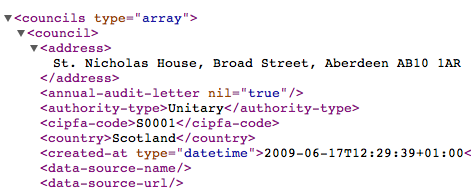
Here’s an example of part of that XML file shown in the Chrome browser:

XML from OpenlyLocal

The indentation and triangles indicate the way the data is structured. So, the <councils> tag contains at least one item called <council> (if you scrolled down, or clicked on the triangle to collapse <council> you would see there are a few hundred).

And each <council> contains an <address>, <authority-type>, and many other pieces of information.

If you wanted to grab every <council> from this XML file, then, you use the query “//council” as shown above. Think of the // as a replacement for the < in a tag – you are saying: ‘grab the contents of every item that begins <council>’.

You’ll notice that in your spreadsheet where you have typed the formula above, it gathers the contents (called a value) of each tag within <council>, each tag’s value going into their own column – giving you dozens of columns.

You can continue this logic to look for tags within tags. For example, if you wanted to grab the <name> value from within each <council> tag, you could use:

=ImportXML(“http://openlylocal.com/councils/all.xml”, ”//council//name”)

You would then only have one column, containing the names of all the councils – if that’s all you wanted. You could of course adapt the formula again in cell B2 to pull another piece of information. However, you may end up with a mismatch of data where that information is missing – so it’s always better to grab all the XML once, then clean it up on a copy.

If the XML is more complex then you can ask more complex questions – which I’ll cover in the second part of this post. You can also put the URL and/or query in other cells to simplify matters, e.g.

=ImportXML(A1, B1)

Where cell A1 contains http://openlylocal.com/councils/all.xml and B1 contains //council (note the lack of quotation marks). You then only need to change the contents of A1 or B1 to change the results, rather than having to edit the formula directly)

If you’ve any other examples, ideas or corrections, let me know. Meanwhile, I’ve published an example spreadsheet demonstrating all the above techniques here.


Kit Review: Gymbl Pro iPhone Mount

The Gymbl – makes your iPhone not quite a good phone or a good camera

Jon Hickman reviews iPhone tripod Gymbl Pro.

Jonathan Ive didn’t design my iPhone with a pistol grip. Instead of a hard, brittle feeling, bumpy, plastic case, Jonathan Ive fashioned a fetish object wrapped in perfectly smooth flat glass. Jonathan Ive did not design the Gymbl Pro, by Youbiq.

Would Jonathan Ive use a Gymbl Pro in pistol grip mode to shoot a video?

No, he wouldn’t. Jonathan Ive would use an iPhone 4 to grab short informal videos. If he was in the field and had a chance to grab an important interview with somebody, he’d not hesitate to use his iPhone 4 in the hand. Jony would know that informal handheld shooting would add a sense of urgency or intimicay to his media file – he’d say: “There’s no need for handheld slickness, we’re over that now”. Continue reading

SFTW: How to scrape webpages and ask questions with Google Docs and =importXML

XML puzzle cube

Image by dullhunk on Flickr

Here’s another Something for the Weekend post. Last week I wrote a post on how to use the =importFeed formula in Google Docs spreadsheets to pull an RSS feed (or part of one) into a spreadsheet, and split it into columns. Another formula which performs a similar function more powerfully is =importXML.

There are at least 2 distinct journalistic uses for =importXML:

  1. You have found information that is only available in XML format and need to put it into a standard spreadsheet to interrogate it or combine it with other data.
  2. You want to extract some information from a webpage – perhaps on a regular basis – and put that in a structured format (a spreadsheet) so you can more easily ask questions of it.

The first task is the easiest, so I’ll explain how to do that in this post. I’ll use a separate post to explain the latter. Continue reading

The style challenge

Odd one out - image by Cliff Muller
Spot the odd one out. Image by Cliff Muller

Time was when a journalist could learn one or two writing styles and stick with them.

They might command enormous respect for being the best at what they did. But sometimes, when that journalist moved to another employer, their style became incongruous.

And they couldn’t change.

This is the style challenge, and it’s one that has become increasingly demanding for journalists in an online age. Because not only must they be able to adapt their style for different types of reporting; not only must they be able to adapt for different brands; not only must they be able to adapt their style within different brands across multiple media; but they must also be able to adapt their style within a single medium, across multiple platforms: Twitter, Facebook, blogs, Flickr, YouTube, or anywhere else that their audiences gather.

Immersion and language

Style is a fundamental skill in journalism. It is difficult to teach, because it relies on an individual immersing themselves in media, and doing so in a way that goes beyond each message to the medium itself.

This is why journalism tutors urge their students so strongly to read as many newspapers as they can; to watch the news and listen to it, obsessively.

Without immersion it is difficult to speak any language.

Now. Some people do immerse themselves and have a handle on current affairs. That’s useful, but not the point. Some do it and gain an understanding of institutions and audiences (that one is left-leaning; this one is conservative with a small c, etc.). This is also useful, but also not the point.

The point is about how each institution addresses each audience, and when.

Despite journalists and editors often having an intuitive understanding of this difference in print or broadcast, over the last decade they’ve often demonstrated an inability to apply the same principles when it comes to publishing online.

And so we’ve had shovelware: organisations republishing print articles online without any changes.

We’ve had opinion columns published as blogs because ‘blogs are all about opinion’.

And we’ve had journalists treating Twitter as just another newswire to throw out headlines.

This is like a person’s first attempt at a radio broadcast where they begin by addressing “Hey all you out there” as if they’re a Balearic DJ.

Good journalists should know better.

Style serves communication

Among many other things a good journalism or media degree should teach not just the practical skills of journalism but an intellectual understanding of communication, and by extension, style.

Because style is, at its base, about communication. It is about register: understanding what tone to adopt based on who you are talking to, what you are talking about, the relationship you seek to engender, and the history behind that.

As communication channels and tools proliferate, we probably need to pay more attention to that.

Journalists are being asked to adapt their skills from print to video; from formal articles to informal blog posts; from Facebook Page updates to tweets.

They are having to learn new styles of liveblogging, audio slideshows, mapping and apps; to operate within the formal restrictions of XML or SEO.

For freelance journalists commissioning briefs increasingly ask for that flexibility even within the same piece of work, offering an extra payments for an online version, a structured version, a podcast, and so on.

These requests are often quite basic – requiring a list of links for an online version, for example – but as content management systems become more sophisticated, those conditions will become more stringent: supplying an XML file with data on a product being reviewed, for example, or a version optimised for search.

What complicates things further is that, for many of these platforms, we are inventing the language as we speak it.

For those new to the platform, it can be intimidating. But for those who invest time in gaining experience, it is an enormous opportunity. Because those who master the style of a blog, or Facebook, or Twitter, or addressing a particular group on Flickr, or a YouTube community, put themselves in an incredible position, building networks that a small magazine publisher would die for.

That’s why style is so important – now more than ever, and in the future more than now.

The style challenge

Odd one out - image by Cliff Muller

Spot the odd one out. Image by Cliff Muller

Time was when a journalist could learn one or two writing styles and stick with them. They might command enormous respect for being the best at what they did. But sometimes, when that journalist moved to another employer, their style became incongruous. And they couldn’t change.

This is the style challenge, and it’s one that has become increasingly demanding for journalists in an online age.

Because not only must they be able to adapt their style for different types of reporting; not only must they be able to adapt for different brands; not only must they be able to adapt their style within different brands across multiple media; but they must also be able to adapt their style within a single medium, across multiple platforms: Twitter, Facebook, blogs, Flickr, YouTube, or anywhere else that their audiences gather. Continue reading

SFTW: How to grab useful political data with the They Work For You API

They Work For You

It’s been over 2 years since I stopped doing the ‘Something for the Weekend’ series. I thought I would revive it with a tutorial on They Work For You and Google Refine…


If you want to add political context to a spreadsheet – say you need to know what political parties a list of constituencies voted for, or the MPs for those constituencies – the They Work For You API can save you hours of fiddling – if you know how to use it. Continue reading