Tag Archives: Google Sheets

Google Sheets has a new AI function — how does it perform on classification tasks?

A new AI function is being added to Google Sheets that could make most other functions redundant. But is it any good? And what can it be used for? Here’s what I’ve learned in the first week…

AI has been built into Google Sheets for some time now in the Clippy-like form of Gemini in Sheets. But Google Sheets’s AI function is different.

Available to a limited number of users for now, it allows you to incorporate AI prompts directly into a formula rather than having to rely on Gemini to suggest a formula using existing functions. 

At the most basic level that means the AI function can be used instead of functions like SUM, AVERAGE or COUNT by simply including a prompt like “Add the numbers in these cells” (or “calculate an average for” or “count”). But more interesting applications come in areas such as classification, translation, analysis and extraction, especially where a task requires a little more ‘intelligence’ than a more literally-minded function can offer.

I put the AI function through its paces with a series of classification challenges to see how it performed. Here’s what happened — and some ways in which the risks of generative AI need to be identified and addressed.

Continue reading

What is dirty data and how do I clean it? A great big guide for data journalists

Image: George Hodan

If you’re working with data as a journalist it won’t be long before you come across the phrases “dirty data” or “cleaning data“. The phrases cover a wide range of problems, and a variety of techniques for tackling them, so in this post I’m going to break down exactly what it is that makes data “dirty”, and the different cleaning strategies that a journalist might adopt in tackling them.

Four categories of dirty data problem

Look around for definitions of dirty data and the same three words will crop up: inaccurate, incomplete, or inconsistent.

Dirty data problems:
Inaccurate: Data stored as wrong type; Misentered data; Duplicate data; abbreviation and symbols.
Incomplete: Uncategorised; missing data.
Inconsistent: Inconsistency in naming of entities; mixed data
Incompatible data:  Wrong shape;
‘Dirty’ characters (e.g. unescaped HTML)

Inaccurate data includes duplicate or misentered information, or data which is stored as the wrong data type.

Incomplete data might only cover particular periods of time, specific areas, or categories — or be lacking categorisation entirely.

Inconsistent data might name the same entities in different ways or mix different types of data together.

To those three common terms I would also add a fourth: data that is simply incompatible with the questions or visualisation that we want to perform with it. One of the most common cleaning tasks in data journalism, for example, is ‘reshaping‘ data from long to wide, or vice versa, so that we can aggregate or filter along particular dimensions. (More on this later).

Continue reading

How to: fix spreadsheet dates that are in both US and UK formats

640px-Date_format_by_country.svg

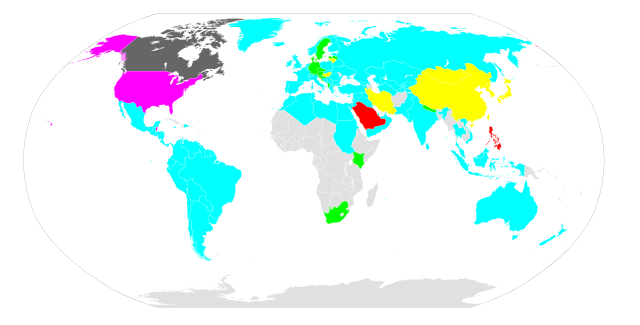
This map by Artem Karimov shows which countries use which data formats

It’s quite common when working with Google Sheets to have data set to US format (Month-Day-Year) without realising it. This is because Google will format your dates based on what ‘locale’ or language you have set – and the default is US English.

Instructions on how to change that are here – but what if it’s too late? What if you’ve already inputted or imported data which, when updated to a different format, will make it the wrong date? Continue reading