Category Archives: data journalism

AUDIO: Text mining tips from Andy Lehren and Sarah Cohen

Searches made of the Sarah Palin emails

Searches made of the Sarah Palin emails - from a presentation by the New York Times's Andy Lehren

One of the highlights of last week’s Global Investigative Journalism Conference was the session on text mining, where the New York Times’s Andy Lehren talked about his experiences of working with data from Wikileaks and elsewhere, and former Washington Post database editor Sarah Cohen gave her insights into various tools and techniques in text mining.

Andy Lehren’s audio is embedded below. The story mentioned on North Korean missile deals can be found here. Other relevant links: Infomine and NICAR Net Tour.

And here’s Sarah’s talk which covers extracting information from large sets of documents. Many of the tools mentioned are bookmarked ‘textmining’ on my Delicious account.


Scraping data from a list of webpages using Google Docs

Quite often when you’re looking for data as part of a story, that data will not be on a single page, but on a series of pages. To manually copy the data from each one – or even scrape the data individually – would take time. Here I explain a way to use Google Docs to grab the data for you.

Some basic principles

Although Google Docs is a pretty clumsy tool to use to scrape webpages, the method used is much the same as if you were writing a scraper in a programming language like Python or Ruby. For that reason, I think this is a good quick way to introduce the basics of certain types of scrapers.

Here’s how it works:

Firstly, you need a list of links to the pages containing data.

Quite often that list might be on a webpage which links to them all, but if not you should look at whether the links have any common structure, for example “http://www.country.com/data/australia” or “http://www.country.com/data/country2”. If it does, then you can generate a list by filling in the part of the URL that changes each time (in this case, the country name or number), assuming you have a list to fill it from (i.e. a list of countries, codes or simple addition).

Second, you need the destination pages to have some consistent structure to them. In other words, they should look the same (although looking the same doesn’t mean they have the same structure – more on this below).

The scraper then cycles through each link in your list, grabs particular bits of data from each linked page (because it is always in the same place), and saves them all in one place.

Scraping with Google Docs using =importXML – a case study

If you’ve not used =importXML before it’s worth catching up on my previous 2 posts How to scrape webpages and ask questions with Google Docs and =importXML and Asking questions of a webpage – and finding out when those answers change.

This takes things a little bit further.

In this case I’m going to scrape some data for a story about local history – the data for which is helpfully published by the Durham Mining Museum. Their homepage has a list of local mining disasters, with the date and cause of the disaster, the name and county of the colliery, the number of deaths, and links to the names and to a page about each colliery.

However, there is not enough geographical information here to map the data. That, instead, is provided on each colliery’s individual page.

So we need to go through this list of webpages, grab the location information, and pull it all together into a single list.

Finding the structure in the HTML

To do this we need to isolate which part of the homepage contains the list. If you right-click on the page to ‘view source’ and search for ‘Haig’ (the first colliery listed) we can see it’s in a table that has a beginning tag like so: <table border=0 align=center style=”font-size:10pt”>

We can use =importXML to grab the contents of the table like so:

=Importxml(“http://www.dmm.org.uk/mindex.htm&#8221;, “//table[starts-with(@style, ‘font-size:10pt’)]”)

But we only want the links, so how do we grab just those instead of the whole table contents?

The answer is to add more detail to our request. If we look at the HTML that contains the link, it looks like this:

<td valign=top><a href=”http://www.dmm.org.uk/colliery/h029.htm“>Haig&nbsp;Pit</a></td>

So it’s within a <td> tag – but all the data in this table is, not surprisingly, contained within <td> tags. The key is to identify which <td> tag we want – and in this case, it’s always the fourth one in each row.

So we can add “//td[4]” (‘look for the fourth <td> tag’) to our function like so:

=Importxml(“http://www.dmm.org.uk/mindex.htm&#8221;, “//table[starts-with(@style, ‘font-size:10pt’)]//td[4]”)

Now we should have a list of the collieries – but we want the actual URL of the page that is linked to with that text. That is contained within the value of the href attribute – or, put in plain language: it comes after the bit that says href=”.

So we just need to add one more bit to our function: “//@href”:

=Importxml(“http://www.dmm.org.uk/mindex.htm&#8221;, “//table[starts-with(@style, ‘font-size:10pt’)]//td[4]//@href”)

So, reading from the far right inwards, this is what it says: “Grab the value of href, within the fourth <td> tag on every row, of the table that has a style value of font-size:10pt

Note: if there was only one link in every row, we wouldn’t need to include //td[4] to specify the link we needed.

Scraping data from each link in a list

Now we have a list – but we still need to scrape some information from each link in that list

Firstly, we need to identify the location of information that we need on the linked pages. Taking the first page, view source and search for ‘Sheet 89’, which are the first two words of the ‘Map Ref’ line.

The HTML code around that information looks like this:

<td valign=top>(Sheet 89) NX965176, 54° 32' 35" N, 3° 36' 0" W</td>

Looking a little further up, the table that contains this cell uses HTML like this:

<table border=0 width=”95%”>

So if we needed to scrape this information, we would write a function like this:

=importXML(“http://www.dmm.org.uk/colliery/h029.htm&#8221;, “//table[starts-with(@width, ‘95%’)]//tr[2]//td[2]”)

…And we’d have to write it for every URL.

But because we have a list of URLs, we can do this much quicker by using cell references instead of the full URL.

So. Let’s assume that your formula was in cell C2 (as it is in this example), and the results have formed a column of links going from C2 down to C11. Now we can write a formula that looks at each URL in turn and performs a scrape on it.

In D2 then, we type the following:

=importXML(C2, “//table[starts-with(@width, ‘95%’)]//tr[2]//td[2]”)

If you copy the cell all the way down the column, it will change the function so that it is performed on each neighbouring cell.

In fact, we could simplify things even further by putting the second part of the function in cell D1 – without the quotation marks – like so:

//table[starts-with(@width, ‘95%’)]//tr[2]//td[2]

And then in D2 change the formula to this:

=ImportXML(C2,$D$1)

(The dollar signs keep the D1 reference the same even when the formula is copied down, while C2 will change in each cell)

Now it works – we have the data from each of 8 different pages. Almost.

Troubleshooting with =IF

The problem is that the structure of those pages is not as consistent as we thought: the scraper is producing extra cells of data for some, which knocks out the data that should be appearing there from other cells.

So I’ve used an IF formula to clean that up as follows:

In cell E2 I type the following:

=if(D2=””, ImportXML(C2,$D$1), D2)

Which says ‘If D2 is empty, then run the importXML formula again and put the results here, but if it’s not empty then copy the values across

That formula is copied down the column.

But there’s still one empty column even now, so the same formula is used again in column F:

=if(E2=””, ImportXML(C2,$D$1), E2)

A hack, but an instructive one

As I said earlier, this isn’t the best way to write a scraper, but it is a useful way to start to understand how they work, and a quick method if you don’t have huge numbers of pages to scrape. With hundreds of pages, it’s more likely you will miss problems – so watch out for inconsistent structure and data that doesn’t line up.

Statistics as journalism redux: Benford’s Law used to question company accounts

A year and a day ago (which is slightly eerie) I wrote about how one Mexican blogger had used Benford’s Law to spot some unreliable data on drug-related murders being used by the UN and Mexican police.

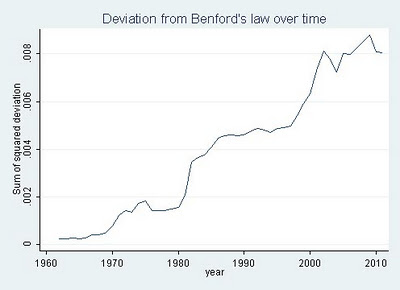
On Sunday Jialan Wang used the same technique to look at US accounting data on over 20,000 firms – and found that over the last few decades the data has become increasingly unreliable.

Deviation from Benford's Law over time

“According to Benford’s law,” she wrote, “accounting statements are getting less and less representative of what’s really going on inside of companies. The major reform that was passed after Enron and other major accounting standards barely made a dent.”

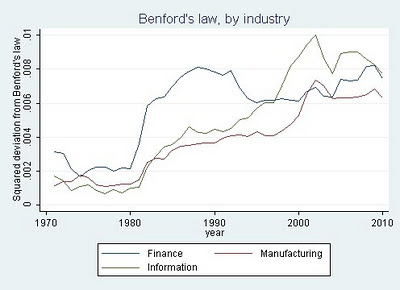
She then drilled down into three industries: finance, information technology, and manufacturing, and here’s where it gets even more interesting.

“The finance industry showed a huge surge in the deviation from Benford’s from 1981-82, coincident with two major deregulatory acts that sparked the beginnings of that other big mortgage debacle, the Savings and Loan Crisis.  The deviation from Benford’s in the finance industry reached a peak in 1988 and then decreased starting in 1993 at the tail end of the S&L fraud wave, not matching its 1988 level until … 2008.”

Benford's law, by industry

She continues:

“The time series for information technology is similarly tied to that industry’s big debacle, the dotcom bubble.  Neither manufacturing nor IT showed the huge increase and decline of the deviation from Benford’s that finance experienced in the 1980s and early 1990s, further validating the measure since neither industry experienced major fraud scandals during that period.  The deviation for IT streaked up between 1998-2002 exactly during the dotcom bubble, and manufacturing experienced a more muted increase during the same period.”
The correlation and comparison adds a compelling level to the work, as Benford’s Law is a method of detecting fraud rather than proving it. As Wang writes herself:
“Deviations from Benford’s law are [here] compellingly correlated with known financial crises, bubbles, and fraud waves.  And overall, the picture looks grim.  Accounting data seem to be less and less related to the natural data-generating process that governs everything from rivers to molecules to cities.  Since these data form the basis of most of our research in finance, Benford’s law casts serious doubt on the reliability of our results.  And it’s just one more reason for investors to beware.”

I love this sort of stuff, because it highlights how important it is for us to question data just as much as we question any other source, while showing just how that can be done.

It also highlights just how central that data often is to key decisions that we and our governments make. Indeed, you might suggest that financial journalists should be doing this sort of stuff routinely if they want to avoid being caught out by the next financial crisis. Oh, as well as environment reporters and crime correspondents.

Scraperwiki now makes it easier to ask questions of data

EatSafeWalsall

Image from @EatSafeWalsall

I was very excited recently to read on the Scraperwiki mailing list that the website was working on making it possible to create an RSS feed from a SQL query.

Yes, that’s the sort of thing that gets me excited these days.

But before you reach for a blunt object to knock some sense into me, allow me to explain…

Scraperwiki has, until now, done very well at trying to make it easier to get hold of hard-to-reach data. It has done this in two ways: firstly by creating an environment which lowers the technical barrier to creating scrapers (these get hold of the data); and secondly by lowering the social barrier to creating scrapers (by hosting a space where journalists can ask developers for help in writing scrapers).

This move, however, does something different. Continue reading

Dutch regional newspapers launch data journalism project RegioHack

In a guest post for OJB, Jerry Vermanen explains the background to RegioHack

The internet is bursting with information, but journalists – at least in The Netherlands – don’t get the full potential out of it. Basic questions on what data driven journalism is, and how to practise it, still have to be answered. Two Dutch regional newspapers (de Stentor and TC Tubantia) have launched RegioHack, an experiment with data driven journalism around local issues and open data.

Both newspapers circulate in the eastern and middle part of the Netherlands. In November, journalists will collaborate with local students, programmers and open data experts in a 30 hour coding event. In preparation for this hackathon, the forum on our website (www.regiohack.nl) is opened for discussion. Anyone can start a thread for a specific problem. For example, what’s the average age of each town in our region? And in 10 years, do we have enough facilities to accommodate the future population? And if not, what do we need?

The newspapers provide the participants with hot pizza, energy drink and 30 hours to find, clean up and present the data on these subjects.

After the hackathon, the projects are presented and participants will be named in the publications. That’s what RegioHack is all about: making unique stories with data, helping each other to develop new skills and finding out how to practise data driven journalism.

If you happen to be in The Netherlands on November 10th and 11th, contact me on jerry@regiohack.nl or Twitter (@JerryVermanen) for an invite to the final presentation.

We’re also searching for guest bloggers – and yes, that can be in English.

The New Online Journalists #11: Jack Dearlove

Jack Dearlove

Reviving an ongoing series of profiles of young journalists, I interviewed Leeds university journalism student Jack Dearlove about his work in data journalism. Jack works as a BA on BBC Radio York’s Breakfast show and is also a third year Broadcast Journalism student at the University of Leeds, where he is News Editor for Leeds Student Radio.

How did you get into data journalism?

I started exploring data journalism when I saw how the Guardian was publishing stories attached to the raw spreadsheets on their guardian.co.uk/data blog. I liked the way they could bring a little extra to a story by digging up a big old spreadsheet and letting people play around with it.

I’m really a spreadsheet guy, doing the classic autofilter and then ordering things by the biggest and smallest values and slowly going down each line in the spreadsheet. This can take a while but it’s the only way you can be sure you’ve seen the whole picture.

I’d like to get into ‘scraping’ but haven’t really had the time to play around with it. But any technique that means data that I might not have naturally come across is something I’d love to get the hang of.

How do you use it in your work for the BBC?

I’ve worked for the BBC for nearly 4 years and it’s something i’ve built into my role as my job has changed. It will certainly be something that I use when it comes to future job interviews though, because hopefully it sets me apart from your standard journalist.

I think my colleagues were quite sceptical at first, but I have a very supportive and data savvy Assistant Editor who’s just as keen to use the techniques as I am. So there’s an air of curiosity, as there is in many newsrooms. Continue reading

How to use the CableSearch API to quickly reference names against Wikileaks cables (SFTW)

Cablesearch logo

CableSearch is a neat project by the European Centre for Computer Assisted Research and VVOJ (the Dutch-Flemish association for investigative journalists) which aims to make it easier for journalists to interrogate the Wikileaks cables. Although it’s been around for some time, I’ve only just noticed the site’s API, so I thought I’d show how such an API can be useful as a way to draw on such data sources to complement data of your own. Continue reading

Gathering data: a flow chart for data journalists

Gathering data - a flow chart

Above is a flow chart that I sketched out during a long car journey to the Balkan Investigative Reporters Network Summer School in Croatia (don’t worry: I wasn’t driving).

It aims to help those doing data journalism identify how best to get hold of and deal with data by asking a series of questions about the information you want to compile and making suggestions on ways both to get hold of it and tools to then get it into a state which makes it easier to ask questions.

It also illustrates at a glance how the process of ‘getting hold of the data’ can vary widely, and how different projects can often involve completely different tools and skillsets from previous ones.

I will have missed obvious things, so please help me improve this. And if you find it useful, let me know.

Click on the image for other sizes.

Has investigative journalism found its feet online? (part 1)

Earlier this year I was asked to write a chapter for a book on the future of investigative journalism – ‘Investigative Journalism: Dead Or Alive?‘. I’m reproducing it here. The chapter was originally published on my Facebook page. An open event around the book’s launch, with a panel discussion, is being held at the Frontline Club next month.

We may finally be moving past the troubled youth of the internet as a medium for investigative journalism. For more than a decade observers looked at this ungainly form stumbling its way around journalism, and said: “It will never be able to do this properly.”

They had short memories, of course. Television was an equally awkward child: the first news broadcast was simply a radio bulletin on a black screen, and for decades print journalists sneered at the idea that this fleeting, image-obsessed medium could ever do justice to investigative journalism. But it did. And it did it superbly, finding a new way to engage people with the dry, with the political, and the complex.
Continue reading