Category Archives: data journalism

Following the money: making networks visible with HTML5

Network analysis – the ability to map connections between people and organisations – is one branch of data journalism which has enormous potential. But it is also an area which has not yet been particularly well explored, partly because of the lack of simple tools with which to do it.

One recent example – AngelsOfTheRight.net – is particularly interesting, because of the way that it is experimenting with HTML5.

The site is attempting to map “relationships among institutions due to the exchange of large quantities of money between them as reported to IRS in a decade of Form 990 tax filings.”

But it’s also attempting to “push the limits” of using HTML5 to create network maps. As this blog post explains:

“This project was built using the NodeViz project […] which wraps up a bunch of the functionality needed to squeeze network ties out of a database, through Graphviz, and into a browser with features like zooming, panning, and full DOM and JavaScript interaction with the rest of the page content. This means that we can do fun things like have a tour to mode a viewer through the map, and have list views of related data alongside the map that will open and focus on related nodes when clicked. It is also supposed to degrade gracefully to just display a clickable image on non-SVG browsers like Internet Explorer 7 and 8.”

HTML5 offers some other interesting possibilities, such as improved search engine optimisation compared to a static image or Flash interactive, although I have no idea how much this project explores that (comments invited).

Also interesting is the discussion section of AngelsOfTheRight.net, which outlines some of the holes in the data, methodological flaws, and ways that the project could be improved:

“In this sort of survey, it is always hard to tell if organizations are missing because they really didn’t make contributions, or just because nobody had time to record the data from their financial statements into the database. Several sources mention the Adolph Coors Foundation as an important funder of the conservative agenda, yet they do not appear in this database. Why not?”

via Pete Warden

Data Referenced Journalism and the Media – Still a Long Way to Go Yet?

Reading our local weekly press this evening (the Isle of Wight County Press), I noticed a page 5 headline declaring “Alarm over death rates at St Mary’s”, St Mary’s being the local general hospital. It seems a Department of Health report on hospital mortality rates came out earlier this week, and the Island’s hospital, it seems, has not performed so well…

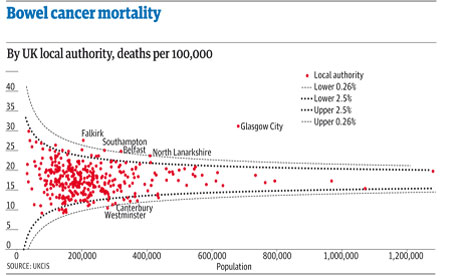
Seeing the headline – and reading the report – I couldn’t help but think of Ben Goldacre’s Bad Science column in the Observer last week (DIY statistical analysis: experience the thrill of touching real data ), which commented on the potential for misleading reporting around bowel cancer death rates; among other things, the column described a statistical graphic known as a funnel plot which could be used to support the interpretation of death rate statistics and communicate the extent to which a particular death rate, for a given head of population, was “significantly unlikely” in statistical terms given the distribution of death rates across different population sizes.

I also put together a couple of posts describing how the funnel plot could be generated from a data set using the statistical programming language R.

Given the interest there appears to be around data journalism at the moment (amongst the digerati at least), I thought there might be a reasonable chance of finding some data inspired commentary around the hospital mortality figures. So what sort of report was produced by the Guardian (Call for inquiries at 36 NHS hospital trusts with high death rates) or the Telegraph (36 hospital trusts have higher than expected death rates), both of which have pioneering data journalists working for them, come up with? Little more than the official press release: New hospital mortality indicator to improve measurement of patient safety.

The reports were both formulaic, picking on leading with the worst performing hospital (which admittedly was not mentioned in the press release) and including some bog standard quotes from the responsible Minister lifted straight out of the press release (and presumably written by someone working for the Ministry…) Neither the Guardian nor the Telegraph story contained a link to the original data, which was linked to from the press release as part of the Notes to editors rider.

If we do a general, recency filtered, search for hospital death rates on either Google web search:

UK hosptial death rates reporting

or Google news search:

UK hospital death rate reporting

we see a wealth of stories from various local press outlets. This was a story with national reach and local colour, and local data set against a national backdrop to back it up. Rather than drawing on the Ministerial press released quotes, a quick scan of the local news reports suggests that at least the local journalists made some effort compared to the nationals’ churnalism, and got quotes from local NHS spokespeople to comment on the local figures. Most of the local reports I checked did not give a link to the original report, or dig too deeply into the data. However, This is Tamworth, (which had a Tamworth Herald byline in the Google News results), did publish the URL to the full report in its article Shock report reveals hospital has highest death rate in country, although not actually as a link… Just by the by, I also noticed the headline was flagged with a “Trusted Source” badge:

WHich is the trusted source?

Is that Tamworth Herald as the trusted source, or the Department of Health?!

Given that just a few days earlier, Ben Goldacre had provided an interesting way of looking at death rate data, it would have been nice to think that maybe it could have influenced someone out there to try something similar with the hospital mortality data. Indeed, if you check the original report, you can find a document describing How to interpret SHMI bandings and funnel plots (although, admittedly, not that clearly perhaps?). And along with the explanation, some example funnel plots.

However, the plots as provided are not that useful. They aren’t available as image files in a social or rich media press release format, nor are statistical analysis scripts that would allow the plots to be generated from the supplied data in too like R; that is to say, the executable working wasn’t shown…

So here’s what I’m thinking: firstly, we need data press officers as well as data journalists. Their job would be to put together the tools that support the data churnalist in taking the raw data and producing statistical charts and interpretation from it. Just like the ministerial quote can be reused by the journalist, so the data press pack can be used to hep the journalist get some graphs out there to help them illustrate the story. (The finishing of the graph would be up to the journalist, but the mechanics of the generation of the base plot would be provided as part of the data press pack.)

Secondly, there may be an opportunity for an enterprising individual to take the data sets and produced localised statistical graphics from the source data. In the absence of a data press officer, the enterprising individual could even fulfil this role. (To a certain extent, that’s what the Guardian Datastore does.)

(Okay, I know: the local press will have allocated only a certain amount of space to the story, and the editor would likely see any mention of stats or funnel plots as scaring folk off, but we have to start changing attitudes, expectations, willingness and ability to engage with this sort of stuff somehow. Most people have very little education in reading any charts other than pie charts, bar charts, and line charts, and even then are easily misled. We have start working on this, we have to start looking at ways of introducing more powerful plots and charts and helping people get a folk understanding of them. And funnel plots may be one of the things we should be starting to push?)

Now back to the hospital data. In How Might Data Journalists Show Their Working? Sweave, I posted a script that included the working for generating a funnel plot from an appropriate online CSV data source. Could this script be used to generate a funnel plot from the hospital data?

I had a quick play, and managed to get a scatterplot distribution that looks like the one on the funnel plot explanation guide by setting the number value to the SHMI Indicator data (csv) EXPECTED column and the p to the VALUE column. However, because the p value isn’t a probability in the range 0..1, the p.se calculation fails:
p.se <- sqrt((p*(1-p)) / (number))

Anyway, here’s the script for generating the straightforward scatter plot (I had to read the data in from a local file because there was some issue with the security certificate trying to read the data in from the online URL using the RCurl library and hospitaldata = data.frame( read.csv( textConnection( getURL( DATA_URL ) ) ) ):

hospitaldata = read.csv("~/Downloads/SHMI_10_10_2011.csv")
number = hospitaldata$EXPECTED
p = hospitaldata$VALUE
df = data.frame(p, number, Area=hospitaldata$PROVIDER.NAME)
ggplot(aes(x = number, y = p), data = df) + geom_point(shape = 1)

There’s presumably a simple fix to the original script that will take the range of the VALUE column into account and allow us to plot the funnel distribution lines appropriately? If anyone can suggest the fix, please let me know in a comment…;-)

VIDEO: Advice for investigative journalists, from the Balkan Investigative Reporters Network Summer School

In September I spoke at the Balkan Investigative Reporters Network (BIRN) Summer School in Croatia. I took the opportunity to film brief interviews with 4 journalists on their tips for investigating companies, bribery and corruption, and finding and analysing data and experts.

These were originally published on the Help Me Investigate blog, but I’m cross-posting them all here for those who don’t follow that.

As always these videos are published under a Creative Commons licence, so you are free to re-edit the material or add it to other work, with attribution. (In fact, these videos were actually re-edited from the original uploads on my own YouTube account – adding simple titles and re-publishing on the Help Me Investigate YouTube channel using the YouTube editor).

A quick exercise for aspiring data journalists

A funnel plot of bowel cancer mortality rates in different areas of the UK

The latest Ben Goldacre Bad Science column provides a particularly useful exercise for anyone interested in avoiding an easy mistake in data journalism: mistaking random variation for a story (in this case about some health services being worse than others for treating a particular condition):

“The Public Health Observatories provide several neat tools for analysing data, and one will draw a funnel plot for you, from exactly this kind of mortality data. The bowel cancer numbers are in the table below. You can paste them into the Observatories’ tool, click “calculate”, and experience the thrill of touching real data.

“In fact, if you’re a journalist, and you find yourself wanting to claim one region is worse than another, for any similar set of death rate figures, then do feel free to use this tool on those figures yourself. It might take five minutes.”

By the way, if you want an easy way to get that data into a spreadsheet (or any other table on a webpage), try out the =importHTML formula, as explained on my spreadsheet blog (and there’s an example for this data here).

Hacking German foreign aid (guest post)

German foreign aid map, from http://www.maptivism.net/oda-ger/index.html

German foreign aid map, from http://www.maptivism.net/oda-ger/index.html

In a guest post for the Online Journalism Blog, Christiane Schulzki-Haddouti explains how participants at an open data event helped crack open data on German aid spending. This post was originally published in German at Hyperland.

How does the foreign aid of Germany support other countries? The Federal Ministry of Economic Cooperation and Development (BMZ) releases no details, although about 6 billion euros is made available for aid every year. Now the Open Knowledge Foundation in Germany has broken down the data – with the unintended help of the OECD.

Until now it was a mystery to the German public which countries benefit, and to what extent, from their government’s spending on foreign aid: the BMZ publishes only a list of the countries that receive aid (PDF). It was also not known which particular sectors in these countries were being supported.

For the political scientist Christian Kreutz, member of the Open Knowledge Foundation Germany, the BMZ database for development aid was just disappointing:

“The relevant information is scattered, little data is available in open formats and a breakdown of financial data such as project expenses is not yet published.”

An institutional workaround

In the course of the Open Aid Data Conference in Berlin, participants decided to tackle the situation. They noted that there has long been a public database at international level which explains the expenditures at a larger scale: the BMZ regularly reports its data as part of “Official Development Assistance” (ODA) to the Organisation for Economic Co-operation and Development, better known as the OECD.

Now the data is also available on the website Aid Data.

For two days Christian Kreutz wrangled with the data sets, then he presented his first results on a new open-data map. More than half the ODA payments come from the BMZ, the rest come from other ministries. Kreutz concludes: “Hardly any country receives nothing.”

Surprising findings

Interestingly, not only classic developing countries are supported. The lion’s share goes to BRIC countries, namely Brazil, Russia, India and China which have profited from high economic growth for years.

Russia received around 12 billion euros in the years 1995 to 2009, China and India around 6 and 4 billion euros respectively.

Current sites of conflict receive quite a lot of money: Iraq received 7 billion euros, with the majority coming from debt cancellation. A similar situation is found in Nigeria and Cameroon.

In comparison Afghanistan and Pakistan receive only about 1.2 billion euros.

Even authoritarian regimes benefit from German development aid: Syria received around 1 billion euros. A large proportion of the money is spent on debt relief as well as water and education projects.

Interestingly, however, some European states received more money: Poland got 2.8 billion, mainly going into the education sector.

EU aspirants Serbia and Turkey received 2 billion euros each.

Payment information was also combined with data from the Economist on democratic development. Here a kind of rule of thumb can be recognised: countries which are less democratic are encouraged.

Egypt, for example, not only received support for water projects and its textile industry, but also for its border police – by an unspecified federal ministry.

BMZ is opening up

The new aid data map does not break down numbers by donors yet. But it could do so, as the detailed OECD data supports it.

Christian Kreutz has filed a Freedom of Information Act request with the BMZ to get further data. But the ministry is already showing signs of movement: a spokesperson said that project funding data will be published soon on the ministry’s website.

The interesting question is how open and accessible the BMZ data will be. Recipients of ODA funds can not be inferred directly from the OECD database. Open data activists hope that the BMZ will not hide the data behind a restrictive search interface to prevent further analysis, à la Farmsubsidy.

Making it easier to join the dots of government: publicbodies.org

publicBodies.org

publicbodies.org - jargon translation: this could be very useful

If you deal with information on government departments you may want to offer your help in improving a new project that aims to make it easier to combine government data.

Publicbodies.org is attempting to do for government data what OpenCorporates does for company data: create unique resources that allow you to distinguish between similar-sounding departments, and grab extra contextual data along the way.

Created at last week’s Open Government Data Camp in Warsaw, the project currently contains basic data on German, UK and EU public bodies.

In a post introducing the project, Friedrich Lindenberg explains how the seed data for the site was compiled from freedom of information request sites such as WhatDoTheyKnow and AskTheEU.

The project still needs data on government departments in other countries, however.

This is a promising service which already includes a reconciliation service for Google Refine (in other words, if you have a spreadsheet that mentions government departments, you can relatively easily bring in extra data in just a few clicks).

And news organisations wanting to steal a march on their rivals on this front should seriously consider contributing some time to making it better.

Anyone wanting to help can comment on the blog post or find Friedrich @pudo on Twitter.

AUDIO: Text mining tips from Andy Lehren and Sarah Cohen

Searches made of the Sarah Palin emails

Searches made of the Sarah Palin emails - from a presentation by the New York Times's Andy Lehren

One of the highlights of last week’s Global Investigative Journalism Conference was the session on text mining, where the New York Times’s Andy Lehren talked about his experiences of working with data from Wikileaks and elsewhere, and former Washington Post database editor Sarah Cohen gave her insights into various tools and techniques in text mining.

Andy Lehren’s audio is embedded below. The story mentioned on North Korean missile deals can be found here. Other relevant links: Infomine and NICAR Net Tour.

And here’s Sarah’s talk which covers extracting information from large sets of documents. Many of the tools mentioned are bookmarked ‘textmining’ on my Delicious account.


Scraping data from a list of webpages using Google Docs

Quite often when you’re looking for data as part of a story, that data will not be on a single page, but on a series of pages. To manually copy the data from each one – or even scrape the data individually – would take time. Here I explain a way to use Google Docs to grab the data for you.

Some basic principles

Although Google Docs is a pretty clumsy tool to use to scrape webpages, the method used is much the same as if you were writing a scraper in a programming language like Python or Ruby. For that reason, I think this is a good quick way to introduce the basics of certain types of scrapers.

Here’s how it works:

Firstly, you need a list of links to the pages containing data.

Quite often that list might be on a webpage which links to them all, but if not you should look at whether the links have any common structure, for example “http://www.country.com/data/australia&#8221; or “http://www.country.com/data/country2&#8221;. If it does, then you can generate a list by filling in the part of the URL that changes each time (in this case, the country name or number), assuming you have a list to fill it from (i.e. a list of countries, codes or simple addition).

Second, you need the destination pages to have some consistent structure to them. In other words, they should look the same (although looking the same doesn’t mean they have the same structure – more on this below).

The scraper then cycles through each link in your list, grabs particular bits of data from each linked page (because it is always in the same place), and saves them all in one place.

Scraping with Google Docs using =importXML – a case study

If you’ve not used =importXML before it’s worth catching up on my previous 2 posts How to scrape webpages and ask questions with Google Docs and =importXML and Asking questions of a webpage – and finding out when those answers change.

This takes things a little bit further.

In this case I’m going to scrape some data for a story about local history – the data for which is helpfully published by the Durham Mining Museum. Their homepage has a list of local mining disasters, with the date and cause of the disaster, the name and county of the colliery, the number of deaths, and links to the names and to a page about each colliery.

However, there is not enough geographical information here to map the data. That, instead, is provided on each colliery’s individual page.

So we need to go through this list of webpages, grab the location information, and pull it all together into a single list.

Finding the structure in the HTML

To do this we need to isolate which part of the homepage contains the list. If you right-click on the page to ‘view source’ and search for ‘Haig’ (the first colliery listed) we can see it’s in a table that has a beginning tag like so: <table border=0 align=center style=”font-size:10pt”>

We can use =importXML to grab the contents of the table like so:

=Importxml(“http://www.dmm.org.uk/mindex.htm&#8221;, “//table[starts-with(@style, ‘font-size:10pt’)]”)

But we only want the links, so how do we grab just those instead of the whole table contents?

The answer is to add more detail to our request. If we look at the HTML that contains the link, it looks like this:

<td valign=top><a href=”http://www.dmm.org.uk/colliery/h029.htm“>Haig&nbsp;Pit</a></td>

So it’s within a <td> tag – but all the data in this table is, not surprisingly, contained within <td> tags. The key is to identify which <td> tag we want – and in this case, it’s always the fourth one in each row.

So we can add “//td[4]” (‘look for the fourth <td> tag’) to our function like so:

=Importxml(“http://www.dmm.org.uk/mindex.htm&#8221;, “//table[starts-with(@style, ‘font-size:10pt’)]//td[4]”)

Now we should have a list of the collieries – but we want the actual URL of the page that is linked to with that text. That is contained within the value of the href attribute – or, put in plain language: it comes after the bit that says href=”.

So we just need to add one more bit to our function: “//@href”:

=Importxml(“http://www.dmm.org.uk/mindex.htm&#8221;, “//table[starts-with(@style, ‘font-size:10pt’)]//td[4]//@href”)

So, reading from the far right inwards, this is what it says: “Grab the value of href, within the fourth <td> tag on every row, of the table that has a style value of font-size:10pt

Note: if there was only one link in every row, we wouldn’t need to include //td[4] to specify the link we needed.

Scraping data from each link in a list

Now we have a list – but we still need to scrape some information from each link in that list

Firstly, we need to identify the location of information that we need on the linked pages. Taking the first page, view source and search for ‘Sheet 89’, which are the first two words of the ‘Map Ref’ line.

The HTML code around that information looks like this:

<td valign=top>(Sheet 89) NX965176, 54° 32' 35" N, 3° 36' 0" W</td>

Looking a little further up, the table that contains this cell uses HTML like this:

<table border=0 width=”95%”>

So if we needed to scrape this information, we would write a function like this:

=importXML(“http://www.dmm.org.uk/colliery/h029.htm&#8221;, “//table[starts-with(@width, ‘95%’)]//tr[2]//td[2]”)

…And we’d have to write it for every URL.

But because we have a list of URLs, we can do this much quicker by using cell references instead of the full URL.

So. Let’s assume that your formula was in cell C2 (as it is in this example), and the results have formed a column of links going from C2 down to C11. Now we can write a formula that looks at each URL in turn and performs a scrape on it.

In D2 then, we type the following:

=importXML(C2, “//table[starts-with(@width, ‘95%’)]//tr[2]//td[2]”)

If you copy the cell all the way down the column, it will change the function so that it is performed on each neighbouring cell.

In fact, we could simplify things even further by putting the second part of the function in cell D1 – without the quotation marks – like so:

//table[starts-with(@width, ‘95%’)]//tr[2]//td[2]

And then in D2 change the formula to this:

=ImportXML(C2,$D$1)

(The dollar signs keep the D1 reference the same even when the formula is copied down, while C2 will change in each cell)

Now it works – we have the data from each of 8 different pages. Almost.

Troubleshooting with =IF

The problem is that the structure of those pages is not as consistent as we thought: the scraper is producing extra cells of data for some, which knocks out the data that should be appearing there from other cells.

So I’ve used an IF formula to clean that up as follows:

In cell E2 I type the following:

=if(D2=””, ImportXML(C2,$D$1), D2)

Which says ‘If D2 is empty, then run the importXML formula again and put the results here, but if it’s not empty then copy the values across

That formula is copied down the column.

But there’s still one empty column even now, so the same formula is used again in column F:

=if(E2=””, ImportXML(C2,$D$1), E2)

A hack, but an instructive one

As I said earlier, this isn’t the best way to write a scraper, but it is a useful way to start to understand how they work, and a quick method if you don’t have huge numbers of pages to scrape. With hundreds of pages, it’s more likely you will miss problems – so watch out for inconsistent structure and data that doesn’t line up.

Statistics as journalism redux: Benford’s Law used to question company accounts

A year and a day ago (which is slightly eerie) I wrote about how one Mexican blogger had used Benford’s Law to spot some unreliable data on drug-related murders being used by the UN and Mexican police.

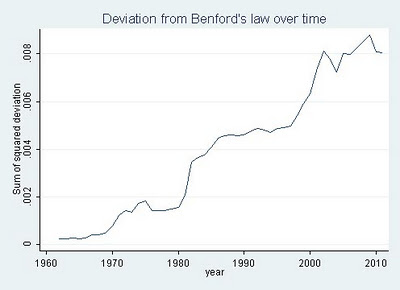
On Sunday Jialan Wang used the same technique to look at US accounting data on over 20,000 firms – and found that over the last few decades the data has become increasingly unreliable.

Deviation from Benford's Law over time

“According to Benford’s law,” she wrote, “accounting statements are getting less and less representative of what’s really going on inside of companies. The major reform that was passed after Enron and other major accounting standards barely made a dent.”

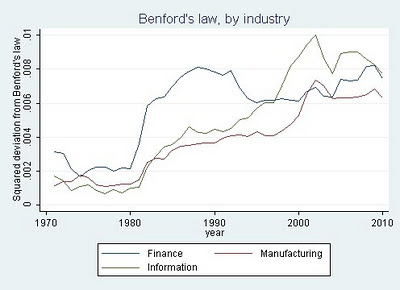
She then drilled down into three industries: finance, information technology, and manufacturing, and here’s where it gets even more interesting.

“The finance industry showed a huge surge in the deviation from Benford’s from 1981-82, coincident with two major deregulatory acts that sparked the beginnings of that other big mortgage debacle, the Savings and Loan Crisis.  The deviation from Benford’s in the finance industry reached a peak in 1988 and then decreased starting in 1993 at the tail end of the S&L fraud wave, not matching its 1988 level until … 2008.”

Benford's law, by industry

She continues:

“The time series for information technology is similarly tied to that industry’s big debacle, the dotcom bubble.  Neither manufacturing nor IT showed the huge increase and decline of the deviation from Benford’s that finance experienced in the 1980s and early 1990s, further validating the measure since neither industry experienced major fraud scandals during that period.  The deviation for IT streaked up between 1998-2002 exactly during the dotcom bubble, and manufacturing experienced a more muted increase during the same period.”
The correlation and comparison adds a compelling level to the work, as Benford’s Law is a method of detecting fraud rather than proving it. As Wang writes herself:
“Deviations from Benford’s law are [here] compellingly correlated with known financial crises, bubbles, and fraud waves.  And overall, the picture looks grim.  Accounting data seem to be less and less related to the natural data-generating process that governs everything from rivers to molecules to cities.  Since these data form the basis of most of our research in finance, Benford’s law casts serious doubt on the reliability of our results.  And it’s just one more reason for investors to beware.”

I love this sort of stuff, because it highlights how important it is for us to question data just as much as we question any other source, while showing just how that can be done.

It also highlights just how central that data often is to key decisions that we and our governments make. Indeed, you might suggest that financial journalists should be doing this sort of stuff routinely if they want to avoid being caught out by the next financial crisis. Oh, as well as environment reporters and crime correspondents.

Scraperwiki now makes it easier to ask questions of data

EatSafeWalsall

Image from @EatSafeWalsall

I was very excited recently to read on the Scraperwiki mailing list that the website was working on making it possible to create an RSS feed from a SQL query.

Yes, that’s the sort of thing that gets me excited these days.

But before you reach for a blunt object to knock some sense into me, allow me to explain…

Scraperwiki has, until now, done very well at trying to make it easier to get hold of hard-to-reach data. It has done this in two ways: firstly by creating an environment which lowers the technical barrier to creating scrapers (these get hold of the data); and secondly by lowering the social barrier to creating scrapers (by hosting a space where journalists can ask developers for help in writing scrapers).

This move, however, does something different. Continue reading